Recommended resources
The freely available resources this lesson will direct you to.
- How LLMs Work & Why Prompt Engineering Matterswww.youtube.com
- How ChatGPT Works Technically | ChatGPT Architecturewww.youtube.com
- The architecture of today's LLM applications - The GitHub Bloggithub.blog
- Generative AI beginner's guide | Gemini Enterprise Agent Platform | Google Cloud Documentationdocs.cloud.google.com
Welcome back. Last lesson, you diagnosed unreliable AI output by checking what the assistant was asked, what information it received, and what its answer claimed. Today, we’ll make that investigation more concrete: where does a request go after someone submits it, and what has to happen before a result appears in the interface?
We’ll follow a meeting-note assistant from a user’s request through the application, the model, and back to a reviewable draft. The aim is not to learn how to build each service. It is to understand the journey well enough to design the experience—and to locate where an unexpected result might have arisen. Allow about 35–40 minutes, including the video, readings, and diagrams.
The model is only one part of the experience
Imagine a user has meeting notes open and selects Summarize decisions and follow-ups. The interface shows a loading state, then displays two sections: “Confirmed decisions” and “Tentative follow-ups.” That looks like one interaction. Behind it, the application must decide which notes to include, send a request to a model, handle the response, and present it as something the user can review.
Watch this short portion of ByteMonk’s How LLMs Work & Why Prompt Engineering Matters. Focus on its distinction between the model’s completion and the application’s work around it.
How LLMs Work & Why Prompt Engineering Matters
ByteMonk’s “How LLMs Work & Why Prompt Engineering Matters” gives a compact overview of how a product wraps a model request. Watch it to establish the basic input-and-output loop before we inspect the parts.
In the section on practical LLM applications, watch the application loop. Notice the separate jobs: assembling an input payload, obtaining a model completion, and turning that completion into something useful for the user. You can skip the earlier history of model architectures for this lesson.
A model generates an output from the input it is given. An AI product determines what that input contains and what the user can do with the output. This distinction matters because a convincing response might still be based on the wrong document, displayed with a misleading label, or mistaken for an action that never occurred.
For our example, suppose the selected note says:
“Mina might send a draft Friday if legal approves it.”
The user asks, “What did we decide, and who has follow-ups?” We’ll trace what must happen for the product to return a useful answer without turning Mina’s tentative draft into a confirmed commitment.
From the interface to the model request
The interface collects the user’s instruction and may also capture a document selection, highlighted text, or the identity of the current workspace. The application receives those inputs. It cannot safely assume that everything visible on the screen has automatically reached the model: it must deliberately select and supply the relevant material.
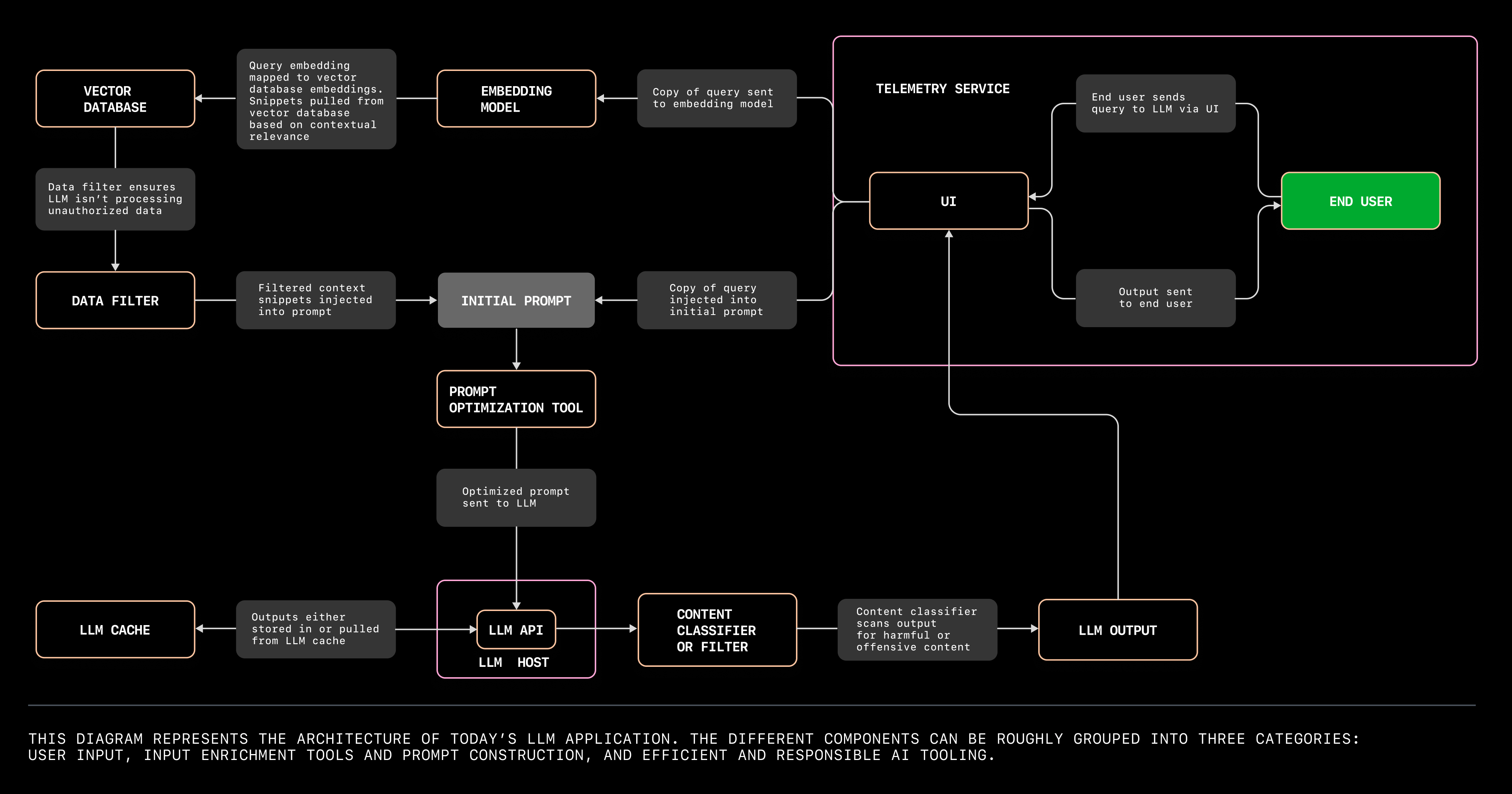
The GitHub Blog’s The architecture of today’s LLM applications walks through an assistant for an internet-service customer. Its setting differs from a meeting assistant, but the distinction between user input, retrieved information, and the assembled model request transfers directly.
The architecture of today's LLM applications - The GitHub Blog
Read this GitHub Blog account for the components between a user’s initial message and a model request. You do not need to learn the named vendors or implementation tools.
Under “User input tools,” find Dave’s description of his broken Wi-Fi box. Read the input tools, noting that speech transcription is needed for Dave’s voice interface but not for a text-entry feature. Then, under “Input enrichment and prompt construction tools,” read the stored-information example and the retrieval explanation. Finally, read the filtering and packaging bullets. Focus on why the application retrieves and selects source material; skip the provider lists and the sample prompt.
In the article’s example, an embedding model helps find relevant material in a searchable store. That search representation is not itself the customer-facing answer. The application selects useful passages and packages them with the request sent to the language model. A product could instead use a simpler document lookup—or no retrieval at all. What matters for your trace is which information was actually supplied, not whether the system has a vector database.
Our meeting assistant might assemble a model request containing:
User request: What did we decide, and who has follow-ups?
Selected source: The relevant meeting-note excerpt, including “might,” “draft,” and “if legal approves it.”
Application instruction: Separate confirmed decisions from tentative follow-ups. Do not report a tentative item as a commitment.
The user wrote only the first line. The product chose the source and added task instructions. Before sending them, it may also need to check that this user is permitted to access the selected notes. If the product sends a shortened excerpt that drops “if legal approves it,” the model cannot recover that qualification from the original document merely because the document was open on the user’s screen.
The GitHub diagram shows one possible set of components. Start at End User on the right and follow the request toward Initial Prompt and LLM API; the response takes a different route back to the UI. Treat its retrieval, caching, and filtering components as possible design choices, not as a checklist every feature must implement.
What happens at the model boundary
Once the application has assembled its request, it calls a model service, often through an API. The model processes the supplied input and generates an output in tokens—pieces of text, rather than a verified record of facts or completed actions. Its training helps it produce a plausible response, but training does not give it automatic access to this meeting’s notes, the organization’s current records, or the result of an external action.
The model might return:
Confirmed decisions: None recorded in the supplied excerpt.
Tentative follow-ups: Mina may prepare a draft by Friday, subject to legal approval.
That is a useful completion if it reflects the supplied notes. Another completion might say, “Mina will deliver the final proposal Friday.” The model response is therefore not the same thing as a trustworthy final product state. The application still has to decide how to handle and present it.
Some products also allow a model to request a tool or another service—for example, to look up a document before answering. Such a request is not proof that the lookup succeeded. The application must execute the lookup, receive its result, and decide whether to make that result available for further generation. In a simpler meeting-summary feature, there may be just one model call and no tools.
This gives you a useful boundary to mark when tracing any feature: what went into the model request, and what came back? You do not need access to the model’s hidden internal process to distinguish a missing note from a response that misread a note it received.
From model output back to the screen
The model’s response may pass through application checks before it appears. The GitHub article describes examples: a cache for reusing suitable outputs, a content filter, and telemetry for observing how the product performs. Read this final portion for the purpose of each component, rather than assuming the diagram prescribes their order for every application.
The architecture of today's LLM applications - The GitHub Blog
Return to the GitHub Blog article to examine what can happen around the output stage. The design question is what each component changes about the experience the user receives.
Under “Efficient and responsible AI tooling,” read the cache explanation, the content-filter explanation, and the telemetry explanation. Skip the product and framework links. Notice that telemetry observes interactions; it is not source material the model needs in order to answer Dave’s question.
For a meeting assistant, an application might check whether the model returned usable text and whether it should be displayed. It could attach the source excerpt, distinguish confirmed from tentative items, and label the result Draft summary. If the request fails or a response is blocked, the interface needs a failure state rather than an empty card that looks like a completed summary.
The last product decision is particularly important: what does the interface imply happened? Showing “Draft follow-up: Mina may prepare a draft” is different from showing “Follow-up assigned to Mina.” The first presents content for review. The second suggests that a responsibility has been established—and perhaps recorded elsewhere—when neither may be true.
The user’s review is also part of the product experience, even though it is not part of model generation. They may compare the draft with the note, edit a tentative item, or reject the summary. Those choices give the product a way to remain useful when the model’s output is imperfect.
One request can involve more than one model call
The Google Cloud customer-support diagram offers a useful contrast to the single-call meeting example. Follow its numbered markers: a customer’s question reaches the support application; a model helps identify relevant resources; a retrieval service obtains those resources; then a solution generator asks the model for an answer using the question and resources. The solution returns through the application to the customer.

You need not adopt this architecture. Its lesson for tracing is that “the AI answered” can conceal multiple requests and handoffs. If a support answer uses the wrong policy, you would want to know whether the wrong resource was identified, the wrong document was retrieved, or the final response misinterpreted the correct document. Those are different points in the journey and suggest different product and engineering remedies.
For the meeting assistant, you can now tell a complete trace in plain language: the user selects notes and asks a question; the application checks and selects source text, adds task instructions, and sends the assembled request to a model; the model returns a generated summary; the application handles that response; and the interface presents a draft the user can inspect. At every stage, distinguish what the user saw from what the system actually supplied or did.
Key takeaways
A user request does not travel straight from a text box into a finished answer. The application collects input, may retrieve and filter context, constructs a model request, handles the generated response, and decides how to present its status and evidence. Retrieval, caches, tools, and additional model calls are possibilities—not universal requirements.
As you trace an AI feature, keep asking two questions: What information crossed this boundary? and What does the interface lead the user to believe happened? Those questions connect system behavior to product design. Next, you’ll map a productivity workflow to find the user’s pain points, decisions, and information needs—the starting point for deciding where AI assistance belongs.