Recommended resources
The freely available resources this lesson will direct you to.
Welcome back. In the last lesson, you traced a request through an AI product: what the application supplied to the model, what the model returned, and what the interface led the user to believe. Today we move upstream of that request. Before designing AI assistance, we need to understand the work someone is trying to finish without it.
We’ll map a productivity workflow so that its pain points, decisions, and information needs are visible. We’ll use the meeting-follow-up scenario from the previous lesson, but this time focus on the person doing the work rather than the system processing a request. Allow about 40 minutes for the lesson and resources.
Start with a person and a goal
A workflow map tells the story of one person accomplishing a specific goal. That sounds simple, but it prevents a consequential design mistake: starting with “Where could we put a summarization button?” rather than “What makes sending an accurate meeting follow-up difficult?”
NNgroup’s short Customer Journey Mapping 101 introduces the elements that keep such a map focused.
Watch Customer Journey Mapping 101 from NNgroup for a compact introduction to the structure of a journey map.
Watch the definition, then the five elements. Notice how the actor and scenario establish whose goal the map represents, while actions, mindsets, and feelings describe what happens along the way.
For our example, the actor is Maya, a project coordinator. Her scenario is sending attendees an accurate follow-up after a planning meeting. She has rough notes and a team chat thread; some outcomes are settled, while others await confirmation. The workflow begins when she turns to those materials after the meeting and ends when she has sent a follow-up that distinguishes decisions from open items.
This is a current-state map: it describes how the work gets done now, without assuming an AI feature exists. The scenario is illustrative, not a claim based on observing a real coordinator. That distinction matters if you later use the map to justify a product decision.
Scope the map around the user’s goal, not one application. Maya may move between notes, chat, a calendar, and email. A map of only her email clicks would miss the work of deciding what is true enough to send.
Find the work—including the branches
To map a workflow, first learn what people actually do. An interview can reveal what Maya remembers about sending follow-ups; watching her handle a recent one may reveal repeated checks, interruptions, and information scattered across tools. The two sources of evidence complement one another.
Read the opening of NNgroup’s Task Analysis: Support Users in Achieving Their Goals. It distinguishes gathering evidence from organizing tasks into a diagram.
Task Analysis: Support Users in Achieving Their Goals - NN/G
Read NNgroup’s article to see how observation and conversation inform a task map, and how a task can be broken into smaller operations.
Start at the article’s opening, with the two stages and research methods, ending with “Simulations” in “Stage 1: Gather Information.” Then, under “Stage 2: Analyze Tasks,” read the HTA explanation, from the warning about relying solely on reports through the password-recovery example. Focus on how a plan captures a step that happens only under a particular condition.
The article’s scanner example makes the value of a branch easy to see:
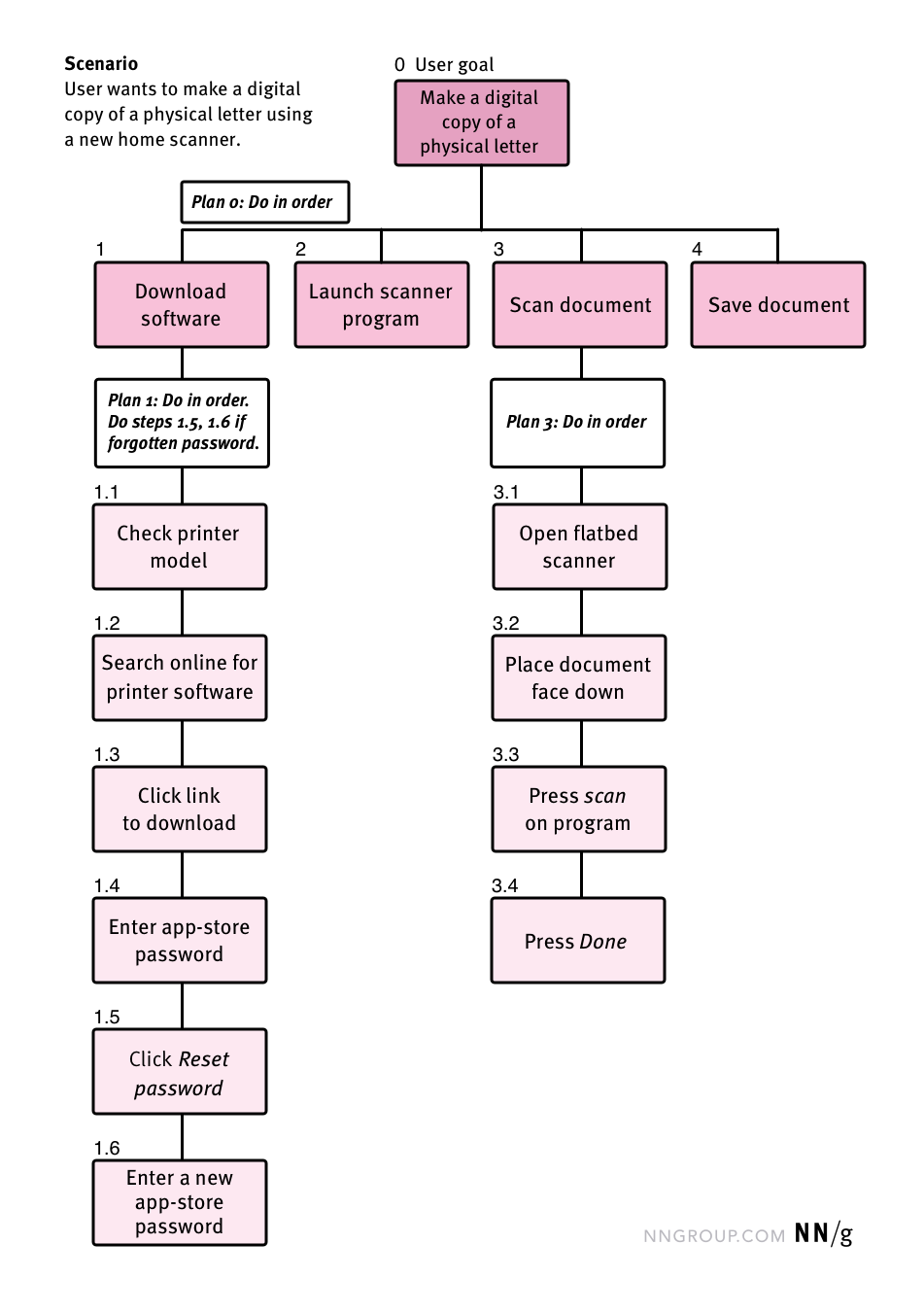
A workflow is rarely just a fixed list of actions. In Maya’s case, she might check a chat thread if her notes do not establish whether an item was approved. She might ask a colleague if the thread is inconclusive. These branches reveal more than extra steps: they reveal where a decision depends on information she may not have.
Keep the first pass at a useful level of detail. “Prepare the follow-up” is too broad to expose a problem; recording every cursor movement is too fine. “Compare notes with chat to resolve an uncertain action item” is a task that makes both the work and its difficulty visible.
Add decisions and information needs to the timeline
A task sequence shows what Maya does. A decision-aware map also shows what she has to judge and what she needs to know to judge it. These are related, but not interchangeable:
- An action is observable: Maya opens the chat thread.
- A decision is the judgment at stake: can she describe Mina’s draft as a committed follow-up?
- An information need is what would support that judgment: the meeting note’s wording and whether legal approval has occurred.
- A pain point is a difficulty with a consequence: approval status is hard to locate, so Maya must delay the message or risk reporting a tentative item as settled.
NNgroup’s Journey Mapping 101 explains how a map connects actions to users’ questions and to opportunities for improving the experience.
Read the relevant part of NNgroup’s Journey Mapping 101 to enrich a task sequence with mindsets and opportunities.
In “Key Components of a Journey Map,” begin at the “Journey Phases” subsection with phases through opportunities. Stop after the final question in “Opportunities,” before “Journey-Map Variations.” Pay particular attention to “Actions, Mindsets, and Emotions”: a mindset includes the questions and information needs that may not be apparent from the action alone.
Here is a compact first-pass map for Maya. Each row is a phase, not a screen. The note about Mina comes from our illustrative scenario: “Mina might send a draft Friday if legal approves it.”
| Phase and action | Decision Maya faces | Information she needs | Possible pain point and effect |
|---|---|---|---|
| Gather: Review notes and chat | Which sources cover the meeting’s outcomes? | Where decisions and follow-ups were recorded | Relevant details are spread across tools, increasing search time. |
| Interpret: Sort statements into decisions and open items | Is Mina’s draft a commitment or a possibility? | The exact wording and current approval status | A qualification is easy to overlook, so a tentative item may appear confirmed. |
| Draft: Write the attendee update | What can be stated now, and what needs a pending label? | Intended recipients, agreed wording, owners, and dates | Maya may have to revisit sources while writing, interrupting the draft. |
| Verify and send: Check the update against its sources | Is it accurate enough to share? | Evidence for each consequential claim and any unresolved questions | Verification is time-consuming; skipping it risks sending a misleading update. |
The map does not claim that Maya always checks chat, frequently makes mistakes, or spends a particular number of minutes verifying. Those would require evidence. For now, the rows expose places to investigate.
Notice also that “Maya feels frustrated” would not, on its own, explain what to design. “She cannot find the current approval status when deciding how to phrase Mina’s item” is more useful: it names the missing information, the moment it matters, and the risk created by its absence.
Check where the difficulty actually lies
Once you have a draft map, look closely at its costly or consequential tasks. NNgroup’s task-analysis article suggests considering repetition, time, and cognitive complexity—the thoughts, judgments, and decisions a task demands.
Task Analysis: Support Users in Achieving Their Goals - NN/G
Return to NNgroup’s task-analysis article for ways to examine a task after you have mapped it.
Under “Stage 2: Analyze Tasks,” resume after the scanner example. Read the task attributes, beginning with the paragraph about further analyses and ending with the questions under “The physical requirements of the task.” Focus on the questions about frequency and cognitive complexity rather than assuming the longest task is necessarily the most difficult.
For Maya, finding all the notes might be repetitive; classifying an ambiguous commitment might require more judgment. The second task could matter more even if it takes less time, because an incorrect classification changes what attendees believe was agreed.
A useful map therefore separates evidence from inference. You might annotate an observed action as “saw Maya reopen the chat,” a reported difficulty as “Maya says approval status is often unclear,” and an untested hypothesis as “we think unclear status delays sending.” If you have no user access yet, a simulated walkthrough can help you draft the map, but it cannot establish that real users behave that way.
The map can now guide investigation: Which uncertainties occur often? Which create costly rework? Which affect other people when the follow-up is sent? Answers to those questions are stronger grounds for choosing a design opportunity than the mere presence of text that an AI model could summarize.
From workflow insight to a design opportunity
The point of mapping is not to assign AI to every difficult row. If the core issue is that approval status is stored inconsistently, a clearer status field or an agreed recording practice might help more than generated prose. If comparing sources is slow, assistance with locating relevant passages might be worth exploring. If phrasing a tentative item is difficult, a draft could help—provided Maya can inspect its source and retain the decision about what to send.
At this stage, describe the opportunity without committing to a feature. For example:
Maya needs a reliable way to distinguish confirmed meeting outcomes from pending ones while preparing an attendee update, because qualifications and approval status are difficult to track across her sources.
That statement is grounded in a specific phase, decision, and information need. It remains a hypothesis until research establishes the problem’s importance, but it gives the next design decision something concrete to address.
Key takeaways
A productive workflow map follows one actor pursuing one bounded goal across the tools and conversations the work actually involves. Task analysis reveals actions and conditional branches; journey mapping adds the person’s questions, information needs, and difficulties. A useful pain point explains not just where work feels hard, but why it is hard and what can go wrong.
Keep illustrative assumptions distinct from observed evidence, and resist choosing an AI solution before you know which decision or information gap matters. In the next lesson, you’ll use a workflow like this to choose an appropriate AI role—assisting, recommending, or automating—based on risk and the control the user needs.