Recommended resources
The freely available resources this lesson will direct you to.
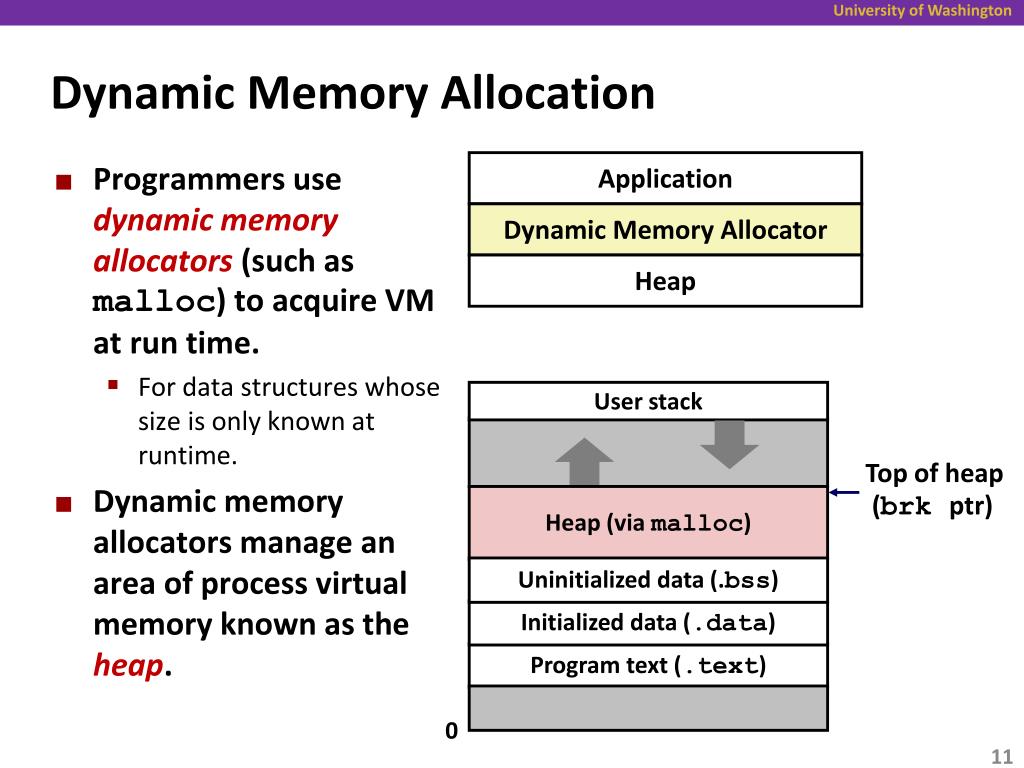
Hello! In our last lesson, we explored the crucial difference between stack and heap memory. We learned that while the stack is fast and automatically managed, its fixed size and limited data lifetime make it unsuitable for data whose size is unknown at compile time or that needs to outlive a single function call. This is where the heap comes in.
Today, we transition from the "why" to the "how." You will learn to take direct control of the heap using C's fundamental memory management functions: malloc() and free(). Mastering these functions is not just a requirement for C programming; it's a foundational skill for building any complex data structure, from dynamic arrays to trees and linked lists, which are central to many AI algorithms.
By the end of this lesson, you will be able to confidently allocate memory on the heap for your data and, just as importantly, deallocate it responsibly to prevent common and serious programming errors.
1. The Tools for the Job: malloc() and free()
In the previous lesson, we established the heap as a large pool of memory available for our program to use. Unlike the stack, the compiler doesn't manage this space for us. We must manually request memory and then return it when we're done.
The functions to perform these actions are malloc (memory allocation) and free. They are both part of the C Standard Library and are declared in the <stdlib.h> header file.
2. Allocating Memory with malloc()
The malloc() function is your tool for requesting a block of memory from the heap.
Syntax and Behavior
The function signature for malloc() is:
void* malloc(size_t size);
Let's break this down:
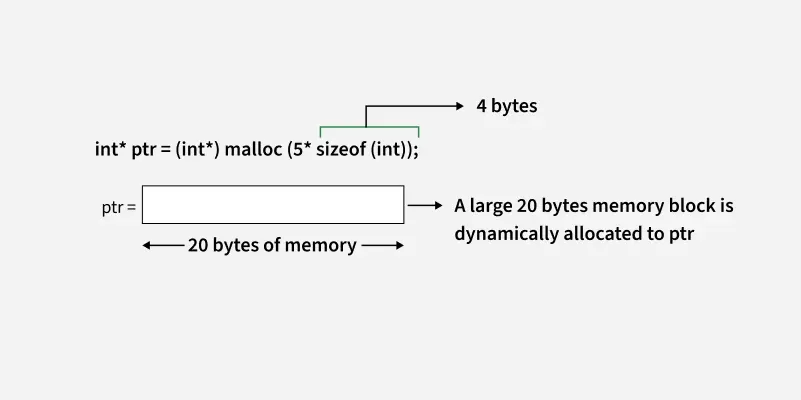
size_t size: This is the one and only argument. It's the number of bytes you want to allocate.size_tis an unsigned integer type, appropriate for representing sizes.void*return value:malloc()returns a "void pointer," which is a generic pointer that can point to any type of data. If it successfully allocates the memory, this pointer will hold the starting address of your new memory block.
Because malloc() returns a generic void*, you must cast it to the specific pointer type you need, like int* or char*. This tells the compiler how to interpret the data stored at that memory address.
A critical rule: You must always calculate the size in bytes. A common mistake is to ask for malloc(10) when you want space for 10 integers. This would only give you 10 bytes, which is likely only enough for two integers on most systems. The correct way is to use the sizeof operator to ensure your code is portable and correct.
The following video provides a great hands-on demonstration of using malloc().
Watch this segment from the video "Malloc in C is easy!" by Bro Code. It clearly shows why malloc is needed and how to use it to create an array whose size is determined at runtime.
Watch from the beginning to the size calculation. Pay close attention to how user input is used to determine the number of elements, and how sizeof(char) is used to calculate the total number of bytes needed.
3. The Programmer's Contract: Checking for Errors and Freeing Memory
Using the heap comes with responsibility. The memory manager is making a contract with you: it gives you a piece of memory, and you promise to give it back when you're done and to handle cases where it can't fulfill your request.
Handling Allocation Failure
The heap is large, but not infinite. If you request a very large block of memory, or if the heap is fragmented, malloc() might not be able to find a suitable space. In this case, it returns NULL.
Dereferencing a NULL pointer is one of the most common causes of program crashes (segmentation faults). Therefore, you MUST always check the pointer returned by malloc() to see if it is NULL before you try to use it.
int *arr = (int*)malloc(1000 * sizeof(int));

// CRITICAL check
if (arr == NULL) {
    printf("Error: Memory allocation failed!\n");
    return 1; // Exit the program or handle the error
}

// If we get here, arr is safe to use.
Releasing Memory with free()
Memory you allocate on the heap will remain allocated for the entire duration of your program unless you explicitly release it. Forgetting to do so causes a memory leak. In a long-running application, these leaks add up and can eventually cause the program to run out of memory and crash.
The free() function is the other half of the contract. Its job is to return the allocated block to the memory manager.
The syntax is simple:
void free(void* ptr);
You pass it the exact same pointer you got from malloc().
Let's watch how to properly handle both error checking and freeing memory.
Continuing with the Bro Code video, let's see how to handle the responsibilities that come with malloc().
First, watch the segment on error checking. This shows the essential if (ptr == NULL) check. Next, watch the explanation of freeing memory. The analogy of renting an apartment is a helpful way to think about your responsibility to "return the space" when you are finished.
4. Avoiding Dangling Pointers
A common and dangerous bug is to use a pointer after the memory it points to has been freed. This is called using a dangling pointer. After you call free(ptr), the ptr variable still holds the memory address, but that memory is no longer yours. It could be given to another part of your program at any time. Writing to or reading from it can lead to data corruption and unpredictable crashes.
A simple best practice is to set your pointer to NULL immediately after freeing it.
free(ptr);
ptr = NULL; // Prevents accidental use of the dangling pointer.
This way, any future attempt to use the pointer can be safely checked with if (ptr != NULL), preventing a crash. The video segment below explains this concept well.
This final clip from the Bro Code video explains dangling pointers and the simple fix.
Watch the section from dangling pointers. The analogy of "returning the key" after you've returned the apartment reinforces the idea of setting the pointer to NULL.
5. A Complete Example
Now let's put all the pieces together: allocating, checking, using, and freeing. The following resource contains a complete program that calculates the sum of numbers entered by a user, using a dynamically allocated array.
C Dynamic Memory Allocation Using malloc(), calloc(), free ...
This article from Programiz provides a concise summary and a perfect example of the malloc/free lifecycle.
First, read the sections "C malloc()" and "C free()" to review the syntax. Then, carefully study the code under "Example 1: malloc() and free()". Trace the program's logic: It prompts for n, the number of elements. It calls malloc(n * sizeof(int)) to get the right amount of memory. It performs the crucial if(ptr == NULL) check. It uses a for loop to read numbers into the allocated memory. Notice the use of pointer arithmetic (ptr + i) to access array elements. Finally, after the sum is printed, it calls free(ptr) to release the memory.
This example program is the canonical pattern for using dynamic memory in C.
Your Turn: Putting Theory into Practice
Now it's your turn to write some code. Create a new C file and implement the following program. This exercise will solidify your understanding of the malloc/free pattern.
Task:
Write a C program that:
- Asks the user how many floating-point numbers they want to enter.
- Dynamically allocates an array of
floats of that size. - Includes error checking to ensure the memory allocation was successful.
- Uses a
forloop to prompt the user to enter each floating-point number and stores them in the allocated array. - Calculates and prints the average of all the numbers in the array.
- Frees the dynamically allocated memory before the program exits.
- Sets the pointer to
NULLafter freeing it.
Click for a hint if you're stuck
Remember to use sizeof(float) when calling malloc(). When reading user input with scanf(), the format specifier for a float is %f.
Your core allocation line will look something like this:float* numbers = (float*)malloc(count * sizeof(float));
Click to see a possible solution
#include <stdio.h>
#include <stdlib.h> // Required for malloc and free

int main() {
    int count, i;
    float *numbers;
    float sum = 0.0f;
    float average = 0.0f;

    printf("How many numbers do you want to average? ");
    scanf("%d", &count);

    // 1. Allocate memory
    numbers = (float*)malloc(count * sizeof(float));

    // 2. Check for allocation failure
    if (numbers == NULL) {
        printf("Error! Memory not allocated.\n");
        return 1; // Indicate an error
    }

    printf("Enter %d numbers:\n", count);

    // 3. Use the memory to store user input
    for (i = 0; i < count; ++i) {
        printf("Enter number %d: ", i + 1);
        scanf("%f", &numbers[i]); // Can use array notation!
        sum += numbers[i];
    }

    // 4. Calculate and print the average
    if (count > 0) {
        average = sum / count;
    }
    printf("Average = %.2f\n", average);

    // 5. Free the memory
    free(numbers);

    // 6. Avoid dangling pointer
    numbers = NULL;

    return 0;
}
Conclusion
You have just learned one of the most powerful and most dangerous features of C. Direct memory control gives you the flexibility to build highly efficient and complex programs, but it demands discipline.
Key Takeaways:
- Use
#include <stdlib.h>formalloc()andfree(). malloc(size_in_bytes)reserves memory on the heap and returns a pointer.- Always use
sizeof()to calculate the required number of bytes for portability. - Always cast the
void*returned bymalloc()to your desired pointer type. - Always check if
malloc()returnedNULLto handle allocation failures. - For every
malloc(), there must be a correspondingfree()to prevent memory leaks. - After calling
free(ptr), setptr = NULLto avoid dangling pointers.
Preview of the Next Lesson:
In this lesson, you've already seen the primary use case for malloc(): creating an array whose size is determined at runtime. In our next lesson, we will focus exclusively on this application. We will practice and explore different ways to work with these dynamically-sized arrays, reinforcing the concepts you've learned today and ensuring you are comfortable with this fundamental technique.