Recommended resources
The freely available resources this lesson will direct you to.
Welcome to the final lesson in our module on custom data types and dynamic memory. In our previous sessions, you've learned how to allocate memory on the heap for simple types, structs, and even arrays of structs. You now have the power to create flexible programs that adapt to data of unknown size at runtime.
However, with great power comes great responsibility. Manual memory management in C is a double-edged sword. While it provides unparalleled control, it also introduces new categories of bugs that are notoriously difficult to track down.
Today, we will confront these challenges head-on. Our goal is to identify and prevent common memory errors, specifically memory leaks and dangling pointers. Mastering these concepts is a crucial step in writing C programs that are not just functional, but also stable and secure.
1. Memory Leaks: The Silent Resource Drain
A memory leak occurs when your program allocates memory on the heap but loses all pointers to it, making it impossible to ever free that memory. This "orphaned" memory remains allocated for the lifetime of the program, consuming resources without providing any benefit. In a long-running application, like a server, this can eventually exhaust all available memory and cause a crash.
There are two primary ways memory leaks happen:
- Simply forgetting to call
free()for amalloc()'d block. - Losing the only pointer to a block of memory, for example, by overwriting the pointer's value with a new address.
This video provides an excellent explanation of what memory leaks are and why they are problematic.
Memory Leaks And How To Prevent Them | C Programming Tutorial
This video, "Memory Leaks And How To Prevent Them," from Portfolio Courses clearly defines and demonstrates the impact of memory leaks.
Watch the introduction for a quick definition. Next, watch the demonstration of a memory leak in action. The presenter creates a loop that repeatedly allocates memory without freeing it. The visual of the program's memory consumption growing in the activity monitor is a powerful illustration of the problem's severity. Finally, focus on the section explaining how leaks occur when you lose the pointer. This is a more subtle but very common cause of leaks in real-world code.
Let's look at a code example of the second, more subtle type of leak:
#include <stdio.h>
#include <stdlib.h>

void create_report() {
    // Allocate memory for a report title
    char *title = malloc(50 * sizeof(char));
    if (title == NULL) return;

    // ... some operations on title ...
    printf("Initial report created.\n");

    // Now, we need a bigger title buffer
    title = malloc(200 * sizeof(char)); // <-- PROBLEM!
    if (title == NULL) return;

    printf("Report expanded.\n");
    // ... do more work ...

    free(title); // This only frees the 200-byte block.
}

int main() {
    create_report();
    return 0;
}
In the code above, the moment we reassign title to the new 200-byte block, we lose the address of the original 50-byte block. That memory is now orphaned—it cannot be accessed or freed. It is leaked.
Prevention Strategy:
The rule is simple but requires discipline: Ensure every block of memory allocated with malloc() is eventually freed with free(). Before reassigning a pointer that holds the address of a dynamic block, either pass that address to another pointer or free the block first if it's no longer needed.
Corrected code:
// ...
// Now, we need a bigger title buffer. We can free the old one first.
free(title); // Free the original 50-byte block
title = malloc(200 * sizeof(char)); // Now allocate the new block
if (title == NULL) return;
// ...
free(title); // This frees the 200-byte block at the end.
2. Dangling Pointers: Pointing to Nothing
A dangling pointer is a pointer that continues to hold the address of a memory location that has been deallocated (freed). The memory at that address might be returned to the operating system or re-allocated for a completely different purpose.
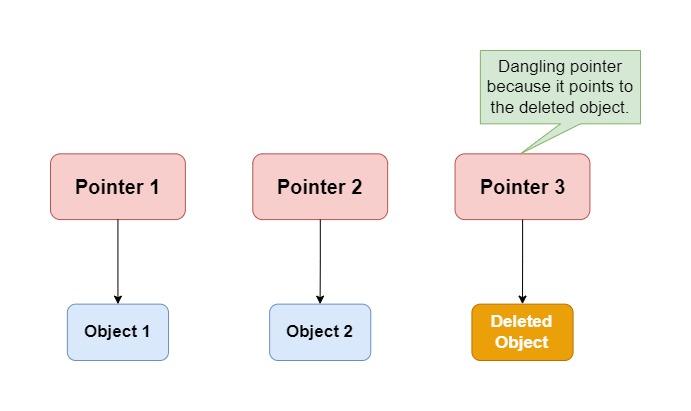
Using a dangling pointer leads to undefined behavior, one of the most dreaded situations in C programming. The program might:
- Crash immediately.
- Seem to work correctly (if the memory hasn't been reused yet).
- Silently corrupt other, unrelated data in your program, leading to bugs that are incredibly difficult to diagnose.
The following resource from GeeksforGeeks outlines the three most common ways dangling pointers are created.
Dangling, Void , Null and Wild Pointers in C
This article provides clear definitions and code examples for different pointer-related issues.
Read the main section titled "Dangling Pointer in C". Pay close attention to the three scenarios it presents: De-allocation of Memory: This is the classic "use-after-free" error. Function Call: This happens when a function returns the address of a local, non-static variable. Variable Goes Out of Scope: This occurs when you point to a variable inside a limited scope (like inside curly braces {}) and then try to use that pointer after the scope has ended.
Now, let's watch a video that not only demonstrates the problem but also introduces the single most important technique for preventing it.
Dangling Pointers | C Programming Tutorial
The video "Dangling Pointers" by Portfolio Courses clearly demonstrates the risks and provides the standard solution.
Watch the first segment, Defining Dangling Pointers, which shows how a pointer still holds an address after free() is called, and the danger of writing to that location. The next segment, Preventing the Problem, introduces the crucial best practice: setting the pointer to NULL after freeing it. Notice the explanation of why this is safer: dereferencing NULL causes a predictable crash, whereas dereferencing a dangling pointer causes unpredictable behavior.
Prevention Strategy:
The best practice is straightforward: After calling free(ptr), immediately set the pointer to NULL.
#include <stdlib.h>

int main() {
    int *data = malloc(100 * sizeof(int));
    if (data == NULL) return 1;

    // ... use the data ...

    free(data);      // Step 1: Deallocate the memory.
    data = NULL;     // Step 2: Invalidate the pointer.

    // Now, any accidental attempt to use 'data' is safer.
    // For example, a check like this would prevent a crash:
    if (data != NULL) {
        data[0] = 42; // This code will not run.
    }

    return 0;
}
3. Spot the Error: A Quick Challenge
Finding memory errors manually is tough. In practice, developers rely on specialized tools. A famous one for C/C++ is Valgrind. It can run your program and report memory errors like leaks and invalid memory access.
The image below shows a C code snippet with two distinct memory errors highlighted, similar to what a tool like Valgrind would flag.
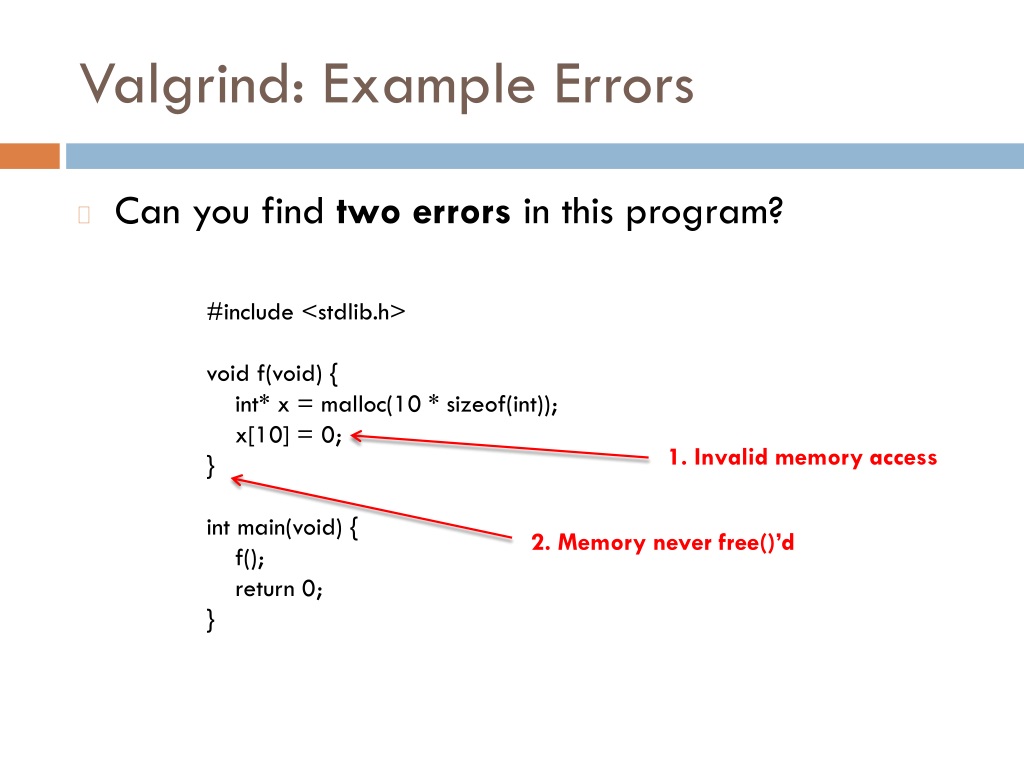
Now, let's try a small challenge. Examine the following C function. Can you identify the line that causes a memory leak and the line that uses a dangling pointer?
void process_items() {
    // Allocate space for 10 items
    int *items = (int *)malloc(10 * sizeof(int));
    if (items == NULL) { return; }

    items[0] = 100; // Use the block

    // A new request comes in for 50 items
    items = (int *)malloc(50 * sizeof(int));
    if (items == NULL) { return; }

    items[0] = 200; // Use the new block

    free(items);

    // Later in the function...
    printf("The first item was: %d\n", items[0]);
}
Click to reveal the errors and the corrected code
The Errors:
- Memory Leak: Occurs on the line
items = (int *)malloc(50 * sizeof(int));. At this moment, the address of the first 10-integer block is overwritten and lost forever, leaking that memory. - Dangling Pointer: Occurs on the line
printf("The first item was: %d\n", items[0]);. Theitemspointer is used after the memory it points to has been freed.
Corrected Code:
void process_items_fixed() {
    // Allocate space for 10 items
    int *items = (int *)malloc(10 * sizeof(int));
    if (items == NULL) { return; }

    items[0] = 100;

    // To get a larger block, we must free the old one first.
    free(items);

    // Now allocate the new, larger block
    items = (int *)malloc(50 * sizeof(int));
    if (items == NULL) { return; }

    items[0] = 200;

    // Print BEFORE freeing
    printf("The first item was: %d\n", items[0]);

    // Now clean up
    free(items);
    items = NULL; // Best practice!
}
Conclusion
You have now confronted two of the most significant dangers in C programming. By understanding how they happen and internalizing the prevention strategies, you are well on your way to writing professional, high-quality C code.
Key Takeaways:
- Memory Leaks: Occur when allocated memory is no longer reachable. Prevent them by ensuring every
mallochas a correspondingfree. Be careful not to overwrite pointers to allocated blocks before they are freed. - Dangling Pointers: Pointers that point to freed memory. They cause undefined behavior and are extremely dangerous. Prevent them by setting pointers to
NULLimmediately after callingfree. - Defensive Programming: Always check the return value of
mallocforNULL, and check if a pointer isNULLbefore dereferencing it.
Preview of the Next Lesson:
We've spent a lot of time managing memory inside our program. In the next module, we'll start interacting with the outside world. You will learn how programs receive arguments from the command line (argc, argv) and how to read from and write to files on your disk. This will allow your programs to persist data and become far more powerful.