Recommended resources
The freely available resources this lesson will direct you to.
Welcome to the start of a new module! In our previous lessons, we dove deep into the internals of a C program, focusing on how to manage memory with structs, malloc(), and free(). You learned how to build dynamic data structures and, just as importantly, how to avoid critical errors like memory leaks and dangling pointers.
Now, we're going to shift our focus from the program's internal world to how it interacts with the outside world. This module is all about making your programs more flexible and powerful by enabling them to receive input from sources other than a scanf() prompt.
In this first lesson, we'll explore a fundamental mechanism for controlling a program from the moment it's launched. Our goal is to explain how command-line arguments are passed to the main function using argc and argv. This will allow you to create programs that can be configured and directed from the terminal, a standard practice for countless software tools you use every day.
1. What Are Command-Line Arguments?
You've actually been using command-line arguments throughout this course without us naming them. When you compile a program using a command like:
gcc my_program.c -o my_program
You are running the gcc program. The parts that follow, my_program.c, -o, and my_program, are command-line arguments. They are pieces of information passed from the command line (your terminal) to the program (gcc) to tell it what to do. In this case, you're telling the compiler which source file to use and what to name the output executable.
Until now, our main function has been declared as int main(). This simple form doesn't allow our program to "see" those extra arguments. To access them, we need to use a more complete declaration of main.
2. The Full main Function Signature
To receive command-line arguments, the main function is declared with two special parameters.
int main(int argc, char *argv[])
While the names argc and argv are just a convention, they are used universally in C programming, and you should always stick to them. Let's break down what they are.
int argc: This stands for argument count. It is an integer that stores the number of command-line arguments passed to the program.char *argv[]: This stands for argument vector. A "vector" is an old term for an array. This parameter is an array of character pointers. Since a character pointer (char *) is how C represents a string, you can think ofargvas an array of strings. Each string in the array is one of the command-line arguments.
The following video provides a quick, high-level overview of these two parameters and their purpose.
What is argc & argv and why do we use them?
The video "What is argc & argv and why do we use them?" by NoTech? gives a friendly introduction to the concept.
Watch from the beginning to understand the basic idea of main taking parameters (main with parameters). Then, jump to the section that defines the parameters' types and names (parameter types). Finally, watch the part that explains what argc and argv actually contain, including the important detail about argv[0] (what they store).
3. Understanding argc and argv in Detail
The video gave us a good start. Let's solidify the two most important rules:
- The program's name is the first argument. This means
argcwill always be at least 1, andargv[0]will always contain the name of the executable program (e.g.,./my_program). - Arguments are separated by spaces. The shell breaks up your command at each space to create the list of string arguments that get passed to
main.
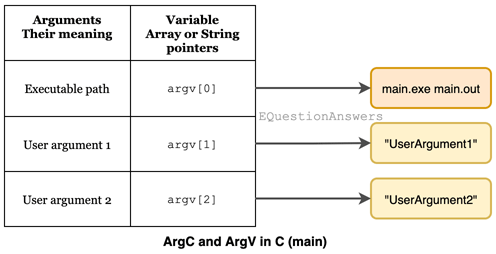
Imagine you compile a program and run it from your terminal like this:
./my_app user1 log.txt
Here’s how the operating system would pass the arguments to your main function:
argcwould be3. (One for the program name, one for "user1", and one for "log.txt").argvwould be an array of three strings:argv[0]="./my_app"argv[1]="user1"argv[2]="log.txt"
This diagram provides a clear visual of this relationship:
4. Processing Arguments in Your Code
Now that we know how the arguments are stored, how do we use them? Since argc tells us how many arguments there are and argv is an array, we can use a simple for loop to iterate through all of them.
The next video demonstrates exactly how to write a C program to access and print every argument it receives.
Command Line Arguments | C Programming Tutorial
The video "Command Line Arguments | C Programming Tutorial" from Portfolio Courses provides a clear, code-focused demonstration.
The introduction shows how to declare main and what the arguments look like on the command line (intro and syntax). Watch the section that explains why argc seems to be "one greater" than you'd expect and prints argv[0] (argc and argv[0]). The final segment is the most important: it shows how to use a for loop to programmatically handle all arguments (looping through argv).
Let's reinforce this with our own code example.
args_printer.c
#include <stdio.h>

// Use the full signature for main to accept command-line arguments
int main(int argc, char *argv[]) {
    // Print the number of arguments received
    printf("Number of arguments (argc): %d\n", argc);
    printf("----------------------------\n");

    // Loop through the argv array and print each argument
    for (int i = 0; i < argc; i++) {
        printf("argv[%d]: %s\n", i, argv[i]);
    }

    return 0;
}
To test this code:
- Save it as
args_printer.c. - Compile it:
gcc args_printer.c -o args_printer - Run it with some arguments:
./args_printer hello C programming 2024
Expected Output:
Number of arguments (argc): 5
----------------------------
argv[0]: ./args_printer
argv[1]: hello
argv[2]: C
argv[3]: programming
argv[4]: 2024
Notice that even 2024, which looks like a number, is treated as a string ("2024"). In future lessons, we will learn how to convert such strings into numbers for calculations.
5. Properties and Special Cases
There are a few more important details to know about how command-line arguments work. The following resource from GeeksforGeeks provides a concise summary and demonstrates some interesting cases.
This article lists key properties and shows how the shell handles different types of input.
First, read the section titled "Properties of Command Line Arguments in C". This is a great summary of the key facts. Next, review the examples under the section "Output in different scenarios". Pay close attention to scenario 3, which shows how to pass an argument that contains spaces by enclosing it in double quotes ("").
The key takeaway from that reading is this: if you need to pass an argument that contains spaces, you must wrap it in quotes. For example:
./args_printer "Hello, world!"
Output for this command:
Number of arguments (argc): 2
----------------------------
argv[0]: ./args_printer
argv[1]: Hello, world!
The shell treats everything inside the quotes as a single argument.
Conclusion
In this lesson, you've learned how to break down the barrier between your program and the command line from which it's launched. This is the first step toward creating powerful and flexible command-line tools.
Key Takeaways:
- The
mainfunction can be declared asint main(int argc, char *argv[])to accept command-line arguments. argcis an integer representing the total count of arguments. It is always at least 1.argvis an array of strings (char *[]), where each element is one argument.argv[0]is always the name of the program itself. The actual arguments start atargv[1].- All arguments are passed as strings, even if they look like numbers.
- You can iterate through all arguments using a
forloop that runs from0toargc - 1.
Preview of the Next Lesson:
Now that you can receive arguments, the next logical step is to use them. In our next lesson, you will write a program that actually processes these arguments to change its behavior, such as performing a simple calculation or printing a customized message.