Recommended resources
The freely available resources this lesson will direct you to.
- Day-5 | AWS Security Group and NACL | Theory + Practical | AWS FREE COURSE by Abhishek |#devops #awswww.youtube.com
- Understanding RouteTables in AWSwww.youtube.com
- Use tools to troubleshoot Amazon VPC network conenctivityrepost.aws
- Troubleshoot an unresponsive website on an EC2 instance | AWS re:Postrepost.aws
Hello! In the previous lesson, you used dig, nc, and curl to find the last successful stage of a request. An EC2 failure adds another question: which layer controls the path between the client and the application? A timeout might come from a missing listener, an operating-system firewall, an AWS traffic rule, a route, or a DNS answer that points somewhere else.
This lesson gives you a repeatable way to separate those possibilities without opening broad access “just to see if it works.” Allow about 40–45 minutes, including the selected video segments and readings.
Define the connection that is failing
Before inspecting rules, write down one specific connection: source, destination hostname, resolved IP address, protocol, port, and direction. Also note where you ran the test. A request from your laptop and one from another EC2 instance may use different DNS answers, source addresses, routes, and access rules.
For example, suppose a client cannot reach https://app.example.org/health on an EC2 instance. Start from the affected client:
dig app.example.org A
getent ahosts app.example.org
nc -vz -w 3 app.example.org 443
curl -v --connect-timeout 3 --max-time 10 \
  https://app.example.org/health -o /dev/null
These checks retain the distinctions from the previous lesson. A DNS answer does not prove a route exists; a TCP connection does not prove TLS or HTTP works. Record the actual IP attempted, not only the hostname: you will need it when checking AWS configuration.
If DNS returns an address you believe is wrong, you can test a known destination while preserving the hostname used for TLS and HTTP:
curl --resolve app.example.org:443:KNOWN_IP \
  https://app.example.org/health
Replace KNOWN_IP with an approved address for that service. If this works but the ordinary request fails, investigate DNS and the addresses selected by the client. If both fail in the same way, continue down the connection path. Check for a configured proxy before interpreting either test as a direct client-to-instance connection.
Establish whether the instance can serve the request
When you have authorized access to the instance, inspect the application before changing its AWS rules. A security group cannot make a stopped service listen on a port.
AWS re:Post’s Troubleshoot an unresponsive website on an EC2 instance provides a useful operating-system checklist.
Troubleshoot an unresponsive website on an EC2 instance | AWS re:Post
Read the AWS re:Post checklist to distinguish a service or host-firewall failure from an AWS network-control failure.
In “Verify that the web server is running and that no OS firewalls block access to ports,” read the local checks, from the localhost test through service status and listening ports. Then inspect the firewall example through its explanation of why web traffic is blocked. Adapt the service name and port to your workload; do not apply the article’s example rule changes without checking your access policy.
On a Linux instance, a compact first pass is:
sudo systemctl status YOUR_SERVICE --no-pager
sudo journalctl -u YOUR_SERVICE -n 50 --no-pager
sudo ss -lntp | grep ':443'
Replace YOUR_SERVICE. Inspect the local address reported by ss, not just the port. A process bound only to 127.0.0.1:443 can answer loopback requests but cannot accept a connection addressed to the instance’s private IP. If the instance itself terminates TLS for app.example.org, compare a loopback test with a test to its private IP:
curl --resolve app.example.org:443:127.0.0.1 \
  https://app.example.org/health

curl --resolve app.example.org:443:INSTANCE_PRIVATE_IP \
  https://app.example.org/health
Replace INSTANCE_PRIVATE_IP. These tests keep the intended hostname for certificate verification; they do not traverse the same path as an external client. If a load balancer terminates TLS and the instance listens for HTTP on another port, test that actual instance listener instead.
Also inspect whichever host firewall is active—for example, sudo ufw status verbose, sudo firewall-cmd --list-all, or sudo nft list ruleset. A healthy service and a successful loopback request do not rule out a host firewall blocking remote traffic. If you cannot log in, first check instance status and available console diagnostics; use an already authorized management path rather than opening SSH to the world.
Separate security groups from network ACLs
Traffic reaching an EC2 instance must satisfy controls at different scopes. A security group is associated with its network interface and specifies permitted inbound and outbound traffic. It has allow rules, not explicit deny rules, and is stateful: response traffic for an allowed connection does not require a separate reverse-direction security-group rule. If several security groups are attached, consider their combined allow rules.
A network ACL (NACL) applies to a subnet. It has numbered allow and deny rules, evaluated from the lowest number until a rule matches, followed by an implicit deny. It is stateless: the request and its response must each match an appropriate rule in their respective directions. Check the NACL actually associated with the instance’s subnet, not merely one that exists in the VPC.
Watch the selected portions of Abhishek.Veeramalla’s Day-5 | AWS Security Group and NACL. The demonstration makes rule scope and rule order visible.
Day-5 | AWS Security Group and NACL | Theory + Practical | AWS FREE COURSE by Abhishek |#devops #aws
Watch the NACL explanation and the later rule-order demonstration to see why a security-group allow does not, by itself, establish connectivity.
Watch subnet-level controls for the distinction between security-group and NACL scope. Then watch rule-order testing, focusing on how a lower-numbered NACL match determines the result. Treat the broadly opened demo port as a demonstration, not a configuration to copy. SSH access shown in the demo is a configured rule, not a universal EC2 default.
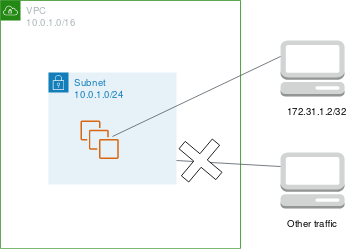
For an inbound TCP connection to port 443, inspect the rules against the real source address:
- Does an attached security group allow TCP 443 from that source, or from an authorized source security group where applicable?
- Does the subnet NACL allow the incoming request to destination port 443?
- Does its outbound side allow the response to the client’s ephemeral destination port?
That final check is easy to miss. The client chooses a temporary source port for its connection; the server’s reply is destined for that port. Confirm the client environment’s ephemeral-port range and the required CIDR before evaluating a restrictive NACL. For an EC2 instance initiating a connection, perform the analogous checks in the opposite direction. If traffic crosses multiple subnets, consider the relevant controls at both ends.
Keep the scopes separate: a NACL allow cannot override a missing security-group allow, and a security-group allow cannot override a matching NACL deny. Neither control proves that a process is listening or that the operating-system firewall permits the traffic.
Verify the route for the destination
Access rules answer whether traffic is permitted; route tables answer where traffic is directed. Check the route table associated with the instance’s subnet, including whether the subnet uses the VPC’s main route table rather than an explicit association.
CloudWolf AWS’s Understanding RouteTables in AWS illustrates the local VPC route and route selection.
Understanding RouteTables in AWS
Watch how subnet associations and destination prefixes determine which route applies to an EC2 connection.
Watch the local route for communication within the VPC. Continue with route selection, focusing on why the most specific matching destination wins over a default route.
For direct IPv4 access from the internet to an EC2 instance, verify that it has a public IPv4 address, its subnet route table has an applicable default route to an attached internet gateway, and the return path is permitted. A subnet without that internet-gateway route does not become directly internet-accessible merely because its security group permits port 443. An instance in a private subnet may instead be reached through an intended load balancer or another network path; diagnose the actual client-facing endpoint and the instance connection separately. A NAT gateway supports typical outbound internet access from private instances, not unsolicited inbound connections to them.
For private-IP communication within a VPC, look for the applicable local route. For destinations outside the VPC—another network or the internet—identify the intended next hop and check that the subnet route table selects it. On the instance, ip route get DESTINATION_IP shows the operating system’s selected interface and route for an outgoing packet; it complements, rather than replaces, the VPC route-table check.
Use AWS diagnostics to test a hypothesis
When inspection still leaves several plausible causes, AWS provides two different kinds of evidence. The AWS re:Post article Use tools to troubleshoot Amazon VPC network connectivity introduces both.
Use tools to troubleshoot Amazon VPC network conenctivity
Read the AWS re:Post sections on path analysis and flow logs as ways to narrow an AWS-side connectivity failure.
Under “Troubleshoot Amazon VPC connectivity issues with Reachability Analyzer,” read the path-check description. Under “Use VPC Flow Logs to identify connectivity issues,” read the log overview. Locate the rejected-traffic query examples, then read their interpretation. You can skip the article’s later DNS, routing, and performance-tool sections for this reading.
Reachability Analyzer evaluates an AWS network path and can identify a blocking security group, NACL, or route configuration. Specify the intended source, destination, protocol, and port. It analyzes configuration; it does not verify that Linux has a listener, that an HTTP endpoint is healthy, or that your hostname resolves as expected.
VPC Flow Logs, when enabled for the relevant VPC, subnet, or network interface, let you look for matching traffic and ACCEPT or REJECT records. Match the interface, addresses, ports, protocol, and time window to your test. A REJECT is evidence of AWS-side filtering, but the record alone may not identify which rule caused it. An ACCEPT is not proof that the application replied successfully. Flow logs are aggregated records rather than a live packet capture; allow for delivery delay and check that logging covers the interface and traffic you tested.
If you can inspect the instance, a narrowly scoped packet capture can add a different clue: whether connection attempts reach its network interface and whether responses leave it. Capture only what you are authorized to inspect, and handle packet data as sensitive operational evidence.
Reconcile the evidence, including DNS
Consider this illustrative incident: app.example.org times out from an external client. On the instance, the service is active, ss shows a listener on its private IP at port 443, and a verified local request succeeds. That makes a stopped service or loopback-only binding less likely, but does not establish external reachability.
You would next compare the DNS answer with the instance’s current public address or its intended load-balancer address. If they differ, investigate the DNS record before changing firewall rules. If they match, check whether the instance is meant to accept direct internet traffic. For direct access, inspect its public address and subnet route; then check the attached security groups and both directions of its subnet NACL for the client’s connection. If AWS configuration appears to permit the path, use Reachability Analyzer or matching flow logs, then revisit the host firewall and packet-level evidence. Each result should eliminate a hypothesis rather than trigger an unrelated configuration change.
DNS deserves a final check from the affected environment. dig shows a DNS query’s answer, while getent ahosts reflects the Linux host’s configured name-resolution path. Private DNS names, private hosted zones, and different resolver configurations can make two clients receive different answers for what appears to be the same service name. Confirm that the answer is appropriate for the client’s intended route—not merely that some address was returned.
When reporting the incident, state the boundary you have actually established: for example, “the instance serves requests locally; the affected client resolves the expected address; AWS path analysis reports a NACL block on the return path.” That is more actionable than “EC2 networking is broken,” and safer than temporarily allowing all traffic.
Key takeaways
Isolate an EC2 connectivity failure against a specific source, destination, port, and direction. Confirm the service, binding, and host firewall; inspect security groups at the interface and NACLs at the subnet; verify the subnet’s route and intended public or private path; then compare DNS answers from the failing client. Use Reachability Analyzer and Flow Logs to strengthen an AWS-side diagnosis, while remembering that neither substitutes for an application test.
This completes the Linux and networking troubleshooting module. The next module turns these kinds of repeatable checks and evidence collection into shell, Git, and Python automation.