Recommended resources
The freely available resources this lesson will direct you to.
Hello, and welcome to the first lesson. This course begins with PyTorch because tensors will hold the inputs, predictions, and parameters in the neural networks you build later. They will also hold the observations and action values used in deep reinforcement learning.
Today’s goal is practical: create a tensor with the shape, data type, and device you intend, then verify all three. You can work through the examples on a CPU; an accelerator is optional.
Shape: what the dimensions describe
A tensor is a collection of values arranged along one or more axes, also called dimensions. A one-dimensional tensor resembles a list; a two-dimensional tensor has rows and columns. For a three-dimensional tensor, you can think of each position along the first axis as selecting a two-dimensional array.
Watch the PyTorch tutorial’s introduction to tensor creation. Pause at the examples to compare the values displayed with the reported shape.
Introduction to PyTorch Tensors
“Introduction to PyTorch Tensors,” from the PyTorch channel, introduces tensors and shows several ways to create them.
Watch the overview for the role tensors play in a model. Then watch creation functions, focusing on the difference between uninitialized storage and tensors filled with zeros, ones, or random values. Continue with matching shapes and Python data to see how *_like functions and nested lists determine a new tensor’s shape. The brief discussion of random seeds will receive fuller treatment later in the course.
A tensor’s .shape reports the length of each axis in order. The following image shows a tensor with one group containing three rows of three values:
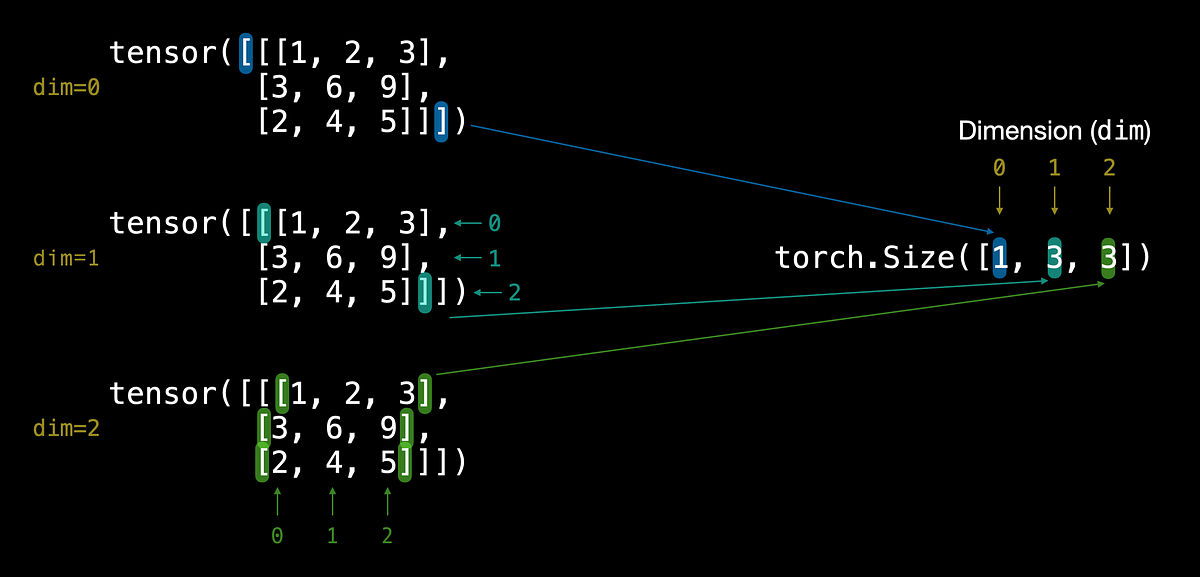
The first 1 in that shape does not mean “one dimension.” It means one position along the first dimension. There are three dimensions because the shape has three entries. In code, you can check this directly:
import torch

values = torch.tensor([[[1, 2, 3],
                        [3, 6, 9],
                        [2, 4, 5]]])

print(values.shape)   # torch.Size([1, 3, 3])
print(values.ndim)    # 3
Use torch.tensor(...) when you already know the values. When you know the shape but want PyTorch to fill the values, use a creation function:
shape = (2, 3)

zeros = torch.zeros(shape)   # Two rows, three columns
ones = torch.ones(shape)
random = torch.rand(shape)   # Random floating-point values from 0 up to 1

print(zeros.shape)           # torch.Size([2, 3])
You can also write torch.zeros(2, 3). A tuple is especially convenient when the shape is stored in a variable. If you need a new tensor shaped like an existing one, torch.zeros_like(random) takes the shape from random rather than requiring you to enter it again. Avoid torch.empty(...) when you need meaningful starting values: it allocates space without initializing its contents.
Data type: what each value can represent
Shape tells you how values are arranged; data type, or dtype, tells you how each value is stored. Floating-point values are common for model inputs and parameters. Integer values often represent categories or indices.
Watch the next part of the same tutorial for the dtype argument and conversion with .to().
Introduction to PyTorch Tensors
The data-type portion of “Introduction to PyTorch Tensors” shows how to choose a type when creating a tensor and how to convert an existing tensor.
Watch data types. Focus on dtype= in a creation call and the later .to() conversion. When the video describes converting floats to integers as “rounding down,” use the more precise rule: the fractional part is discarded toward zero, so a negative value such as -1.9 becomes -1.
Specify a type when creating the tensor whenever you know what it should be:
features = torch.tensor([[1, 2, 3],
                         [4, 5, 6]], dtype=torch.float32)

labels = torch.tensor([0, 2], dtype=torch.int64)
flags = torch.zeros((2, 3), dtype=torch.bool)

print(features.shape, features.dtype)  # torch.Size([2, 3]) torch.float32
print(labels.shape, labels.dtype)      # torch.Size([2]) torch.int64
If you omit dtype, PyTorch infers it from values passed to torch.tensor: a list of integers normally produces torch.int64, while a list of floats uses the default floating-point type, normally torch.float32. Creation functions such as torch.zeros also normally use the default floating-point type. Check .dtype rather than assuming two tensors have the same type.
To change an existing tensor’s type, assign the result of .to():
integer_features = features.to(dtype=torch.int64)
print(integer_features.dtype)  # torch.int64
print(features.dtype)          # torch.float32: the original is unchanged
Conversion can change values—for example, converting non-whole floating-point numbers to integers discards their fractional parts. Choose the intended type at creation time when possible.
Device: where the tensor lives
A tensor’s device is the hardware location where it is stored, such as a CPU or an available accelerator. New tensors normally start on the CPU. Supplying device= places a tensor on the chosen device at creation; .to(device=...) places an existing tensor there.
Read the focused section of the written PyTorch tutorial. You can skip the preceding material on computation history—we will cover gradients in a later lesson.
Introduction to PyTorch Tensors
PyTorch’s “Introduction to PyTorch Tensors” explains why device placement matters and demonstrates both creation on a device and moving an existing tensor.
In “Moving to Accelerator,” begin where the text says “First we should check whether an accelerator is available.” Read the device examples, continuing through the final y = y.to(my_device) code example. Focus on the availability check, the CPU fallback, device= at creation, and .to() for an existing tensor.
The device check lets the same script run whether or not an accelerator is available:
import torch

device = (
    torch.accelerator.current_accelerator()
    if torch.accelerator.is_available()
    else torch.device("cpu")
)

new_values = torch.ones(
    (2, 3),
    dtype=torch.float32,
    device=device,
)

cpu_values = torch.tensor([[1.0, 2.0, 3.0]])
moved_values = cpu_values.to(device=device)

print(new_values.device)
print(cpu_values.device)
print(moved_values.device)
cpu_values stays on the CPU; assigning the result to moved_values gives you the tensor on the selected device. If no accelerator is available, all three device readings will be cpu—that is a correct outcome, not a failed example. Later, when performing computations with multiple tensors, their device placement will need to be compatible.
Putting the three choices together
Here is the creation pattern to carry into subsequent lessons:
batch = torch.zeros(
    (4, 3),
    dtype=torch.float32,
    device=device,
)

print(batch.shape)   # torch.Size([4, 3])
print(batch.dtype)   # torch.float32
print(batch.device)  # The selected accelerator, or cpu
This tensor has four rows of three floating-point values, stored on the selected device. The values happen to be zeros because torch.zeros was chosen; shape, type, and device are separate decisions. When inspecting an unfamiliar tensor, .shape, .dtype, and .device give you those three facts without relying on how its printed values look.
Conclusion
You can now create tensors from supplied data or with creation functions, set their shape and dtype, choose a CPU or available accelerator, and inspect the result. The central habit is to make these properties explicit when they matter—and verify them before building larger computations.
Next, you will use tensors rather than just create them: selecting values with indexing and changing how values are arranged or combined.