Recommended resources
The freely available resources this lesson will direct you to.
- Most devs don’t understand how context windows workwww.youtube.com
- System Prompt vs User Prompt in Prompt Engineering | #AI #promptengineering #prompt #openai #LLMwww.youtube.com
- System Prompts vs User Prompts: Design Patterns for LLM Appstetrate.io
- System Prompts vs. User Prompts: The Missing Manual for ... - Mediummedium.com
Hello! Welcome back to our course on building an AI Security Prompt Injection demo.
In our first lesson, we established a critical foundation: Large Language Models (LLMs) don't have an inherent separation between instructions and user data. Everything is processed as a single stream of tokens, making them "fundamentally gullible" to instructions embedded in user input.
This lesson directly addresses that problem. We will explore the architectural pattern developers use to create a separation of concerns. By the end of this lesson, you will be able to describe the roles of system prompts, user prompts, and the context window in processing LLM requests. Understanding this structure is essential, as it forms the first—and most fundamental—line of defense against prompt injection attacks.
1. The Architectural Blueprint: Separating Rules from Requests
Given the lack of a built-in "code vs. data" boundary, developers impose one through a design pattern. Imagine you're integrating an LLM into an application. You can think of it like onboarding a new, brilliant, but naive employee. You need to provide two distinct types of information:
- A System Prompt: This is the employee's permanent job description and company policy manual. It defines their role, their constraints, what they are allowed and not allowed to do, and the format for their work.
- A User Prompt: This is the specific task that lands in their inbox. It's the immediate request they need to act upon, using the rules from their job description.
This conceptual separation is the cornerstone of building reliable LLM applications.
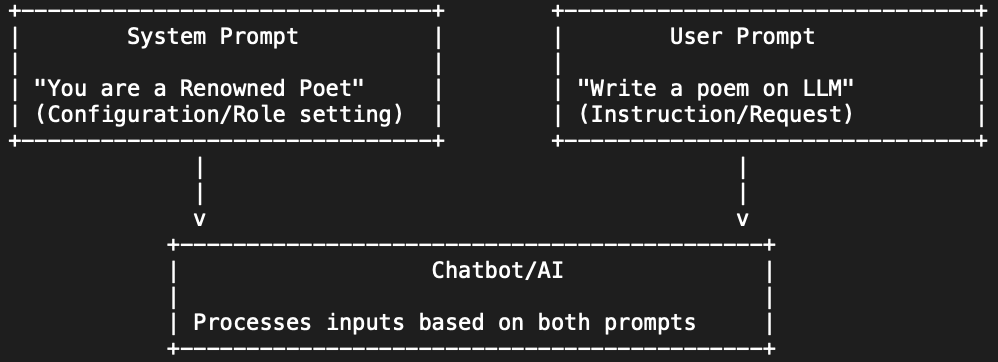
To see how this works in practice, let's look at an article that provides excellent analogies and concrete examples.
System Prompts vs. User Prompts: The Missing Manual for Controlling LLMs
This article from Medium, 'System Prompts vs. User Prompts: The Missing Manual', uses the powerful analogy of a 'Job Description' versus an 'Inbox'. It clearly demonstrates why this separation is critical for moving beyond simple chatbots to build reliable applications.
Please read the first three sections: 'The Core Concept: The Employee Handbook' 'Under the Hood: How the API actually works' 'Real-World Examples: Good vs. Bad' \nFocus on how the system prompt enforces rules (like outputting only JSON or not promising refunds) that the model would otherwise ignore in its attempt to be 'helpful'.
The difference this makes is not just theoretical. To see a live demonstration of an LLM's behavior with and without a system prompt, please watch the following video.
System Prompt vs User Prompt in Prompt Engineering | #AI #promptengineering #prompt #openai #LLM
This video from WafaStudies provides a clear, practical demonstration of how a system prompt controls the format and tone of an LLM's output, even when the user prompt remains the same.
You can quickly review the initial explanations of system and user prompts (00:35 - 02:06), but the key part to watch is the demonstration from 06:43 to 08:20. Notice how the output for the same user query changes drastically once a structured system prompt is applied.
From your background in SRE and platform engineering, you can recognize this as a familiar design principle: separating static configuration from dynamic requests. The system prompt acts as the persistent configuration for the LLM "service," ensuring predictable behavior, while the user prompt is the variable payload for each API call.
2. The Context Window: The LLM's Working Memory
So, where do the system prompt, the user prompt, and the model's own responses all live? They are combined into a single data structure called the context window.
The context window is the entire set of information the model can "see" at any given moment when predicting the next token. It includes the initial system prompt, all subsequent user messages, and all previous assistant (model) responses.

The context window is not infinite. It has a hard-coded size limit, measured in tokens. This has profound implications for both performance and security. Let's explore this in more detail.
Most devs don’t understand how context windows work
This video from Matt Pocock, titled 'Most devs don’t understand how context windows work', offers a superb explanation of what the context window is, why its limits exist, and a critical emergent behavior known as the 'lost in the middle' problem.
Please watch from 00:42 to 04:48. Pay close attention to these three key points: The components of the context window (system, user, assistant messages). The hard limits and why they exist (performance and architectural constraints). The 'lost in the middle' phenomenon, where the model pays less attention to information in the middle of a long context.
Trade-offs and Edge Cases of the Context Window
The "lost in the middle" problem is a crucial concept for security analysis. It's an emergent property of the Transformer architecture's attention mechanism, which exhibits primacy bias (paying more attention to the beginning of the context) and recency bias (paying more attention to the end).
- Why is this important? System prompts are effective precisely because they are placed at the very beginning of the context window, benefiting from primacy bias. The most recent user prompt benefits from recency bias.
- Security Angle: An attacker could try to exploit this. In a very long conversation, malicious instructions "buried" in the middle of the context might be overlooked by simple defense mechanisms but could still influence the model's behavior in subtle ways.
- The Trade-off: While larger context windows seem better (allowing for longer conversations), they can degrade performance (higher latency and cost) and are more susceptible to the "lost in the middle" problem, potentially making the model's behavior less predictable.
3. How Models Process Different Prompt Types
Now that we understand the architectural separation and the context window they live in, let's briefly touch on how the model processes them differently at a technical level.
When you make an API call to most LLMs, you don't just send a block of text. You send a structured list of messages, each with a role. The most common roles are system, user, and assistant.
[
  {
    "role": "system",
    "content": "You are a helpful assistant that only responds in JSON format."
  },
  {
    "role": "user",
    "content": "Extract the name and email from: 'Contact person is John Doe at john.doe@example.com'"
  },
  {
    "role": "assistant",
    "content": "{\"name\": \"John Doe\", \"email\": \"john.doe@example.com\"}"
  },
    {
    "role": "user",
    "content": "Great, now do the same for 'Jane Smith, jane.s@example.net'"
  }
]
This explicit role-tagging allows the model to apply different weights and attention.
System Prompts vs User Prompts: Design Patterns for LLM Apps
The article from Tetrate.io provides a more technical explanation of how the model's internal mechanisms, like attention, treat system and user prompts differently.
Please read the section 'How Models Process Different Prompt Types'. Focus on how the system prompt receives 'sustained attention' and establishes the 'foundational context,' while the user prompt gets 'focused attention' for the specific task.
In essence, the model is trained to give instructions with the system role a higher priority. This makes the system prompt a much more robust—though still not invulnerable—place to put your rules and constraints compared to simply prepending them to a user prompt.
Conclusion
In this lesson, we've established the standard architectural pattern for controlling LLMs. This is the baseline upon which we will build both our attacks and defenses.
Key Takeaways:
- System Prompt: A persistent set of instructions that defines the LLM's role, rules, and output format. It's the developer's primary tool for controlling the AI's behavior and our first line of defense.
- User Prompt: A dynamic, task-specific input from the end-user. From a security perspective, this is the primary entry point for direct prompt injection attacks.
- Context Window: The finite working memory of the LLM, containing all system, user, and assistant messages. Its size limitations and the "lost in the middle" behavior create important performance and security trade-offs.
- Processing Hierarchy: Models are designed to give higher weight to system prompts, making them the most effective place to define security constraints.
You now understand the "battlefield" where prompt injection occurs: the context window. An attacker's goal is to craft a user prompt that, when processed by the model, is compelling enough to override the instructions laid out in the system prompt.
In our next lesson, we will dive deeper into how in-context learning and few-shot prompting are the mechanisms that enable prompt injection attacks. You will see how techniques designed to make LLMs more powerful are the very same techniques attackers exploit.