Recommended resources
The freely available resources this lesson will direct you to.
Welcome to the first lesson in our module on Observability for LLM Systems. In our last discussion on load balancing, we saw how critical it is to route requests intelligently to maximize KV cache hits and improve performance. But how do we verify if our routing strategy is working? How do we pinpoint the source of latency in a complex request that might involve a gateway, a RAG pipeline, and the LLM itself? The answer lies in making the system observable.
Today, we will begin our journey into LLM observability by tackling its foundational pillar. Your goal for this lesson is to instrument an LLM serving endpoint with distributed tracing using OpenTelemetry. Given your deep background in SRE and infrastructure monitoring, the core concepts of tracing will be familiar. Our focus will be on applying them to the unique characteristics of LLM applications and leveraging modern, open-standard tooling to gain deep visibility into the request lifecycle.
1. Why Logs and Metrics Aren't Enough
In a traditional microservices architecture, a single user request can trigger a cascade of calls across dozens of services. Your experience with tools like ELK and New Relic has shown you that while logs from individual services are useful, and metrics give you a high-level overview, neither can tell you the complete story of a single, slow request.
LLM applications amplify this complexity. A seemingly simple call to a RAG-enabled endpoint might involve:
- Receiving the request at an API gateway.
- Calling a separate service to embed the user's query.
- Querying a vector database to retrieve relevant documents.
- Calling the LLM with the query and retrieved context.
- Parsing and formatting the LLM's output before returning it.
If this request takes 8 seconds, where was that time spent? Was the vector search slow? Did the LLM take a long time to generate the first token? You can't answer these questions by looking at isolated logs or average latency metrics.
This video provides an excellent explanation of why this visibility problem exists in any distributed system and sets the stage for the solution.
Distributed Tracing Explained: OpenTelemetry & Jaeger Tutorial
This video from the "DevOps & AI Toolkit" channel, titled "Distributed Tracing Explained," clearly articulates the problem that distributed tracing solves.
Watch the introduction from the problem statement. The speaker effectively describes the challenge of debugging intermittent slowdowns in a complex system using only traditional metrics and logs, which is directly analogous to the challenges in LLM serving.
2. OpenTelemetry and the Anatomy of a Trace
The solution is distributed tracing, and the industry-standard for implementing it is OpenTelemetry (OTel). OTel provides a vendor-neutral set of APIs, SDKs, and tools to instrument your applications, ensuring you can collect and export observability data to any backend you choose without being locked into a specific vendor.
A trace represents the complete, end-to-end journey of a request through your system. It's composed of spans, where each span represents a single unit of work (like an API call or a function execution).
The AI Engineer's Guide to LLM Observability with ...
This guide from Agenta provides a focused look at why traces are the most critical pillar of observability for LLM applications.
Please read the sections "Observability Foundations: Why Traces Matter Most" and "The Standard Solution: OpenTelemetry (OTel)." These sections will detail the anatomy of a trace (traces, spans, attributes, events) and introduce the core components of the OpenTelemetry ecosystem.
To summarize the key concepts:
- Trace: A collection of spans representing the entire lifecycle of a request. It's identified by a unique
Trace ID. - Span: A single named and timed operation within a trace, like a database query or an LLM call. It has a
Span IDand aParent Span IDto form a tree structure. - Attributes: Key-value pairs attached to a span that provide metadata. For LLMs, this is where we add crucial context like
llm.model,llm.temperature, and, critically for cost analysis,gen_ai.usage.input_tokensandgen_ai.usage.output_tokens. - Context Propagation: The mechanism that passes the
Trace IDacross service boundaries, typically via HTTP headers (like the W3Ctraceparentheader). This is what ties the individual spans together into a cohesive trace.
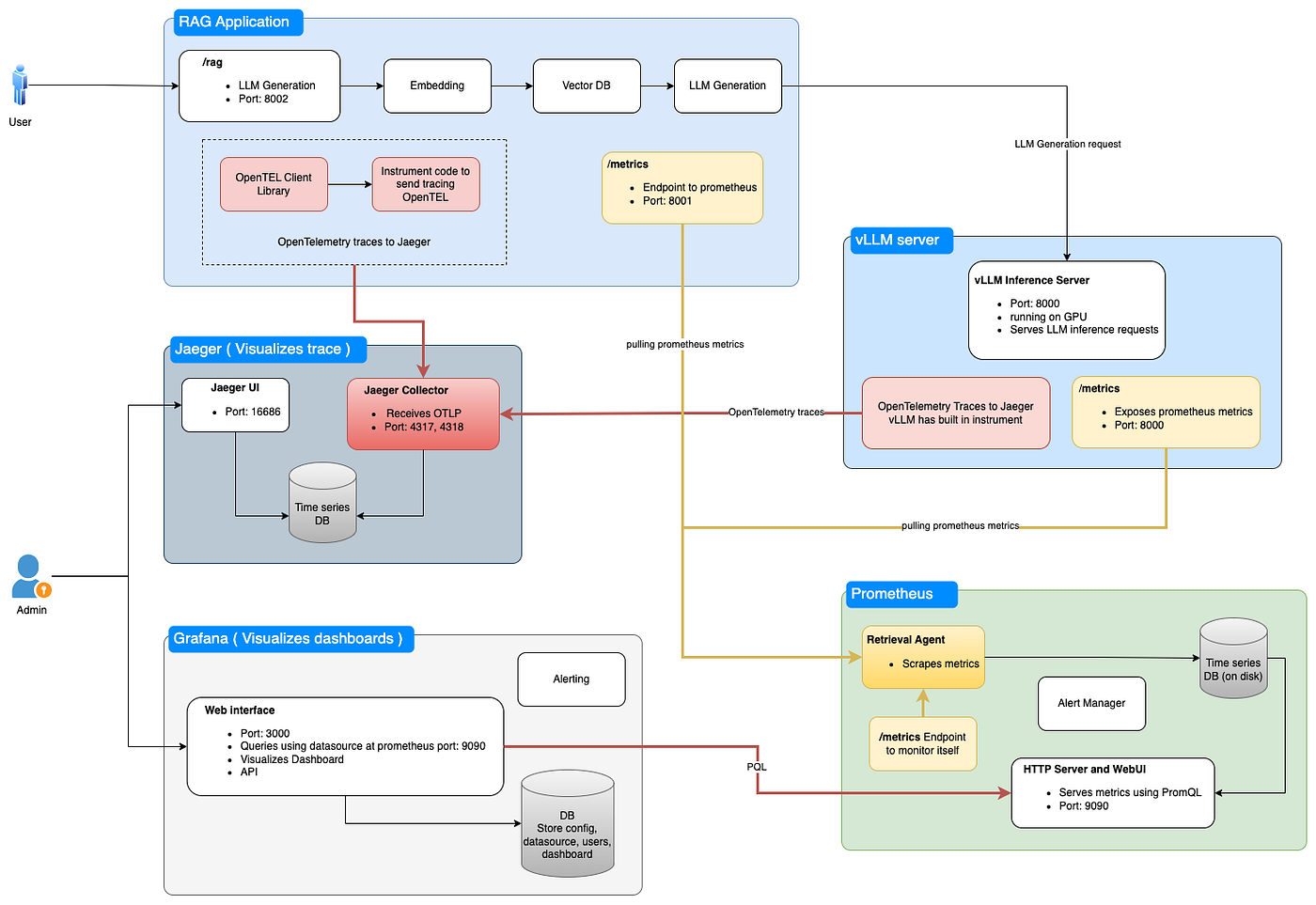
This diagram shows a high-level observability architecture, which should look familiar from your SRE work. It illustrates how instrumented applications send data via OpenTelemetry to backends for tracing (Jaeger) and metrics (Prometheus/Grafana).
3. Instrumentation: Manual vs. Automatic
How do you add this tracing capability to your code? OTel supports two primary approaches.
Distributed Tracing Explained: OpenTelemetry & Jaeger Tutorial
Let's return to the "Distributed Tracing Explained" video to understand the concepts and strategies for instrumentation.
First, watch the segment that defines the core concepts of traces and spans in OpenTelemetry. Then, continue to the next section discussing the two main instrumentation approaches: automatic and manual.
- Automatic Instrumentation: OTel provides libraries that can "monkey-patch" common frameworks (e.g., FastAPI, Flask,
requests,openai) to automatically create spans for you. This is the fastest way to get started and provides broad coverage with minimal effort. - Manual Instrumentation: You use the OTel SDK to explicitly write code to start a span, add attributes, and end the span. This gives you precise control and allows you to trace custom business logic that auto-instrumentation wouldn't understand.
The best practice is often a hybrid approach: use auto-instrumentation for the baseline and then add manual spans for critical, domain-specific parts of your application.
4. Hands-On: Instrumenting an OpenAI Client Call
Let's put this into practice. We will instrument a simple Python script that calls an OpenAI model. We'll use OTel's auto-instrumentation to capture trace data and send it to a local Jaeger instance for visualization. Jaeger is a popular open-source backend for distributed tracing.
Step 1: Set Up Jaeger
First, run Jaeger in a Docker container. This command will expose the necessary ports for receiving telemetry data (4317/4318) and for viewing the UI (16686).
docker run --rm -it -d --name jaeger \
  -p 16686:16686 \
  -p 4317:4317 \
  -p 4318:4318 \
  jaegertracing/all-in-one:latest
You can now access the Jaeger UI at http://localhost:16686.
Step 2: Prepare Your Python Environment
Create a new virtual environment and install the necessary libraries. We need the opentelemetry-distro for the basic SDK and opentelemetry-instrumentation-openai for auto-instrumenting the OpenAI library.
pip install opentelemetry-distro openai


# This installs the auto-instrumentation package for OpenAI
pip install opentelemetry-instrumentation-openai
Step 3: Write the Python Script
Create a file named main.py with the following code. This is a standard script that uses the OpenAI client to make a chat completion call.
# main.py
import os
from openai import OpenAI

client = OpenAI() # The client will use the OPENAI_API_KEY environment variable

chat_completion = client.chat.completions.create(
    model="gpt-4o-mini",
    messages=[
        {
            "role": "user",
            "content": "Write a short haiku about distributed tracing.",
        },
    ],
)

print(chat_completion.choices[0].message.content)
Step 4: Run with Auto-Instrumentation
Now, instead of running python main.py, you will use the opentelemetry-instrument command-line tool. This tool bootstraps the OTel SDK, enables the installed instrumentation packages, and then runs your script.
Before running, set the required environment variables. These tell OTel what to name your service and where to send the traces.
# Make sure to set your OpenAI API key
export OPENAI_API_KEY="sk-..."


# Configure OpenTelemetry
export OTEL_SERVICE_NAME="llm-client-example"
export OTEL_EXPORTER_OTLP_PROTOCOL="grpc"
export OTEL_EXPORTER_OTLP_ENDPOINT="http://localhost:4317"


# Run the script with instrumentation
opentelemetry-instrument python main.py
The script will run as usual and print the haiku. But in the background, the OpenAI instrumentation captured a span for the API call and sent it to Jaeger.
Step 5: View the Trace in Jaeger
Go back to the Jaeger UI in your browser (http://localhost:16686).
- In the "Service" dropdown, select
llm-client-example. - Click "Find Traces".
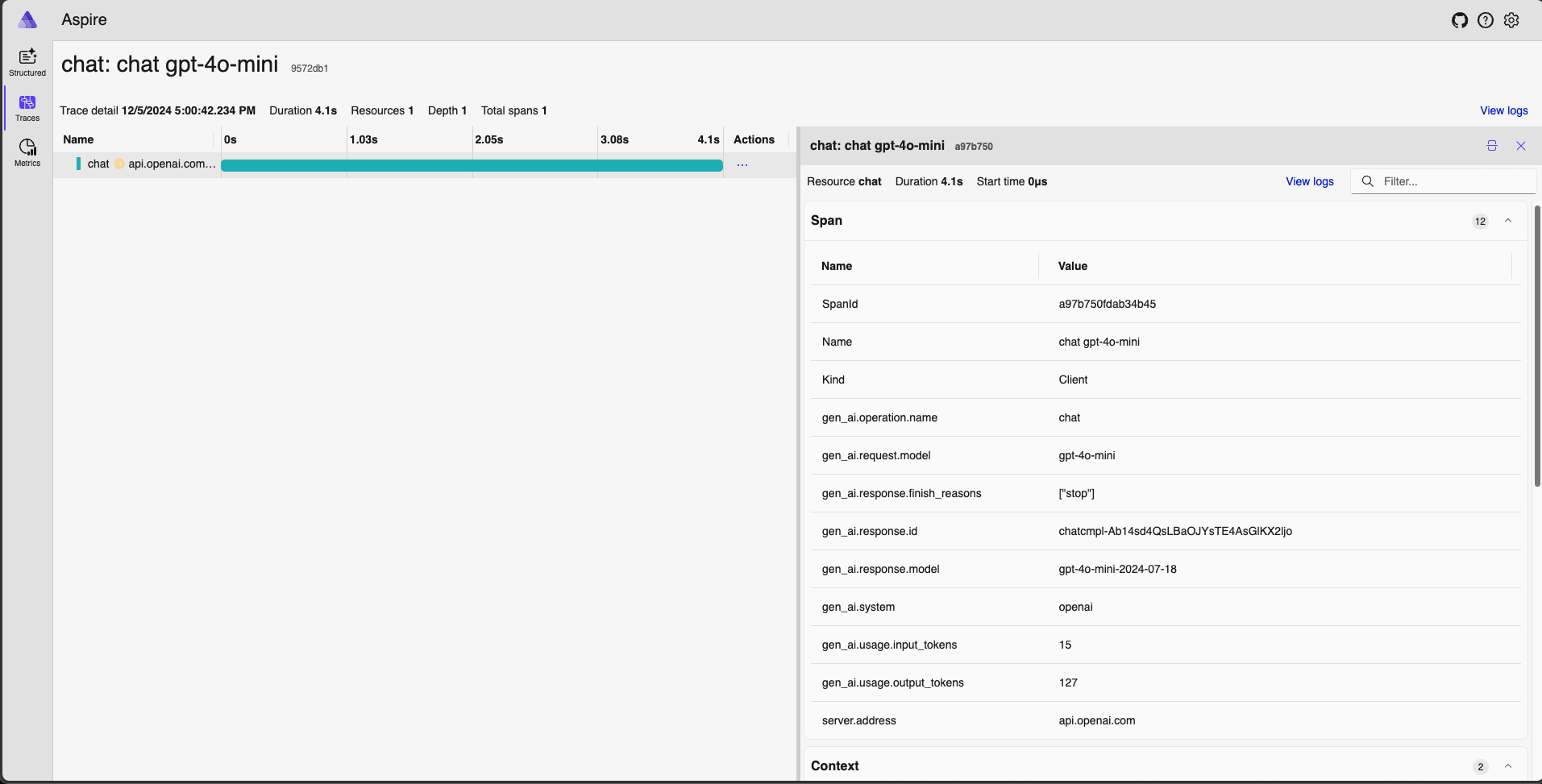
You should see a trace for the openai.chat operation. Clicking on it reveals a waterfall diagram showing the duration of the call. More importantly, if you inspect the Tags and Logs for the span, you'll find the rich attributes captured by the instrumentation.
This hands-on example is covered concisely in the official OpenTelemetry blog.
OpenTelemetry for Generative AI
This official blog post from OpenTelemetry introduces the effort to create standards for GenAI observability.
Focus on the sections "Building the Python Instrumentation Library for OpenAI" and the "Example Usage". This reinforces the steps we just followed and shows how the community is actively building these essential tools.
5. Instrumenting a LangChain RAG Pipeline
The power of auto-instrumentation becomes even more apparent with higher-level frameworks like LangChain. You can instrument an entire RAG pipeline with a single command. The video below demonstrates this using Arize Phoenix (another OTel-compatible observability tool) and LangChain's built-in instrumentation support.
Arize AI Phoenix: Open-Source Tracing & Evaluation for AI (LLM/RAG/Agent)
This video by AI Anytime demonstrates building and tracing a RAG pipeline. The concepts are directly applicable, even though the specific backend UI is different from Jaeger.
Watch these key segments: Setting up Phoenix: This is analogous to launching our Jaeger container. It starts the observability backend. Instrumenting the chain: Notice how a call to LangChainInstrumentor().instrument() is all that's needed to wrap the entire RAG chain. The subsequent chain.invoke() calls now automatically generate detailed traces. Viewing the trace: The presenter shows the resulting trace, which contains nested spans for the retriever, the document chain, the LLM call, and more. This is the level of detail needed to debug complex chains.
This demonstrates that by adopting standard frameworks and OTel, you gain immense visibility into complex application logic with very little effort.
Conclusion
In this lesson, you've learned how to apply the principles of distributed tracing to LLM applications using the OpenTelemetry standard. This is the first and most crucial step toward building an observable system that you can debug, optimize, and manage effectively in production.
Key Takeaways:
- Tracing is Essential: For complex, multi-step LLM applications (especially those involving RAG), distributed tracing is not optional. It's the only way to get a complete picture of a request's lifecycle.
- OpenTelemetry is the Standard: OTel provides a vendor-neutral way to instrument your code once and send telemetry to any backend, a core principle for robust, maintainable systems.
- Auto-Instrumentation is Powerful: For common libraries like
openaiand frameworks likelangchain, auto-instrumentation gives you deep visibility with just a few lines of configuration. - LLM-Specific Attributes are Key: Effective LLM observability hinges on capturing rich, domain-specific attributes like model parameters, token counts, and finish reasons within your spans.
Now that we can trace the path of individual requests, the next step is to understand the system's health at an aggregate level. In our next lesson, we will build on this foundation and learn how to configure metrics collection for latency percentiles, throughput, error rates, and GPU utilization, giving us the high-level dashboard views needed to monitor the health of our LLM service.