Recommended resources
The freely available resources this lesson will direct you to.
Good to see you again. In the previous lesson, you made programs choose between paths with Boolean expressions and if/elif/else blocks. Those decisions become much more useful when a program can apply them repeatedly to a collection of items.
This lesson introduces the for loop: Python’s standard way to process a sequence one item at a time, or to repeat work across a numeric range. This is a core automation pattern. A future agent may inspect several candidate actions, process incoming records, or make a deliberately bounded number of attempts. For now, we will use print() so the behavior remains safe and visible.
Repetition without copying code
Suppose an automation has three pending tasks:
print("Reviewing: summarize notes")
print("Reviewing: draft report")
print("Reviewing: classify request")
This works for three tasks, but it becomes fragile if the task list grows to 30 or 300 items. You would be copying the same instruction again and again.
A for loop tells Python:
For each item in this sequence, run this block of code.
Its basic shape is:
for item in sequence:
    print(item)
Four parts matter:
forstarts the loop.itemis a variable name you choose. It holds one current value at a time.inconnects that variable to the sequence being processed.- The colon and indented body define the repeated work.
Here is a real example:
pending_actions = [
    "summarize local notes",
    "draft a response",
    "send an external email"
]

for action in pending_actions:
    print(f"Reviewing: {action}")

print("Review complete.")
Output:
Reviewing: summarize local notes
Reviewing: draft a response
Reviewing: send an external email
Review complete.
Python performs the loop body once for each item:
| Iteration | Current value of action |
Printed output |
|---|---|---|
| 1 | "summarize local notes" |
Reviewing: summarize local notes |
| 2 | "draft a response" |
Reviewing: draft a response |
| 3 | "send an external email" |
Reviewing: send an external email |
After Python reaches the end of the indented body, it returns to the loop header, takes the next item, and runs the body again. Once no items remain, the loop ends and Python continues with unindented code such as print("Review complete.").
The bracketed value above is a list: an ordered collection of values. You will study lists in detail in the next module; for this lesson, the important point is that a for loop can visit each list item in order.
Python For Loops - Visually Explained
Watch “Python For Loops - Visually Explained” from Visually Explained. It gives a clear visual model of the loop header, the indented body, and the changing loop variable.
First watch loop execution. Notice how the loop variable receives one list item, the indented body runs, and then the variable is updated with the next item. Then watch using range for the numeric-range form of a loop. Focus on why the ending number is not included.
Indentation defines what repeats
Just as with conditionals, indentation is Python syntax. Every line indented under the for header belongs to the loop body and runs once per item.
models = ["small", "medium", "large"]

for model in models:
    print(f"Testing model: {model}")
    print("Recording result.")

print("All model tests finished.")
The first two print() calls are indented, so they each run three times. The final line is outside the loop, so it runs once after every model has been processed.
A useful way to read this is:
For each
modelinmodels, print its name and record its result.
If you accidentally remove the indentation:
for model in models:
print(model)
Python raises an IndentationError, because it expects an indented block after the colon.
A different error is more subtle:
for model in models:
    print(f"Testing model: {model}")

print("Recording result.")
This code is valid, but "Recording result." runs only once, after the loop finishes. That may be correct or incorrect depending on your intention. Pay close attention to where indentation ends.
Looping through text and other sequences
A string is also a sequence. When you loop through text, Python gives you one character at a time:
status = "OK"

for letter in status:
    print(letter)
Output:
O
K
The loop variable should have a name that describes the individual value it holds:
for character in "safe":
    print(character)
For a list of actions, use action. For a list of filenames, use filename. For a list of requests, use request.
Clear names make automation code easier to inspect. Compare:
for x in pending_actions:
    print(x)
with:
for action in pending_actions:
    print(action)
Both work identically, but the second version communicates the program’s intent.
Numeric repetition with range()
Sometimes you do not have a collection of text items. Instead, you need a block to run a known number of times. Python’s range() function provides numbers for this purpose.
for number in range(3):
    print(number)
Output:
0
1
2
range(3) supplies three numbers: 0, 1, and 2.
The important rule is:
range(stop)begins at0and stops beforestop.
So range(3) does not include 3. It produces exactly three values, which is why the loop runs three times.
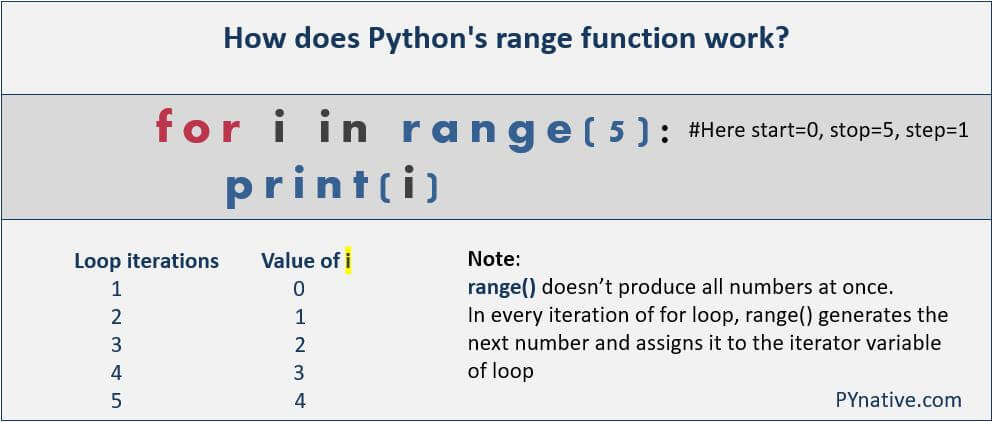
In ordinary loop use, range() supplies each next number as the loop needs it. You do not need to manually create a list such as [0, 1, 2, 3, 4].
Starting from a different number
Often, people expect attempt numbers to start at one rather than zero:
for attempt_number in range(1, 4):
    print(f"Attempt {attempt_number}")
Output:
Attempt 1
Attempt 2
Attempt 3
With two arguments, the format is:
range(start, stop)
The start is included; the stop is excluded.
| Expression | Numbers supplied |
|---|---|
range(4) |
0, 1, 2, 3 |
range(1, 4) |
1, 2, 3 |
range(3, 7) |
3, 4, 5, 6 |
This “stop-before” rule may feel unusual initially, but it is consistent. If you want values from 1 through max_attempts, use:
max_attempts = 3

for attempt_number in range(1, max_attempts + 1):
    print(f"Attempt {attempt_number}")
Because the stopping value is excluded, max_attempts + 1 lets the final attempt number be included.
Stepping through a numeric range
range() can also take a third value, the step:
for batch_number in range(1, 10, 2):
    print(batch_number)
Output:
1
3
5
7
9
The general form is:
range(start, stop, step)
For now, the most useful patterns are:
range(count)
range(start, stop)
range(start, stop, step)
Use a numeric range when the numbers themselves matter, such as numbered attempts, pages, batch identifiers, or a fixed test count.
Repeating without using the number
Sometimes the loop needs to repeat work, but the current number has no meaning. By convention, use _ as the loop variable:
for _ in range(3):
    print("Running a local preview.")
Output:
Running a local preview.
Running a local preview.
Running a local preview.
The underscore signals: “Python needs a loop variable here, but this program does not need to use its value.”
By contrast, this loop should use a meaningful name because the number appears in the output:
for attempt_number in range(1, 4):
    print(f"Starting attempt {attempt_number}")
Guided build: preview a batch of candidate actions
Create a new file in your project folder:
batch_preview.py
This script simulates a cautious automation reviewing several actions. It does not send messages or make changes; it only prints decisions.
candidate_actions = [
    "summarize local notes",
    "draft a project update",
    "send an external email"
]

action_needing_approval = "send an external email"
human_approved = False
reviewed_count = 0

for action in candidate_actions:
    print(f"\nReviewing: {action}")

    if action == action_needing_approval and not human_approved:
        print("Decision: blocked because human approval is missing.")
    else:
        print("Decision: preview only; no external change was made.")

    reviewed_count = reviewed_count + 1

print(f"\nReviewed {reviewed_count} actions.")
Run it:
python3 batch_preview.py
Expected output:
Reviewing: summarize local notes
Decision: preview only; no external change was made.

Reviewing: draft a project update
Decision: preview only; no external change was made.

Reviewing: send an external email
Decision: blocked because human approval is missing.

Reviewed 3 actions.
This script combines ideas you already know:
candidate_actionsis the sequence.actionis the current item during each iteration.- The
ifstatement makes a decision separately for each action. reviewed_count = reviewed_count + 1updates the count once per iteration.- The final
print()is outside the loop, so it reports only once, after the complete batch is reviewed.
Now add this second section at the bottom of the same file:
print("\nPlanning safe test attempts:")

max_attempts = 3

for attempt_number in range(1, max_attempts + 1):
    print(f"Test attempt {attempt_number} of {max_attempts}")
The final output should include:
Planning safe test attempts:
Test attempt 1 of 3
Test attempt 2 of 3
Test attempt 3 of 3
Make these small changes and predict the behavior before you rerun:
- Change
human_approvedtoTrue. Which action’s decision changes? - Add
"save a local draft"tocandidate_actions. How many actions are reviewed? - Change
max_attemptsto5. What value must remain in therange()expression for attempt 5 to appear? - Move
reviewed_count = reviewed_count + 1outside the loop. What count do you expect, and why?
These are small experiments, but they build the habit of tracing a program’s control flow instead of guessing.
Common for loop mistakes
| Mistake | Result | Fix |
|---|---|---|
| Forgetting the colon after the loop header | SyntaxError |
End the header with : |
| Forgetting indentation in the loop body | IndentationError |
Indent loop-body lines consistently |
Writing range(1, 3) but expecting 1, 2, 3 |
Only 1 and 2 appear |
Use range(1, 4) |
| Putting a statement outside the loop by mistake | It runs once instead of once per item | Indent it if it belongs in the body |
Using a vague variable such as x |
Code becomes harder to understand | Name the current item: action, request, filename |
Using _ and then trying to print it meaningfully |
The output is unclear | Use a descriptive loop-variable name when you need the value |
When a loop behaves unexpectedly, make the current value visible:
for action in candidate_actions:
    print(f"DEBUG: current action is {action}")
    print(f"Reviewing: {action}")
This technique is especially valuable in automation: before a system processes many inputs, first confirm that it is iterating over exactly the values you intended.
Key takeaways
A for loop repeats an indented block once for each value in a sequence.
- Use
for item in sequence:to process each item in a list or each character in a string. - The loop variable changes on every iteration, holding the current item.
- Indentation determines which statements repeat.
- Use
range(count)to repeat a taskcounttimes, starting from0. - Use
range(start, stop)when you need a specific numeric span. Thestopvalue is excluded. - Use
range(1, max_attempts + 1)for human-readable counting from 1 through a maximum. - Use
_when the loop must repeat but the current number is irrelevant. - A loop can contain an
ifstatement, allowing an automation to make a separate safe decision for every item it reviews.
Next, you will learn while loops, which repeat based on whether a Boolean condition remains true rather than by walking through a fixed sequence or range.