Recommended resources
The freely available resources this lesson will direct you to.
You have already used if statements to make a one-time decision and for loops to repeat a known amount of work. A while loop addresses a different situation: the program should keep working while a Boolean condition remains true, but the number of repetitions is not necessarily known in advance.
This matters in automation work. A program may need to wait for valid input, keep checking whether a local task is complete, or retry a safe operation until it succeeds or reaches a limit. In this lesson, you will learn the mechanics of while loops, how to ensure they stop, and how to use Boolean state to create a small, bounded retry simulation.
The basic while loop
A while loop checks a condition before every iteration.
while condition:
    # repeated code
Python evaluates condition:
- If it is
True, Python runs the indented body. - When it reaches the end of that body, Python checks the condition again.
- If the condition is
False, Python skips the body and continues with the first unindented line after the loop.
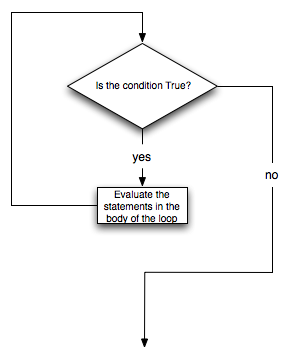
A while loop can therefore run:
- Zero times, if its condition is false immediately.
- One or more times, while the condition stays true.
- Forever, if the condition never becomes false.
The last possibility is called an infinite loop, and avoiding it is one of the central responsibilities when writing while loops.
While loops in Python are easy! ♾️
Watch While loops in Python are easy! by Bro Code for a visual introduction to repeating a prompt until a condition changes. It is especially useful for seeing why a loop must have a path to termination.
Watch name validation to see the difference between checking an input once with if and repeatedly checking it with while. Then watch termination and age for an infinite-loop example and a second validation pattern. Focus on what value changes between iterations and what eventually makes the condition false.
A counter-controlled while loop
Here is the smallest common pattern: repeat while a counter has remaining work.
remaining_checks = 3

while remaining_checks > 0:
    print(f"Checks remaining: {remaining_checks}")
    remaining_checks = remaining_checks - 1

print("No checks remain.")
Output:
Checks remaining: 3
Checks remaining: 2
Checks remaining: 1
No checks remain.
There are three essential parts:
- Initial state:
remaining_checksstarts at3. - Condition: the body may run only while
remaining_checks > 0. - State update: each pass subtracts one from
remaining_checks.
Trace the values carefully:
| Moment | remaining_checks |
Is remaining_checks > 0 true? |
|---|---|---|
| Before loop | 3 | Yes |
| After first loop body | 2 | Yes |
| After second loop body | 1 | Yes |
| After third loop body | 0 | No |
When the value reaches 0, the condition becomes false. Python exits the loop and prints the final message.
Notice that the line changing the counter is inside the indented body:
remaining_checks = remaining_checks - 1
If you accidentally placed that line outside the loop, remaining_checks would remain 3 forever. The condition would never become false, so the program would print indefinitely.
Read a while loop as a control-flow cycle
A useful way to read this code aloud is:
While there are checks remaining, print the number and reduce the remaining count.
The assignment before the loop runs only once. Python does not return to it after each iteration. It repeatedly returns only to the while condition.
14.2. The while Statement — Foundations of Python Programming
Read The while Statement from Runestone Academy to reinforce the condition-checking cycle and to compare while loops with the for loops you used previously.
In Section 14.2, begin with the opening explanation and the two flow diagrams. Read the core description and connect it to the flowchart above. Then, below the diagrams, find the paragraph beginning “More formally” and read the execution steps. Finally, in the later discussion beginning “Introduction of the while statement,” read the loop comparison and focus on why a for loop is usually clearer when the iteration count is already known.
while versus for: choosing the right loop
You can use a while loop to count from 0 to 4:
number = 0

while number < 5:
    print(number)
    number = number + 1
Output:
0
1
2
3
4
But you learned a clearer way to do exactly this last lesson:
for number in range(5):
    print(number)
Both versions produce the same output. The for version is preferable because Python manages the next number and the endpoint for you.
Use this rule of thumb:
| Situation | Prefer |
|---|---|
| Process every item in a list of requests | for loop |
| Repeat exactly five test runs | for loop with range() |
| Keep asking until an input is valid | while loop |
| Continue until a task succeeds, is cancelled, or reaches a safe limit | while loop |
| Repeat while a Boolean state says work remains | while loop |
A for loop is usually definite iteration: you know the collection or range at the beginning.
A while loop is often condition-controlled iteration: it stops when some program state changes. The final number of iterations may not be known in advance.
Boolean state: what makes a loop continue or stop
The condition in a while loop is a Boolean expression, just as it was in an if statement.
while remaining_checks > 0:
Here, the Boolean expression is:
remaining_checks > 0
It evaluates to either True or False.
You can also use Boolean variables directly:
task_completed = False

while not task_completed:
    print("The task is not complete yet.")
    task_completed = True
On the first check, task_completed is False, so not task_completed is True. The loop runs and changes task_completed to True. On the next check, not task_completed is false, so the loop ends.
In realistic programs, state might represent:
- whether a user has supplied required input;
- whether a local task has completed;
- whether a safe retry limit has been reached;
- whether an approval has been granted;
- whether an agent has reached a stated stopping condition.
The crucial question is always:
What changes inside this loop so that the condition can eventually become false?
If you cannot answer that clearly, do not run the loop yet.
A safe retry pattern: completion state plus a maximum limit
An automation should not retry forever. Even if an action is harmless, endless retries consume time and resources. If an action has side effects, unbounded retries can create duplicate work or repeated requests.
The following local simulation uses two stopping conditions:
- Stop when the task is completed.
- Stop when the maximum number of attempts is reached.
Create a file named:
bounded_retry.py
Add this code:
max_attempts = 3
attempt_number = 1
task_completed = False

while attempt_number <= max_attempts and not task_completed:
    print(f"Attempt {attempt_number} of {max_attempts}")

    # This simulates a local task succeeding on its second attempt.
    if attempt_number == 2:
        task_completed = True
        print("Local simulation: task completed.")
    else:
        print("Local simulation: no result yet.")

    attempt_number = attempt_number + 1

if task_completed:
    print("Finished safely within the retry limit.")
else:
    print("Stopped after reaching the retry limit.")
Run it in the VS Code terminal:
python3 bounded_retry.py
Expected output:
Attempt 1 of 3
Local simulation: no result yet.
Attempt 2 of 3
Local simulation: task completed.
Finished safely within the retry limit.
The while condition is:
attempt_number <= max_attempts and not task_completed
Both parts must be true for the body to run:
attempt_number <= max_attemptsprevents more than three attempts.not task_completedprevents further attempts once the task succeeds.
This is a useful control structure for future agent and automation systems: a task should have explicit success conditions and explicit limits. Later, when you work with real APIs, you will add details such as timeouts, error handling, delays, and carefully designed retry policies. For now, this local simulation makes the control flow visible and safe.
To test the “limit reached” path, change this line:
if attempt_number == 2:
to:
if attempt_number == 99:
Since attempt 99 cannot occur when max_attempts is 3, the task will never be marked complete. The loop will still stop safely after three attempts.
Repeating input until the state is acceptable
A common while loop pattern is input validation. Here, the program cannot proceed until the user enters one exact approval word.
Create a second file named:
approval_prompt.py
approval = ""

while approval != "APPROVE":
    approval = input("Type APPROVE to allow a local preview: ")

    if approval != "APPROVE":
        print("Approval was not received. Nothing was changed.")

print("Approval recorded. Running a preview only.")
The initial value is an empty string:
approval = ""
Because an empty string is not equal to "APPROVE", the condition is initially true and Python asks for input.
If the user enters yes, the condition remains true, so Python asks again. If the user enters exactly APPROVE, the condition becomes false and the loop finishes.
This program deliberately performs only a printed preview. That is a good early habit: before connecting a loop to external actions, first make its decisions visible with print().
Common while loop mistakes
| Mistake | What happens | Correction |
|---|---|---|
Forgetting the colon after while condition |
SyntaxError |
Add : at the end of the loop header. |
| Forgetting indentation | IndentationError |
Indent every statement in the loop body consistently. |
| Forgetting to change state | The loop may run forever | Update a counter, flag, or input value inside the body. |
| Changing a counter in the wrong direction | The condition may stay true forever | If testing count > 0, decrease count. |
| Resetting the state inside the loop | The loop never makes progress | Initialize state before the loop, not repeatedly in its body. |
Using = rather than == in a condition |
SyntaxError |
Use == to compare values; use = to assign a value. |
Choosing while for a fixed range |
Code becomes more complex than needed | Use for ... in range(...) when the repeat count is known. |
If a program is clearly stuck printing the same output repeatedly in the terminal, press Control+C to interrupt it. Then inspect the condition and identify which variable was supposed to change.
A simple debugging technique is to print the state:
remaining_checks = 3

while remaining_checks > 0:
    print(f"DEBUG: remaining_checks is {remaining_checks}")
    remaining_checks = remaining_checks - 1
For any loop, make the changing state visible until you trust its behavior.
Key takeaways
A while loop repeats an indented block while its Boolean condition is true.
- Python checks the condition before every iteration.
- If the condition is false initially, the loop body runs zero times.
- A reliable loop has an initial state, a Boolean condition, and a state change that permits termination.
- Use
forloops for known sequences and known repeat counts. - Use
whileloops when continuation depends on changing state, such as valid input, completion, approval, or a bounded retry. - Pair a completion condition with a maximum attempt limit when designing automation behavior.
- If a loop appears stuck, interrupt it with Control+C and inspect the state that should have changed.
You have now completed the looping portion of this module. Next, you will begin working with strings: inspecting, transforming, and combining text, which will make command-line tools and later automation inputs much more useful.