Recommended resources
The freely available resources this lesson will direct you to.
Hello! Welcome to the final lesson of our first module on the fundamentals of the CAN bus.
In our previous lessons, we built a comprehensive understanding of Classical CAN, covering everything from its physical signaling and frame structure to the arbitration process and its robust error-handling mechanisms. You now have a solid foundation in how this protocol, which has been the backbone of in-vehicle networking for decades, operates.
However, as automotive systems have grown in complexity with features like advanced driver-assistance systems (ADAS), high-definition displays, and over-the-air updates, the 8-byte payload and 1 Mbit/s speed limit of Classical CAN have become significant bottlenecks. This created the need for an evolution of the protocol.
This lesson bridges the gap between the classic protocol and its modern successor. We will compare the enhancements of CAN FD (CAN with Flexible Data-rate) over Classical CAN, focusing on its increased payload and flexible data rate. Understanding CAN FD is crucial, as it is increasingly the standard for new vehicle architectures and is directly relevant to your work in both software development and system testing, especially for high-throughput tasks like diagnostics and ECU reprogramming.
The Two Primary Bottlenecks of Classical CAN
Before diving into the solution, let's clearly define the problems CAN FD was designed to solve.
- Limited Bandwidth: The maximum data rate of 1 Mbit/s was becoming insufficient for the sheer volume of data generated by modern ECUs (e.g., radar, cameras).
- Poor Payload Efficiency: With a maximum of 8 data bytes per frame, a significant portion of the bus time is spent on overhead (ID, CRC, control bits). For a standard 8-byte frame, the overhead can be over 50%, meaning less than half of the bits transmitted are actual payload data.
To see a great introduction to why CAN FD was necessary and the main benefits it provides, please watch the first few minutes of the following video.
CAN FD Explained - A Simple Intro (2020)
The video 'CAN FD Explained - A Simple Intro' from CSS Electronics provides a clear, visual introduction to the core concepts of CAN FD.
Watch from the beginning to 03:09. This section introduces the limitations of Classical CAN and outlines the four main benefits of CAN FD: increased data length, increased speed, better reliability, and a smooth transition path.
As the video highlights, CAN FD addresses these issues with two primary enhancements: a much larger data payload and a clever method for increasing the transmission speed without breaking the fundamental rules of CAN.
Enhancement 1: Increased Payload (Up to 64 Bytes)
The most straightforward enhancement in CAN FD is the increase in the maximum data payload size.
- Classical CAN: Maximum 8 bytes per data frame.
- CAN FD: Maximum 64 bytes per data frame.
This change has a dramatic effect on efficiency. While a Classical CAN frame carrying 8 bytes has a data efficiency of around 50%, a CAN FD frame with 64 bytes can achieve an efficiency close to 90%.
For your work in diagnostics, this is a game-changer. A UDS request to read multiple data identifiers (DIDs) or a response containing a detailed DTC snapshot record often exceeds 8 bytes. With Classical CAN, this would require segmentation using a transport protocol (like ISO-TP, which we'll cover next). With CAN FD, the entire diagnostic message can often fit into a single frame, significantly reducing latency and software complexity.
Enhancement 2: Flexible Data Rate
Simply increasing the payload to 64 bytes at the standard 1 Mbit/s speed would create a new problem: a single large frame would occupy the bus for a very long time, potentially delaying critical, high-priority messages like airbag deployment signals. This would compromise the real-time performance of the network.
The solution is the "Flexible Data-rate". The CAN FD frame is split into two phases with different bit rates:
- Arbitration Phase: This includes the Start of Frame (SOF), Identifier (ID), and other control bits. This part is transmitted at the nominal bit rate (e.g., 500 kbit/s or 1 Mbit/s), identical to Classical CAN. This is critical because it ensures the arbitration process, which relies on signal propagation time across the entire network, remains reliable.
- Data Phase: This includes the data payload and the CRC. This part can be transmitted at a much higher bit rate (e.g., 2, 5, or even 8 Mbit/s).
This dual-rate approach provides the best of both worlds: the reliability of Classical CAN's arbitration mechanism and the high throughput needed for large data payloads.
The following resource explains why this dual-rate approach is necessary.
CAN FD Explained - A Simple Intro (2020)
This section of the 'CAN FD Explained' video clearly explains the challenge of maintaining bus length and arbitration integrity while increasing speed, leading to the dual bit-rate solution.
Watch from 03:09 to 05:08. Pay close attention to the explanation of why you can't simply speed up the entire frame (due to arbitration and bus length constraints).
The CAN FD Frame: A Closer Look
To enable these enhancements, the CAN frame format had to be modified. The changes are concentrated in the control field that follows the CAN ID.

Let's break down the new bits that make CAN FD work. The video below provides an excellent walk-through.
CAN FD Explained - A Simple Intro (2020)
To understand how the flexible data rate and larger payload are encoded in the frame, let's examine the new bits introduced in CAN FD.
Watch from 05:08 to 08:44. This section details the new control bits in the CAN FD frame, including FDF, BRS, ESI, and the updated use of the DLC and CRC fields.
Here is a summary of the most important changes you just saw:
- FDF (Flexible Data-rate Format): In Classical CAN, this bit position (
r0) was always dominant (0). In a CAN FD frame, it is set to recessive (1). This is the key flag that tells a CAN FD-capable controller to interpret the frame using the new rules. A legacy Classical CAN controller will see this recessive bit as a Form Error and generate an error frame, ensuring backward compatibility is handled gracefully. - BRS (Bit Rate Switch): If this bit is recessive (1), the controller switches to the higher bit rate for the data phase. If it's dominant (0), the entire frame is sent at the nominal arbitration rate. This allows for CAN FD frames to be sent without the speed increase if needed.
- ESI (Error State Indicator): A new bit that is typically dominant (0). If the transmitting node becomes Error Passive (as we discussed in the previous lesson), it will set this bit to recessive (1), providing other nodes with information about its health status.
- DLC (Data Length Code): The DLC is still 4 bits, but the codes from 9 to 15 are re-mapped to represent larger, specific payload sizes (12, 16, 20, 24, 32, 48, and 64 bytes).
- CRC (Cyclic Redundancy Check): The CRC is longer and more robust to handle the larger data payload. It uses a 17-bit CRC for frames up to 16 bytes and a 21-bit CRC for frames larger than 16 bytes, improving the integrity of the data transmission.
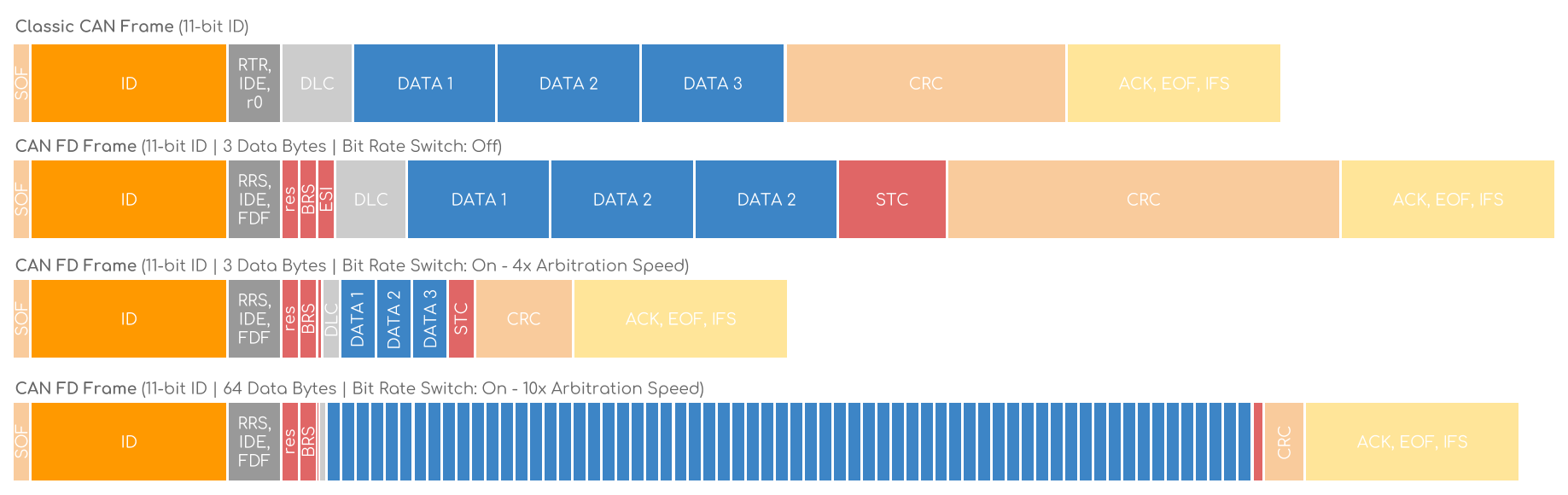
The following image provides another excellent visualization of how a CAN FD frame with bit-rate switching shortens the transmission time compared to both Classical CAN and a CAN FD frame without the switch.
Efficiency and Real-World Impact
The combination of a larger payload and a higher data rate dramatically increases data throughput. While a CAN FD frame with only a few bytes is slightly less efficient than its Classical CAN counterpart due to the extra control bits, the efficiency quickly surpasses Classical CAN as the payload size increases.
This is especially relevant for two key use cases in your field:
- ECU Reprogramming (Flashing): This was one of the primary drivers for CAN FD's development. Transferring a multi-megabyte software update to an ECU over Classical CAN can take a very long time. By using 64-byte payloads at high speed, CAN FD can reduce flashing time by a factor of 8 or more.
- Advanced Diagnostics: Modern vehicles log extensive diagnostic data. Using CAN FD, a tester can pull large snapshot data records, memory dumps, or logs from an ECU far more quickly than before.
Test your understanding!
You are designing a new network segment for a vehicle.
- One ECU (ECU-A) needs to stream 32 bytes of sensor data for an ADAS feature.
- Another ECU (ECU-B) needs to send a critical 2-byte command to an actuator with the highest priority and lowest possible latency.
- Why is CAN FD the only viable choice for ECU-A's data stream?
- If ECU-A is transmitting its 32-byte CAN FD message with bit-rate switching enabled, how does the protocol's design still allow ECU-B to transmit its message with minimal delay if it needs to?
Show answer
- Classical CAN has a maximum payload of 8 bytes. To send 32 bytes, the data would need to be broken into at least four separate frames using a transport protocol. CAN FD, with its maximum payload of 64 bytes, can easily accommodate the 32-byte message in a single frame, which is far more efficient.
- The CAN FD arbitration phase is transmitted at the same nominal bit rate as Classical CAN. This means that even if ECU-A is about to send a large frame, ECU-B can still win arbitration if it has a lower (higher priority) CAN ID. It will win access to the bus before ECU-A begins its high-speed data phase. This ensures that the flexible data rate enhancement does not compromise the fundamental priority-based, real-time nature of the CAN protocol.
Conclusion
In this lesson, we've completed our survey of the CAN data link layer by introducing its modern evolution, CAN FD. We saw how the limitations of Classical CAN drove the need for a more capable protocol and how CAN FD addresses these needs without discarding the core principles that made CAN so successful.
Key Takeaways:
- CAN FD was developed to overcome the bandwidth and payload limitations of Classical CAN.
- Its two main enhancements are an increased data payload (up to 64 bytes) and a flexible data rate, where the data phase is transmitted much faster than the arbitration phase.
- These enhancements are enabled by new bits in the frame format, primarily the FDF (Flexible Data-rate Format) and BRS (Bit Rate Switch) bits.
- The use of a larger payload and a higher bit rate dramatically improves data throughput and efficiency, which is critical for modern applications like ECU flashing and advanced diagnostics.
- CAN FD maintains the priority-based arbitration of Classical CAN, ensuring real-time performance is not compromised.
This lesson concludes the first module of our course. You now have a robust understanding of the CAN and CAN FD protocols, which function at Layers 1 (Physical) and 2 (Data Link) of the OSI model.
In our next module, we will move up to Layer 3 (Network) and Layer 4 (Transport) to see how we can send messages that are even larger than CAN FD's 64-byte limit. We will start by exploring ISO-TP (ISO 15765-2), the standard transport protocol used to segment and reassemble large diagnostic messages over a CAN bus.