Recommended resources
The freely available resources this lesson will direct you to.
Hello! Welcome to the third lesson in our module on CAN bus fundamentals.
In our previous lesson, we explored the CAN bus physical layer, focusing on the two-wire differential signaling and the critical role of termination resistors. We established how the "wires" of the network are designed for robust communication. Now, we will move up from the physical layer (OSI Layer 1) to the data link layer (OSI Layer 2) to understand the structure of the messages themselves.
Today's lesson focuses on identifying and explaining the fields within a Classical CAN and CAN with Flexible Data-Rate (CAN FD) frame. Understanding this structure is non-negotiable for both development and testing. As a developer, you'll need to know how to pack data into these frames; as a tester, you'll analyze bus traffic where these frames are the fundamental unit of information.
The Anatomy of a Classical CAN Frame
A CAN message is transmitted on the bus in a strictly defined format called a data frame. Think of it as a digital envelope containing the sender's "address" (priority), control information, the data itself, and error-checking mechanisms.
Let's dissect this envelope field by field. The following video provides a clear and detailed walkthrough of a standard 11-bit CAN frame.
The video 'CAN and CAN FD protocol' from Texas Instruments provides an excellent, detailed breakdown of a Classical CAN frame. It walks through each field in sequence.
Please watch from 05:34 to 10:39. As you watch, try to identify the purpose of each of the following fields: Start of Frame, Identifier, RTR, Control Field (IDE, DLC), Data, CRC, and ACK.
To reinforce what you've just seen, here is a summary of the fields in a Classical CAN data frame:
| Field | Length (bits) | Description |
|---|---|---|
| Start of Frame (SOF) | 1 | A single dominant bit ('0') that marks the beginning of the frame and synchronizes all nodes on the bus. |
| Arbitration Field | 12 (Standard) | Contains the message Identifier (11 bits) and the Remote Transmission Request (RTR) bit (1 bit). The ID determines the message's priority. The RTR bit is dominant ('0') for a data frame and recessive ('1') for a remote frame (which requests data). We'll cover arbitration in detail in the next lesson. |
| Control Field | 6 | Contains the Identifier Extension (IDE) bit (which is '0' for standard 11-bit ID frames), a reserved bit, and the 4-bit Data Length Code (DLC). The DLC specifies the number of bytes in the Data Field (from 0 to 8). |
| Data Field | 0-64 (0-8 Bytes) | The actual data payload of the message. Its length is defined by the DLC. |
| CRC Field | 16 | Contains a 15-bit Cyclic Redundancy Check (CRC) sequence for error detection and a 1-bit recessive CRC Delimiter. |
| ACK Field | 2 | Contains the 1-bit ACK Slot and a 1-bit recessive ACK Delimiter. The transmitter sends a recessive bit in the ACK Slot, and any node that correctly receives the frame overwrites it with a dominant bit. |
| End of Frame (EOF) | 7 | A sequence of 7 recessive bits marking the end of the CAN frame. |
| Inter-Frame Space (IFS) | 3 (min) | A minimum of 3 recessive bits that separate consecutive frames. This provides a small delay for ECUs to process the previous frame. |
Bit Stuffing: Ensuring Synchronization
CAN controllers are asynchronous and rely on the transition from dominant to recessive bits (or vice-versa) to stay synchronized. What happens if a long string of identical bits is transmitted (e.g., 00000000)? The controllers could lose their timing reference.
To prevent this, CAN employs bit stuffing. After five consecutive bits of the same polarity (either five '0's or five '1's), the transmitter automatically inserts a single bit of the opposite polarity. The receiver is aware of this rule and automatically removes the stuffed bit.
This mechanism ensures that a signal transition occurs at least every six bit-times, allowing the receivers to stay perfectly synchronized.
The next segment of the video explains this clever technique.
This clip from the Texas Instruments video clearly explains the concept of bit stuffing with animated examples.
Watch from 10:39 to 13:05. Pay close attention to how a stuff bit is inserted after five identical bits and note which parts of the frame are excluded from bit stuffing.
Test your understanding!
A transmitter needs to send a data sequence that contains the bit pattern 11111000001. How would this sequence appear on the CAN bus after bit stuffing is applied?
Show answer
The sequence on the bus would be 11111(0)0000(1)1. A '0' is stuffed after the first five '1's, and a '1' is stuffed after the subsequent five '0's.
The Evolution to CAN FD
Classical CAN, with its 1 Mbit/s speed and 8-byte payload limit, has served the industry well for decades. However, the explosion of data from modern vehicle features like ADAS, complex diagnostics, and ECU reprogramming (flashing) pushed it to its limits. Sending large data blocks required segmenting them across many small frames, creating significant overhead.
This led to the development of CAN with Flexible Data-Rate (CAN FD). As its name implies, CAN FD introduces two major enhancements:
- Larger Payload: The maximum data payload is increased from 8 bytes to 64 bytes.
- Flexible Data Rate: The frame is split into two phases. The arbitration and control phase runs at the standard CAN speed (e.g., 500 kbit/s), but the data and CRC phase can be transmitted at a much higher bit rate (e.g., 2 or 5 Mbit/s).
Let's look at the frame structure that makes this possible.
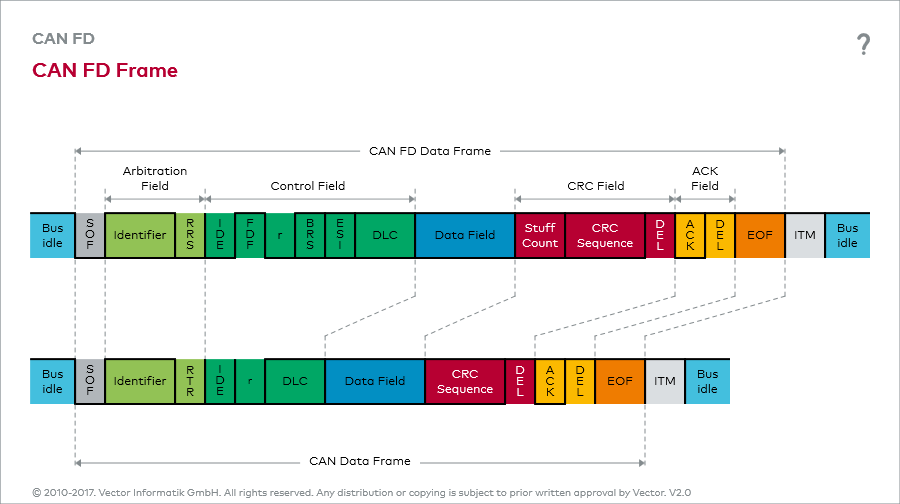
The following video provides a fantastic comparison of the two frame formats, explaining the role of the new fields introduced in CAN FD.
CAN FD Explained - A Simple Intro (2020)
The video 'CAN FD Explained' from CSS Electronics expertly contrasts the Classical CAN and CAN FD frames. It highlights each of the new and modified fields that enable the enhanced capabilities.
Watch from 05:08 to 08:44. Focus on the differences in the control field (FDF, BRS, ESI), the extended meaning of the DLC, and the changes to the CRC field.
Key Differences in the CAN FD Frame
As you just saw, the CAN FD frame introduces several new bits and modifies the function of others to achieve its goals.
Here's a breakdown of the critical changes:
- FDF (Flexible Data Format) Bit: This is a new bit in the control field that replaces the old reserved
r0bit.- FDF = '0' (dominant): The frame is a Classical CAN frame.
- FDF = '1' (recessive): The frame is a CAN FD frame.
This is the key flag that allows CAN FD and Classical CAN controllers to coexist on the same bus (a CAN FD controller can understand classical frames, but not vice-versa).
- BRS (Bit Rate Switch) Bit:
- BRS = '0' (dominant): The entire frame is sent at the standard (arbitration) rate.
- BRS = '1' (recessive): The transmission speed is increased for the data and CRC phases. The switch back to the standard rate happens before the ACK field.
- ESI (Error State Indicator) Bit: A new bit that indicates the error status of the transmitting node.
- ESI = '0' (dominant): The transmitter is in the 'error-active' state.
- ESI = '1' (recessive): The transmitter is in the 'error-passive' state (we will cover error states in a future lesson).
- DLC (Data Length Code): Still 4 bits, but the meaning is extended. Values
0000to1000still represent 0 to 8 bytes. However, values1001to1111are now used to represent larger payloads (12, 16, 20, 24, 32, 48, and 64 bytes). - CRC (Cyclic Redundancy Check): The CRC algorithm is improved. Depending on the payload size, the CRC field is now 17 or 21 bits long, providing better error detection. It is also preceded by a new Stuff Bit Counter (SBC).
For a deeper dive and a handy reference, the following article provides a clear textual summary and excellent diagrams comparing the two frame formats.
101: Controller Area Network with Flexible Data Rate (CAN FD)
The article '101: Controller Area Network with Flexible Data Rate (CAN FD)' from NXP provides a great textual summary with clear diagrams comparing the frame structures.
Read the section 'CAN FD Frame Format'. Pay close attention to Figures 1, 2, and 3, which visually compare the Classical CAN frame, the CAN FD frame, and the different interpretations of the DLC values.
Test your understanding!
You are developing a test script to verify the logging functionality of a new ECU. The ECU needs to transmit a diagnostic snapshot that is 30 bytes in size.
- Which protocol (Classical CAN or CAN FD) must be used for this transmission? Why?
- If you had to use Classical CAN, what would be the challenge?
Show answer
- CAN FD must be used. The 30-byte payload exceeds the 8-byte maximum of a Classical CAN frame. CAN FD supports payloads up to 64 bytes.
- With Classical CAN, the 30-byte message would need to be segmented into multiple frames (e.g., four frames: 8+8+8+6 bytes). This requires a transport protocol like ISO-TP (ISO 15765-2) to manage the segmentation and reassembly, adding complexity and overhead. We will cover ISO-TP in detail in the next module.
Conclusion
In this lesson, we moved from the physical wires to the data that flows across them. We have dissected both the workhorse Classical CAN frame and its modern, high-performance successor, the CAN FD frame.
Key Takeaways:
- A Classical CAN frame is a structured packet containing fields for synchronization (SOF), message priority (Identifier), control (DLC), data payload (0-8 bytes), error checking (CRC), and acknowledgement (ACK).
- Bit stuffing is a critical mechanism that ensures synchronization by preventing long sequences of identical bits.
- CAN FD enhances Classical CAN by allowing for a flexible data rate and a much larger data payload (up to 64 bytes).
- The CAN FD frame is distinguished by the FDF bit and includes new fields like BRS (Bit Rate Switch) and ESI (Error State Indicator) to manage its advanced features.
As a tester or developer, you'll rarely build these frames bit by bit manually. High-level software APIs and tools like Vector CANoe or PCAN-View handle the low-level details. However, knowing what happens "under the hood" is invaluable for debugging, analyzing bus traffic, and understanding why a message might be failing.
Now that we've seen that the frame contains an "Identifier," our next lesson will explore its most important function: managing bus access through the process of CAN bus arbitration. We will see how this elegant, non-destructive process uses the identifier to decide which message gets priority when multiple ECUs try to transmit at the same time.