Recommended resources
The freely available resources this lesson will direct you to.
Hello again. Last lesson, you traced a pinned snapshot through its manifest list to the data and delete files visible in that snapshot. You also saw that manifest entries carry file metadata, not just paths.
This lesson looks at one part of that metadata: partition values. You’ll learn how a partition spec derives them from table columns, what a bucket value means, and why neither a query nor a backup should infer an Iceberg table’s layout from S3 directory names. Allow about 40 minutes, including the short readings.
Partitioning without a directory contract
Partitioning groups rows with related values so a query can avoid reading files that cannot match its filter. For example, if a table is partitioned by the day of event_time, a query for one day need not examine files known to contain rows from other days.
The important Iceberg distinction is where that knowledge lives. In a traditional directory-oriented layout, a writer may supply an explicit partition column and a reader may need to filter on it. With Iceberg, the table records how to derive partition values from ordinary columns. A query can filter on event_time; it does not have to know that the table uses day(event_time).
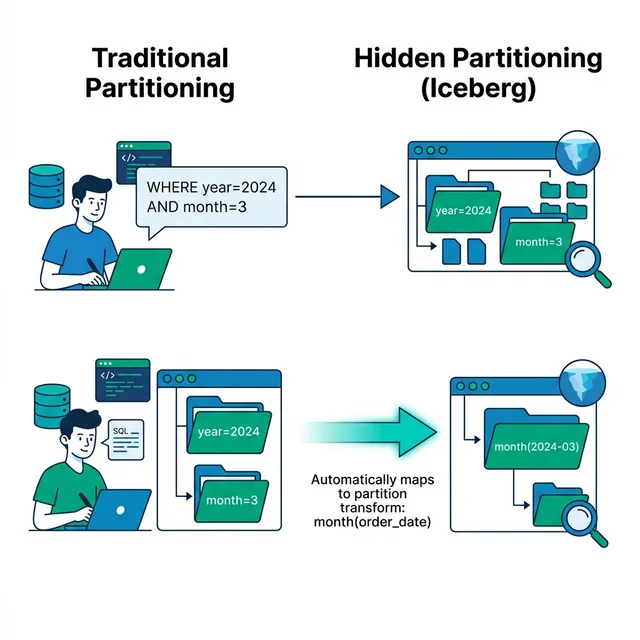
Read Apache Iceberg’s Partitioning guide for the contrast behind the illustration.
Partitioning - Apache Iceberg™
The Apache Iceberg guide explains why hidden partitioning lets queries use table columns without depending on a physical layout.
Read from partitioning and layout. Start in “What is partitioning?”; then follow “What does Iceberg do differently?”, including “Partitioning in Hive” and “Problems with Hive partitioning,” through the end of “Iceberg's hidden partitioning.” Focus on who produces partition values and whether a query must name a separate partition column.
“Hidden” does not mean partition values are absent. It means applications can express filters in terms of the table’s data columns while Iceberg handles the relationship between those columns and the stored partition values. Nor does it mean every file must live in a directory named after its partition. A path might contain helpful-looking names, but a path string is not the definition of the partition.
What a partition spec actually specifies
A partition spec is the table metadata that defines how to produce a tuple of partition values from a row. Each partition field identifies a source column, applies a transform, and has a partition-field ID and name. The IDs matter to software interpreting the metadata; the name is not an instruction to parse an S3 path.
Suppose an events table has this illustrative spec:
day(event_time)
bucket[16](account_id)
For each row, the writer derives a day value from event_time and a bucket value from account_id. Rows written into a particular data file must share the same partition tuple for that file. Its manifest entry records that tuple. The manifest can list files from different partitions, provided they use the same partition spec.
Read the specification’s definition before treating a partition field you find in code as either a directory or a snapshot.
The official Iceberg specification defines partition fields and explains how recorded values help translate query filters into file-filtering decisions.
In “Partitioning,” read the spec definition, starting with the paragraph about data files in manifests and continuing through the paragraph about logical queries and physical storage. Focus on the four components of a partition field and on the requirement that all rows in one data file have the same partition values.
There are two distinct jobs here. A writer computes partition values when it writes files. A reader planning a filtered query uses the spec to determine which files might contain matching rows. For instance, a time-range filter on event_time can provide a useful filter on day(event_time). The reader still applies the original row-level condition: selecting a candidate partition does not prove that every row in it matches.
This distinction connects directly to your backup task. A query may deliberately skip files using partition values. A backup intended to preserve an entire pinned snapshot cannot use that shortcut to discover its complete file set. It must follow the selected snapshot’s manifest graph, as in the previous lesson.
Transforms, especially buckets
A transform maps a source value to a partition value. Iceberg supports several kinds; these are the ones most useful to recognize while reading metadata:
| Transform | Partition value it produces | Useful intuition |
|---|---|---|
identity(column) |
The source value | Group by that value directly. |
day(timestamp_column) |
Its date | Group timestamps by day. |
month(timestamp_column) |
Its month | Group timestamps at coarser time granularity. |
truncate[W](column) |
A value reduced to a specified width or length | Group ranges of numbers or values sharing a prefix, depending on type. |
bucket[N](column) |
One of integer bucket values | Group source values by a specified hash transform. |
The displayed date or month in a tool need not be the literal value stored in metadata; the spec defines each transform’s result type and representation. When interpreting a serialized tuple, use its partition spec rather than guessing from a human-readable label.
Read the transform table and the bucket details in the specification. You do not need to implement the hash to understand the file graph, but you do need to know why an arbitrary hash function is not interchangeable with Iceberg’s.
The official specification lists the transforms and defines the bucket calculation precisely enough to distinguish an Iceberg bucket from an application-defined hash or an S3 folder.
In “Partition Transforms,” begin at the transform details, just above the transform table. Read the table, then continue through “Bucket Transform Details,” stopping at the sentence pointing to Appendix B. Focus on what bucket[N] returns, the specified Murmur3 hash and sign-bit handling, and the note that the bucket count can change through partition evolution.
For bucket[16](account_id), Iceberg computes its specified 32-bit Murmur3 hash of the source value, discards the sign bit, and takes the result modulo 16. The partition value is an integer from through . A Java implementation using String.hashCode() followed by % 16 would not be the Iceberg bucket transform. A null source value produces a null transform result, not bucket zero.
A bucket number is not an account ID. Different IDs can land in the same bucket. Many data files can share one bucket, and a file’s bucket value does not imply that its path contains bucket=.... For a predicate matching one account_id, the bucket transform can help rule out files in other buckets, but files in the matching bucket may contain other IDs too. A simple range of account IDs generally cannot be reduced to one bucket: nearby values need not hash nearby.
If a spec has both day(event_time) and bucket[16](account_id), a file carries a tuple with both values. Neither the existence of a tuple nor the number 16 means there are exactly 16 files. Partitioning describes how row values are grouped and recorded; it does not prescribe a one-file-per-partition layout.
A layout can change while old files remain
Iceberg can evolve a partition spec without rewriting every existing data file. Suppose new files switch from bucket[16](account_id) to bucket[32](account_id). The table now has two specs with different spec IDs. Existing files retain partition values computed under the old spec; new files use the new one. A bucket value of 3 under one spec must not be interpreted as though it were computed under the other.
The specification explains why changed partitioning receives a new spec ID and why partition-field IDs remain important.
In “Partition Evolution,” read the evolution rules. Start at the section’s opening sentence and stop after the paragraph about v2 field IDs. Focus on the difference between a spec ID, which identifies a version of the partition scheme, and a partition-field ID, which identifies a field within that metadata.
This is another reason not to reconstruct file membership from paths. Two files in the same snapshot may have been written under different specs. The manifest metadata identifies the applicable spec, and the file entry supplies its partition values. Directory listings or folder names cannot reliably tell you how to interpret those values—or whether a file is live in the pinned snapshot at all.
When you encounter partition-related code in the backup service, keep three questions separate: Which snapshot names this file? Which spec gives its partition tuple meaning? What exact object path does the manifest entry name? The first and third govern discovery and fetching. The second explains layout and query pruning; it does not replace the snapshot’s file graph.
Key takeaways
A partition spec records transforms from table columns to per-file partition values. bucket[N] uses Iceberg’s specified hash calculation to produce one of values; it is neither a source value nor a required directory name. Files can use different specs after partition evolution, so interpret each partition tuple with its applicable spec. For a complete snapshot backup, follow metadata references to files rather than deriving file paths or membership from partitions.
Next, you’ll examine how a new table state is committed. That will make it possible to reason about what happens when a new snapshot appears while a backup is already following an older one.