Recommended resources
The freely available resources this lesson will direct you to.
Hello again. Last lesson, you identified what a snapshot record tells you: its ID names a table state, and its manifest-list location gives you a starting point for finding that state’s files. The parent ID and summary describe history and change; neither is a complete file inventory.
Today you’ll follow that starting point. The practical question is: if a backup selects one snapshot, which stored files belong to it? Answering it requires reading manifest entries correctly—especially distinguishing a file marked DELETED in Iceberg metadata from an object already removed from S3.
Follow the selected snapshot, not a directory
The official Iceberg metadata diagram is a useful map of the objects involved. Notice that a newer snapshot can reuse manifests from an older one: a snapshot need not have a fresh copy of every file listing.
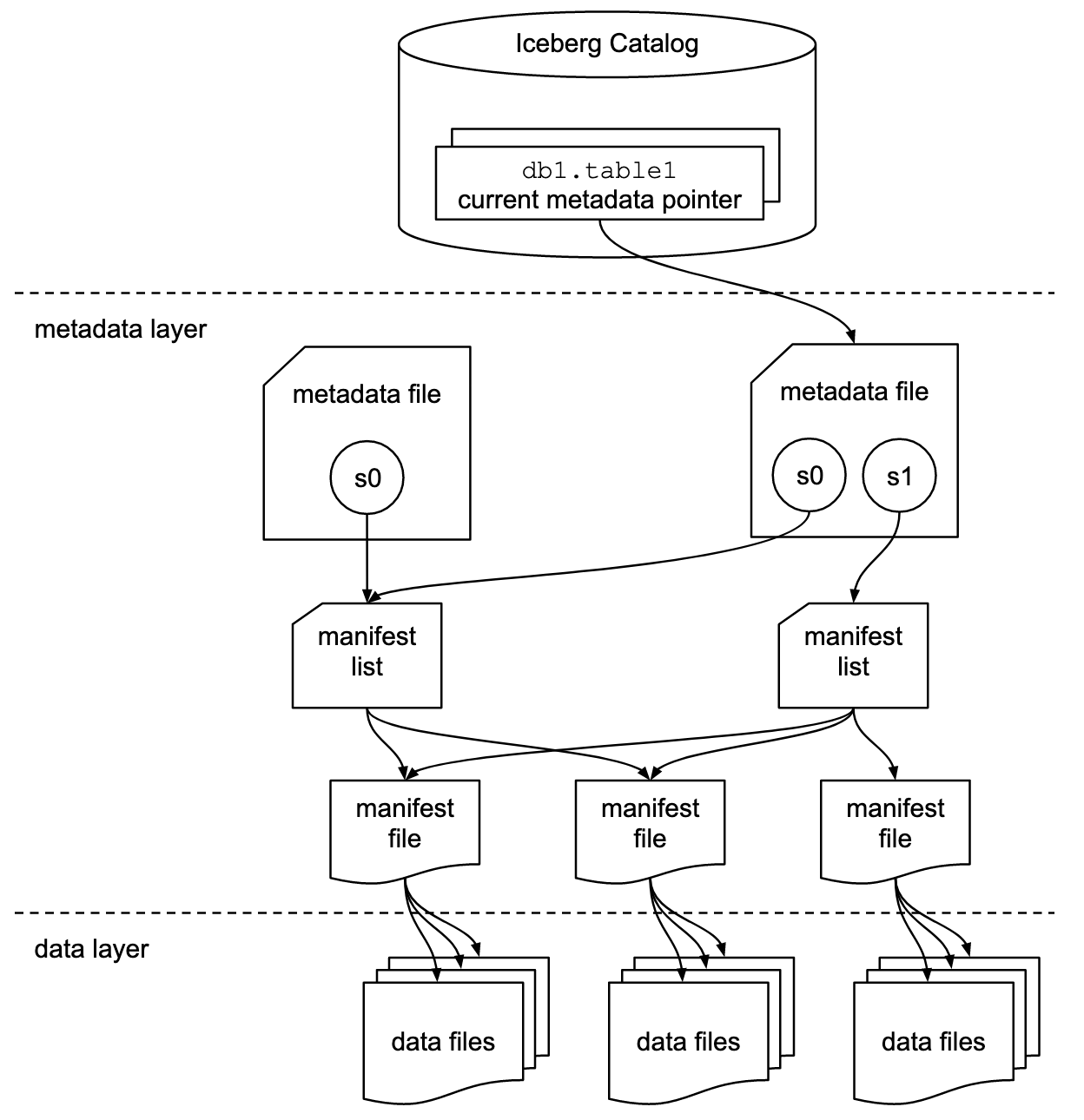
The key boundary is the selected snapshot’s manifest list. If you pinned snapshot S1, you read the manifests named by its list. You do not list every object under the table’s S3 prefix, and you do not start with the parent snapshot and apply its summary as a file-by-file patch.
For a brief visual walkthrough, watch these portions of Dremio’s Apache Iceberg 101 Course #5 | Transactions Step-by-Step. The video sometimes uses informal names for snapshot-related files; keep the precise distinction from last lesson in mind: the snapshot record names a manifest list.
Apache Iceberg 101 Course #5 | Transactions Step-by-Step | Dremio
Watch Dremio's query walkthrough to see how selecting a snapshot changes the files reached through its metadata.
Watch the current read for the unfiltered path to data files. Then watch the historical read: the selected snapshot changes, so the file set changes even though the table name does not.
The Iceberg specification makes two details explicit that matter when implementing this traversal: manifests list individual files, and a manifest can list either data files or delete files.
Read the Apache Iceberg specification for the distinction between a snapshot's manifest list and the files recorded inside its manifests.
In “Overview,” read the table-state overview, stopping before “Optimistic Concurrency.” Focus on the sentences about manifest reuse and the manifest list. Then, in “Manifests,” read the opening paragraphs, stopping after the explanation of data versus delete manifests.
A manifest is an immutable listing of file entries, not a container holding those files’ bytes. Its entries include paths and file metadata such as partition values and metrics. A data manifest tracks data files; a delete manifest tracks delete files used for row-level deletion. The status of an entry tells you whether its referenced file is live in the snapshot being examined.
Read statuses as snapshot visibility
The three entry statuses are compact, but their names can mislead if you read them as S3 operations. The specification gives both their numerical representation—which you may encounter in deserialization code—and the scan rule.
Read the authoritative status definitions before working through the example below. Pay particular attention to what a scan ignores and when physical cleanup may occur.
In “Manifest Entry Fields,” read the field table beginning with the status row; the status description identifies the crucial rule. Continue through the snapshot_id and data_file rows, then read the addition and deletion explanation. You can leave the subsequent sequence-number details for later reference. In “Scan Planning,” read the opening scan rule. Finally, find the paragraph beginning “Note that for any snapshot” and read the live-path constraint.
For the snapshot whose manifest list you are traversing, interpret an entry this way:
| Status in a manifest | What it means for the referenced file |
|---|---|
ADDED (1) |
The file was added when this entry was written. It is live in a snapshot that includes this manifest. |
EXISTING (0) |
The file was already present when this entry was written. It is also live. |
DELETED (2) |
The entry records a logical removal. Do not use this entry as a live file in a scan. It does not report that the S3 object was deleted at that moment. |
A subtle point: ADDED is not shorthand for “added by the snapshot I am reading now.” If a newer snapshot reuses an older manifest, that manifest’s ADDED entries remain ADDED; the manifest is immutable. Conversely, an EXISTING entry may appear when file metadata is rewritten into a new manifest without newly adding the underlying file. To determine visibility, include both statuses.
Nor should you treat DELETED as an instruction to subtract a path from some independently assembled list of all older snapshots. First choose one snapshot’s manifest list. Among the manifests it names, ADDED and EXISTING entries supply live file paths; DELETED entries do not. Iceberg requires a live path to appear at most once across that snapshot’s manifests.
Work through one pinned file graph
Suppose apple.parquet and banana.parquet are data files. The following is an illustrative set of manifest lists and data manifests; it is not a claim that every Iceberg write must arrange its manifests this way.
| Snapshot selected | Manifests in its list | Entries in those manifests | Live data files |
|---|---|---|---|
S100 |
M_A |
M_A: apple.parquet — ADDED |
apple.parquet |
S101 |
M_A, M_B |
M_A: apple.parquet — ADDED; M_B: banana.parquet — ADDED |
apple.parquet, banana.parquet |
S102 |
M_C |
M_C: banana.parquet — EXISTING; apple.parquet — DELETED |
banana.parquet |
Two observations do most of the work here. First, S101 reuses M_A. The apple entry has not changed status, but apple is live in both S100 and S101. Second, S102 names M_C, not M_A or M_B. Its live data-file set comes from M_C’s EXISTING entry for banana. Apple’s DELETED entry documents its removal from the table state, but does not make apple live in S102.
If a backup has pinned S101, a later commit of S102 does not change which manifests S101 names. Equally, the backup should not encounter M_C merely because it asks the catalog for “current” again. That would be a new selection, not a continuation of the original file-graph traversal.
For a query, Iceberg may use statistics to skip manifests or data files that cannot match a predicate. For an inventory of a whole snapshot, that pruning would give an incomplete answer: inspect all manifests in the pinned list and collect their live entries. If a service intends to preserve the snapshot’s metadata as written, the referenced manifest objects themselves matter too—even a manifest with no live files cannot simply be omitted while leaving its manifest list unchanged.
“Deleted entry” is not “deleted S3 object”
At S102, apple.parquet is no longer a live data file. It can nevertheless still exist in S3, and S100 or S101 can still need it while those snapshots remain available. The spec describes physical deletion as a later garbage-collection possibility, subject to older snapshots no longer needing the file. Thus not visible in this snapshot, present in S3, and safe to remove from S3 are three different judgments.
There is a second use of the word delete worth separating now. A delete file is itself a stored file, recorded in a delete manifest. If its entry is ADDED or EXISTING, that delete file is live and can affect which rows a reader sees. A DELETED manifest-entry status, by contrast, says the referenced data or delete file is not live through that entry. You do not need the full row-level delete rules to determine the snapshot’s file inventory; just remember that a snapshot may have live data files and delete files, and both kinds must be considered when tracing its graph.
This distinction is especially useful when reading backup code. A Snapshot object and its manifest-list path identify where discovery begins; a count in the snapshot summary is not a path inventory. Likewise, seeing a DELETED entry should not trigger the conclusion that an S3 fetch for that path must already fail. Whether an old object remains available is a lifecycle question, not something the entry status alone proves.
Key takeaways
To determine a pinned snapshot’s files, use that snapshot’s manifest list, inspect its data and delete manifests, and treat ADDED and EXISTING entries as live while excluding DELETED entries from the live set. A reused manifest keeps its original statuses. Logical removal from a snapshot does not imply immediate S3 deletion, although later cleanup can remove files once they are no longer needed.
Next, you’ll examine partition specs and bucket transforms. They describe the layout recorded alongside these file entries; they do not change the rule that Iceberg’s metadata, rather than directory names, determines a snapshot’s file set.