Recommended resources
The freely available resources this lesson will direct you to.
Welcome back! In our last lesson, we built a crucial foundation by exploring robust time-series cross-validation techniques. We established that correctly evaluating a model's performance over time, using methods like walk-forward validation and purged k-fold, is paramount to avoid the pitfalls of data leakage and build systems that work in the real world.
Now that you have a reliable framework for testing your ideas, we can turn our attention to creating the very features we want to test. This lesson dives into the heart of temporal feature engineering, focusing on three fundamental techniques: lag, rolling, and expanding window calculations. These methods allow you to distill information from a time series's past into a structured format that machine learning models can understand. We will go beyond simply implementing these techniques and explore how to justify key design choices, such as the size of a window or the length of a lag, using the powerful tool of autocorrelation analysis.
From Sequence to Structure: Preparing Time Series for Machine Learning
Before we can engineer features, we must first reframe our time-series problem. A typical time series is a single sequence of values over time. Most machine learning algorithms, however, expect a tabular structure of features () and a target variable (). The first step is to transform our sequence into this supervised learning format.
The following video provides an excellent overview of this transformation, which is the conceptual starting point for all the techniques we'll discuss today.
Feature Engineering for Time Series Forecasting - Kishan Manani
This segment from a DataTalksClub presentation by Kishan Manani clearly explains the core idea of converting a time-series forecasting task into a standard regression problem.
Watch the section from the introduction that frames the problem. This sets the stage for how we'll construct our feature matrix.
With this reframing in mind, let's start building the features themselves.
The Building Blocks: Lag, Rolling, and Expanding Windows
These three techniques form the bedrock of feature engineering from a target variable's own history.
1. Lag Features: Looking Directly into the Past
The most straightforward feature to create is a lag feature. This is simply the value of the time series at a previous time step. For example, to predict today's sales, we might use yesterday's sales (lag 1), the sales from two days ago (lag 2), and the sales from a week ago (lag 7) as features.
In pandas, this is easily accomplished with the .shift() method.
The video below explains the concept and also provides a critical warning about its implementation.
Feature Engineering for Time Series Forecasting - Kishan Manani
This video continues by introducing lag features and then offers a crucial practical tip for multi-series datasets.
First, watch the section that introduces lag features and how they form a feature vector. Then, pay close attention to the warning about pandas.shift. When working with a dataframe containing multiple independent time series (e.g., sales data for different stores), you must apply the .shift() operation within a groupby() call on the series identifier (e.g., store_id). Failing to do so will cause data to leak from the end of one series to the beginning of the next, corrupting your features.
2. Rolling Window Features: Capturing Recent Trends
While lag features look at specific discrete points in the past, rolling window features summarize a recent period. A rolling window slides along the time series and calculates a statistic (e.g., mean, standard deviation, min, max) over the data points within its fixed-size window.
For instance, a 7-day rolling average of sales can smooth out daily noise and provide a more stable feature representing the recent trend. A 30-day rolling standard deviation can be a feature for recent market volatility.
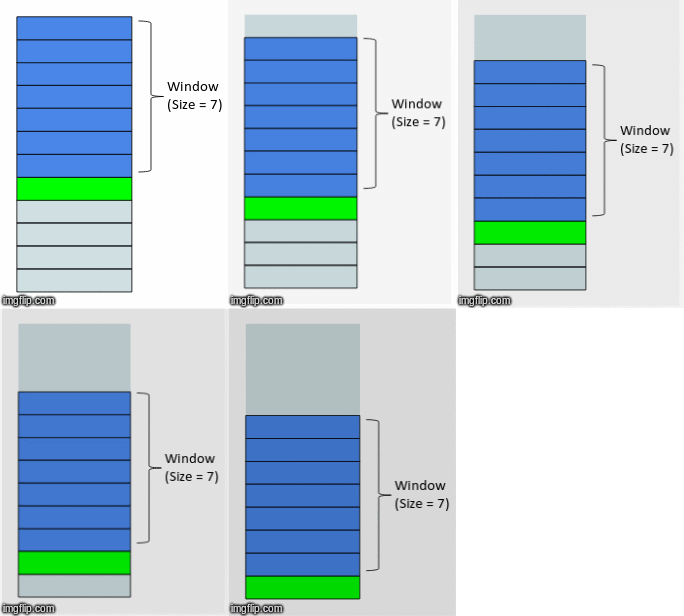
For a quick reference on implementing these features in pandas, the following article is very helpful.
Window Magic in Pandas: Rolling, Expanding & Lag
This article provides a concise code example for creating rolling window features.
Read the section on Rolling Windows. It demonstrates how to calculate a 3-day rolling mean using df['sales'].rolling(window=3).mean().
A Critical Point on Data Leakage:
When you calculate a rolling feature, you must be careful not to introduce lookahead bias. The feature for predicting the target at time t must only use information available before time t.
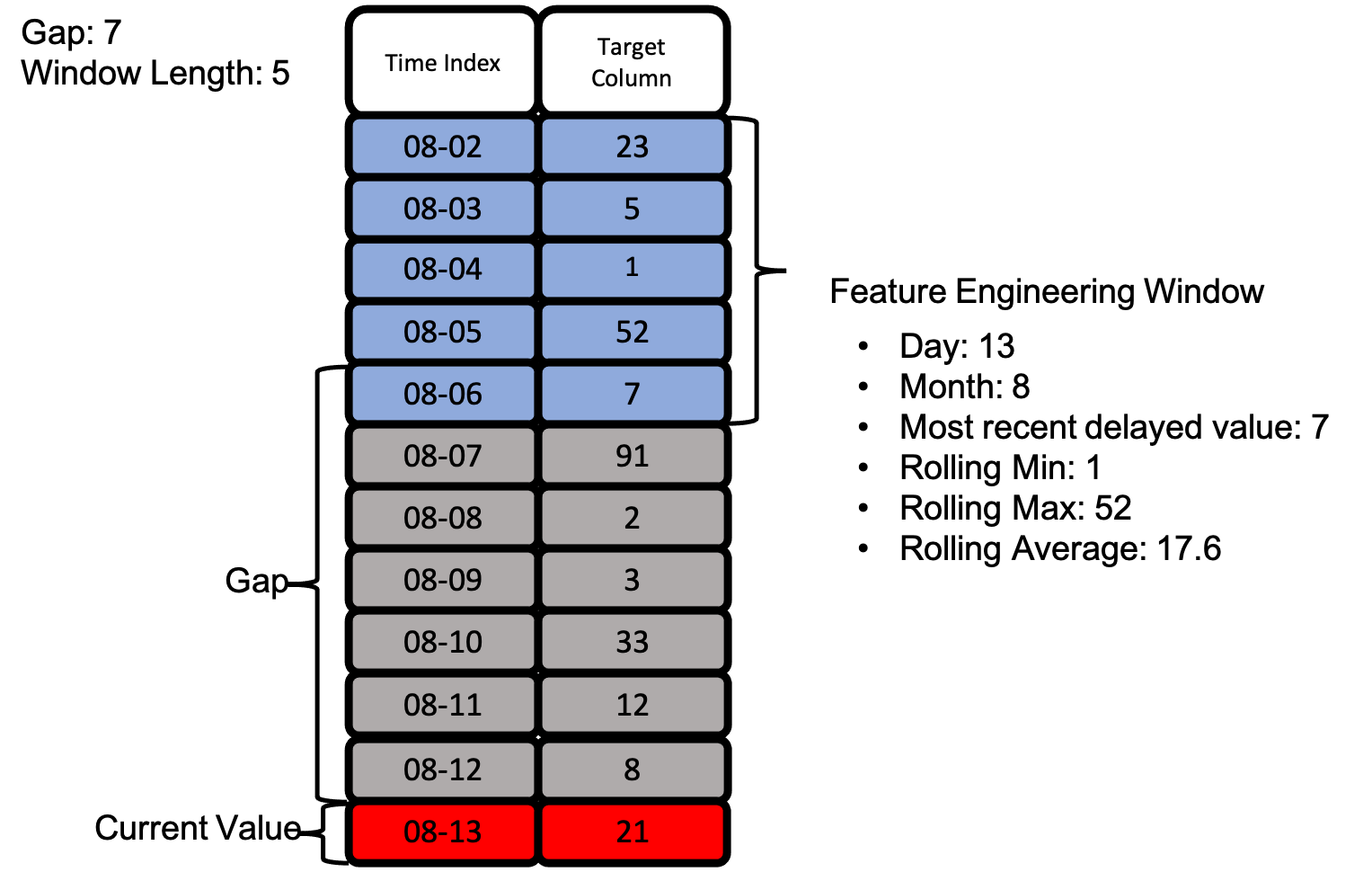
A common mistake is to calculate a rolling mean where the window includes the value at time t. For example, df['sales'].rolling(window=3).mean() will, for the date '08-13', calculate the mean of '08-11', '08-12', and '08-13'. This uses the value from '08-13' to create a feature for predicting the target at '08-13'—a clear case of data leakage.
The correct approach is to calculate the rolling statistic and then lag it by at least one time step. The video segment below explains this vital point.
Feature Engineering for Time Series Forecasting - Kishan Manani
This segment explicitly addresses the data leakage issue with rolling windows.
Watch the section on window features, focusing on the explanation of why you must lag the resulting rolling statistic to prevent leaking information from the target.
The image below, which you might recognize from your work with Featuretools, correctly illustrates this concept. The features for the "Current Value" on '08-13' are engineered from a "Feature Engineering Window" that ends on '08-06', separated by a "Gap". This gap ensures there is no leakage.
3. Expanding Window Features: The Cumulative View
Unlike a rolling window with a fixed size, an expanding window grows over time. At each point t, it includes all data from the beginning of the series up to point t. This is useful for creating features that represent cumulative or "all-time" metrics, such as a running total of sales, a cumulative average return, or an all-time high water mark. In pandas, this is implemented with the .expanding() method.
Window Magic in Pandas: Rolling, Expanding & Lag
This article provides a simple explanation and code for expanding windows.
Read the section on Expanding Windows to see the pandas implementation and its use cases.
Justifying Window Size: Autocorrelation Analysis
We can now create lag and rolling features, but a crucial question remains: how do we choose the right parameters? Should we use a lag of 3 or 30? A rolling window of 7 days or 90 days? While domain knowledge (e.g., using a lag of 7 for weekly seasonality) is a good starting point, a more data-driven approach involves analyzing the series's correlation with its own past.
Autocorrelation (ACF) vs. Partial Autocorrelation (PACF)
-
Autocorrelation Function (ACF): Measures the correlation between a time series and a lagged version of itself. For a lag of
k, ACF measures the total correlation—both the direct effect of thek-th value and the indirect effects transmitted through intermediate values (lags 1 tok-1). -
Partial Autocorrelation Function (PACF): Also measures the correlation between a time series and its lag
k, but it removes the effects of the shorter, intermediate lags. It shows the direct correlation between an observation and its valuekperiods ago.
This distinction is subtle but incredibly important for feature selection. The following video provides one of the best intuitive explanations available.
Time Series Talk : Autocorrelation and Partial Autocorrelation
This video from ritvikmath uses a simple, powerful analogy to explain the difference between ACF and PACF.
Watch from the beginning to understand the setup with the salmon price example. Pay close attention to the distinction between direct and indirect effects. Then, watch the sections explaining how ACF includes both effects, while PACF isolates the direct effect using a regression-based approach. This conceptual clarity is key.
Using ACF/PACF Plots for Feature Selection
ACF and PACF plots show the correlation value for each lag on the y-axis and the lag number on the x-axis. A confidence interval (usually 95%) is also plotted. Lags whose correlation values fall outside this interval are considered statistically significant.
- For Lag Features: The PACF plot is generally more useful. A significant spike at lag
kin the PACF plot implies that thek-th lag has a direct, meaningful relationship with the current value, making it a good candidate for a feature. The ACF can be misleading because a high correlation at lagkmight just be an echo of a very high correlation at lagk-1. - For Rolling Window Size: The ACF plot can provide a heuristic. The rate at which the ACF plot decays towards zero indicates the "memory" of the process. If the autocorrelation becomes insignificant after, say, 20 lags, it suggests that events more than 20 periods ago have little direct or indirect impact on the present. This can inform the choice of a rolling window size, suggesting a window of around 20 periods might be sufficient to capture the relevant recent dynamics.
This next resource provides a fantastic summary of how to use these plots to inform your feature engineering strategy.
A Gentle Introduction to Autocorrelation and Partial ...
This article from Machine Learning Mastery provides a solid overview and practical Python examples for plotting ACF and PACF.
First, read the sections defining Correlation and Autocorrelation and the Partial Autocorrelation Function to see how they are implemented in Python using statsmodels. Then, review the intuition section, which connects these plots to AR and MA processes. Finally, take a look at the comments section. A user asks a highly relevant question: whether ACF/PACF plots can help determine the window size for an MLP model. The author's response—"I would recommend an ACF/PACF analysis. I would also recommend grid searching window sizes"—perfectly encapsulates the best practice: use ACF/PACF for an educated starting point, then treat the window size as a hyperparameter to be tuned with cross-validation.
Interview Alert: You are tasked with predicting daily user engagement for an app. What time-series features would you engineer from the historical engagement data, and how would you justify your choices?
A strong answer would involve:
- Feature Types: Propose lag features (e.g., engagement 1, 2, and 7 days ago), rolling window features (e.g., 7-day rolling mean and standard deviation to capture weekly trends and volatility), and possibly expanding window features (e.g., all-time average engagement).
- Parameter Justification: Explain that you would start by analyzing the PACF plot to identify significant lags for direct features. You would examine the ACF plot's decay to get a feel for the "memory" of the series to propose an initial rolling window size.
- Final Tuning: Crucially, state that these choices are initial hypotheses. The final lag/window parameters are hyperparameters. You would define a search space for them and use a robust time-series cross-validation strategy (like the walk-forward or blocked k-fold methods from our previous lesson) to find the combination that yields the best out-of-sample performance.
Conclusion
In this lesson, we transitioned from validating time-series models to actively constructing their features. You've learned the mechanics and rationale behind the three most important types of window-based features and, critically, how to make principled, data-driven decisions about their design.
Key Takeaways:
- Fundamental Techniques: Lag, rolling, and expanding windows are the primary methods for extracting features from a time series's own past.
- Leakage Prevention: To avoid lookahead bias, it is essential to lag any rolling or expanding window features so that the feature for time
tuses data strictly from beforet. - Informed Parameter Selection: Autocorrelation (ACF) and Partial Autocorrelation (PACF) plots are indispensable tools. PACF helps identify direct relationships for lag features, while ACF can inform the choice of rolling window size by revealing the process's memory.
- Validation is Key: Ultimately, window sizes and lag periods are hyperparameters. Your initial choices should be validated and tuned using the robust cross-validation methods we covered in the previous lesson.
You now have a powerful toolkit for creating and justifying features derived from the target variable. In our next lesson, we'll broaden our scope to features derived from the timestamp itself, exploring how to encode cyclical patterns like time of day, day of week, and seasonality using sine and cosine transformations to preserve their proximity.