Recommended resources
The freely available resources this lesson will direct you to.
In our last lesson, we focused on making your file-handling code robust by systematically checking for and reporting errors. This is a critical skill for writing reliable software. Now, we'll apply those techniques to a more complex and common task: reading structured data from a file.
This lesson will guide you through the process of taking data from a text file, like a CSV (Comma-Separated Values) file, and loading it into an organized in-memory structure—an array of structs. This is a fundamental operation in many applications, from loading a list of user profiles to processing scientific datasets. By the end of this lesson, you'll be able to parse text files and populate your program's data structures, all while handling potential errors gracefully.
1. Modeling the Data: From File to struct
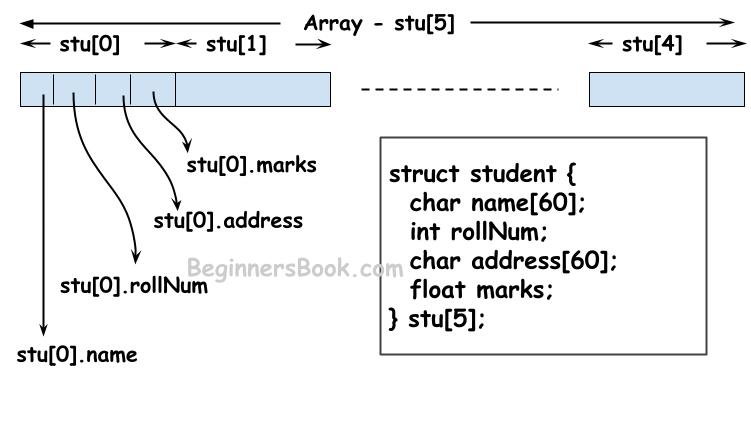
Before we can read structured data, we need a blueprint in our code to represent it. In C, the struct is the perfect tool for this. Each struct can represent a single record or row from our file, and an array of these structs can hold the entire dataset.
For example, if our file contains information about products, with an ID, name, and price on each line, we could define a struct like this:
typedef struct {
    int id;
    char name[50];
    float price;
} Product;
Our goal is to read each line from the file and fill one Product struct, then place that struct into an array.
2. Strategy 1: Direct Parsing with fscanf
One way to read and parse a file is to use the fscanf function to pull data directly from the file stream according to a specific format. This can be very efficient for well-structured files.
The following video provides an excellent, detailed walkthrough of this entire process. It reads student data from a CSV file into an array of structs, demonstrating all the necessary steps from defining the struct to verifying the final data.
Read CSV File Data Into An Array Of Structs | C Programming Example
This video from Portfolio Courses, "Read CSV File Data Into An Array Of Structs," will be our primary guide for this method.
Please watch the following sections in order: Defining the struct: Notice how the struct members correspond to the columns in the data file. Setup and file opening: This covers opening the file (with error checking, as we learned) and declaring the array to hold the data. The reading loop: This is the core of the program. Pay close attention to the fscanf format string. We'll break it down next. Error checking: This demonstrates the critical step of checking fscanf's return value to detect malformed lines, reinforcing what we covered in the last lesson. Verification: Finally, see how to print the data from the array to confirm it was read correctly.
Deconstructing the fscanf Format String
The most complex part of that video is the fscanf call:fscanf(file, "%c,%49[^,],%d,%lf", ...);
Let's break down that format string:
%c: Reads a single character (the student type).,: Matches and discards a literal comma.%49[^,]: This is the most interesting part.- The
[...]is a scanset. It tellsfscanfto match a sequence of characters that are all in the specified set. - The
^at the beginning inverts the set, so[^,]means "match any character except a comma." - The
49is a width limiter. It prevents buffer overflows by ensuring at most 49 characters are read into thenamefield (leaving one spot for the null terminator\0).
- The
,: Matches and discards the next comma.%d: Reads a decimal integer (the age).,: Matches and discards the final comma.%lf: Reads a double-precision floating-point number (the average). Note thelffordouble, whereasprintfuses just%f.
This powerful format string allows fscanf to parse a delimited line in one go.
3. Strategy 2: A More Robust Method with fgets and sscanf
Using fscanf directly can sometimes be brittle. If a line in the file is malformed, it can be difficult for fscanf to recover and find the beginning of the next line. A more robust and often easier-to-debug method is a two-step process:
- Read an entire line from the file into a character buffer (a string) using
fgets(). - Parse the data from that buffer using
sscanf(), the string-based version ofscanf.
This approach isolates the act of reading from parsing, which can make error handling more straightforward.
The video "Read an array of structs in C" from CodeVault explains this alternative method.
First, watch the main explanation of the fgets and sscanf technique: Reading with fgets and sscanf. This shows how a line is read into a buffer and then parsed. Next, see how this is integrated into a loop to populate an array: Populating an array. Finally, pay close attention to this common pitfall: The feof pitfall. The video explains why a naive loop structure can cause the last line of the file to be processed twice and shows the correct way to structure the loop.
The key takeaway is that when using fgets to control a loop, you should check its return value directly, as it returns NULL on error or when it reaches the end of the file. A safe loop structure looks like this:
char line_buffer[256];
while (fgets(line_buffer, sizeof(line_buffer), file_pointer) != NULL) {
    // The buffer now contains a full line. Parse it with sscanf.
    sscanf(line_buffer, ...);
}
This avoids the "double read" problem explained in the video.
4. Practical Exercise
It's time to put this into practice. Imagine you have a file named inventory.csv with the following content:
101,Laptop,999.99
234,Mouse,24.50
502,Keyboard,75.00
811,Webcam,120.00
Your Task:
Write a C program named read_inventory.c that does the following:
- Defines a
struct Productwith members forid(int),name(char array), andprice(float). - Creates an array of
Productstructs (e.g., of size 10). - Opens
inventory.csvfor reading, with proper error checking usingperror(). - Uses a loop and the
fscanfmethod to read each line from the file into the array of structs. Keep track of how many products you've actually read. - Inside the loop, check that
fscanfsuccessfully reads 3 items. If not, print a format error and stop. - After the loop finishes, close the file.
- Finally, loop through the structs you populated and print their contents to the console to verify that the data was read correctly.
Solution
#include <stdio.h>
#include <stdlib.h> // For exit()


#define MAX_PRODUCTS 10
#define MAX_NAME_LEN 50

typedef struct {
    int id;
    char name[MAX_NAME_LEN];
    float price;
} Product;

int main() {
    FILE *file_pointer;
    Product inventory[MAX_PRODUCTS];
    int product_count = 0;

    // 1. Open the file with error checking
    file_pointer = fopen("inventory.csv", "r");
    if (file_pointer == NULL) {
        perror("Error opening inventory.csv");
        return 1;
    }

    // 2. Loop and read data using fscanf
    // We loop as long as we have space in our array AND fscanf reads 3 items
    while (product_count < MAX_PRODUCTS &&
           fscanf(file_pointer, "%d,%49[^,],%f",
                  &inventory[product_count].id,
                  inventory[product_count].name,
                  &inventory[product_count].price) == 3)
    {
        product_count++;
    }

    // Close the file
    fclose(file_pointer);

    // 3. Print the data to verify
    printf("Successfully read %d products from inventory.csv:\n", product_count);
    printf("---------------------------------------------\n");
    printf("%-5s %-20s %s\n", "ID", "Name", "Price");
    printf("---------------------------------------------\n");

    for (int i = 0; i < product_count; i++) {
        printf("%-5d %-20s %.2f\n",
               inventory[i].id,
               inventory[i].name,
               inventory[i].price);
    }

    return 0;
}
Conclusion
In this lesson, you've combined your knowledge of structs, arrays, and file I/O to perform a crucial programming task: loading structured data from a text file. You now have two effective strategies for parsing this data and the knowledge to choose the one that best fits your needs.
Key Takeaways:
- An array of
structsis the standard C approach for storing structured records from a file in memory. - The
fscanffunction can parse data directly from a file stream, and its format string can be tailored with scansets (%[...]) to handle delimited data like CSVs. - The
fgets+sscanfmethod provides a more robust, two-step alternative that separates reading from parsing, which can simplify error handling and debugging. - Always check the return value of I/O and parsing functions (
fopen,fscanf,fgets) to build reliable programs that can handle unexpected file content.
Preview of the Next Lesson:
You've mastered reading structured data from a file. The logical next step is to write data to a file. In the next lesson, we will complete the round trip by learning how to take an array of structs in your program and save its contents to a text file in a structured format.