Recommended resources
The freely available resources this lesson will direct you to.
Welcome to the next lesson in our exploration of C programming. In our last session, we successfully wrote programs that could save data to files and read it back. We even included a basic check to see if a file opened correctly. However, real-world programming requires us to handle a much wider range of potential problems.
This lesson is dedicated to making our file-handling code more robust and reliable. We will move beyond a simple NULL check and learn how to systematically detect, identify, and report errors that can occur when opening or operating on files. This will ensure your programs can react gracefully to issues like a missing file, incorrect permissions, or corrupted data, rather than just crashing.
1. The First Line of Defense: Checking fopen()
In the previous lesson, you learned that fopen() returns a NULL pointer if it fails to open a file. This check is the single most important piece of error handling in file I/O. Failing to perform this check and then trying to use the NULL pointer will cause your program to crash.
The logic is straightforward: attempt to open the file, and if the result is NULL, stop and report an error.
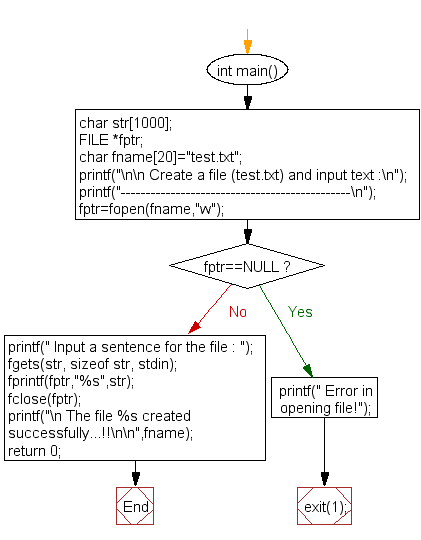
But why might fopen() fail? Common reasons include:
- The file does not exist (when opening in read mode).
- The program lacks the necessary permissions to read from or write to the specified path.
- The path itself is invalid.
Simply printing "Error opening file" isn't very helpful. To get more specific information, we can use the perror() function.
2. Getting Descriptive Errors with errno and perror()
When a standard library function like fopen() fails, it often sets a global integer variable named errno to a value that indicates the specific error. The <errno.h> header file provides access to this variable and related error constants.
While you can inspect the integer value of errno, it's more practical to use functions that translate this code into a human-readable message.
perror(const char *s): Prints the string you provide, followed by a colon, a space, and a descriptive message for the current value oferrno.strerror(int errnum): Returns a pointer to the string that describes the error code passed inerrnum.
The following video introduces errno and demonstrates how to use perror() and strerror() to produce meaningful error messages. It also explains the important concept of stderr.
Error Handling | C Programming Tutorial
This video from Portfolio Courses provides a clear and concise tutorial on C's primary error-handling mechanisms.
First, watch the introduction to the errno global variable: The errno variable. Next, see how strerror() can be used to get a descriptive string: Using strerror. Then, learn about perror(), which is often a more convenient alternative: Using perror. Finally, understand the difference between stdout and stderr and why error messages should be sent to stderr: The stderr stream.
As the video explained, directing error messages to the standard error stream (stderr) is a crucial best practice. It separates normal program output (stdout) from error output, which allows users to redirect them independently (e.g., save normal output to a file while still seeing errors on the screen).
Let's modify our basic file opening check to use these new tools.
#include <stdio.h>
#include <string.h> // For strerror()
#include <errno.h>  // For errno

int main() {
    FILE *file_pointer;

    // Attempt to open a file that doesn't exist
    file_pointer = fopen("non_existent_file.txt", "r");

    if (file_pointer == NULL) {
        // Option 1: Use perror() - simple and effective
        perror("Error opening file");

        // Option 2: Use strerror() and fprintf() to stderr - more flexible
        fprintf(stderr, "Detailed Error: %s\n", strerror(errno));

        return 1; // Exit with an error code
    }

    // ... proceed with file operations ...
    fclose(file_pointer);
    return 0;
}
When you run this code, perror will produce output like:Error opening file: No such file or directory
This is far more informative for diagnosing the problem.
3. Handling Errors During Read and Write Operations
Errors aren't limited to opening a file. They can also occur during read (fscanf, fgetc) or write (fprintf, fputc) operations. For instance, the disk could run out of space while writing, or the data in a file might not match the format fscanf is expecting.
Checking the Return Value of fscanf
In the previous lesson, we checked if fscanf returned EOF. However, fscanf also returns the number of items it successfully read and assigned. If this number is less than what you requested, it indicates either the end of the file or a format mismatch.
Checking the Stream's Error Flag with ferror
Sometimes an I/O operation fails for reasons other than reaching the end-of-file or a format mismatch (e.g., a hardware error on the disk). The ferror() function checks if the error indicator for a given file stream has been set. It returns a non-zero value if an error has occurred.
This next video demonstrates these two techniques in a practical context of reading structured data.
Read CSV File Data Into An Array Of Structs | C Programming Example
This excerpt from a Portfolio Courses video on reading CSV files shows how to build a robust reading loop.
Watch this segment to see how to check the return value of fscanf to detect formatting problems: Checking fscanf's return. Next, see how ferror() is used as an additional check for other types of read errors: Using ferror.
Distinguishing between EOF and a true error is important. A common pattern after a read loop finishes is to check why it finished.
// Assume 'file_pointer' is open and a read loop has just finished
if (ferror(file_pointer)) {
    perror("An error occurred during reading");
} else if (feof(file_pointer)) {
    printf("Reached end of file successfully.\n");
} else {
    // This case would be for a format mismatch detected inside the loop
    fprintf(stderr, "Error: File format incorrect.\n");
}
4. Practical Exercise: Building a Robust Reader
Let's apply everything we've learned. Take the reader.c program from our last lesson's exercise. Its job was to read integers from numbers.txt and calculate their product. We will now make it robust.
Your Task:
Modify your reader.c program to incorporate the following error checks:
- When opening
numbers.txt, check iffopen()returnsNULL. If it does, useperror()to print a descriptive error tostderrand exit the program with a status of1. - Modify your
whileloop. Instead of just checking forEOF, check thatfscanf()successfully reads exactly one integer (fscanf(...) == 1). - After the loop terminates, check
ferror(). If it's true, print a generic "Error reading from file" message tostderr. - If no errors occurred, print the final calculated product as before. If the loop terminated early due to a formatting error (i.e.,
fscanfreturned 0 butfeofandferrorare false), print a "File format error" message tostderr.
This layered approach to error checking is characteristic of high-quality C code.
Solution
#include <stdio.h>
#include <errno.h>

int main() {
    FILE *file_pointer;
    int number;
    long long product = 1; // Use long long for larger products
    int items_read;
    int numbers_found = 0;

    // 1. Check fopen() result
    file_pointer = fopen("numbers.txt", "r");
    if (file_pointer == NULL) {
        perror("Error opening numbers.txt");
        return 1;
    }

    // 2. Check fscanf() return value in the loop
    while ((items_read = fscanf(file_pointer, "%d", &number)) == 1) {
        product *= number;
        numbers_found++;
    }

    // 3. & 4. Check why the loop terminated
    if (ferror(file_pointer)) {
        fprintf(stderr, "Error reading from file.\n");
    } else if (!feof(file_pointer)) {
        // If not ferror and not feof, it must be a format mismatch
        fprintf(stderr, "File format error: expected an integer.\n");
    } else if (numbers_found > 0) {
        // Success!
        printf("The product of the numbers is: %lld\n", product);
    } else {
        printf("No numbers were found in the file.\n");
    }

    fclose(file_pointer);

    return 0;
}
Conclusion
You have now learned how to write C programs that can gracefully handle the most common file I/O errors. This is a significant step forward from simply hoping everything works, and it is a fundamental skill for writing stable and user-friendly applications.
Key Takeaways:
- Always check the return value of
fopen()forNULLto prevent crashes. - Use
perror()to print a descriptive, system-level error message when a function fails. - Direct error messages to the
stderrstream usingfprintf(stderr, ...)to separate them from normal output. - Check the integer return value of
fscanf()to ensure the data format in the file is correct. - Use
ferror()after read/write operations to catch generic stream errors. - Combine
ferror()andfeof()checks after a loop to determine if it finished successfully or due to an error.
Preview of the Next Lesson:
With robust error handling now in your toolkit, we are ready to tackle more complex file data. In the next lessons, we will learn how to read structured data from a file directly into an array of structs, and then write that array of structs back to a file, applying the error-checking techniques you mastered today.