Recommended resources
The freely available resources this lesson will direct you to.
Hello! Welcome back to our course on architecting security products.
In the previous module, we designed a robust DDoS mitigation system capable of handling massive volumetric attacks. We concluded by noting that the most sophisticated attacks often happen at Layer 7, where attackers mimic legitimate user behavior to evade simple network-level defenses.
This brings us to our new module: Architecting Bot Management Systems. Our first step in identifying and stopping malicious bots is to build a foundational understanding of the client's reputation. This is where an IP reputation system comes in.
In this lesson, we will tackle the first learning outcome of this module: to design a data collection pipeline for an IP reputation system using honeypots, threat intelligence feeds, and application logs. We will architect the "nervous system" that gathers security signals from across the internet and from within your own infrastructure, transforming raw data into the fuel for a powerful reputation engine.
1. The Goal: An IP Reputation System
An IP reputation system's core function is to answer a simple question very quickly: "What is the likelihood that this IP address is malicious?" It does this by collecting evidence of an IP's behavior over time and assigning it a score. This score then becomes a critical, low-latency signal for other security systems, such as your WAF or application logic, to make an initial trust decision.
To build this system, we first need to design a pipeline to collect the evidence. Let's look at a high-level architecture for such a system.

As your software engineering background suggests, this is fundamentally a data engineering problem. We need to build a scalable and reliable data pipeline. Let's borrow a familiar framework for this.
Data Pipeline (Security Telemetry) - Conifers AI
The article 'Data Pipeline (Security Telemetry)' from Conifers AI provides an excellent overview of the stages involved in processing security data. It frames the problem in terms of a structured data flow, which will be our guide for this lesson.
Please read the introduction ('What is a Data Pipeline...') and the section 'How Data Pipelines Transform Raw Security Data Into Actionable Intelligence'. Focus on the key stages: Collection and Ingestion, Parsing and Normalization, and Enrichment and Contextualization. We will use these stages to structure our design.
Our pipeline will consist of these core stages. Let's design the collection and ingestion for each of our three primary data sources.
2. Source 1: Threat Intelligence Feeds
Threat intelligence (TI) feeds are lists of known indicators of compromise (IoCs), such as malicious IP addresses, domains, and file hashes. They are an essential "kick-starter" for our reputation system, providing data from a global sensor network.
These feeds come in two main flavors:
- Open-Source/Community: Curated by security communities and often free (e.g., AlienVault OTX, abuse.ch).
- Commercial/Proprietary: Offered by security vendors, often with higher fidelity, more context, and a price tag (e.g., CrowdStrike, Recorded Future).
Design Challenge: How do we efficiently ingest, de-duplicate, and manage data from dozens of heterogeneous feeds?
A great way to understand this is to look at a purpose-built tool. MISP (Malware Information Sharing Platform) is a widely used open-source platform for exactly this purpose.
How to Use Threat Intelligence Feeds With MISP
The video 'How to Use Threat Intelligence Feeds With MISP' by Adam Goss demonstrates how a platform like MISP tackles the ingestion problem. It provides a concrete example of the architectural components needed.
Please watch from the beginning to 06:27. As you watch, focus on: The different types of feeds (open-source vs. proprietary). The ingestion mechanisms: How MISP pulls data from remote URLs in various formats (MISP format, FreeText, CSV). The concept of automation through scheduled tasks or cron jobs to keep the intelligence fresh.
From an architectural standpoint, an ingestion module for TI feeds must include:
- Connectors: A set of pluggable components, each capable of speaking a different protocol or parsing a different format (e.g., an API client for one feed, a CSV parser for another).
- Scheduler: A cron-like service to periodically trigger the connectors to fetch fresh data. The frequency is a key trade-off between data freshness and processing load.
- A Normalizer: A component that transforms the varied input formats into a single, consistent internal schema for our reputation system. For example:
{"indicator": "1.2.3.4", "type": "ipv4", "source": "abuse.ch", "timestamp": "..."}. - Storage: A place to hold the raw and normalized data, which we'll discuss in more detail later.
3. Source 2: Honeypots
While TI feeds tell us what the global community thinks is bad, honeypots tell us what is actively attacking us. A honeypot is a decoy system designed to be probed, attacked, and compromised. By observing these interactions, we gather extremely high-fidelity intelligence.
Intelligent Threat Detection—AI-Driven Analysis of Honeypot Data to ...
The research paper 'Intelligent Threat Detection' provides a deep dive into using honeypot data. It classifies honeypots and details a complete data collection pipeline built on AWS, which is a perfect real-world example for our design.
This paper is rich with relevant details. Please focus on these parts: Section 1 (Introduction): Read the descriptions of Low-, Medium-, and High-Interaction Honeypots to understand the trade-offs. Section 3 (Methodology) & Subsection 3.1 (Attacker IP Address): Skim the tables and read the text to see what kind of data is collected. Note that the attacker's IP is considered a direct indicator of compromise. Section 3.6.2 (Model Infrastructure Implementation) & Figure 7: Study this section and the architecture diagram closely. This is a complete, practical design for a honeypot data collection pipeline.
Let's break down the architecture from the paper (LINK) and generalize it:
- Honeypot Sensors: These are the decoy services themselves (e.g., ContainerSSH, Cowrie, Dionaea). You would deploy a fleet of these, perhaps in different cloud regions, to maximize exposure.
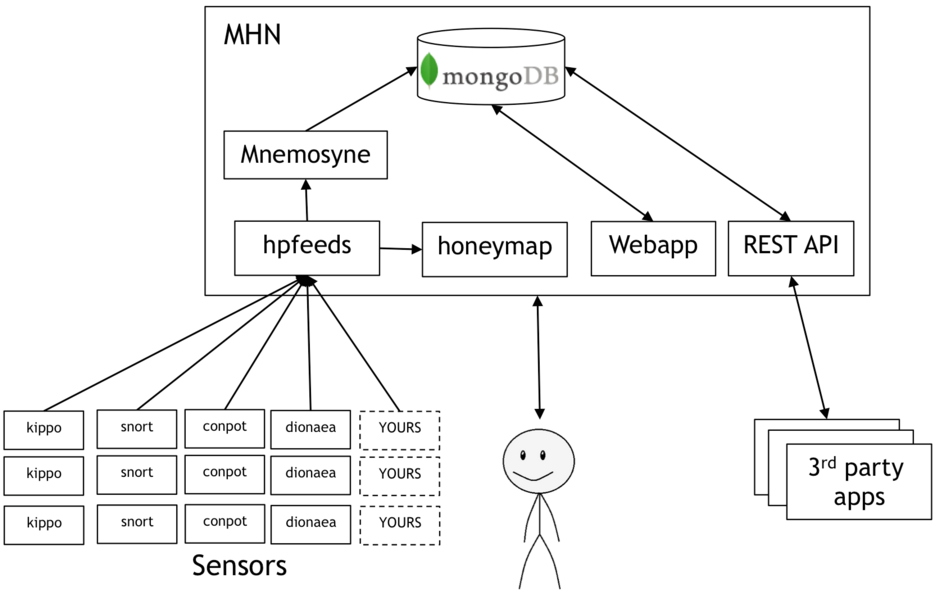
-
Log Collection & Transport: The honeypots generate logs for every interaction. A robust design ships these logs off-system immediately to prevent the attacker from tampering with them.
- Agent: A lightweight agent like Fluent Bit or Filebeat runs alongside the honeypot, tailing the log files.
- Transport: The agent ships the logs to a central, durable location. The paper's use of an S3 bucket is an excellent choice. A message queue like Kafka or Kinesis would also be a standard pattern here to act as a buffer.
-
Processing: Raw logs need to be parsed to extract the valuable indicators.
- The paper's use of AWS Lambda triggered by S3 object creation is a classic, scalable, and cost-effective serverless pattern.
- This processing function would parse the log, extract the attacker's IP address, the timestamp, the protocol used, and other relevant metadata.
-
Storage: The parsed data is then stored for our reputation system. The paper suggests DynamoDB with a TTL (Time To Live), which is perfect for storing indicators that expire after a certain period (e.g., 7 days).
This Honeypot -> Agent -> S3/Kafka -> Lambda Parser -> DynamoDB pattern is a powerful, modern architecture for a high-volume data collection pipeline.
4. Source 3: Application Logs
Our final source is the logs from our own production applications. These are invaluable because they reflect actual, targeted activity against our real services. An attacker trying to brute-force a login page or probing for SQL injection vulnerabilities on our production API generates strong negative reputation signals.
Design Challenge: How do we collect and process logs from a large, distributed fleet of application servers without impacting their performance?
The architecture here is a standard distributed logging pipeline, as you've likely encountered in your software engineering work.
Data Pipeline (Security Telemetry) - Conifers AI
Let's revisit the 'Data Pipeline (Security Telemetry)' article, this time focusing on the components used for large-scale collection.
Please read the section 'Key Components in Security Telemetry Pipelines'. Pay close attention to the roles of 'Data Collection Agents' and 'Message Queues and Stream Processing'.
The pipeline for application logs mirrors the honeypot design but on a larger scale:
- Collection Agents: Lightweight agents (e.g., Filebeat) are deployed on every application server. They are configured to watch application and system log files.
- Message Queue: This is non-negotiable for a large-scale system. All agents send their logs to a central message queue like Apache Kafka. This decouples the application servers from the processing pipeline, absorbs traffic spikes (e.g., during an attack), and prevents data loss if the downstream processing layer is slow or unavailable.
- Stream Processing: One or more services consume from the Kafka topic. These services parse the logs, looking for specific security-relevant events (e.g., "authentication failure," "403 Forbidden response," "SQL syntax error in query"). When such an event is found, it extracts the source IP and other context.
- Output: The extracted indicators (the IP addresses from those security events) are then published to another Kafka topic or written directly to our reputation database.
5. Synthesizing the Pipeline: Normalization and Storage
We now have three distinct data streams flowing into our system. The final step is to unify them.
Normalization:
Before storing, all indicators must be converted to a common schema. An IP from a TI feed, a honeypot, and an application log should all look the same to our scoring engine. A simple unified schema might be:
{
  "ip_address": "198.51.100.5",
  "source_type": "honeypot", // or "threat_feed", "application_log"
  "source_name": "cowrie_ssh", // or "alienvault_otx", "prod_api_gw"
  "event_time": "2023-10-27T10:00:00Z",
  "event_description": "SSH brute-force attempt",
  "confidence_score": 0.9,
  "ttl": 1699005600 // Expiration timestamp
}
Storage Architecture:
The choice of database is critical and depends on the access patterns. We have two primary needs: fast real-time lookups and offline analysis. This calls for a multi-tiered storage approach:
-
Real-Time Lookup (Hot Store): This is for the live WAF or application to query. It needs to be extremely fast (sub-millisecond latency).
- Technology: An in-memory key-value store like Redis is the canonical choice.
- Data Model: The IP address is the key. The value could be a simple score, or a small JSON object with a score and expiration time.
GET 198.51.100.5->{"score": 85, "category": "brute_force"}
-
Analytics & Investigation (Warm Store): This is for security analysts to run complex queries and for the scoring model to be retrained.
- Technology: A search database like Elasticsearch is ideal.
- Data Model: Store the full, normalized JSON objects. This allows for queries like: "Show me all IPs from ASN 12345 that have appeared in both honeypots and TI feeds in the last 24 hours."
-
Raw Log Archive (Cold Store): For long-term storage, compliance, and reprocessing.
- Technology: A cheap object store like Amazon S3 or Google Cloud Storage. All raw logs from all sources should be dumped here for archival before any processing happens.
Conclusion
In this lesson, we designed a comprehensive, multi-source data collection pipeline for an IP reputation system. We moved from high-level concepts to concrete architectural patterns for each data source.
Key Takeaways:
- A security data pipeline follows familiar stages: Ingestion, Normalization, Enrichment, and Storage.
- Threat Intelligence Feeds are ingested via scheduled jobs that pull from APIs or file downloads, using a platform like MISP to manage the process.
- Honeypot data is best collected using a serverless pattern like Agent -> S3 -> Lambda -> DynamoDB, providing a scalable and high-fidelity signal source.
- Application Logs require a standard distributed logging architecture with Agents -> Message Queue (Kafka) -> Stream Processors to handle scale and ensure reliability.
- A tiered storage architecture using Redis for real-time lookups, Elasticsearch for analytics, and S3 for archival provides the best balance of performance, capability, and cost.
Preview of the Next Lesson:
Now that we have a robust pipeline collecting evidence, what do we do with it? In our next lesson, we will address the next logical step: "Design a scoring model and low-latency, real-time lookup architecture for an IP reputation system." We will explore how to turn this raw data into a numerical score and how to serve it to consumers with minimal latency.