Recommended resources
The freely available resources this lesson will direct you to.
Hello! Let's get started on our next lesson.
In our previous session, we designed the complete pipeline for issuing and validating JSON Web Tokens (JWTs). We saw how claims like scope are embedded within the token to represent permissions. But a crucial question remains: How are those scopes determined in the first place? They aren't arbitrary; they are the result of a carefully orchestrated negotiation between the client application, the user, and the authorization server.
Today, we will design that entire negotiation and management process. This lesson directly addresses the learning outcome: Design scope and consent management within an OAuth 2.0 authorization server.
We will cover:
- The fundamental role of scopes in delegated authorization.
- Architectural best practices for designing clear, secure, and maintainable scopes for your APIs.
- The design of a consent flow, the user-facing mechanism for approving scope requests.
- Advanced techniques for managing the lifecycle of these approvals, known as "grants."
This will connect the high-level OAuth protocol to the user experience and the long-term management of permissions, providing a complete picture of this critical authorization component.
1. Scopes and Consent: The Foundation of Delegated Authorization
At its core, OAuth 2.0 solves the "delegated authorization" problem: allowing a third-party application (a Client) to access resources on behalf of a user (the Resource Owner) without the user having to share their credentials. The mechanism for controlling what the client is allowed to do is scopes. The process of the user approving this is consent.
The following video provides an excellent explanation of how scopes are used to define permissions and generate the user-facing consent screen.
OAuth 2.0 and OpenID Connect (in plain English)
The video 'OAuth 2.0 and OpenID Connect (in plain English)' by OktaDev explains how scopes provide granular permissions and how the authorization server uses them to create the consent screen presented to the user.
Please watch the segment from 22:12 to 24:59. It clearly illustrates how the client requests specific scopes and how the authorization server translates this into a user-facing decision.
As the video explained, the process begins when the client initiates the authorization flow. It includes a scope parameter in the request to the authorization server, listing the permissions it wants.
For example, an authorization request URL might look like this:https://auth.example.com/authorize?response_type=code&client_id=CLIENT_ID&redirect_uri=...&scope=contacts.read%20profile.read
Here, the client is requesting permission to read the user's contacts and their profile. The authorization server then presents this request to the user in a consent screen: "ExampleApp wants to: Read your contacts, View your profile. Allow?"
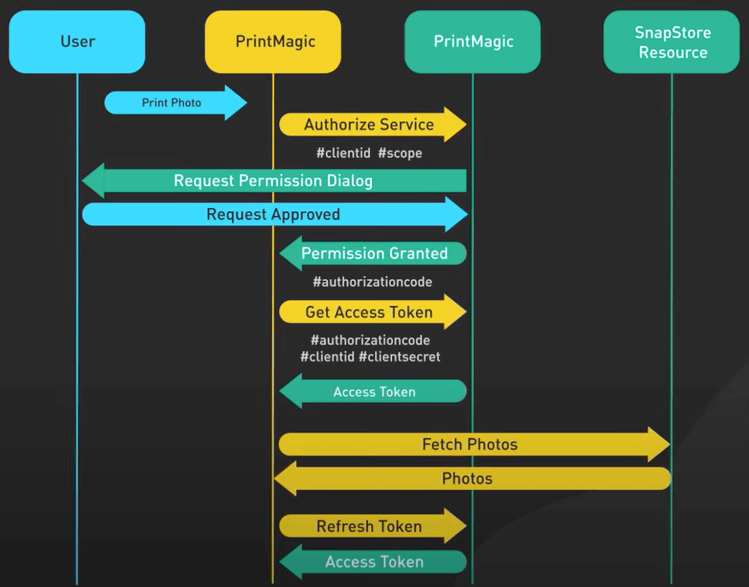
If the user grants consent, the authorization server issues an access token with the approved scopes embedded within it. This ensures the client can only perform the actions the user explicitly allowed.
2. How to Design Effective Scopes
The design of your scopes is a critical part of your API's architecture. Poorly designed scopes can lead to security vulnerabilities, maintenance nightmares, and a confusing user experience.
Let's look at how major companies approach this. The following video analyzes scope design patterns from Google, Dropbox, and GitHub, providing excellent real-world context.
OAuth 2 scope design for security
The video 'OAuth 2 scope design for security' by Manning Publications offers a fantastic analysis of real-world scope design and the security principles behind them.
Please watch these two key segments: Examples of Scope Design (06:12 - 11:56): This part analyzes the scope patterns used by Google, Dropbox, and GitHub, highlighting hierarchical, action-based, and field-level scopes. Why Scopes Aren't Enough (11:56 - 15:29): This is a crucial segment explaining why scopes alone are insufficient for authorization and how they can lead to vulnerabilities like Insecure Direct Object Reference (IDOR) if not layered with other checks.
The video reveals several key patterns and a critical security warning. Let's formalize these into a set of architectural best practices.
The article 'OAuth Scopes Best Practices' from Curity provides a structured guide to designing and managing scopes at scale.
Please read the section 'Scopes Design' and the final 'Scope Best Practices Summary'. These sections provide actionable rules for creating a robust and scalable scope system.
Based on these resources, here are the core principles for designing your authorization server's scopes:
-
Use Hierarchical or Structured Naming: Structure scopes logically, often using
resource.actionor a similar pattern. This makes them intuitive and manageable.- Good:
orders:read,orders:write,inventory:read - Bad:
scope1,permission_a
- Good:
-
Embrace Least Privilege: Design fine-grained scopes so clients can request only what they need. A client that only displays orders should request
orders:read, not a genericordersscope that also grants write access. -
Design Stable, Business-Oriented Scopes: Scopes should represent business capabilities, not technical implementation details. If you refactor your
Ordersmicroservice into three smaller services, you shouldn't need to change your public-facing scopes. This avoids "scope explosion" and decouples clients from your internal architecture. -
Layer Your Authorization: This is the most critical security principle. Scopes are not a complete authorization solution. A scope like
messages.readtells the API that the client has permission to read messages on behalf of some user. It does not answer the question: "Does the current user, Alice, have permission to read this specific message, which belongs to Bob?"Your API must always perform its own fine-grained authorization check after verifying the token's scope.
- Check if token has
messages.readscope. If not, reject (403 Forbidden). - If yes, extract user ID from the token (e.g., the
subclaim). - Check your application's business logic:
is_message_owner(user_id, message_id). If false, reject (403 Forbidden).
- Check if token has
Failing to do step 3 is how Insecure Direct Object Reference (IDOR) vulnerabilities occur.
3. Architecting the Consent Management Flow
Now let's design the system that handles user consent. A common and robust architectural pattern is to decouple the consent UI into a separate, dedicated application. The main authorization server's job is to orchestrate the flow, while the "Consent App" is responsible for rendering the UI and interacting with the user.
This architecture is clearly illustrated in the following flowchart.
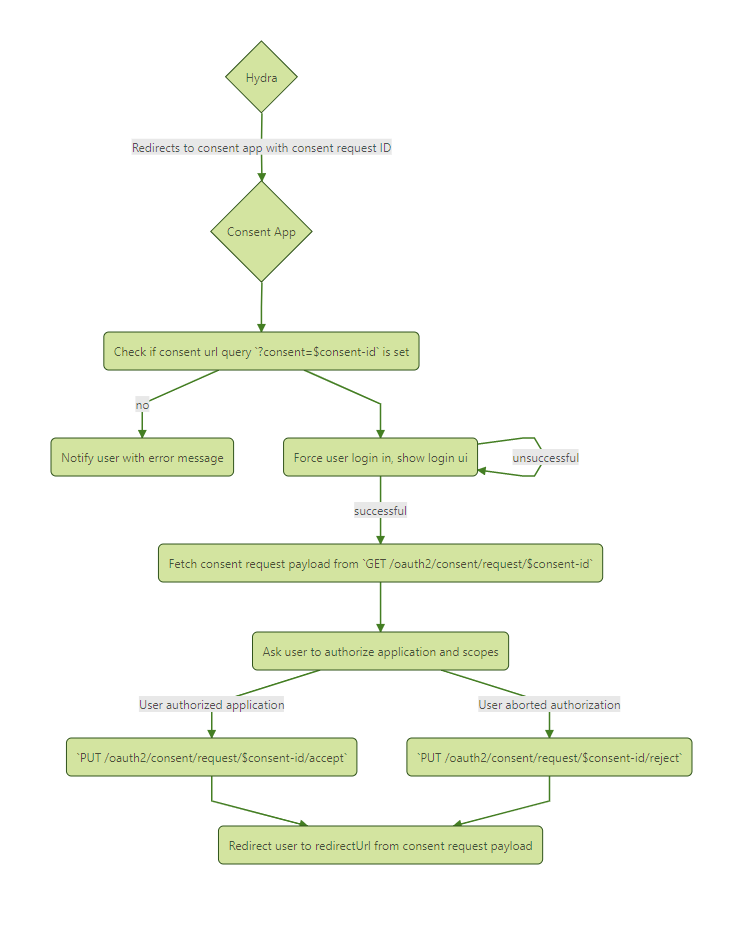
Let's walk through the architectural steps to implement this flow:
-
Redirection to Consent App: When the authorization flow begins, the authorization server first authenticates the user. After successful login, it redirects the user to the Consent App. This redirect includes a
consent_challengeparameter, which is a one-time-use, secure identifier for this specific consent request.https://consent.example.com/consent?consent_challenge=CHALLENGE_STRING -
Consent App Fetches Request Details: The Consent App receives the request. It makes a secure, back-channel API call to the authorization server, presenting the
consent_challenge.POST /oauth2/auth/requests/consent/CHALLENGE_STRING
The authorization server validates the challenge and returns a JSON payload with details about the request: the client's name, logo, and therequested_scopearray. -
User Interaction: The Consent App renders the consent screen. It displays the client's information and asks the user to approve the requested scopes (e.g., using checkboxes). The user can review the permissions and click "Allow" or "Deny".
-
Accepting or Rejecting Consent: The Consent App makes another back-channel API call to the authorization server's "accept consent" endpoint.
- If the user clicked Allow, the payload includes the list of scopes the user actually granted. This can be all or a subset of what the client requested.
- If the user clicked Deny, the payload indicates the request was rejected.
-
Completing the Flow: The authorization server receives this decision.
- If accepted, it marks the consent as granted, generates the authorization code, and redirects the user back to the client's
redirect_uriwith the code. The granted scopes are now associated with this code. - If rejected, it redirects the user back to the client's
redirect_uriwith anerror=access_deniedparameter.
- If accepted, it marks the consent as granted, generates the authorization code, and redirects the user back to the client's
This decoupled design is powerful. It allows you to build a rich consent UI with complex logic without cluttering the core authorization server, which can focus solely on protocol correctness and security.
4. Advanced: Lifecycle Management with Grants
A user's consent is not a one-time event; it creates a persistent relationship between the user, the client, and the permissions granted. In OAuth terminology, this persistent record of approval is called a grant.
As a system architect, you need to answer these questions:
- How can a user see all the applications they've granted access to?
- How can a user revoke access for an application they no longer trust?
- How can a client programmatically clean up grants that are no longer needed?
This requires a system for grant management. The OpenID Foundation has a draft specification that provides an excellent blueprint for designing such a system.
Grant Management for OAuth 2.0
The 'Grant Management for OAuth 2.0' specification details an API for explicitly managing grants. This is an advanced topic but essential for building a complete, enterprise-grade authorization server.
This is a technical spec, so focus on the high-level concepts. Read Section 1.1 (Terminology) to understand the official distinction between a 'Grant' and 'Consent'. Skim Section 6 (Grant Management API) to understand the shape of the proposed API. Focus on the purpose of the GET and DELETE operations on the /grants/{grant_id} endpoint.
Here is the architectural design for a grant management system based on that specification:
-
Introduce a
grant_id: When a user provides consent for the first time and the client exchanges the authorization code for an access token, the token response should include a newgrant_id. This is a unique identifier for the grant created at the authorization server.{ "access_token": "2YotnFZFEjr1zCsicMWpAA", "token_type": "Bearer", "expires_in": 3600, "refresh_token": "tGzv3JOkF0XG5Qx2TlKWIA", "grant_id": "TSdqirmAxDa0_-DB_1bASQ" // <-- The new identifier } -
Create a Grant Management API Endpoint: The authorization server exposes a new, protected API endpoint, for example:
/grants. Access to this API requires a special access token with a scope likegrant_management. -
Implement Core Operations:
- Querying a Grant: A client can make a
GETrequest to/grants/{grant_id}to retrieve the current details of a specific grant, such as the scopes it contains and its status. This is useful for building user-facing dashboards that show active permissions. - Revoking a Grant: A client can make a
DELETErequest to/grants/{grant_id}to revoke the grant. When this happens, the authorization server MUST invalidate the grant and all associated refresh tokens. It SHOULD also attempt to invalidate any active access tokens tied to that grant. This is the mechanism for a user to log out of a specific application or for a client to perform cleanup.
- Querying a Grant: A client can make a
By implementing this API, you provide a complete lifecycle for consent, moving from a transient decision to a manageable, auditable resource within your system.
Conclusion
In this lesson, we have designed the complete scope and consent management subsystem for our authorization server. We have seen that this is far more than just adding a string to a token; it's a comprehensive system that involves API design, user interaction, and lifecycle management.
Key Takeaways:
- Scopes Define Permissions: Scopes are the primary mechanism in OAuth 2.0 for a client to request, and a user to grant, specific, limited permissions.
- Scope Design is API Architecture: Well-designed scopes are hierarchical, business-oriented, and adhere to the principle of least privilege. They must be layered with application-level authorization to prevent vulnerabilities.
- Consent is a Decoupled Flow: A robust architecture separates the consent UI into a dedicated application, orchestrated by the authorization server, to handle user interaction securely and flexibly.
- Grants are Manageable Resources: A user's consent creates a persistent "grant" at the authorization server. A well-designed system exposes a Grant Management API (
/grants/{grant_id}) to allow for querying and revoking these grants over their lifecycle.
Preview of the Next Lesson:
We have now thoroughly explored OAuth 2.0 as an authorization framework. But what about authentication—proving who a user is? In our next lesson, we will architect the OpenID Connect (OIDC) layer on top of our existing OAuth 2.0 server. We'll leverage our knowledge of JWTs to design the ID Token, a specialized token that provides verifiable identity information, enabling secure, federated login across applications.