Recommended resources
The freely available resources this lesson will direct you to.
- How to add long-term memory using PostgreSQL + pgvector to LangGraph agent🤖: Python — LangGraph #4www.youtube.com
- LangGraph Intro – Storing and Using Long-Term Memory in AI Agents with LangGraphwww.youtube.com
- Comprehensive Guide: Long-Term Agentic Memory With ...medium.com
- Persistence - Docs by LangChaindocs.langchain.com
Hello and welcome back to your journey into AI agents!
In our last lesson, we built an impressive agent that could take a complex request, decompose it into a multi-step plan, and execute that plan from start to finish. However, that agent's memory was ephemeral—it forgot everything once the task was complete. This is a significant limitation for creating truly helpful assistants.
Today, we will solve that problem. Our learning outcome is to add persistent memory to an agent using a vector store or key-value database. We will explore how to give our agents the ability to remember information not just for one conversation, but across multiple interactions over time.
This lesson will cover:
- The difference between short-term (conversational) and long-term (persistent) memory.
- How to use a simple key-value store to remember specific facts about a user.
- How to leverage a vector store for semantic memory, allowing an agent to recall relevant context from past conversations based on meaning.
Short-Term vs. Long-Term Memory
In the context of AI agents, it's helpful to distinguish between two types of memory, much like how humans operate.
- Short-Term Memory: This is the context of the current conversation. It includes the recent back-and-forth messages that allow the agent to understand pronouns, follow a line of reasoning, and stay on topic. In LangGraph, this is managed by the agent's
stateand made persistent for a single conversation thread using Checkpointers. - Long-Term Memory: This is a repository of information that persists across conversations. It could be facts about the user ("my name is Alex," "I'm a Java developer"), summaries of past interactions, or general knowledge gained over time. In LangGraph, this is handled by Stores.
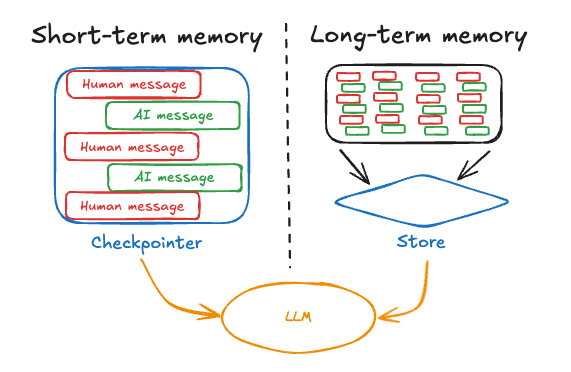
The video below gives an excellent conceptual overview of this distinction.
LangGraph Intro – Storing and Using Long-Term Memory in AI Agents with LangGraph
To start, let's watch a short clip from the 'LangGraph Intro' video by GrabDuck! that clearly explains the difference between short-term and long-term memory using a simple analogy.
Watch from 00:50 to 02:57. Focus on how the video contrasts thread-specific, conversational memory with stable, cross-thread facts.
Now that we have the core concepts, let's dive into the two primary ways to implement long-term memory.
1. Key-Value Memory: Storing Specific Facts
The most straightforward way to implement long-term memory is with a key-value store. This is perfect for storing discrete, structured pieces of information, such as a user's profile.
- Key: A unique identifier for the piece of data (e.g.,
"user_profile","project_details"). - Value: The data itself, often a JSON object (e.g.,
{"name": "Alex", "profession": "Software Engineer"}).
LangGraph's Store interface provides a simple way to manage this. Stores are organized by namespaces, which are tuples that act like a folder structure for your memories. For example, you could store all memories for a specific user under the namespace ("memories", "user-id-123").
The official LangChain documentation provides a concise guide on how to use Store.
Persistence - Docs by LangChain
The article 'Persistence' from the LangChain documentation explains the 'Store' interface and how it's used to retain information across threads. It's the foundation for what we'll be implementing.
Please read the sections 'Memory store' and 'Using in LangGraph'. Pay close attention to: How memories are organized by namespace and key. The store.put() method for saving memories. How a graph is compiled with both a checkpointer and a store. How a node function can access the store via the runtime: Runtime parameter. This is the key mechanism for interacting with memory during an agent's execution.
Practical Example: Remembering User Details
Let's see this in action. The following video demonstrates building a chatbot that can extract facts from a conversation and remember them for the next one, even if it's a completely new session.
LangGraph Intro – Storing and Using Long-Term Memory in AI Agents with LangGraph
This clip from the 'LangGraph Intro' video shows a complete, practical example of implementing key-value memory. It will show you how to define, store, and retrieve user facts across different conversation threads.
Watch from 06:14 to 13:58. You will see: Memory-aware Nodes: A chatbot node that fetches existing user details from the store to enrich its prompt, and an update_memory node that extracts new facts from the conversation. Configuration: How to pass a user_id in the graph's configuration to correctly namespace the memories. Demonstration: A clear example where the agent learns the user's name and project in one thread (thread_id=1) and correctly recalls the project context in a completely new thread (thread_id=2).
This key-value approach is powerful for explicit facts, but what about recalling the gist of a past conversation? For that, we need a more sophisticated approach.
2. Vector Store Memory: Semantic Retrieval
Imagine you told your agent about a "bug in the authentication module" a week ago. Today, you ask, "What were we discussing about that login problem?" A key-value store would fail unless you used the exact key "bug in the authentication module".
This is where vector stores come in. Instead of storing data by a fixed key, we store it by its semantic meaning, represented as a numerical vector (an embedding). This allows us to retrieve relevant memories by searching for similar meanings, not just exact words.
The process for semantic retrieval looks like this:
- When a memory (e.g., a message) is saved, it is converted into an embedding vector and stored.
- When the agent needs to recall something, its current query is also converted into an embedding vector.
- The vector store then performs a similarity search (often using cosine similarity) to find the stored vectors that are "closest" to the query vector.
The video below offers an excellent, non-mathematical explanation of these core concepts, tailored for a developer's understanding.
How to add long-term memory using PostgreSQL + pgvector to LangGraph agent🤖: Python — LangGraph #4
The video 'How to add long-term memory using PostgreSQL + pgvector' by Code AI with Rok provides a superb theoretical breakdown of the concepts behind vector-based memory.
Watch from 02:56 to 10:24. This section covers: Embedding Vectors: What they are and why they're needed. Vector Similarity Search: The basic idea of comparing vectors. Cosine Similarity: An intuitive explanation of how it measures 'relatedness'. Limit vs. Threshold Retrieval: Two common strategies for deciding which memories to retrieve (e.g., 'get the top 5 most similar' vs. 'get all memories with similarity > 0.75').
Practical Example: Persistent Memory with pgvector
Now, let's look at the code. This next segment from the same video walks through a Python script that implements persistent memory for a LangGraph agent using PostgreSQL and the pgvector extension, a very common setup for production applications.
How to add long-term memory using PostgreSQL + pgvector to LangGraph agent🤖: Python — LangGraph #4
This part of the tutorial translates the theory into a full implementation. You will see how an agent can store and retrieve messages from a PostgreSQL database using vector similarity search.
Watch from 14:47 to 21:59. As a software engineer, you'll find the structure familiar. Focus on the logic within the main function: Storing Messages: See how both the user's question and the agent's answer are turned into embedding vectors and INSERT-ed into the chat table. Searching for Context: Observe the SQL query that performs the vector similarity search (<=> operator for cosine distance) against the latest user message to find relevant past messages. Building the Prompt: Notice how the retrieved messages are compiled into a system message to provide context to the LLM before it generates a new answer.
This implementation provides a robust, scalable pattern for giving your agent a semantic long-term memory. For further reading, the article "Long-Term Agentic Memory With LangGraph" offers an extensive written guide covering many of these topics, including a full code example in Chapter 6.
Conclusion
In this lesson, you've equipped your agent with one of the most critical components for advanced behavior: persistent memory. You now understand how to make your agent learn and retain information across multiple conversations.
Key Takeaways:
- Agent memory is divided into short-term (thread-scoped) and long-term (cross-thread).
- LangGraph uses Checkpointers for short-term state and Stores for long-term memory.
- Key-value stores are ideal for persisting structured facts like user profiles, accessed via namespaces and keys.
- Vector stores enable semantic memory, allowing the agent to retrieve relevant information based on meaning, not just keywords, by using embedding vectors and similarity search.
- You can integrate a store into your agent by
compilingthe graph with it and accessing it within nodes via theruntimeobject.
With agents that can plan, execute, and now remember, we are ready to explore more complex architectures. In our next module, "Advanced Agent Architectures," we'll start by looking at multi-agent collaboration patterns, where we can have multiple specialized agents work together to solve even more challenging problems.