Recommended resources
The freely available resources this lesson will direct you to.
Hello and welcome back!
In our last lesson, you built an agent capable of choosing the right tool for a given task. It could decide whether to search a specialized document (using a RAG tool) or call a simple function. This is a powerful capability, but it's fundamentally about single-step decision-making.
What happens when a user's request is too complex for a single tool call? For example, "Write a brief report on the 2024 Australian Open men's final, including the winner's hometown and their path to victory in the tournament." A single search won't suffice; this requires a sequence of actions: find the winner, find their hometown, find their match history, and then synthesize it all.
This brings us to our current learning outcome: Implement an agent that uses a planner to decompose a complex request into a sequence of steps. We will explore the "Plan-and-Execute" architecture, a more robust paradigm for building agents that can tackle sophisticated, multi-step problems.
From Reactive to Proactive: The Need for Planning
The agents you've built so far operate largely in a "Reason-Act" (ReAct) loop. They think about the next immediate action, execute it, observe the result, and repeat. While effective, this approach can be inefficient for complex tasks.
- Myopic View: The agent only plans one step at a time, which can lead to suboptimal or inefficient paths to the final goal.
- High Latency & Cost: Each step requires a new call to the LLM, increasing both the time and cost to get a final answer.
To overcome these limitations, we can introduce an explicit planning phase.
Plan-and-Execute Agents - LangChain Blog
The LangChain blog post, 'Plan-and-Execute Agents', provides an excellent overview of this paradigm. It clearly contrasts the limitations of ReAct agents with the benefits of planning.
Please read the introduction and the 'Background' section. Focus on the three main benefits of plan-and-execute agents (speed, cost, performance) and the two primary downsides of the ReAct design.
The Plan-and-Execute Architecture
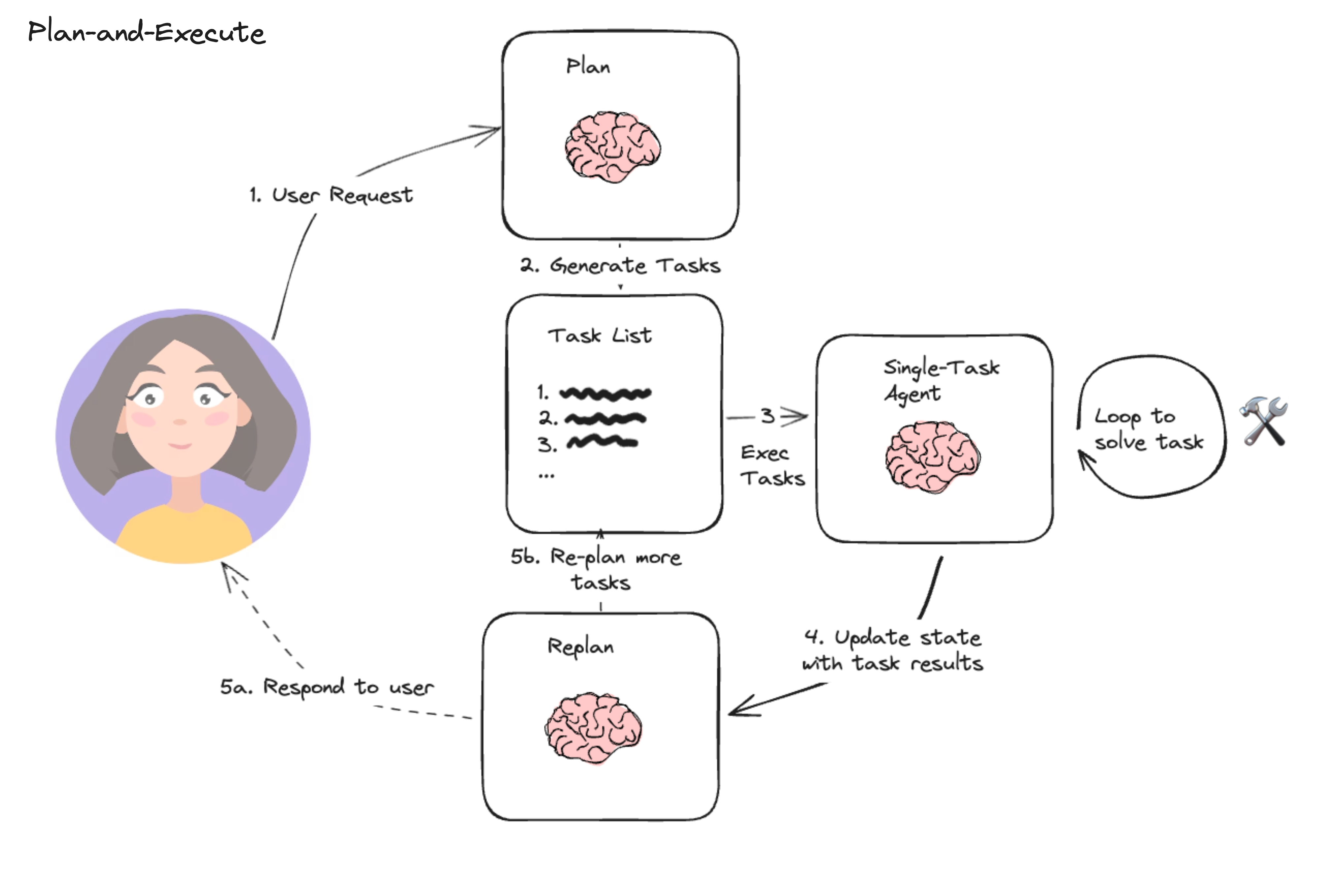
The core idea is simple yet powerful: divide the agent's work into two distinct components: a Planner and an Executor.
- Planner: A dedicated LLM call that takes the user's high-level objective and breaks it down into a concrete, multi-step plan.
- Executor: An agent (or set of tools) responsible for carrying out each individual step of the plan.
This separation allows the agent to "think through" the entire problem first, creating a more coherent strategy before taking any action. If the plan fails or needs adjustment, a Replanner can be invoked to modify the plan based on the results of the executed steps.
This workflow is visualized well in the following diagram:
Implementing a Planning Agent with LangGraph
Now, let's put this theory into practice. We'll use LangGraph, a library for building stateful, multi-actor applications with LLMs. Its graph-based structure is perfect for representing the cycles in agentic workflows like planning and replanning.
The following video will guide you through building a Plan-and-Execute agent from scratch.
The video 'LangGraph: Planning Agents' from the official LangChain channel provides a clear, code-along tutorial for what we want to achieve. We'll start by understanding the main components.
First, watch from 00:37 to 03:35. This segment introduces the core modules of a plan-and-execute agent: the Planner, the Executor, and the Replanner. It sets the conceptual stage for the implementation to come.
With the core concepts in place, you're ready to build the agent. The next part of the video dives into the code. As a software engineer, you'll find the structure familiar: defining components (nodes in the graph) and the logic that connects them (edges).
Now for the hands-on part. This segment will walk you through the full implementation.
Watch from 04:06 to 10:21. Follow along with the code. Pay close attention to: The Planner Prompt: Notice how the prompt is specifically engineered to make the LLM output a structured list of steps. The State Definition: The PlanExecute state object is used to pass information (input, plan, past steps) between the nodes of the graph. Graph Construction: See how workflow.add_node defines the planner and executor, and workflow.add_conditional_edges creates the replanning loop. This video provides links to the notebook, so you can run the code yourself.
After following this tutorial, you will have a working agent that can take a complex request, generate a step-by-step plan, and begin executing it.
Variations on Planning: More Advanced Strategies
The basic Plan-and-Execute model is a huge improvement over simple ReAct agents, but the field is evolving rapidly. More advanced strategies build on this foundation to add efficiency and capability. Let's briefly look at two such strategies.
1. Orchestrator-Worker: Dynamic and Parallel Execution
Instead of a linear plan, what if the planner could create a set of independent subtasks and assign them to "worker" agents to be executed in parallel? This is the "Orchestrator-Worker" pattern. It's particularly useful for tasks like generating a comprehensive report, where different sections can be researched and written concurrently.
Building Effective Agents with LangGraph
The video 'Building Effective Agents with LangGraph' explains this powerful pattern. It's analogous to a map-reduce operation or a dynamic task queue in traditional software engineering.
Watch from 13:53 to 19:39. Focus on the concept: the planner dynamically generates a list of 'report sections' (subtasks), and the system spawns an independent worker for each section. This shows how planning can lead to parallel, rather than just sequential, execution.
2. ReWOO: Planning with Variable Substitution
A limitation of the basic Plan-and-Execute agent is that the plan is static. If a later step depends on the output of an earlier one (e.g., "search for the hometown of [winner of the Super Bowl]"), the agent often needs to replan.
The ReWOO (Reasoning WithOut Observations) approach solves this by allowing the planner to use variables in its plan.
Plan-and-Execute Agents - LangChain Blog
The LangChain blog post we looked at earlier also introduces ReWOO. This is a clever optimization that makes planning more efficient.
Read the section 'Reasoning WithOut Observations'. Note how the plan includes placeholders like #E1 and #E2. This allows the executor to substitute the output of an early step directly into a later one without needing to call the planner again.
These advanced patterns show that "planning" is not a single technique but a broad design space for creating more intelligent and efficient agents.
Conclusion
In this lesson, you've taken a significant step from building reactive agents to architecting proactive, planning agents. You learned how to move beyond the limitations of the single-step ReAct loop by implementing the Plan-and-Execute paradigm.
Key Takeaways:
- Plan-and-Execute vs. ReAct: Plan-and-Execute agents first create a comprehensive, multi-step plan and then execute it, making them more efficient and effective for complex tasks than ReAct agents, which plan one step at a time.
- Core Components: The architecture consists of a Planner (to create the task list), an Executor (to carry out tasks), and often a Replanner (to adapt the plan based on new information).
- LangGraph for Implementation: LangGraph's stateful graph structure is ideal for defining the nodes (planner, executor) and edges (control flow, replanning loops) of a planning agent.
- Advanced Planning: More sophisticated strategies like the Orchestrator-Worker pattern enable parallel execution, while ReWOO's variable substitution makes sequential plans more efficient by reducing the need for replanning.
You've now implemented an agent that can create a plan. But what does a robust execution of that plan look like? How does the agent handle the outputs from multiple tool calls and synthesize them into a coherent final answer?
Our next lesson, Build an agent that executes a multi-step plan, handling tool call outputs and synthesizing a final answer, will focus on exactly that. We will dive deeper into the execution phase, ensuring our agent can not only plan its work but also work its plan to completion.