Recommended resources
The freely available resources this lesson will direct you to.
Hello! Last lesson followed a cold launch from process creation to the first displayed frame. Now consider what happens after that screen is in use: you rotate the device, leave the app, or return after Android has reclaimed its process. Those events can all lead to an Activity being created, but they do not preserve the same state.
In this lesson, you’ll build a prediction model: which objects are new, which values can be recovered, and what the user should see. That model is useful whether a screen uses Views or Compose, and it will underpin the ViewModel and state-management work later in the course.
A configuration change replaces the Activity, not necessarily its process
Rotation is the familiar example of a configuration change. Changes to language, theme, or available window space can also change the resources and layout an Activity needs. By default, Android handles such a change by destroying the current Activity instance and creating a new one for the new configuration.
Read the callback sequence in the Android Developers guide. Treat it as the normal recreation path, rather than assuming that every transition through the lifecycle has this cause.
Activity state changes | App architecture | Android Developers
Read Android Developers’ “Activity state changes” to distinguish an Activity restart from the loss of an entire app process.
In “Configuration change occurs,” read the recreation sequence. Note both sets of callbacks and what happens to the original Compose composition. Then find “System kills app process” and read the process-death warning; pay particular attention to the lack of a guaranteed onDestroy() callback.
For a foreground Activity undergoing an ordinary rotation, a useful trace is:
- The old Activity receives
onPause(),onStop(), andonDestroy(). - Android constructs a new Activity, which receives
onCreate(),onStart(), andonResume(). - The new Activity builds a UI for the new configuration.
The old Activity’s fields and its View hierarchy are gone. In Compose, the old composition is disposed of; a new composition does not inherit values held only by remember. The app process usually remains alive during this recreation, however. That distinction permits an Activity-scoped ViewModel to remain in memory and be associated with the new Activity instance.
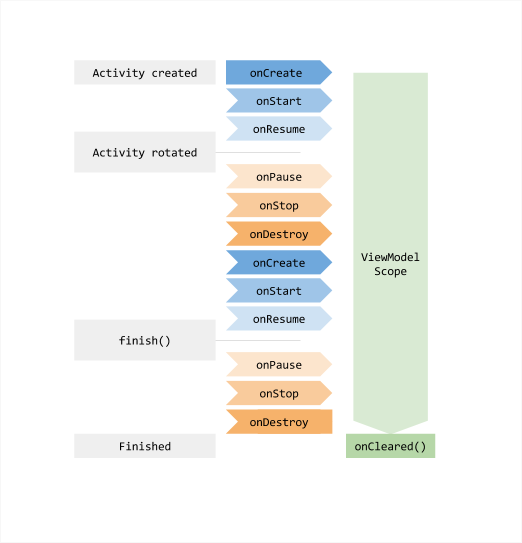
Notice what the diagram does not show: a ViewModel preserving the old Activity itself. Retaining an Activity or its Views inside a ViewModel would keep references to UI objects that should be discarded. Retain screen data, then let the new Activity or composition render it using the current configuration.
If you deliberately handle certain configuration changes yourself in the manifest, this default restart trace changes. That is a specialized choice with additional responsibilities, not a general way to make state loss disappear. For our predictions, assume the normal Activity recreation behavior.
Process death removes the objects that survived rotation
Now suppose the user leaves a search screen for another app. Your Activity is stopped, but its task may remain available for the user to return to. Android may keep the app process in memory. If it needs that memory later, it may kill the background process without calling onDestroy() at the time of the kill.
When the user returns to that retained task, Android needs a new process, a new Application object, a new Activity, and new ViewModels. This connects directly to the cold-start lesson: process initialization happens again even though, from the user’s perspective, they are returning to a screen. All ordinary in-process objects—Activity fields, remember values, ViewModel contents, and singletons—have vanished.
The Android Developers video gives a useful visual account of the two failure modes and introduces the mechanisms used to recover state.
Best practices for saving UI state on Android
Watch “Best practices for saving UI state on Android” from Android Developers to compare recreation with process loss and see why a ViewModel alone is insufficient.
Watch loss scenarios for configuration changes and background process termination, then ViewModel retention for the configuration-change case. Skip to saved-state limits and API placement; focus on why small restoration values belong in saved state, while UI-only and ViewModel-owned state use different APIs. We’ll distinguish system restoration from user dismissal more carefully below.
Here is the crucial qualification: a new process does not imply that every prior screen can or should be restored. Android can provide previously saved instance state when it recreates an eligible Activity in a retained task after system-initiated process death. It is not a promise that arbitrary in-memory changes, or every kind of termination, will be recovered. Your code must also handle a fresh launch with no saved state.
Three lifetimes, three different jobs
State survival is easier to predict when you identify where a value lives. Android Developers’ comparison is worth reading closely: it separates fast in-memory retention from a small restoration snapshot and from durable application data.
Save UI states | App architecture | Android Developers
Read Android Developers’ “Save UI states” for the survival comparison and the reasoning behind choosing each storage mechanism.
In “User expectations and system behavior,” compare “User-initiated UI state dismissal” with “System-initiated UI state dismissal”; read these scenarios. In “Options for preserving UI state,” study the comparison table, then read “Use ViewModel to handle configuration changes” and “Use saved state as backup to handle system-initiated process death” through the storage limits; finish that subsection’s advice about saving a minimal identifier. Finally, in “Use local persistence to handle process death for complex or large data” and “Managing UI state: divide and conquer,” read the search example. Focus on which values are saved and which are reconstructed.
Consider a screen that displays search results for saved articles:
| Value | Appropriate home | After rotation | After eligible system process death |
|---|---|---|---|
| Results currently held in a ViewModel | ViewModel memory | The same Activity-scoped ViewModel can retain them. | A new ViewModel must obtain them again. |
| The search query needed to recover the screen | Small saved-state value, such as one in SavedStateHandle |
Available to the new Activity and its ViewModel. | Can be restored from the saved-state snapshot. |
| Articles the user saved | Persistent storage | Still available. | Still available, provided they were actually persisted. |
A value held only in an Activity field or Compose remember |
Current Activity or composition | Lost with the old instance. | Lost with the old process. |
The table describes mechanisms, not a requirement to store every value three times. A ViewModel may hold results for quick reuse across rotation, while a saved query gives a new ViewModel enough information to reload those results after process death. Persistent storage holds the articles because the user expects them to remain even after intentionally leaving the screen or restarting the app.
The saved-state mechanism is deliberately small. It is suited to a query, selected item ID, input text, or scroll position—not a bitmap, a large result list, or a database replacement. Saved state participates in system restoration; it is not durable storage under your control. Also, saving an updated value to a SavedStateHandle does not make it an immediately durable disk write: restoration depends on the system having captured an appropriate state snapshot. If work changes a value after the Activity’s last stop, do not assume that change will be present after a sudden kill.
Predict the outcome by asking what was destroyed
Here is a compact decision procedure for an Activity screen:
- Was only the Activity recreated? Its fields, Views, and composition are new. Check for an appropriately scoped ViewModel and saved UI state to recover values.
- Was the process killed while the task remained eligible for restoration? Everything that lived solely in that process is new. Check for saved instance state and reload larger data from persistent sources.
- Was the screen completely dismissed? Treat a later visit as a fresh screen unless the product explicitly persists something. Finishing an Activity removes its associated transient saved state and clears its Activity-scoped ViewModel.
For Compose, this explains the different meanings of remember and rememberSaveable. remember retains a value across recompositions of the current composition; it does not survive replacement of that composition after Activity recreation. rememberSaveable can restore suitable small UI values across recreation and eligible system-initiated process death. If the state belongs to screen logic managed by a ViewModel, SavedStateHandle provides the corresponding restoration mechanism there. You will implement these choices in more depth in the Compose and ViewModel modules.
In a Views screen, the same lifetime rules apply even though the APIs differ. Activity code can put small values in onSaveInstanceState() and retrieve them from the restored Bundle; Views with suitable IDs can also participate in view-state restoration. Neither approach preserves an arbitrary Activity field automatically.
One last distinction prevents a common debugging mistake: rotation, system process death, and user dismissal are not interchangeable tests. Rotation normally retains the ViewModel. System process death does not, but may restore saved instance state for the retained task. Explicitly finishing a screen signals that its transient state should generally be discarded. A force-stop or a dismissal from Recents is not a reliable substitute for testing the eligible system-restoration path.
Key takeaways
A configuration change normally replaces the Activity and its UI while leaving an appropriately scoped ViewModel available. System-initiated process death removes all app-process objects; a returning screen must use eligible saved state for small restoration values and persistent sources for durable data. Complete screen dismissal has a different meaning again: transient screen state should generally start fresh.
The practical question is not “How do I keep this Activity alive?” It is “What minimum information lets a new Activity reconstruct the screen the user expects?” Next, we’ll shift from Android lifetimes to Kotlin’s type system, using sealed interfaces, data classes, and value classes to represent valid application states precisely.