Recommended resources
The freely available resources this lesson will direct you to.
Hello! Welcome to the final lesson in our module on Advanced Generics and Type Safety.
In our last lesson, we learned how to build our own generic classes and methods with multiple type parameters, like Pair<K, V>. This empowered you to create flexible and reusable components.
Today, we'll address a common and important side effect of using generics, especially when interacting with older, non-generic code: compiler warnings. Specifically, we'll focus on how to resolve common issues like "unchecked cast" warnings. Understanding these warnings is crucial for ensuring the type safety that generics promise. This lesson will equip you to write robust generic code that is free of potential runtime errors.
1. The Problem: From Runtime Errors to Compiler Warnings
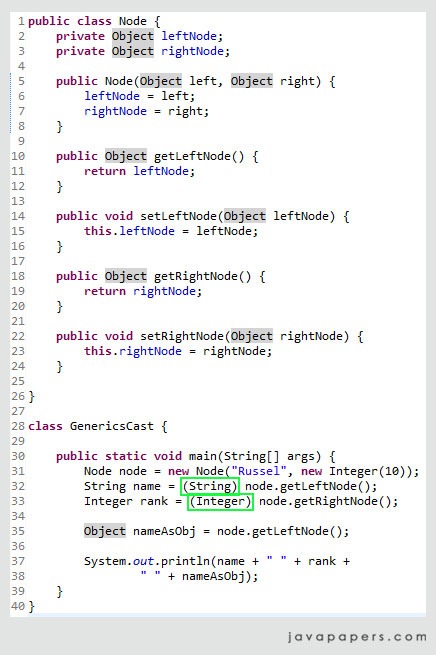
Before generics were introduced in Java 5, developers often used collections of Objects. This required explicit casting when retrieving elements, creating a risk of a ClassCastException at runtime if the actual object type didn't match the expected type.
Generics were designed to solve this very problem by moving type checking from runtime to compile time. Let's watch a short video clip that revisits this fundamental benefit.
Java Generics: Past, Present and Futurit by Richard Warburton/Raoul-Gabriel Urma
The talk 'Java Generics: Past, Present and Future' by Richard Warburton and Raoul-Gabriel Urma on the Devoxx channel gives a great historical context. This segment shows how generics prevent a ClassCastException by turning a runtime error into a compile-time error.
Please watch from 02:36 to 03:55. Notice the clear 'before' and 'after' code, where a runtime ClassCastException is transformed into a compile-time error, preventing the bad code from even running.
However, due to type erasure (which we discussed a few lessons ago) and the need for backward compatibility with pre-generics code (known as raw types), the compiler can't always guarantee type safety. When it can't, it issues an "unchecked" warning. This is the compiler telling you: "I'm allowing this operation, but I cannot verify it's type-safe. You might get a ClassCastException at runtime."
2. Understanding the "Unchecked Cast" Warning
An "unchecked cast" warning typically occurs when you cast a raw type collection to a parameterized one. Let's examine exactly what this means and why it's dangerous.
Java Warning “Unchecked Cast” | Baeldung
The article 'Java Warning “Unchecked Cast”' on Baeldung provides a clear, code-driven explanation of this warning. It will show you why the warning exists and the potential danger it signals.
Please read sections '2. What Does the "unchecked cast" Warning Mean?' and '3. Why Does the Java Compiler Warn Us?'. Focus on the example of casting a raw Map and how the ClassCastException doesn't happen at the line of the cast, but later when the incorrectly typed data is accessed.
The key takeaway from the article is that an unchecked cast creates a "ticking time bomb". The cast itself succeeds, but it pollutes the heap, and the program will fail with a ClassCastException at a later, often unrelated, point in the code when the problematic element is actually used.
Let's see this in action. Consider this code, which simulates interacting with a legacy API that returns a raw Map.
import java.util.HashMap;
import java.util.Map;

public class UncheckedWarningDemo {

    // Simulates a legacy API that returns a raw Map
    public static Map getLegacyData() {
        Map rawMap = new HashMap();
        rawMap.put("user_id", 123);
        rawMap.put("username", "test_user"); // Problematic entry: value is a String, not Integer
        return rawMap;
    }

    public static void main(String[] args) {
        // We expect a Map<String, Integer>, but get a raw Map.
        // The compiler will issue an "unchecked cast" warning on the next line.
        Map<String, Integer> userData = (Map<String, Integer>) getLegacyData();

        System.out.println("Cast seems successful. Let's process the data...");

        try {
            // The program will crash when it tries to process the "username" entry.
            for (Map.Entry<String, Integer> entry : userData.entrySet()) {
                String key = entry.getKey();
                // The JVM implicitly tries to cast the value to Integer here.
                Integer value = entry.getValue();
                System.out.println("Processing: " + key + " -> " + value);
            }
        } catch (ClassCastException e) {
            System.err.println("\n>>> BOOM! Caught a ClassCastException!");
            System.err.println("    Error: " + e.getMessage());
            System.err.println("    This happened because the raw map contained a String value where an Integer was expected.");
        }
    }
}
If you compile and run this code, you'll see the warning and then the runtime exception, proving the compiler was right to be concerned.
3. How to Properly Handle Unchecked Warnings
Now that you understand the danger, what should you do? Joshua Bloch's classic book, Effective Java, provides clear and authoritative guidance. The fundamental principle is: Eliminate every unchecked warning you can.
Item 27: Eliminate unchecked warnings | Effective Java Generics
Let's read the definitive guide on this topic from 'Effective Java'. This excerpt covers the philosophy and the practical steps for dealing with these warnings.
Read through the sections covering the core advice. Pay close attention to the three key rules for handling warnings: 1) Eliminate them if possible, 2) Suppress them with @SuppressWarnings("unchecked") only when you can prove the code is safe, and 3) Always use the smallest possible scope and add a comment explaining why the suppression is safe.
To summarize the wisdom from Effective Java:
-
First, try to eliminate the warning. The best solution is to fix the source of the problem. If you see
Set exaltation = new HashSet();, change it toSet<Lark> exaltation = new HashSet<>();. If a legacy method returns a raw type, see if it can be refactored to return a generic type. This is always the preferred approach. -
If you can't eliminate it, suppress it (safely). Sometimes, elimination isn't possible (e.g., interacting with an unchangeable third-party library or dealing with casts involving arrays of generic types). In these cases, and only if you can prove the operation is type-safe, you should suppress the warning using the
@SuppressWarnings("unchecked")annotation. -
Follow the rules for suppression:
- Minimize Scope: Apply the annotation to the smallest possible declaration. Never put it on an entire class or a long method. As shown in the article's
toArrayexample, it's often best to introduce a local variable just to attach the annotation to its declaration. - Add a Comment: Every time you use
@SuppressWarnings("unchecked"), add a comment explaining why the operation is safe. This forces you to think through the logic and helps future developers understand your code. If you can't write a good comment, the cast probably isn't safe.
- Minimize Scope: Apply the annotation to the smallest possible declaration. Never put it on an entire class or a long method. As shown in the article's
4. A Practical Example of Safe Handling
Let's apply these principles to our UncheckedWarningDemo. Blindly suppressing the warning is wrong because we can't prove the legacy data is safe. The correct approach is to handle the uncertainty programmatically.
Instead of casting directly to Map<String, Integer>, we can cast to Map<String, Object> and then manually validate the types of the values.
import java.util.HashMap;
import java.util.Map;

public class SafeHandlingDemo {

    public static Map getLegacyData() {
        Map rawMap = new HashMap();
        rawMap.put("user_id", 123);
        rawMap.put("username", "test_user");
        return rawMap;
    }

    public static Map<String, Integer> getAndValidateLegacyData() {
        // Suppress the warning for the initial cast to a map with Object values.
        // This is a reasonable compromise when dealing with a raw map.
        @SuppressWarnings("unchecked")
        // This cast is safe because any object can be a value in Map<String, Object>.
        // We will perform runtime checks on the values before putting them into our typed map.
        Map<String, Object> rawData = (Map<String, Object>) getLegacyData();

        Map<String, Integer> typedMap = new HashMap<>();
        for (Map.Entry<String, Object> entry : rawData.entrySet()) {
            // Perform a runtime type check
            if (entry.getValue() instanceof Integer) {
                typedMap.put(entry.getKey(), (Integer) entry.getValue());
            } else {
                // Handle the error: log it, skip it, or throw an exception.
                System.err.println(
                    "Warning: Skipping entry '" + entry.getKey() + "' due to incorrect type: "
                    + entry.getValue().getClass().getSimpleName()
                );
            }
        }
        return typedMap;
    }

    public static void main(String[] args) {
        Map<String, Integer> safeUserData = getAndValidateLegacyData();
        System.out.println("Safely processed data: " + safeUserData);
    }
}
This revised code is robust. It acknowledges the unchecked nature of the initial data source, suppresses the warning in a very limited and documented scope, and then enforces type safety with runtime checks, preventing any ClassCastException.
Conclusion
This lesson completes our deep dive into Java Generics. You've learned how to make your APIs more flexible with wildcards and the PECS principle, understood the implementation details of type erasure, created your own multi-parameter generic types, and now, you can confidently resolve the unchecked warnings that arise.
Key Takeaways:
- Unchecked warnings are important. They signal a potential
ClassCastExceptionwhere the compiler cannot guarantee type safety, usually when mixing raw and parameterized types. - Your primary goal is to eliminate warnings. The best fix is to parameterize your code correctly (e.g.,
List->List<String>). - Suppress warnings only as a last resort. If you must suppress a warning, you must first prove to yourself that the operation is type-safe.
- When suppressing, use
@SuppressWarnings("unchecked")on the smallest possible scope and always add a comment explaining the justification for its safety.
In our next lesson, we will begin a new module and explore a different paradigm of Java programming: Functional Programming with Lambdas. We'll start by seeing how lambda expressions can replace anonymous inner classes to make your code significantly more concise and expressive.