Recommended resources
The freely available resources this lesson will direct you to.
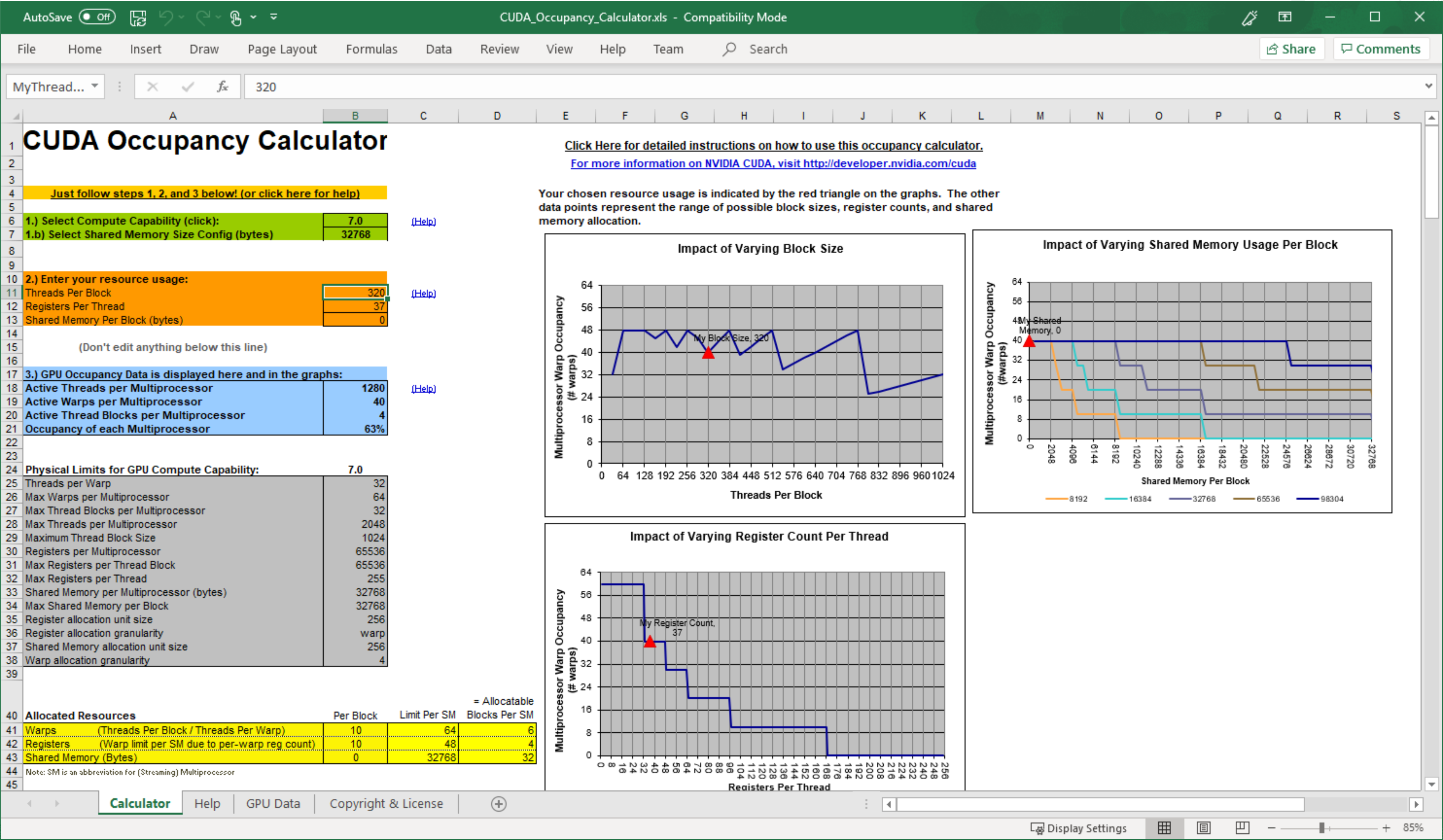
Hello! In the previous lesson, you distinguished resident warps from warps that are eligible to issue. Now we can put a number on the resident pool: given a kernel’s block size and resource usage, how many of its blocks—and therefore warps—can fit on one SM?
This lesson develops a per-SM occupancy calculation you can use to check a compiler report or profiler estimate. The result is a capacity limit, not a prediction that the kernel will run faster at the highest possible occupancy.
From block resources to resident warps
An SM admits whole thread blocks. If it has room for most, but not all, of another block’s threads, registers, and shared memory, that block cannot be partly admitted to fill the gap. Occupancy calculations therefore start with the number of blocks that fit, rather than dividing the SM’s warp capacity directly by a kernel’s warp count.
Read the CUDA Programming Guide’s treatment before working through the calculation:
2.2. Writing CUDA SIMT Kernels
The CUDA Programming Guide explains the admission limits and gives examples where threads per SM, blocks per SM, and shared memory produce different occupancy limits.
In “2.3.7. Kernel Launch and Occupancy,” read the occupancy discussion from its opening paragraph through the final paragraph about register limits. Pay particular attention to “Table 2 SM Resource Example” and the two launches with 768 and 32 threads per block: identify which limit stops additional blocks in each case. Treat the guide’s advice to seek high occupancy as a starting point, not a guarantee of higher performance.
To calculate a limit, first collect two sets of inputs:
- For the launch and compiled kernel: threads per block , registers per thread , and shared-memory bytes per block . Shared memory includes the kernel’s static allocation and any dynamic allocation requested at launch.
- For the device: maximum resident blocks , threads , and warps per SM, plus the SM’s available registers and shared memory . Check per-block limits as well: a block that exceeds one cannot launch merely because the SM-wide total is larger.
The architecture matters. The following tables let you see which values must be checked rather than assumed:
5.1. Compute Capabilities — CUDA Programming Guide
These CUDA Programming Guide tables show how residency and resource limits differ across compute capabilities.
In “5.1. Compute Capabilities,” find the hardware-limits table immediately before “Table 31 Memory Information per Compute Capability.” Read its rows from resident blocks through resident threads, including the intervening resident-warps row. Then, in “Table 31 Memory Information per Compute Capability,” read the rows from register capacity through per-block shared memory. Compare columns 8.0 and 8.6: their limits are not interchangeable, even though both have 32-thread warps.
The calculation
A block of threads contains warps, including a partially filled final warp if is not a multiple of 32. Each limit gives an independent ceiling on resident blocks:
Here and mean the resources actually allocated for a block. For a first-pass estimate, use and . Real allocation may be rounded to architectural units, so an estimate near a boundary needs checking against an occupancy tool or device calculation. If a kernel requests no shared memory, simply omit the shared-memory ceiling rather than dividing by zero.
The maximum resident block count is the smallest ceiling:
Once you have blocks, convert back to warps:
This is why you must not add the limits or average their percentages: every admitted block must satisfy every constraint simultaneously. When is a multiple of 32, a thread-based fraction gives the same occupancy as the warp-based fraction. With a partial warp, use the warp definition; scheduled warp slots and useful threads are different counts.
A worked resource budget
Use the Programming Guide’s illustrative compute-capability 10.0 resource example: 2,048 resident threads, 32 resident blocks, 65,536 registers, and 233,472 bytes of shared memory per SM. With 32 threads per warp, the 2,048-thread limit corresponds to 64 resident warps. These are inputs for this example, not universal GPU constants.
Suppose a compiled kernel launches 256 threads per block, uses 64 registers per thread, and allocates 24 KiB of shared memory per block. Assume for this first pass that the allocations match those nominal quantities. Each block has eight warps and needs registers.
| Constraint | Calculation | Blocks allowed |
|---|---|---|
| Resident-block maximum | Architectural limit | 32 |
| Threads | 8 | |
| Warps | 8 | |
| Registers | 4 | |
| Shared memory | 9 |
Registers are the binding limit. Four blocks provide 32 resident warps, so theoretical occupancy is . Having enough grid blocks to keep submitting work does not change that per-SM ceiling.
Notice what the arithmetic can reveal about a proposed change. If this kernel instead compiled to 32 registers per thread, while retaining its 256-thread block and 24 KiB shared-memory allocation, the register ceiling would rise to eight blocks. The thread and warp ceilings would then also be eight, yielding 64 resident warps and 100% theoretical occupancy. That calculation does not show that restricting registers would help: forcing a lower register count can cause spills and additional memory traffic.
Block size can create a different ceiling even with negligible register and shared-memory use. In the same illustrative architecture, a 32-thread block is one warp. Although the SM can support 64 warps, its 32-block limit admits only 32 such blocks: 50% theoretical occupancy. At the other extreme, a 768-thread block has 24 warps; only two blocks fit under the 2,048-thread limit, producing 48 resident warps, or 75% occupancy. Whole-block admission makes the result stepwise rather than smooth.
What a calculated percentage does—and does not—say
For an actual kernel, obtain register and static shared-memory usage from the compiled kernel—for example, using nvcc --resource-usage—and include the dynamic shared-memory bytes specified at launch. Obtain the applicable device limits rather than borrowing a table column from a different GPU. In particular, account for allocation granularity and the effective shared-memory configuration if a hand calculation lands close to a block-count boundary. A runtime occupancy calculation such as cudaOccupancyMaxActiveBlocksPerMultiprocessor can help check the predicted resident-block count for a particular kernel and block size.
Also separate theoretical from achieved occupancy. The calculation asks how many warps could fit on one SM at once. A small grid, a partially filled final wave of blocks, or blocks completing at different times can reduce the time-averaged number actually resident. Neither number tells you how many resident warps are eligible to issue—precisely the distinction from the previous lesson.
When reading a profiler result, a useful interpretation is therefore: Which resource sets the resident-block ceiling, and is that ceiling plausibly restricting the supply of eligible work? The first question is arithmetic. The second requires performance evidence. Raising occupancy without addressing the real wait or throughput limit may accomplish nothing, while sacrificing registers or shared memory may make the kernel slower.
Takeaways
Calculate occupancy by finding the number of whole blocks permitted by each architectural and per-block resource limit, taking the minimum, and converting those blocks to resident warps. Threads, warps, registers, shared memory, and the maximum block count can each be decisive; allocation rounding makes boundary cases worth verifying. The resulting percentage describes residency capacity, not useful issue or speed.
Next, you will map CUDA memory spaces onto caches and device memory, adding the memory-system context needed to interpret what those resident warps may be waiting for.