Recommended resources
The freely available resources this lesson will direct you to.
Hello! Welcome to the final lesson in our module on "Knowledge Transfer."
In our last session, we broke down the theory of deliberate practice, identifying its four essential components: setting specific goals, applying focused effort just outside your comfort zone, getting immediate feedback, and using repetition and refinement to improve. You learned what makes practice effective.
Today, we put that theory into action. Our learning outcome is to design a deliberate practice session to improve a specific UX skill or coding concept. We'll move from describing the ingredients to writing the recipe. This lesson is all about creating a structured, repeatable plan that you can use to systematically level up your skills, directly addressing your goal of improving how you apply new knowledge.
From Components to a Coherent Plan
Designing a practice session is like designing a user experience: it needs a clear goal, a structured flow, and a feedback mechanism. To guide us, we can use a simple framework. Think of it as a canvas for planning your practice.
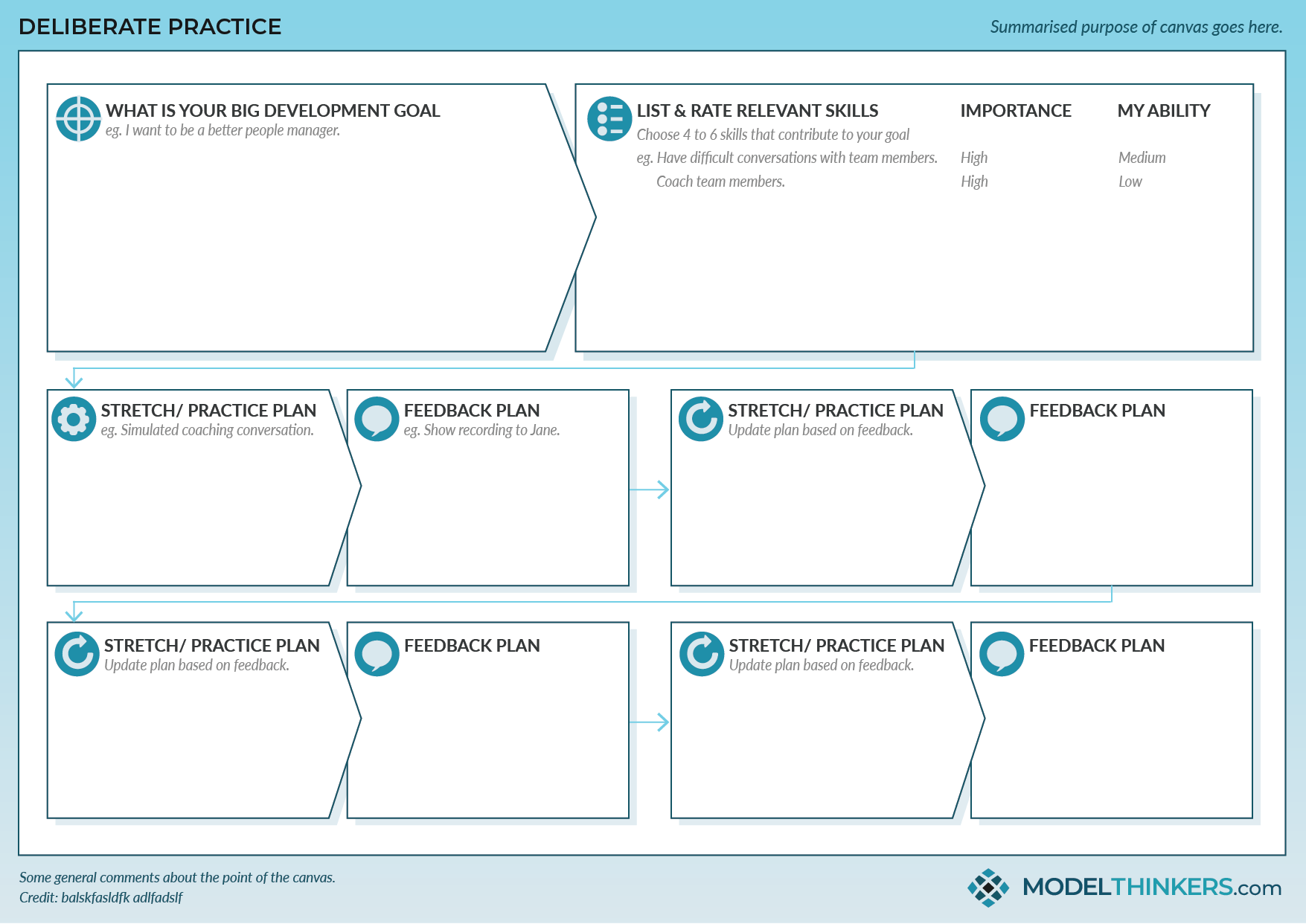
We can simplify this into a four-step process:
- Define and Deconstruct: Identify the target skill and break it down into smaller, manageable sub-skills.
- Design the 'Stretch' Activity: Create a specific, challenging task that pushes you just beyond your current ability.
- Design the Feedback Loop: Plan how you will get immediate, informative feedback on your performance.
- Plan for Refinement: Decide how you'll use that feedback to adjust and repeat the practice.
Let's walk through how to build a session using this structure.
Step 1: Define and Deconstruct the Skill
First, you need a clear, high-level goal. "Get better at UI design" is too broad. "Become faster at building responsive components in Figma" is better.
Once you have a goal, you must break the target skill down into its fundamental elements. To learn how to do this effectively, start by watching this short video.
Deliberate Practice: Achieve Mastery in Anything
The video 'Deliberate Practice: Achieve Mastery in Anything' by Sprouts explains why breaking a complex skill into smaller, drillable elements is the first step toward mastery.
Watch the segment from 00:31 to 01:02. Pay attention to how it suggests drilling each element one after the other, using the examples of tennis and a barista.
For a UI/UX designer, deconstruction might look like this:
- Target Skill: Building a responsive navigation header in Figma.
- Sub-skills:
- Using auto-layout for spacing and alignment.
- Creating component variants for different states (e.g., default, hover, active).
- Structuring layers for responsiveness (e.g., how it collapses on mobile).
- Applying styles and tokens for color and typography.
Choosing which sub-skill to focus on is the first decision in designing your session.
Step 2: Design the 'Stretch' Activity
This is where you design the core task that requires focused effort. The key is to choose an activity that is challenging but not overwhelming, following the "Goldilocks Rule" we've discussed.
For design and coding skills, one of the most effective methods is to recreate the work of experts. This gives you a clear target and a "gold standard" to compare against. Two excellent articles provide practical blueprints for how to do this in a UX/UI context.
First, read this section from 'Deliberate Practice in Design' by Brian McKenna. It describes how he improved his visual design skills by creating a test app and how you can apply the same principle to Information Architecture and Interface Design.
Read the sections 'How do we apply this to UX?' and the following paragraphs discussing interface design. Notice the two core ideas: creating a personal project to practice specific elements (like color or layout) and the 'Ben Franklin method' of recreating a well-designed product.
Learning UI design through deliberate practice
Next, let's explore a more granular approach. This article, 'Learning UI design through deliberate practice,' offers a powerful, bottom-up method for practicing UI skills.
Read the section 'Taking a Bottom-Up approach to learning UI design.' The key idea here is not just to copy a screen, but to recreate it by first analyzing and defining its foundational elements (colors, typography, spacing, etc.) as if you were building a real design system. This turns simple copying into a deep analytical exercise.
Based on these readings, here are two powerful 'stretch' activities for a designer:
- The Reverse-Engineer & Recreate: Find a well-designed screen or component (e.g., on Mobbin or from a UI kit like Untitled UI). Study it, then hide it and try to recreate it from memory. The goal is not a perfect copy but to force your brain to reconstruct the design logic.
- The Bottom-Up Build: Find a screen and, instead of just copying it visually, first create a mini-design system for it in Figma. Define the color styles, text styles, and spacing variables. Then, build the screen using only your defined styles and components. This forces you to practice system-level thinking, not just pixel-pushing.
Step 3: Design the Feedback Loop
How will you get immediate feedback? Without it, you're practicing blind. The goal is to create a tight loop between your action and the result.
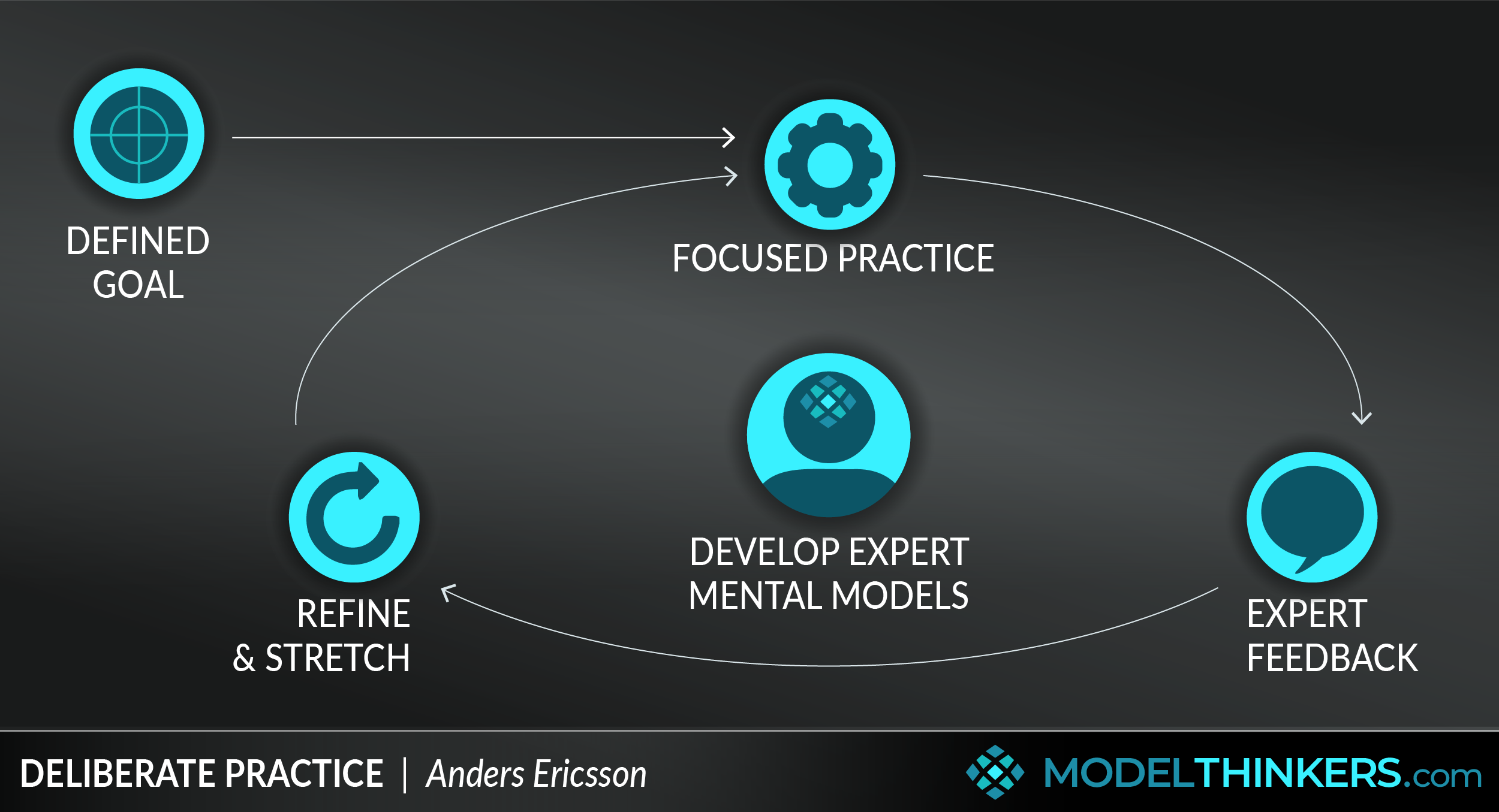
Here are some ways to get feedback for a design or coding task:
- Direct Comparison: Place your creation side-by-side with the expert original. Where are the differences? Is your spacing off by 2px? Does your component fail to resize correctly while the original does? The discrepancy is the feedback.
- The Task Itself: When coding, the feedback is often binary: the code runs or it throws an error. The linter squiggles red. In Figma, the auto-layout breaks or it doesn't.
- Expert Review: If possible, ask a senior designer or developer to review your work for 5 minutes. Ask them a specific question: "I struggled with the nesting here. Is there a more efficient way to structure these layers?"
- Self-Observation: This is a skill you build over time. As you practice, you must also learn to be your own coach.
How to Deliberate Practice | Routines and Examples
This video, 'How to Deliberate Practice', explains why self-regulation and rigorous evaluation are critical for creating your own feedback loops.
Watch the segment from 03:26 to 04:34. Focus on the concepts of setting process-oriented goals, self-observation during the work, and rigorous evaluation after the work. The key question to ask is 'How can I do it better next time?'
Step 4: Plan for Repetition and Refinement
A single practice session is just one iteration. The real growth comes from repetition and refinement. Your plan should account for what you'll do after the first attempt.
- Analyze the Feedback: Look at the gap between your work and the expert standard. What was the single biggest point of failure?
- Formulate a New Hypothesis: Based on your analysis, decide what to change. "I think if I use a wrapper frame for these two elements, the auto-layout will work as expected."
- Narrow the Next Session: Your next practice session could focus exclusively on that single point of failure. If you struggled with responsive typography, your next session might be 15 minutes of just building and testing different type scales.
This iterative cycle is what turns practice from a chore into a scientific process of improvement.
Putting It All Together: A Worked Example
Let's use our four-step framework to design a deliberate practice session.
- Skill to Improve: Creating accessible color palettes for UI design.
- 1. Define and Deconstruct:
- Goal: To be able to create a 5-shade palette for a primary color that meets WCAG AA contrast ratios for text on both the lightest and darkest shades.
- Sub-skills: Understanding contrast ratios, using a contrast checker tool, generating color shades, applying colors to components for testing.
- 2. Design the 'Stretch' Activity (60 mins):
- Task: Pick a single brand color (e.g.,
#4A90E2). - Challenge: Using a tool like Eva Design or a similar color generator, create a primary palette (50, 100, 300, 500, 700, 900). Your goal is to ensure that black text (
#000000) on the lightest shades (e.g., 100) and white text (#FFFFFF) on the darkest shades (e.g., 900) both pass a 4.5:1 contrast ratio. - Constraints: You have 3 attempts (approx. 20 mins each) to get it right.
- Task: Pick a single brand color (e.g.,
- 3. Design the Feedback Loop:
- Immediate Feedback: Use a Figma plugin (e.g., "Stark" or "Contrast") to check the contrast ratios in real-time. The plugin's pass/fail result is your feedback.
- Self-Evaluation: After each attempt, ask: Why did it fail? Was the jump between shades too large? Did I start with a mid-point color that was too light or too dark?
- 4. Plan for Refinement:
- Repetition: Perform this exercise with three different starting brand colors.
- Refinement: If you consistently fail on the light end of the palette, your next session will focus only on generating accessible light shades. You will practice generating shades 50-300 for various base colors until you develop an intuition for it.
Test your understanding!
Now it's your turn. Choose one of the following skills and briefly outline a deliberate practice session for it using the four steps we've discussed.
Option A (UX Skill): Improving the speed and quality of your user flow diagrams.
Option B (Coding Skill): Understanding and applying CSS Flexbox for layout.
For your chosen skill, describe:
- Define/Deconstruct: What is a specific, measurable goal?
- 'Stretch' Activity: What specific task would you perform?
- Feedback Loop: How would you get immediate feedback?
- Refinement: How would you refine your next session?
Show answer
Here are example answers for both options. Your answer may vary, but it should follow the same structure.
Option A: User Flow Diagrams
- Define/Deconstruct: My goal is to map the complete "add to cart" flow from an existing e-commerce app (e.g., Nike) in under 15 minutes, capturing all decision points and edge cases.
- 'Stretch' Activity: I'll set a 15-minute timer and use FigJam. I'll start from the product detail page and map out every step, screen, and user choice until the item is successfully in the cart. I will do this from memory after studying the app for 5 minutes.
- Feedback Loop: After the timer goes off, I'll compare my flow diagram side-by-side with the actual app, clicking through it on my phone. Did I miss a step? Did I forget the "select size" modal? The difference between my diagram and the real flow is my feedback.
- Refinement: I noticed I completely forgot about the "out of stock" error state. My next 15-minute session will focus only on mapping error states and edge cases for a different user flow (e.g., "password reset").
Option B: CSS Flexbox
- Define/Deconstruct: My goal is to perfectly recreate the layout of a complex component (e.g., the header of the Stripe homepage) using only Flexbox properties in a Codepen, in under 20 minutes.
- 'Stretch' Activity: I'll inspect the Stripe header to understand its structure (logo, nav links, buttons). Then, in a blank Codepen with a 20-minute timer, I will write the HTML and CSS from scratch to replicate the layout, alignment, and spacing.
- Feedback Loop: I can visually compare my Codepen to the live Stripe site. Does my nav group on the right while the logo stays on the left? Do the items center vertically? I can use the browser's developer tools to inspect both my version and the original to see which Flexbox properties differ.
- Refinement: I struggled with getting the
space-betweenjustification right while also having grouped items. My next session will be doing Flexbox Zombies or another tutorial focused specifically on thejustify-contentandalign-itemsproperties for 20 minutes.
Conclusion
You now have a practical framework for turning abstract learning goals into concrete, effective practice sessions. By consciously designing your practice, you take control of your own skill development.
Key Takeaways:
- Effective practice is designed, not accidental.
- Start by deconstructing a complex skill into its smallest testable parts.
- Design a "stretch" activity that is challenging and based on an expert model.
- Build a tight, immediate feedback loop to guide your corrections.
- Use an iterative cycle of practice, feedback, and refinement to make steady progress.
What's Next?
This lesson concludes our module on knowledge transfer. You've learned how to connect new ideas and, now, how to turn those ideas into skills.
This act of planning and evaluating your own learning is a form of metacognition—thinking about your own thinking. In our next module, we will dive deeper into this topic. The very first lesson will tackle a common pitfall for learners: the 'illusion of competence,' and how the passive learning methods we often default to can make us feel like we're learning more than we actually are.