Recommended resources
The freely available resources this lesson will direct you to.
Hello! Welcome to your next lesson.
In our last session, we did a deep dive into the approve and transferFrom pattern, understanding why it's the secure and standard way for smart contracts to interact with users' tokens. We established the "pull over push" principle as a cornerstone of DeFi interactions.
Today, we transition from theory to practice. Your learning outcome is to use the OpenZeppelin Contracts library to build a standard-compliant ERC-20 token. Instead of writing all the complex ERC-20 logic from scratch, we will leverage a professional, secure, and widely-used library, just as you would use a backend framework like Express or a library like requests in Python to avoid reinventing the wheel.
1. Why Not Build From Scratch? Introducing OpenZeppelin
In the world of blockchain, security is not just a feature; it's the foundation. A single bug in a smart contract can lead to the permanent loss of millions of dollars. This is why developers rarely write something as critical as a token standard from scratch. Instead, we rely on libraries of pre-built, audited, and battle-tested contracts.
The most trusted and widely used library in the Ethereum ecosystem is OpenZeppelin.
How To Create a Token (Step-by-Step ERC20 Code Explained)
To understand the value of OpenZeppelin, let's hear from the 'Whiteboard Crypto' channel. This short clip explains the core concept of a token and why using a library like OpenZeppelin is the professional standard.
Watch from the beginning until 02:59. Focus on two key ideas: how a token is essentially just a table mapping addresses to balances, and the role of OpenZeppelin in providing secure, standard-compliant code for free.
By using OpenZeppelin, we inherit a wealth of features and security considerations that have been vetted by experts, including the approve/transferFrom logic we just studied. This allows us to focus on our token's unique features rather than the complex boilerplate of the standard itself.
2. The Anatomy of an OpenZeppelin ERC-20 Contract
Let's start by looking at the fundamental structure of an ERC-20 token built with OpenZeppelin. Since you have a background in Java and other programming languages, the concept of inheritance will be very familiar.
The OpenZeppelin documentation itself provides the most direct and clean example of a basic ERC-20 token. Let's look at their reference implementation.
Read the section 'Constructing an ERC-20 Token Contract'. You don't need to read beyond the code block and the brief explanation of balanceOf and transfer.
Let's break down that code snippet piece by piece:
-
import {ERC20} from "@openzeppelin/contracts/token/ERC20/ERC20.sol";
This line is analogous to animportstatement in JavaScript/TypeScript or Java. It imports theERC20contract from the OpenZeppelin library that you installed in your Hardhat project in a previous module. -
contract GLDToken is ERC20 { ... }
This declares our new contract,GLDToken. Theis ERC20part signifies inheritance. OurGLDTokencontract will inherit all the public functions (transfer,approve,balanceOf, etc.) and internal logic from OpenZeppelin'sERC20contract. -
constructor(uint256 initialSupply) ERC20("Gold", "GLD") { ... }
This is the constructor, which runs only once when the contract is deployed.- It accepts an
initialSupplyso we can decide how many tokens to create at launch. - The
ERC20("Gold", "GLD")part is a call to the parentERC20contract's constructor. This is where we set our token'sname("Gold") andsymbol("GLD").
- It accepts an
-
_mint(msg.sender, initialSupply);
Inside the constructor, we call_mint. This is an internal function provided by the OpenZeppelinERC20contract._mintcreates new tokens.msg.senderis a global variable in Solidity that always refers to the address that initiated the current transaction. In this case, it's the address deploying the contract.- So, this line means: "Mint the
initialSupplyof tokens and assign them all to the contract creator's wallet."
With just these few lines, we have a fully compliant ERC-20 token.
3. Building Your First Token in a Sandbox
Before we add this to our Hardhat project, let's build and interact with this token in a simplified online environment called Remix. This lets us focus purely on the contract logic without any project configuration.
ERC20 Token Tutorial | Create Your Own Cryptocurrency
The 'Block Explorer' channel has an excellent tutorial that starts in Remix. We'll watch the first part to see our simple token contract come to life.
Watch from 03:33 to 09:40. Follow along as the presenter: Creates a new Solidity file. Imports the OpenZeppelin ERC20 contract using a GitHub URL (this is specific to Remix). Writes the contract and constructor code, very similar to what we just saw. Compiles the contract.
A Quick Detour: Solidity and Decimals
In the video, the presenter is about to deploy the contract and needs to input the initialSupply. This brings us back to a crucial concept: how numbers work in Solidity.
As we've touched on, Solidity does not have floating-point numbers or decimals. Everything is an integer. To represent fractional parts of a token (like 1.5 tokens), the ERC-20 standard uses a decimals property.
By default, OpenZeppelin's ERC20 contract sets decimals to 18. This is the most common value, matching Ether itself.
This means:
- To represent 1 token, we use the integer
1,000,000,000,000,000,000(1 followed by 18 zeros). - To represent 0.5 tokens, we use
500,000,000,000,000,000.
The decimals value is purely for display purposes in user interfaces like MetaMask or Etherscan. They read the decimals value and format the large integer into a human-readable number. All on-chain math is done with the large integers.
OpenZeppelin Docs: A Note on `decimals`
The OpenZeppelin documentation has a concise explanation of this. Reading it will solidify your understanding.
Please read the entire section 'A Note on decimals'. It clearly explains that this property is for display purposes and how on-chain arithmetic works.
Test your understanding!
You want to mint an initial supply of 50,000 tokens for your new cryptocurrency. Your token uses the standard 18 decimals. What uint256 value would you need to pass to the constructor?
Show answer
You would need to pass the number 50000 followed by 18 zeros.
In scientific notation, this is 50000 * 10**18.
The full number is: 50,000,000,000,000,000,000,000.
4. Integrating into Your Hardhat Project
Now that we understand the code and can interact with it in Remix, let's move it into the Hardhat project you set up in Module 2. This is the professional workflow you will use for all your smart contract development.
- In your Hardhat project, navigate to the
contracts/directory. - Create a new file, for example,
MyToken.sol. - Add the ERC-20 contract code we just wrote.
The key difference from the Remix example is the import statement. In Hardhat, because you've installed OpenZeppelin via npm, you use a direct path to the library.
// contracts/MyToken.sol
// SPDX-License-Identifier: MIT
pragma solidity ^0.8.20;

import "@openzeppelin/contracts/token/ERC20/ERC20.sol";

contract MyToken is ERC20 {
    constructor(uint256 initialSupply) ERC20("My Token", "MYT") {
        // We multiply the initial supply by 10**18 to account for decimals
        _mint(msg.sender, initialSupply * (10 ** decimals()));
    }
}
Notice the small but important change in the _mint call! Instead of passing a giant number in our deployment script, we can pass the human-readable amount (e.g., 1000000 for one million tokens) and let the contract itself handle the conversion by multiplying by 10 ** decimals(). The decimals() function is inherited from OpenZeppelin's ERC20 contract and returns 18 by default.
ERC20 Token Tutorial | Create Your Own Cryptocurrency
Let's return to the 'Block Explorer' video. The presenter now transitions from Remix to a local Hardhat project, which is exactly our next step. Pay close attention to how the import statement changes.
Watch from 17:16 to 23:28. This section covers setting up the file in the Hardhat project and changing the import from a URL to the local @openzeppelin/contracts path. You can ignore the parts about installing Hardhat, as you've already done this.
To compile your new contract, simply run the following command in your project's root directory:npx hardhat compile
If everything is set up correctly, you should see a success message. You have now locally compiled your first ERC-20 token contract!
5. A Look Ahead: The OpenZeppelin Wizard
Manually writing the contract is a great way to learn, but OpenZeppelin also provides a powerful tool to bootstrap your contracts even faster. The OpenZeppelin Contracts Wizard is a web-based tool that generates Solidity code based on your desired features.
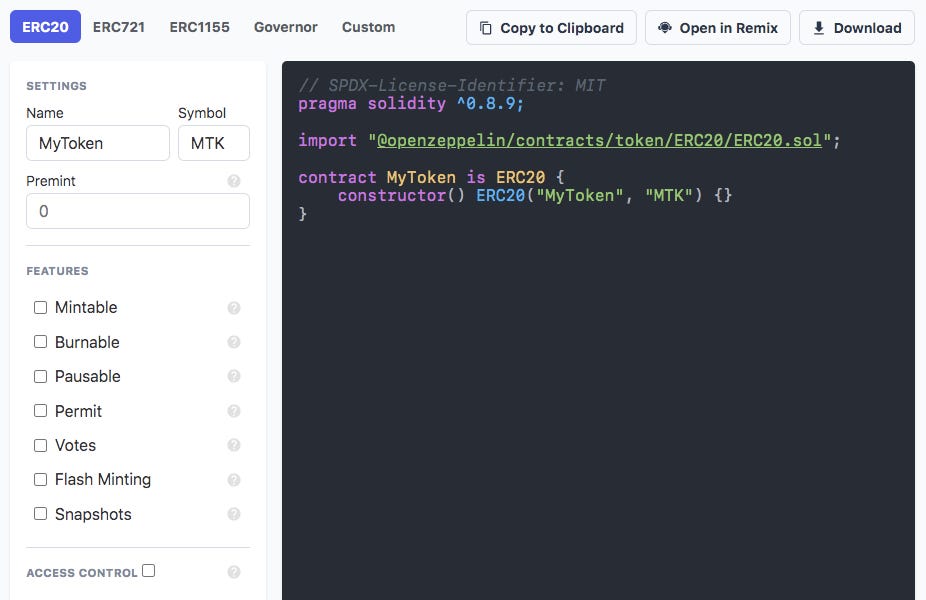
This tool perfectly demonstrates the power of OpenZeppelin's modular design. The ERC20 contract is the base, and you can easily mix in other "extensions" to add functionality. We will be using some of these extensions in our upcoming lessons.
Conclusion
Congratulations! You have successfully built your first standards-compliant ERC-20 token contract using the industry-standard OpenZeppelin library.
Key Takeaways:
- Don't Reinvent the Wheel: OpenZeppelin provides secure, audited, and standard-compliant contract implementations that are essential for professional development.
- Inheritance is Key: We use the
is ERC20syntax to inherit all the core functionality of a token. - The Constructor Sets the Stage: We use the
constructorto set the token's name, symbol, and mint the initial supply to the creator's address. - Decimals are for Display: All on-chain token math uses large integers. The
decimalsproperty (usually 18) is used by wallets and UIs to display the values correctly.
Preview of the Next Lesson:
We've set the name and symbol in the constructor, but what if we want to change the default number of decimals? In the next lesson, "Configure token metadata including its name, symbol, and decimals," we will take a closer look at these properties, learn how to override the default decimals value, and discuss why this metadata is so important for your token's identity in the broader ecosystem.