Recommended resources
The freely available resources this lesson will direct you to.
Good to see the domain model taking shape. In the previous lesson, you refactored JobApplication so it protects its state and collaborates with focused types such as ApplicationNote and StatusTransitionPolicy. The next design question is: how should an object hold many things?
For a job-application tracker, this decision appears everywhere: notes may need a meaningful sequence, skills may need to be unique, and applications may need fast lookup by ID. This lesson develops a practical way to select List, Set, or Map from the data-access requirement, rather than from habit.
By the end, you should be able to justify both the interface and a sensible common implementation, such as List with ArrayList, Set with HashSet, or Map with HashMap.
Begin with the question your code must answer
Java’s collections framework has two separate families:
- Collections store elements directly.
ListandSetbelong here. - Maps associate a unique key with a value.
The distinction is not about syntax first; it is about the operation the application needs to perform.
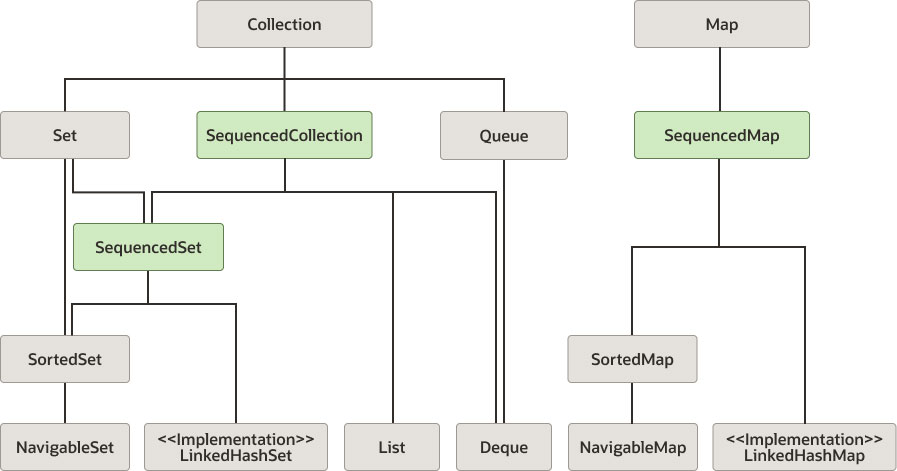
A reliable first-pass decision is:
| Requirement stated in plain language | Best starting abstraction |
|---|---|
| “Keep every item, in a meaningful order; allow repeated values.” | List<E> |
| “Keep each value only once.” | Set<E> |
| “Find a value using a distinct identifier or lookup key.” | Map<K, V> |
For example, imagine these fields in the tracker:
private final List<ApplicationNote> notes = new ArrayList<>();
private final Set<String> skills = new HashSet<>();
private final Map<UUID, JobApplication> applicationsById = new HashMap<>();
Each field has a different access story:
- A user reads notes in the order they were added.
- A user should not be able to add
"Java"as a skill five times. - The application needs to retrieve one job application when given its ID.
Do not choose ArrayList, HashSet, or HashMap merely because they are familiar. First select the interface that expresses the required behavior; then choose an implementation whose ordering and performance fit.
Storing Data Using the Collections Framework - Dev.java
Read Dev.java’s overview to frame collection choice as a requirements decision rather than a memorization task. It also clarifies why Map is separate from the Collection hierarchy.
In the section “Finding Your Way in the Collections Framework,” read from the opening discussion. Pay particular attention to the questions about iteration, keyed retrieval, index access, duplicates, sorting, and concurrent access. Then continue through the explanation that distinguishes collections from maps; queues and concurrency are useful context, but not today’s main selection problem.
Use a List when position and repetition matter
A List<E> is an ordered sequence. Every item has a zero-based position, and duplicate elements are allowed.
List<String> interviewSteps = new ArrayList<>();

interviewSteps.add("Recruiter screen");
interviewSteps.add("Technical interview");
interviewSteps.add("Technical interview");

System.out.println(interviewSteps.get(1)); // Technical interview
System.out.println(interviewSteps.size()); // 3
The second occurrence is not treated as an error, because a list models occurrences, not uniqueness. In a real tracker, repeated notes can be legitimate:
List<ApplicationNote> notes = new ArrayList<>();

notes.add(new ApplicationNote(
        "Sent follow-up email",
        LocalDate.of(2026, 4, 4)
));
notes.add(new ApplicationNote(
        "Sent follow-up email",
        LocalDate.of(2026, 4, 8)
));
Even identical text may refer to two separate actions on different dates.
ArrayList is the usual default
For an ordinary ordered collection, use the interface on the left and the common implementation on the right:
List<ApplicationNote> notes = new ArrayList<>();
ArrayList is backed by a resizable array. It is a strong default when your usual work is:
- append items with
add(item); - iterate in sequence;
- retrieve an item by position with
get(index).
Its practical performance profile is:
ArrayList operation |
Typical cost | Why |
|---|---|---|
get(index) |
The array can calculate the location from the index. | |
Append add(item) |
amortized | Usually writes at the next free position; occasionally grows its backing array. |
contains(item) |
May need to inspect each item. | |
| Insert or remove in the middle | Elements after that position must shift. |
The word amortized matters. Most appends are constant time; a resize occasionally costs more because elements are copied into a larger array. Across a long run of appends, the average cost remains constant.
Do not use a List merely because “there can be many items.” If your frequent operation is “does this exact item already exist?”, a list makes that check a linear scan.
Avoid choosing LinkedList by name alone
LinkedList is sometimes selected because inserting or deleting a linked node can be efficient. But first Java must locate that node. For typical backend code, especially code that accesses items by index or mostly appends and iterates, ArrayList is generally the better baseline.
Use LinkedList only after an actual access pattern justifies it. Later, when you study queues and stacks, ArrayDeque will be the more relevant modern choice for many front/back operations.
Java Collections Explained (with examples)
Watch “Java Collections Explained (with examples)” from Visual Computer Science for a visual model of the implementations behind the interfaces. Focus on what operations each structure makes convenient, not on memorizing every internal detail.
Watch ArrayList behavior to connect indexed access and middle removal to the underlying resizable array. Then watch HashMap lookup and Set variants. Notice the separate purposes of fast lookup, uniqueness, and predictable iteration order.
Use a Set when the collection itself enforces uniqueness
A Set<E> represents distinct elements. Adding an element equal to one already present does not create another entry.
Set<String> skills = new HashSet<>();

skills.add("Java");
skills.add("Spring Boot");
skills.add("Java");

System.out.println(skills); // Java appears once
The add method makes this visible in its return value:
boolean added = skills.add("Java");
added is true when "Java" was absent and is false when it was already present. That is useful when you need to distinguish a newly added preference from a duplicate request.
A set fits requirements such as:
- unique technology tags for an application;
- names of companies already contacted;
- permission names assigned to a user;
- IDs that have already been processed.
Equality defines “duplicate”
For objects, Set does not guess what “the same” means. A HashSet uses equals() and hashCode() to decide whether an element is already present.
Suppose you want to store skill names. Strings already implement content-based equality, so "Java" and a separately created "Java" count as duplicates. Custom classes need a deliberate equality definition.
For simple immutable value objects, a Java record gives appropriate value-based equality automatically:
public record Skill(String name) { }
Set<Skill> skills = new HashSet<>();

skills.add(new Skill("Java"));
skills.add(new Skill("Java"));

System.out.println(skills.size()); // 1
For mutable domain entities such as JobApplication, be cautious. Equality based on a database-generated ID can be awkward before persistence assigns the ID; equality based on mutable fields can also make a hash-based set unreliable after mutation. For this lesson, the key rule is:
Put an object into a
HashSetonly when its equality and hash code represent the uniqueness rule you actually want, and do not mutate fields used in that equality while it is stored there.
Common Set choices
HashSet is a good default when you need uniqueness and do not require a specific iteration order:
Set<String> skills = new HashSet<>();
Its typical add, contains, and remove operations are on average.
When order matters, select a different implementation:
| Requirement | Declaration and implementation | Iteration behavior | Typical lookup cost |
|---|---|---|---|
| Unique items; no meaningful order | Set<String> skills = new HashSet<>(); |
Unspecified order | average |
| Unique items; preserve insertion order | Set<String> skills = new LinkedHashSet<>(); |
First-added first | average |
| Unique items; always sorted | Set<String> skills = new TreeSet<>(); |
Natural or comparator order |
A HashSet is not “random”; its iteration order is simply not part of its contract. Never present HashSet results as a stable ordered list in a UI or API response unless you explicitly create an ordered result.
For a user-facing skills list, LinkedHashSet is often attractive: it rejects duplicates but retains the user’s first-added ordering.
Use a Map when you retrieve a value by key
A Map<K, V> stores associations between unique keys and values. It is not a Collection, although you can obtain collections from it using keySet(), values(), and entrySet().
Map<UUID, JobApplication> applicationsById = new HashMap<>();
This declaration says that a UUID identifies the application you want to retrieve.
UUID id = UUID.randomUUID();

JobApplication application =
        new JobApplication("Acme Labs", "Junior Java Developer");

applicationsById.put(id, application);

JobApplication found = applicationsById.get(id);
The central operation is keyed lookup:
applicationsById.get(id);
This is a much better match than searching a list every time:
// Works, but scans until it finds a match.
JobApplication found = applications.stream()
        .filter(application -> application.id().equals(id))
        .findFirst()
        .orElse(null);
Streams are useful, but they do not change the fact that this form must examine items until it finds a match. If lookup by ID is the dominant requirement, a map represents that requirement directly.
Key uniqueness is not value uniqueness
A map cannot contain the same key twice. A later put for an existing key replaces its current value.
Map<String, ApplicationStatus> statusByCompany = new HashMap<>();

statusByCompany.put("Acme Labs", ApplicationStatus.APPLIED);
statusByCompany.put("Acme Labs", ApplicationStatus.INTERVIEWING);

System.out.println(statusByCompany.get("Acme Labs"));
// INTERVIEWING
That may be exactly right for a “current status by company” lookup. It would be wrong if your tracker permits several different applications to the same company. In that case, company name is not a unique key. Use an application ID, or possibly model each company’s applications as a value collection:
Map<String, List<JobApplication>> applicationsByCompany =
        new HashMap<>();
This illustrates a key design principle:
A map key must be unique for the relationship you are modelling, not merely easy to obtain.
Map values may repeat. Several application IDs can map to applications with the same status; only the keys must be distinct.
Common Map choices
| Requirement | Implementation | Important property |
|---|---|---|
| Fast lookup by a key; no order requirement | HashMap<K, V> |
average get, put, and remove |
| Fast lookup and insertion-order iteration | LinkedHashMap<K, V> |
Predictable first-insertion order |
| Keys kept sorted, including nearest-key navigation | TreeMap<K, V> |
Sorted keys; operations |
For most small backend use cases, start here:
Map<UUID, JobApplication> applicationsById = new HashMap<>();
Use LinkedHashMap when you need to preserve the order entries were inserted. Use TreeMap when sorting by key is a real access requirement, not merely because sorted output looks convenient.
A selection routine for backend code
When a requirement arrives, translate it into one primary operation. This avoids choosing a collection based only on the stored object type.
Requirement 1: “Display each note in the order it was recorded.”
Choose a list:
List<ApplicationNote> notes = new ArrayList<>();
Why: each note is an occurrence, order matters, and duplicates may be valid.
Requirement 2: “A candidate may list a skill only once.”
Choose a set:
Set<String> skills = new LinkedHashSet<>();
Why: uniqueness is part of the model. LinkedHashSet additionally makes the display order predictable.
Requirement 3: “Find an application instantly from its application ID.”
Choose a map:
Map<UUID, JobApplication> applicationsById = new HashMap<>();
Why: the ID is a unique lookup key. The requirement is not “iterate through applications,” but “retrieve the application identified by this ID.”
Requirement 4: “Show every application ordered by most recent submission.”
Do not jump immediately to a TreeMap. The order is based on a property of the value (submittedOn), not necessarily a unique key. A natural first representation is still a list, sorted when building the view:
List<JobApplication> applications = new ArrayList<>();
In a Spring application backed by PostgreSQL, this would usually become a database query with an ORDER BY submitted_on clause rather than a long-lived in-memory TreeMap. Java collection choice and database design are related but not identical layers.
Requirement 5: “Reject a request if the email address has already been invited.”
Choose a set for membership testing:
Set<String> invitedEmails = new HashSet<>();

if (!invitedEmails.add(email)) {
    throw new IllegalArgumentException("Email has already been invited");
}
Why: add combines the uniqueness check and insertion. With a list, you would need a separate linear contains check before adding.
Code against interfaces, not implementations
As with the StatusTransitionPolicy interface from the previous lesson, declaration type communicates the required contract and avoids unnecessary coupling:
List<ApplicationNote> notes = new ArrayList<>();
Set<String> skills = new LinkedHashSet<>();
Map<UUID, JobApplication> applicationsById = new HashMap<>();
Avoid this when the extra implementation-specific API is not needed:
ArrayList<ApplicationNote> notes = new ArrayList<>();
Using List allows you to replace ArrayList later without changing callers that only need list behavior. The same applies to Set and Map.
A small caveat: select a more specific interface when the requirement itself needs it. For example, a method requiring navigation through sorted keys could accept NavigableMap<K, V>, not broad Map<K, V>. But do not narrow types prematurely.
Compact decision checklist
Before declaring a collection, ask:
-
Are repeated elements meaningful?
If yes, begin withList. -
Must each value occur at most once?
If yes, begin withSet. -
Will callers ask for a value using a separate unique key?
If yes, begin withMap. -
Does iteration order matter to the user or API contract?
ChooseArrayListfor list order,LinkedHashSetorLinkedHashMapfor insertion order, orTreeSetorTreeMapfor sorted order. -
Is fast membership or key lookup a frequent operation?
PreferHashSetorHashMap, assuming valid equality and hash-code behavior. -
Is this in-memory state or persisted application data?
AMapcan be useful as a temporary index or cache, but a database-backed Spring repository is normally the source of truth for persisted job applications.
Key takeaways
List, Set, and Map express different data-access contracts:
- Use a
Listwhen order, position, and possible duplicates matter.ArrayListis the normal default. - Use a
Setwhen uniqueness is part of the model.HashSetis the default for fast membership checks; useLinkedHashSetorTreeSetwhen ordering is required. - Use a
Mapwhen a unique key identifies the value to retrieve.HashMapis the default for fast keyed lookup.
Choose the interface from the requirement first, then choose the implementation based on ordering and access patterns. For hash-based sets and maps, equality and hash codes define what counts as the same element or key.
Next, you will use these collections as inputs to Java Stream pipelines that filter, transform, and aggregate application data.