Recommended resources
The freely available resources this lesson will direct you to.
Good to see the collections refresh turn into something practical. In the previous lesson, you chose List, Set, or Map based on the operation the application needs to support. This lesson uses those collections as sources for Java Stream pipelines.
A Stream pipeline lets you state a data-processing requirement in stages: keep the relevant items, transform them into the form you need, then produce a result such as a list, count, or sum. This is especially useful for backend tasks such as preparing response data, calculating in-memory summaries, or extracting values from a collection returned by another layer.
By the end of this lesson, you should be able to read and write a pipeline using filter, map, and a terminal aggregation operation without treating streams as mysterious syntax.
A stream is a processing pipeline, not a collection
A List<JobApplication> owns and stores application objects. Calling stream() does not copy that list into a new collection. Instead, it creates a Stream<JobApplication>: a pipeline through which the list’s elements can be processed.
A typical pipeline has three parts:
| Pipeline part | Typical operation | Purpose |
|---|---|---|
| Source | applications.stream() |
Supplies elements from a collection. |
| Intermediate operations | filter, map, sorted |
Describe transformations; each returns another stream. |
| Terminal operation | toList, count, sum |
Produces a non-stream result and starts processing. |
The source collection remains separate from the result. A well-written stream pipeline does not mutate its source.
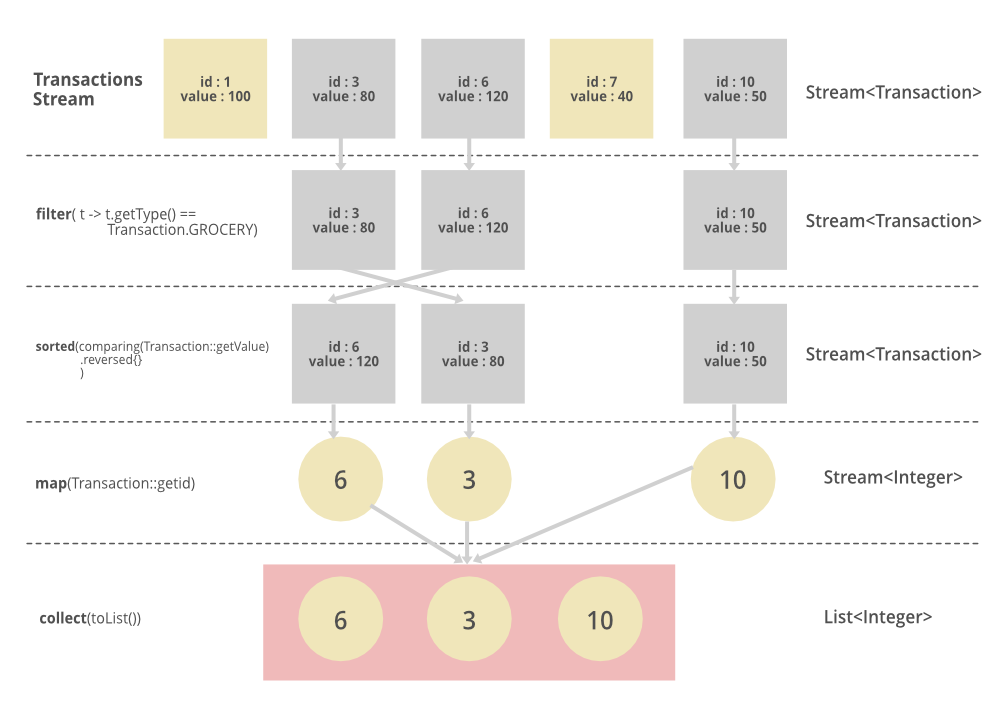
The image includes sorted() as an additional intermediate operation. For this lesson, focus on the central sequence:
- Filter the objects you want.
- Map each retained object into a useful value.
- Aggregate or collect the values into a final result.
Processing Data in Memory Using the Stream API - Dev.java
Read “Processing Data in Memory Using the Stream API” from Dev.java for the core map-filter-reduce model and the distinction between intermediate and terminal operations.
Start with the opening map-filter-reduce example and read the sales walkthrough. Identify which step selects objects, which extracts a property, and which produces one answer. Then read the sections “Optimizing the Map-Filter-Reduce Algorithm,” “Creating a Pipeline with Intermediate Operations,” and “Computing a Result with a Terminal Operation.” In particular, follow the pipeline explanation. Focus on two ideas: streams do not store their own data, and no elements are processed until a terminal operation is reached.
filter: retain elements that satisfy a rule
filter takes a Predicate<T>: a function that accepts one element and returns true or false.
truemeans the element continues through the pipeline.falsemeans that element is excluded.- The elements that remain have the same type as before.
Consider a compact application model:
import java.util.List;

enum ApplicationStatus {
    APPLIED,
    INTERVIEWING,
    REJECTED,
    OFFER
}

record JobApplication(
        String company,
        String role,
        ApplicationStatus status,
        int matchScore,
        int daysSinceApplied
) {
}
Suppose the tracker needs a list of applications where a follow-up may be appropriate: applications still in APPLIED status and at least seven days old.
List<JobApplication> followUpCandidates = applications.stream()
        .filter(application -> application.status() == ApplicationStatus.APPLIED)
        .filter(application -> application.daysSinceApplied() >= 7)
        .toList();
Both filter operations work on JobApplication values:
| Stage | Element type | Effect |
|---|---|---|
applications.stream() |
Stream<JobApplication> |
All applications enter the pipeline. |
First filter |
Stream<JobApplication> |
Keeps only APPLIED applications. |
Second filter |
Stream<JobApplication> |
Keeps only applications at least seven days old. |
toList() |
List<JobApplication> |
Materializes the retained applications as a result. |
For enum values, use ==, as shown above. For String content, use .equals() or a null-safe form such as:
.filter(application -> "Hyderabad".equals(application.company()))
A frequent mistake is to use == for strings. That compares object references, not reliably the textual content.
Prefer clear predicates over compressed logic
This is valid but harder to scan:
.filter(application ->
        application.status() == ApplicationStatus.APPLIED
                && application.daysSinceApplied() >= 7)
For a small rule, one combined predicate is fine. For a rule whose conditions have separate business meanings, two filters can read more naturally. The choice is about clarity, not a major performance difference.
map: transform every surviving element
While filter changes the number of elements, map changes what each element represents.
For example, the follow-up screen may only need company names:
List<String> companiesToFollowUp = applications.stream()
        .filter(application -> application.status() == ApplicationStatus.APPLIED)
        .filter(application -> application.daysSinceApplied() >= 7)
        .map(JobApplication::company)
        .toList();
The method reference:
JobApplication::company
means “given a JobApplication, call its company() accessor.” It is equivalent to:
application -> application.company()
Because JobApplication is a record, its accessor is named company(). With a conventional Java class containing getCompany(), the method reference would be:
JobApplication::getCompany
The important type transition occurs at map:
| Stage | Stream element type |
|---|---|
Before map |
JobApplication |
After map(JobApplication::company) |
String |
After toList() |
List<String> |
After the mapping stage, later operations receive strings, not applications. This is why the following is invalid:
.map(JobApplication::company)
.filter(application -> application.status() == ApplicationStatus.APPLIED)
After map, the lambda parameter is a String, so it no longer has a status() method. Put conditions that depend on application fields before mapping away from the application object.
You can map more than once when each transformation is meaningful:
List<String> normalizedCompanies = applications.stream()
        .filter(application -> application.status() == ApplicationStatus.INTERVIEWING)
        .map(JobApplication::company)
        .map(String::trim)
        .map(String::toUpperCase)
        .toList();
This does not alter the original company strings in applications. It produces a new result list containing transformed strings.
Java Streams API Explained (with examples)
Watch “Java Streams API Explained (with examples)” by Visual Computer Science for a visual demonstration of the type change between filter and map, followed by the crucial lazy-execution behavior.
Watch filtering to see a collection become a filtered list through a predicate and toList(). Continue with mapping types; focus on how extracting a property changes the stream element type. Then skip to lazy execution for the distinction between intermediate operations and the terminal operation that triggers processing.
Aggregate the pipeline into a useful answer
A terminal operation ends the pipeline. It consumes the stream and returns something that is not another stream.
There are several common kinds of result.
Collect into a list
toList() is appropriate when the requirement is “give me the matching values.”
List<String> interviewCompanies = applications.stream()
        .filter(application -> application.status() == ApplicationStatus.INTERVIEWING)
        .map(JobApplication::company)
        .toList();
For a List source, the encounter order is retained through ordinary filter and map operations. So the result follows the original list order unless you add an ordering operation such as sorted().
In modern Java, Stream.toList() returns an unmodifiable list. This is usually useful for a derived result:
interviewCompanies.add("New Company"); // UnsupportedOperationException
If a later step genuinely needs to change the result, build a mutable collection deliberately rather than assuming every returned list is mutable.
Count matching elements
When the UI needs a summary rather than the elements themselves, use count():
long activeApplicationCount = applications.stream()
        .filter(application ->
                application.status() == ApplicationStatus.APPLIED
                        || application.status() == ApplicationStatus.INTERVIEWING)
        .count();
The result is a long, not a collection. There is no reason to first create a list and then call .size() when the count is all you need.
Sum numeric values with a primitive stream
Suppose matchScore is a simple numeric score from 0 to 100 and you want the combined score of active applications.
int totalActiveMatchScore = applications.stream()
        .filter(application ->
                application.status() == ApplicationStatus.APPLIED
                        || application.status() == ApplicationStatus.INTERVIEWING)
        .mapToInt(JobApplication::matchScore)
        .sum();
mapToInt is a numeric version of map. It converts a Stream<JobApplication> into an IntStream, which has operations such as sum(), average(), min(), and max().
double averageActiveMatchScore = applications.stream()
        .filter(application ->
                application.status() == ApplicationStatus.APPLIED
                        || application.status() == ApplicationStatus.INTERVIEWING)
        .mapToInt(JobApplication::matchScore)
        .average()
        .orElse(0.0);
average() returns an OptionalDouble because an average is undefined when there are no matching elements. Here, orElse(0.0) defines a display-friendly fallback. In production code, choose a fallback that matches the business meaning; sometimes “no data” should remain visibly distinct from an actual average of zero.
Build a readable text summary
Aggregation can also mean joining many values into one string:
import static java.util.stream.Collectors.joining;

String companies = applications.stream()
        .filter(application -> application.status() == ApplicationStatus.INTERVIEWING)
        .map(JobApplication::company)
        .collect(joining(", "));
If the interview companies are "Acme" and "Orbit", companies becomes:
Acme, Orbit
Use this kind of output for logging, notifications, or simple display text. For API responses, structured JSON data is usually preferable to a formatted string.
The pipeline runs only at the terminal operation
Intermediate operations are lazy. This code describes a pipeline but does not yet process the list:
var highMatchApplications = applications.stream()
        .filter(application -> application.matchScore() >= 80)
        .map(JobApplication::company);
Processing begins only when a terminal operation is called:
List<String> companies = highMatchApplications.toList();
This design avoids unnecessary intermediate collections. Conceptually, Java can take one application from the source, test the filter, map it if it passes, and place the result into the final list.
It also means a stream is single-use:
var activeApplications = applications.stream()
        .filter(application -> application.status() == ApplicationStatus.APPLIED);

long count = activeApplications.count();

List<JobApplication> list = activeApplications.toList(); // Fails
The second terminal operation throws an IllegalStateException because count() has already consumed the stream.
When you need two results, create two pipelines from the collection:
long count = applications.stream()
        .filter(application -> application.status() == ApplicationStatus.APPLIED)
        .count();

List<String> companies = applications.stream()
        .filter(application -> application.status() == ApplicationStatus.APPLIED)
        .map(JobApplication::company)
        .toList();
For small, readable conditions, repeated pipelines are often clearer than trying to store and reuse a stream.
Pipeline order affects clarity and work performed
A good default ordering is:
- Filter out irrelevant objects early.
- Map only the values you need.
- Sort only if the result needs a particular order.
- Finish with the terminal operation that directly expresses the required result.
For example, if only a few applications are in the interview stage, filter before sorting:
List<String> sortedInterviewCompanies = applications.stream()
        .filter(application -> application.status() == ApplicationStatus.INTERVIEWING)
        .map(JobApplication::company)
        .sorted()
        .toList();
Sorting needs to consider all values that reach it. Filtering first can reduce the set that must be sorted, and it also reads like the business requirement: select interview applications, get their companies, then sort those company names.
Avoid using forEach to manually build a result outside the pipeline:
List<String> companies = new ArrayList<>();

applications.stream()
        .filter(application -> application.status() == ApplicationStatus.INTERVIEWING)
        .forEach(application -> companies.add(application.company()));
This works, but it hides the intended result in a mutable side effect. The direct version says more with less room for mistakes:
List<String> companies = applications.stream()
        .filter(application -> application.status() == ApplicationStatus.INTERVIEWING)
        .map(JobApplication::company)
        .toList();
Streams and SQL: similar questions, different layer
The underlying questions may look familiar from SQL:
| Need | Java Stream expression | SQL concept |
|---|---|---|
| Keep matching rows/items | filter(...) |
WHERE |
| Choose or derive fields | map(...) |
SELECT expressions |
| Count/sum values | count(), sum() |
COUNT, SUM |
| Order a result | sorted(...) |
ORDER BY |
The difference is where processing occurs.
Use a Java Stream when you already have an in-memory collection and need to derive values from it. For a Spring Boot application with PostgreSQL, filtering, sorting, pagination, and large aggregations over persisted job applications should usually happen in the database through a repository query. Fetching every row and filtering it in Java wastes memory and database capability.
For example, converting a small service-layer result into response-friendly strings is a reasonable Stream use. Retrieving every job application in the database just to count active ones is not.
Key takeaways
A Stream pipeline expresses processing over a data source without changing the source collection:
filteruses a boolean rule to keep selected elements; their type stays the same.maptransforms each surviving element, often changing the stream’s element type.- Terminal operations such as
toList(),count(),sum(), andcollect(...)trigger processing and produce the final result. - Use
mapToInt,mapToLong, ormapToDoublewhen numeric aggregation is needed. - Streams are lazy and single-use. Create a new stream from the collection for each independent result.
- Filter early, avoid mutation inside pipeline operations, and let the terminal operation express the result you actually need.
Next, you will focus on exception handling: preserving useful context when a Java operation fails, without swallowing the original failure or returning misleading results.