Recommended resources
The freely available resources this lesson will direct you to.
Welcome to your next lesson on advanced switching. In our previous session, you learned why Spanning Tree Protocol (STP) is essential for preventing network-crippling loops in redundant switched topologies and how RSTP improves upon it.
Today, we will dive into the mechanics of how STP works. You will learn the step-by-step process switches use to create a logical, loop-free path. This includes electing a "leader" for the network and then carefully choosing which ports will forward traffic and which will be blocked. By the end of this lesson, you will be able to describe the STP root bridge election process and the different states a port transitions through as the network converges.
1. The STP Convergence Process: An Overview
STP's primary goal is to transform a physically looped network into a logical, loop-free tree structure. It does this through a systematic, three-step election process after the switches are powered on and connected:
- Elect one Root Bridge: The switches first elect a single switch to act as the reference point, or the "root" of the tree.
- Elect Root Ports: Every other switch (non-root switch) then determines its single best path to get to the root bridge. The port on that path is called the Root Port.
- Elect Designated and Blocked Ports: Finally, on each network segment, the switches decide which port will be responsible for forwarding traffic for that segment (the Designated Port). All other ports on that segment are put into a blocking state to prevent loops.
This entire process is managed by the exchange of special messages called Bridge Protocol Data Units (BPDUs).
2. Step 1: The Root Bridge Election
The first and most important step is electing the root bridge. All subsequent decisions are made from the perspective of reaching this root bridge.
Switches determine the root bridge by comparing their Bridge IDs (BIDs). The switch with the numerically lowest BID wins the election and becomes the root bridge.
A BID is an 8-byte value composed of two main parts:
- Bridge Priority (2 bytes): A configurable value that serves as the primary component of the BID.
- MAC Address (6 bytes): The switch's unique MAC address, used as a tie-breaker if the priorities are the same.
Let's watch a short, animated explanation of this election.
Spanning Tree Protocol | CCNA - Explained
This video from PowerCert Animated Videos clearly illustrates the root bridge election.
Watch the segment on the root bridge election. Pay close attention to how the switches use their Bridge IDs, which consist of priority and MAC address, to determine the winner.
As you saw, the election process is straightforward: lowest BID wins.
A Deeper Look at the Bridge ID
In modern networks that use VLANs, the BID structure is a bit more nuanced. The 2-byte priority field is split into two components:
- A 4-bit Bridge Priority: This is the configurable part. Because it's 4 bits, its value can only be set in increments of 4096 (e.g., 0, 4096, 8192, ... 61440).
- A 12-bit Extended System ID: This field is simply the VLAN ID.
So, the formula for the priority value you'll see on a switch is:Priority = Configurable Priority + VLAN ID
By default, all Cisco switches have a configurable priority of 32768. Therefore, for VLAN 1, the default Bridge Priority portion of the BID is 32769 (32768 + 1).
The complete election logic is:
- The switch with the lowest Bridge Priority becomes the root.
- If priorities are tied, the switch with the lowest MAC address becomes the root.
Because all switches default to the same priority, the switch with the lowest MAC address often becomes the root bridge by default. This is often an older switch, which might not be the most powerful or centrally located. For this reason, network administrators usually manually configure the priority of a powerful, central switch to a lower value (e.g., 4096 or 8192) to ensure it becomes the root.
Let's dig into this structure a little more.
Free CCNA | Spanning Tree Protocol (Part 1) | Day 20 | CCNA 200-301 Complete Course
This video from Jeremy's IT Lab provides more detail on the modern Bridge ID format used with VLANs.
Watch the clip from this point. Focus on how the classic BID was updated to include the Extended System ID (VLAN ID) and how this affects the final priority value.
3. Step 2 & 3: Electing Port Roles
Once the root bridge is elected, the Spanning Tree Algorithm (STA) determines the role for every other port in the network to build the loop-free path.
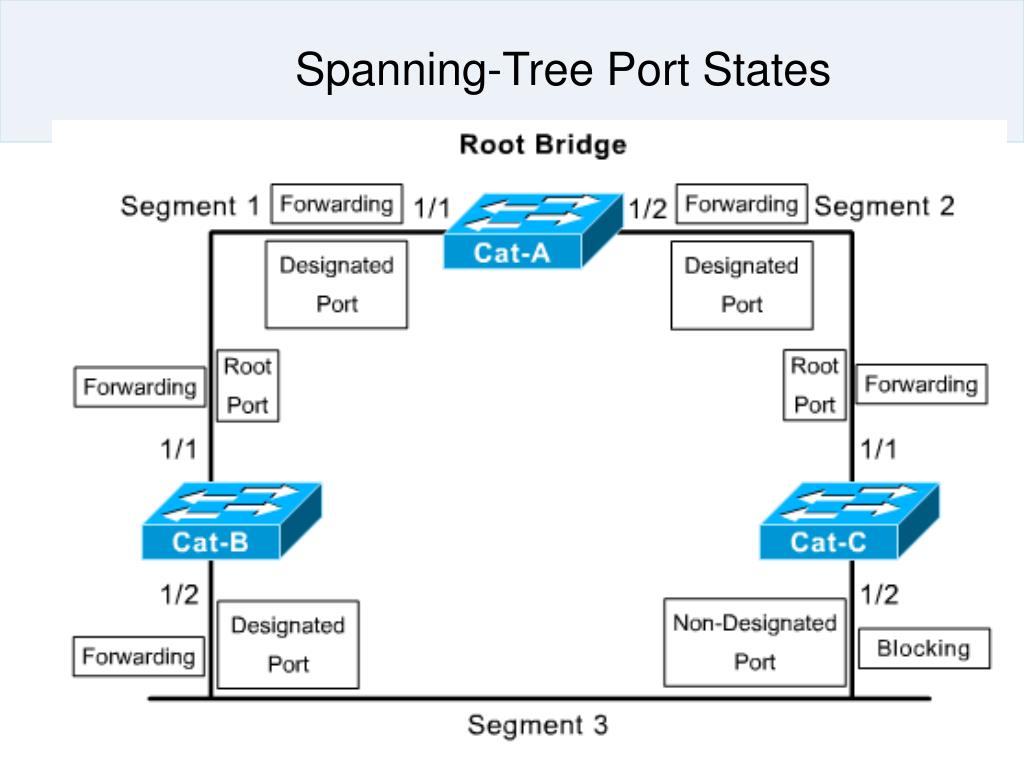
- Root Port (RP): Each non-root switch selects one Root Port. This is the port with the best path (lowest cost) to the root bridge. Root Ports are always in the forwarding state.
- Designated Port (DP): Every network segment has one Designated Port. This is the port on the segment that has the best path to the root bridge. It is responsible for forwarding traffic onto that segment. All ports on the root bridge are Designated Ports. Designated Ports are always in the forwarding state.
- Non-Designated Port (NDP) / Alternate Port: Any port that is not a Root Port or a Designated Port becomes a Non-Designated Port. These ports are put in a blocking state to prevent loops.
How are these roles chosen?
The primary criterion is the Root Path Cost, which is the cumulative cost to reach the root bridge. Each link has a cost based on its speed. The lower the cost, the better the path.
Spanning Tree Protocol Explained
This article from howtonetwork.com defines the key STP terms, including port cost.
Please read the section that starts with the bulleted list of terms. Focus on the definitions of Root port, Port cost, and Designated port. Pay special attention to the STP Port Costs table (Table 11-1), as you will need these values to calculate paths.
STP Port Costs (IEEE Specification)
| Link Speed | STP Cost |
|---|---|
| 10 Gbps | 2 |
| 1 Gbps | 4 |
| 100 Mbps | 19 |
| 10 Mbps | 100 |
A switch calculates the root path cost for each of its ports. The port with the lowest total cost becomes the Root Port.
Let's see this process in action.
Spanning Tree Protocol | CCNA - Explained
We'll return to the PowerCert video to see how Root, Designated, and Blocked ports are selected.
First, watch the segment on electing Root Ports based on path cost. Then, watch how the final blocked port is chosen to prevent the loop.
To summarize the decision process for Designated and Blocked ports on a segment:
- The port on the switch with the lowest root path cost becomes the Designated Port.
- If root path costs are tied, the port on the switch with the lowest Bridge ID becomes the Designated Port.
- The port on the other end of the link becomes the Blocked (Non-Designated) port.
The result is a fully converged, loop-free topology.
4. STP Port States
A port doesn't instantly transition from blocking to forwarding. To prevent temporary loops during a topology change, a port running classic 802.1D STP goes through several states.
This section of the howtonetwork.com article details the five port states.
Please read the section titled "Port States in STP", starting from "First State – Blocking" and ending just before "What is STP Convergence?".
Here is a summary of the states:

- Disabled: The port is administratively shut down. It does not participate in STP.
- Blocking: The port is enabled but is not forwarding data frames to prevent a loop. It only listens to incoming BPDUs. All ports start in this state. After convergence, non-designated ports remain in this state.
- Listening: The first transitional state after blocking. The switch processes BPDUs to determine the STP topology. It does not forward user data or learn MAC addresses. This state lasts for the Forward Delay timer, which is 15 seconds by default.
- Learning: The second transitional state. The switch still does not forward user data, but it does begin populating its MAC address table with source addresses from frames it receives. This state also lasts for the Forward Delay timer (15 seconds by default).
- Forwarding: The port is fully operational. It forwards user data, processes BPDUs, and learns MAC addresses. Root Ports and Designated Ports end up in this state.
This slow, timer-based process (15s listening + 15s learning = 30 seconds) is why classic STP is considered slow. As you learned in the last lesson, RSTP drastically speeds this up by using active negotiation instead of fixed timers.
Conclusion
You have now explored the core mechanics of how Spanning Tree Protocol establishes a loop-free network. You can describe the election processes and the port states involved from the moment switches are connected.
Key Takeaways:
- STP convergence follows a three-step process: electing a Root Bridge, then electing Root Ports, and finally electing Designated and Blocked Ports.
- The Root Bridge is the switch with the lowest Bridge ID (BID). The BID is composed of a configurable Priority and the switch's MAC address.
- Root Ports on non-root switches are chosen based on the lowest cumulative Root Path Cost to the root bridge.
- Designated Ports are elected on each segment, with the port on the switch that has the best path to the root winning. The losing port is Blocked.
- Ports transition through five states: Disabled, Blocking, Listening, Learning, and Forwarding. The timed listening and learning states are what make classic STP slow to converge.
In our next lesson, we will shift our focus from preventing loops to actively combining multiple links for increased bandwidth and redundancy by configuring EtherChannel.