Recommended resources
The freely available resources this lesson will direct you to.
- Goroutines: Under the Hood | Vicki Niu | Go Systems Conf SF 2020www.youtube.com
- net/http: a hung `net.Conn.Close()` in `closeConnIfStillIdle` holds `idleMu` and deadlocks all connection acquisition (Windows) · Issue #79902 · golang/go · GitHubgo.dev
- Go Wiki: Debugging performance issues in Go programsgo.dev
Hello. Last time, you measured how a CPU-bound benchmark’s aggregate throughput changed with GOMAXPROCS. A disappointing result could have several explanations: insufficient CPU capacity, contention, or goroutines waiting for work. This lesson introduces a different kind of evidence. You’ll read a goroutine dump to find where goroutines are currently blocked on locks, channels, or I/O—and learn what a snapshot cannot tell you.
A snapshot of concurrent work
A goroutine dump records the stacks of live goroutines at a particular moment. Each stack has a header indicating a state or wait reason, followed by function calls leading to that point. The wait reason tells you what kind of event the goroutine is waiting for; the stack helps you locate the operation in your code.
First, watch a short scheduler refresher. It distinguishes a goroutine that is running, runnable, or waiting, then illustrates why a network read can appear blocked to your code without necessarily occupying a Go execution slot.
Goroutines: Under the Hood | Vicki Niu | Go Systems Conf SF 2020
Watch “Goroutines: Under the Hood” by Vicki Niu, published by Hypermode, for the distinction between waiting and runnable goroutines and the intuition behind network I/O waits.
Watch goroutine states, then network waits. Focus on the distinction between a goroutine waiting for an event and one ready to run; you do not need the netpoller implementation details to read a dump.
The Go Wiki describes how to obtain a dump from a running process. Its debug=2 view is especially useful here because it shows symbolized stacks rather than only an aggregate profile.
Go Wiki: Debugging performance issues in Go programs
Read the Go Wiki’s “Goroutine Profiler” subsection to see what a goroutine profile contains and how to request readable stacks.
In “Goroutine Profiler,” read the collection guidance. Start at the subsection’s opening sentence and stop after its explanation of the browser view. Then read the two remaining “Note that” sentences in the subsection, which distinguish syscall from IO wait. You only need the goroutine-profiler subsection for this lesson.
For an instrumented HTTP process, /debug/pprof/goroutine?debug=2 can provide that view. Do not expose a diagnostic endpoint publicly merely to collect a dump; a later module covers a separately restricted diagnostic listener. For now, we can generate the same style of stack output inside a small local program.
Read from the header into the stack
A typical header begins with a goroutine number and a bracketed state, such as [chan receive] or [IO wait]. The number identifies that goroutine within the dump; it is not a persistent task identifier to build application logic around. Some dumps also show how long a goroutine has been in its state.
Use the header to find candidates, then read downward through their frames. Runtime and standard-library frames identify the mechanism of the wait. The first relevant frame in your own code tells you which call site reached it. A created by line, when present, identifies where the goroutine was launched—not where it is now blocked.
| Header or stack clue | Likely immediate wait | Question to ask in your code |
|---|---|---|
[sync.Mutex.Lock], with mutex lock frames |
Acquiring a mutex | Which operation holds or repeatedly acquires this lock? |
[chan receive] |
Receiving from a channel | Which sender can provide a value or close the channel? |
[chan send] |
Sending to a channel | Which receiver can take a value or free buffer space? |
[IO wait], with net or internal/poll frames |
Network I/O readiness | Which connection or listener is involved, and should it still be waiting? |
These are clues, not verdicts. An HTTP server’s goroutine waiting in Accept can be entirely healthy. A worker waiting to receive its next job can be healthy too. Conversely, a receiver that remains blocked after all possible senders have exited is a strong lead for a leak. You must interpret the stack in light of the program’s intended lifecycle.
Some headers are less specific: a select wait requires you to inspect the select cases in your source; semacquire can involve synchronization beyond a simple mutex. A syscall state is not interchangeable with IO wait. Read the call stack rather than classifying a goroutine from one word alone.
The following grouped view illustrates why counts and locations together are useful:
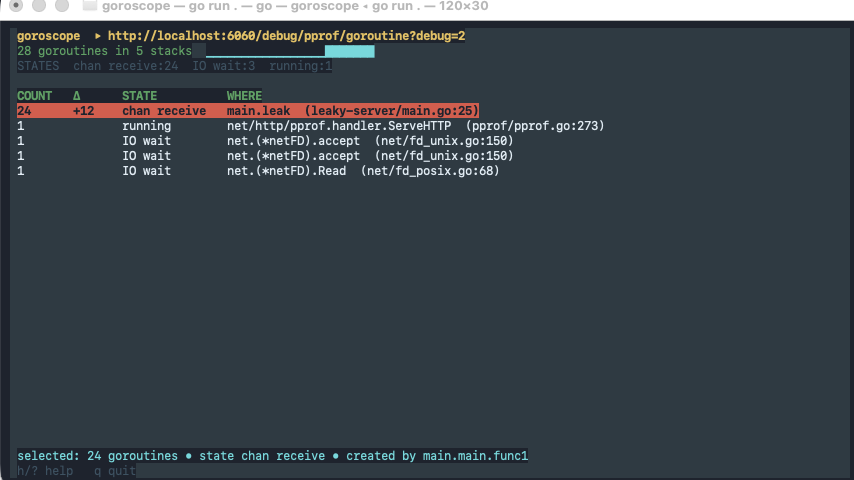
The +12 and grouped columns belong to the viewer shown in the image; they are not fields you should expect in every raw Go dump. The useful observation is that many goroutines share a channel-receive location. You would inspect that receive, its possible senders, and whether the count persists or grows across snapshots.
Produce a dump with all three kinds of wait
This small program deliberately pauses four goroutines: one at a mutex, one receiving from a channel, one sending to a channel, and one accepting a local network connection. It prints a dump, then releases all four so the process can exit. The waits are intentional; the point is to recognize their locations.
In a new directory, run go mod init example.com/dumpdemo, save the following as main.go, and run go run . > goroutines.txt.
package main

import (
	"log"
	"net"
	"os"
	"runtime/pprof"
	"sync"
	"time"
)

func main() {
	ln, err := net.Listen("tcp", "127.0.0.1:0")
	if err != nil {
		log.Fatal(err)
	}

	var mu sync.Mutex
	mu.Lock() // Main holds the lock until after the dump.

	receiveCh := make(chan int)
	sendCh := make(chan int)
	ready := make(chan struct{}, 4)

	var wg sync.WaitGroup
	wg.Add(4)

	go func() {
		defer wg.Done()
		ready <- struct{}{}
		mu.Lock()
		mu.Unlock()
	}()

	go func() {
		defer wg.Done()
		ready <- struct{}{}
		<-receiveCh
	}()

	go func() {
		defer wg.Done()
		ready <- struct{}{}
		sendCh <- 42
	}()

	go func() {
		defer wg.Done()
		ready <- struct{}{}
		conn, err := ln.Accept()
		if err == nil {
			_ = conn.Close()
		}
	}()

	for i := 0; i < 4; i++ {
		<-ready
	}
	// The signals precede the waits; allow time for the goroutines to park.
	time.Sleep(100 * time.Millisecond)

	if err := pprof.Lookup("goroutine").WriteTo(os.Stdout, 2); err != nil {
		log.Print(err)
	}

	mu.Unlock()
	receiveCh <- 1
	<-sendCh
	_ = ln.Close()
	wg.Wait()
}
Open goroutines.txt and scan its goroutine ... headers. Expect a mutex wait, a channel receive, a channel send, and usually an IO wait associated with the listener’s Accept. Exact goroutine numbers, frame names, and some state wording vary by Go version and operating system. The short sleep makes the intended snapshot likely; the ready signals alone establish that each goroutine started, not that it has already parked.
For each candidate, find the application frame corresponding to one of the four go func() bodies. Check the neighboring frames to distinguish the channel send from the receive and to connect the I/O wait to Accept. The dump-taking goroutine will also appear: a stack snapshot includes the work of taking the snapshot.
Notice an important limit in the mutex case. The waiting goroutine’s stack shows its attempted Lock, but generally does not directly name the lock’s owner. In this program, the source tells you that main still holds mu. In an unfamiliar service, you would inspect other stacks and the relevant locking code before claiming to have identified the holder.
Likewise, the channel stacks show attempted operations, not why a counterpart is absent. The program’s code supplies that explanation: main has not yet sent on receiveCh or received from sendCh. After the dump, it performs both operations and closes the listener, allowing Wait to complete.
Turn a snapshot into a useful diagnosis
When a real service stops making progress, start with the affected operation, not necessarily the largest group in the dump. Find its goroutine’s application frame and ask what it is waiting for. Then inspect the code and other stacks that could satisfy that wait: a lock holder, channel counterpart, or I/O event. If possible, collect another dump while the symptom continues. A repeated stack at the same location is stronger evidence of a persistent stall than a single momentary wait.
Be careful about what this method measures. A dump is a snapshot of live goroutines, not a ranking of time lost at each blocking operation. Many goroutines parked in the same place may simply be idle workers. Nor does a large number of blocked goroutines imply that increasing GOMAXPROCS will help: goroutines waiting for a channel value or network event are not ready to use more CPU execution capacity.
Takeaways
To locate a blocked goroutine, read its header for the wait reason, its stack for the operation, and its application frame for the call site. Mutex, channel-send, channel-receive, and I/O waits can all be normal; their significance depends on who can unblock them and whether they persist when progress is expected. A dump tells you where goroutines are now, but not which blocking site has accumulated the most delay.
Next, you’ll capture a block profile to measure that delay and identify the blocking operation with the greatest recorded cost.