Recommended resources
The freely available resources this lesson will direct you to.
Hello. In the previous lesson, you used a goroutine dump to find where goroutines were waiting at one moment. A dump cannot tell you which wait has accumulated the most delay over a workload. Today you’ll collect a block profile and use it to identify the synchronization operation where goroutines spent the most time blocked.
From a snapshot to accumulated waiting time
A block profile records time that goroutines spend blocked at synchronization operations, including channel operations and lock acquisition. Unlike a dump, it can reveal a wait that occurs repeatedly but happens to be absent when you take a snapshot.
Watch the focused block-profiler explanation, then read the Go Wiki’s collection and interpretation guidance. The key distinction is between where a goroutine waited and what made it wait: the profile identifies the waiting call site; understanding its cause still requires inspecting the surrounding code.
GopherCon 2021: Go Profiling and Observability from Scratch - Felix Geisendörfer
Watch “Go Profiling and Observability from Scratch” from Gopher Academy for a concise explanation of what the block profiler records.
Watch block profiling. Focus on which goroutine’s stack receives the blocking sample.
Go Wiki: Debugging performance issues in Go programs
Read the Go Wiki’s “Blocking Profiler” section for the collection methods, the requirement to enable profiling, and examples of waits that may be entirely healthy.
In “Blocking Profiler,” start with the paragraph beginning “The blocking profiler shows where goroutine block waiting on synchronization primitives.” Read the profiler guidance through the paragraph about excluding uninteresting blocking. Pay particular attention to go test --blockprofile, runtime.SetBlockProfileRate, the --lines tip, and the examples involving channels and sync.WaitGroup.
Block profiling is off by default. For the benchmark below, go test -blockprofile enables it and writes the profile to a file. In a program that collects a block profile through runtime/pprof or an HTTP profiling endpoint, you must first enable sampling with runtime.SetBlockProfileRate. A rate of 1 records every blocking event, which is useful for a small experiment but can impose too much overhead on a busy service.
A recorded delay belongs to the goroutine that waited. If a receive blocks because its producer is slow, the receive site appears in the block profile. The profile does not, by itself, establish why the producer was slow.
Capture a profile with two identifiable waits
Create an isolated directory, run go mod init example.com/blockdemo, and save this file as block_test.go:
package blockdemo

import (
	"testing"
	"time"
)

func waitSlow() {
	done := make(chan struct{})
	go func() {
		time.Sleep(5 * time.Millisecond)
		close(done)
	}()
	<-done
}

func waitFast() {
	done := make(chan struct{})
	go func() {
		time.Sleep(1 * time.Millisecond)
		close(done)
	}()
	<-done
}

func BenchmarkWaits(b *testing.B) {
	for i := 0; i < b.N; i++ {
		waitSlow()
		waitFast()
	}
}
Both functions receive from a channel and have the same number of benchmark calls. Their producers deliberately close the channels after different delays, giving us a known comparison. Each receive has its own source line so that you can identify the operation, rather than merely finding a shared channel-receive function in the runtime.
Run:
go test -run '^$' -bench '^BenchmarkWaits$' -benchtime=100x -count=1 -blockprofile=block.out
This runs no ordinary tests, executes the benchmark for a fixed 100 iterations, and writes block.out. The fixed count makes the experiment quick and keeps the number of calls to each function equal. Profiling also observes activity in the test process outside your two functions, so expect some entries from the testing framework.
The profile records waits that have completed. Both channel receives finish before this benchmark returns, which makes them available for inspection in the resulting file. A goroutine still blocked indefinitely when you collect a profile calls for a goroutine dump and lifecycle investigation, not an assumption that its ongoing wait will appear as a large completed block event.
Find the highest-delay operation
Start with a report sorted by cumulative blocked time:
go tool pprof -top -cum -lines block.out
Look for waitSlow and waitFast, and compare their reported cumulative times. With this workload, the receive in waitSlow should accumulate more blocked time: it is called as often as the receive in waitFast, but its channel is closed later. Exact durations depend on timer behavior and scheduling, so treat the ordering—not a particular number—as the expected result.
Then inspect the source attribution:
go tool pprof -list=waitSlow -lines block.out
go tool pprof -list=waitFast -lines block.out
Find the <-done line in each listing. These are the blocking operations you can name in your conclusion. If a report instead highlights a runtime channel-receive function, use the application frames and line listings to distinguish which receive call site accounts for the delay.
Be precise about flat and cumulative cost. Flat cost is attributed directly to a reported location; cumulative cost includes blocking attributed to callees. A broad caller such as BenchmarkWaits can accumulate time from both functions, so it is not necessarily the single highest-delay operation. The call graph below illustrates the distinction: main.FindLoops has a much larger “of” (cumulative) figure than its own figure. Follow its calls before naming a specific blocking site.
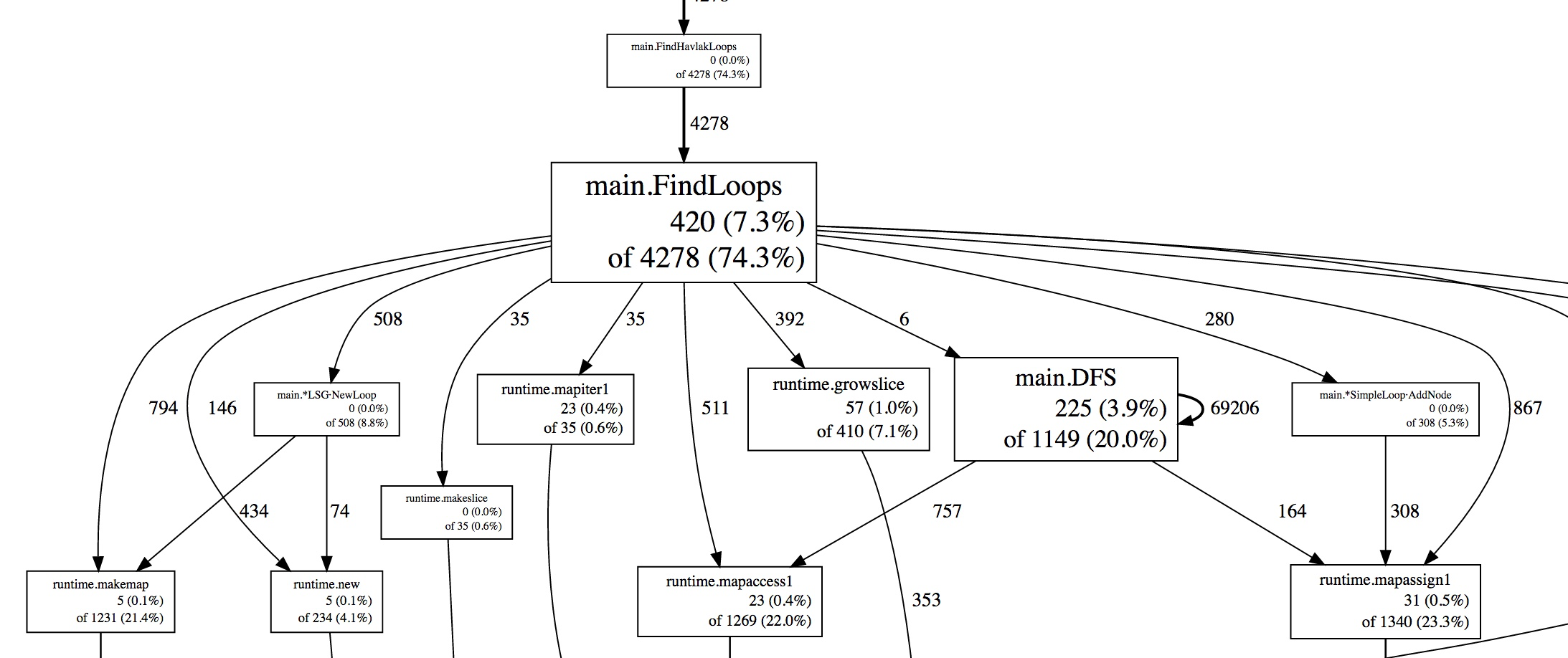
Profile time is also not CPU time. It measures goroutine waiting, and waits by different goroutines can overlap. Consequently, summed blocked time need not equal the benchmark’s elapsed time.
Interpret the result before proposing a change
In this example, the highest-delay operation is expected: waitSlow cannot receive until its producer closes the channel. The profile has successfully identified where delay accumulated, but it has not found an optimization opportunity. In a real workload, you would inspect the producer, the intended coordination, and the operation’s effect on throughput or request latency before changing anything.
That distinction matters for common results. A worker waiting for a job, a goroutine waiting on a WaitGroup, or a consumer waiting for a deliberately paced producer may have substantial blocked time without indicating a defect. Conversely, repeated waiting at a lock or a producer stalled on a full channel may merit investigation. Rank the recorded waits first; diagnose whether the highest one is harmful second.
A block profile is specifically a view of synchronization blocking, not a complete explanation of every delay. In particular, do not infer that a low block-profile total rules out network I/O or scheduler delay. Those require other evidence.
Takeaways
You captured a block profile with go test -blockprofile, compared accumulated wait time, and traced the leading application entry to a particular channel receive. The defensible finding is the operation and its recorded delay; its cause and whether it needs fixing require code and workload context.
Next, you’ll capture a mutex profile. It answers a related but different question about costly lock contention, complementing today’s view of where goroutines waited.