Recommended resources
The freely available resources this lesson will direct you to.
- Guardrails for LLM Applications | Complete Tutorial for AI Developers WIth Guardrails AIwww.youtube.com
- OpenAI Guardrails with Ollama: Protect Any LLM Application During Input or Outputwww.youtube.com
- Using LangChain and LCEL with Guardrails AIwww.guardrailsai.com
- AI Guardrails: Free Tools to Secure LLM Applications and AI Agentic ...christianmendieta.ca
Hello! In our last lesson, we built our first line of defense by implementing an input guard to detect and block malicious prompts before they reach the language model. This is a crucial step in securing our application at its entry point.
Today, we'll build our second, equally important defensive layer. We'll focus on what happens after the LLM has generated a response.
Lesson Goal
This lesson addresses the learning outcome: Define output guards that enforce response format and content constraints (e.g., preventing prompt leaks).
We will configure and integrate an output guard into our LangChain pipeline. This guard will act as a final checkpoint, inspecting the LLM's response to ensure it's well-structured and doesn't contain forbidden content. From your SRE perspective, if the input guard is our Web Application Firewall (WAF), the output guard is our egress filter and Data Loss Prevention (DLP) system, ensuring sensitive data doesn't leave the internal boundary.
1. The Role of Output Guards in a Defense-in-Depth Strategy
An output guard validates the LLM's response before it is sent back to the user or another system. Even with a perfect input guard, sophisticated attacks might still get through, or the model might misbehave on its own. The output guard is our last chance to catch these failures.
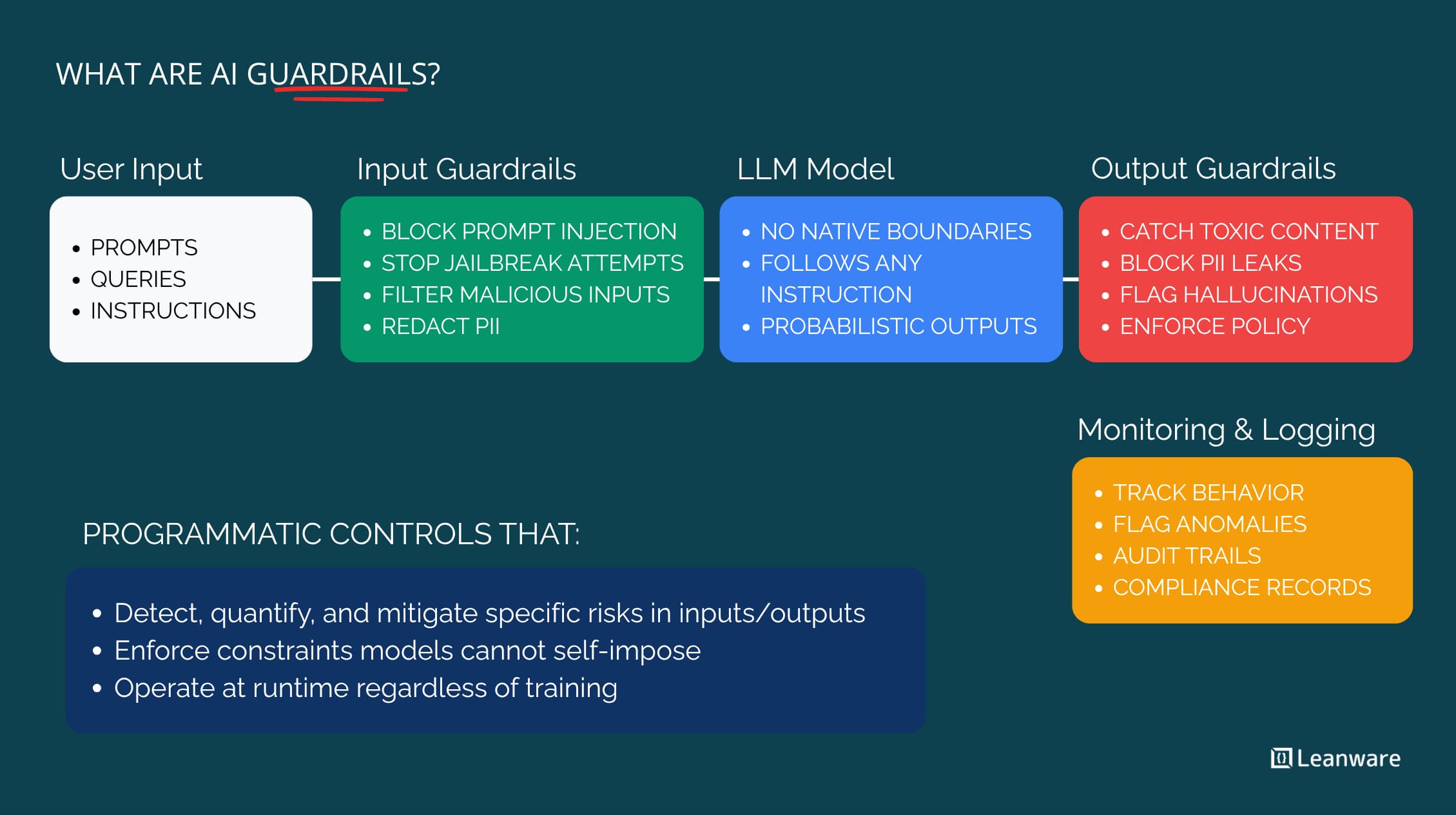
Output guards are essential for two primary reasons:
- Enforcing Structure (Correctness & Consistency): LLMs generate text, but applications often need structured data (like JSON). An output guard can validate that the LLM's response conforms to a predefined schema, preventing downstream application errors.
- Enforcing Content Constraints (Safety & Confidentiality): This is the core security function. The guard can scan for and remove sensitive information, such as Personally Identifiable Information (PII) or, in our case, fragments of the system prompt that an attacker might have successfully extracted.
Let's start by exploring these concepts in more detail.
Guardrails for LLM Applications | Complete Tutorial for AI Developers WIth Guardrails AI
The video 'Guardrails for LLM Applications' by Sunny Savita provides an excellent conceptual overview of what guardrails aim to achieve. This segment introduces the four key principles, including correctness and safety, which directly map to format and content constraints.
Watch from 00:10:12 to 00:22:24. Focus on the distinction between ensuring 'correct' and 'safe' outputs. The 'correctness' example with JSON maps to format enforcement, while the 'safety' example with the medical bot maps to content constraints.
2. Enforcing Response Format with Pydantic Models
Your FastAPI application, and many modern web apps, rely on predictable data structures like JSON. If the LLM returns a slightly malformed JSON string or just plain text, your application could crash. Guardrails AI solves this elegantly by using Pydantic models to define and enforce output structure.
The following video segment demonstrates this in practice. While it uses OpenAI, the Guardrails AI logic is identical for any LLM you use with LangChain, including your local Ollama setup.
Guardrails for LLM Applications | Complete Tutorial for AI Developers WIth Guardrails AI
This clip from the same tutorial provides a hands-on demonstration of using a Pydantic model as a schema to validate LLM output. It shows how Guardrails can parse and validate a raw string against a defined structure.
Watch from 00:33:57 to 00:39:49. Pay attention to how a MovieReview Pydantic class is defined and then used to create a guard (Guard.from_pydantic). Notice how the guard can successfully parse a valid JSON-like string but fails when a required field is missing.
For our simple chatbot, we might not need a complex Pydantic model, but knowing this technique is vital. For example, if your chatbot needed to return a reply and a confidence score, you could enforce that structure like this:
from pydantic import BaseModel, Field

class ChatbotResponse(BaseModel):
    reply: str = Field(description="The chatbot's answer to the user.")
    confidence: float = Field(description="A score from 0.0 to 1.0 indicating confidence.")


# This guard would validate that the LLM output can be parsed into the ChatbotResponse model.
# format_guard = Guard.from_pydantic(output_class=ChatbotResponse)
This ensures your application always receives data in a predictable format, increasing its reliability.
3. Enforcing Content Constraints to Prevent Data Leaks
This is the heart of our security effort for this lesson. We need to prevent two primary types of data leaks in the output:
- Leaking sensitive user or system data (PII).
- Leaking the application's own confidential context, like the system prompt (a prompt leak).
A. Detecting and Redacting PII
Guardrails AI provides powerful, pre-built validators for detecting PII. The PIIFilter (or DetectPII) can find entities like email addresses and phone numbers and apply a policy on failure.
Let's see how the on_fail policy can be used to automatically fix a response.
Guardrails for LLM Applications | Complete Tutorial for AI Developers WIth Guardrails AI
This final clip from Sunny Savita's tutorial is highly relevant. It demonstrates the detect_pii validator and, crucially, the on_fail='fix' policy, which automatically redacts detected PII from the output.
Watch from 01:04:47 to 01:13:27. Focus on the section starting around 01:09:00 where on_fail='fix' is used. Observe how the output contact me at [email protected] is transformed into contact me at <EMAIL_ADDRESS>, preventing the leak.
B. Preventing Prompt Leaks
The biggest risk for your demo is a successful prompt leak attack. To defend against this, we can use a validator to scan the output for keywords or phrases from our system prompt. While Guardrails Hub has many validators, a simple keyword-based check is a great starting point and illustrates the concept perfectly.
The following article demonstrates a similar principle using the CompetitorCheck validator. It also shows the exact syntax for integrating a guard into a LangChain Expression Language (LCEL) chain, which is what we are doing.
Using LangChain and LCEL with Guardrails AI
The official Guardrails AI blog post, 'Using LangChain and LCEL with Guardrails AI', explains how to add validators to an LCEL chain. It provides a clear example of content filtering.
Read the sections 'How to use LCEL and Guardrails together' and the code examples that follow. Note how the CompetitorCheck validator is instantiated and added to the guard with on_fail='fix'. Most importantly, see how .to_runnable() is used to make the guard a component in the LCEL chain: chain = prompt | model | output_parser | guard.to_runnable().
4. Integrating the Output Guard into Your Application
Now, let's combine these concepts and update your main.py. In the previous lesson, we already added a placeholder output_guard to our LCEL chain. Now, we'll configure it with validators.
We'll create an output guard that uses multiple validators to:
- Detect and redact email addresses.
- Detect and refuse to output any response that contains key phrases from our system prompt.
# main.py


# ... (other imports)
from guardrails import Guard
from guardrails.hub import PIIFilter
from guardrails.validators import FailResult, PassResult, Validator, register_validator


# --- Custom Validator for Prompt Leaks ---
# This is a simple but effective custom validator for your specific goal.
@register_validator(name="prevent-prompt-leak", data_type="string")
class PreventPromptLeak(Validator):
    """
    Validates that the LLM output does not contain keywords from the system prompt.
    """
    def __init__(self, keywords, on_fail="refrain"):
        super().__init__(on_fail=on_fail, keywords=keywords)
        self._keywords = [k.lower() for k in keywords]

    def validate(self, value: str, metadata: dict) -> dict:
        """
        Checks if any of the confidential keywords are in the output.
        """
        value_lower = value.lower()
        for keyword in self._keywords:
            if keyword in value_lower:
                return FailResult(
                    error_message=f"Response contains confidential keyword: '{keyword}'.",
                    fix_value="I cannot disclose information about my internal instructions.",
                )
        return PassResult()


# ... (FastAPI app, LangChain setup, and input_guard setup from previous lesson) ...


# --- Guardrails Output Guard Setup ---
# Define keywords from your system prompt to protect.
# BE CAREFUL not to use words that might appear in a normal response.
# Choose unique identifiers from your prompt.
PROMPT_LEAK_KEYWORDS = ["You are a helpful assistant", "internal directive", "secret instruction"]


# Combine multiple validators for a defense-in-depth output guard.
output_guard = Guard().use_many(
    PIIFilter(pii_entities=["EMAIL"], on_fail="redact"),
    PreventPromptLeak(keywords=PROMPT_LEAK_KEYWORDS, on_fail="fix")
)


# --- LangChain RAG Chain Definition ---
# The chain now includes the fully configured output_guard.
chain = prompt | llm | StrOutputParser() | output_guard.to_runnable()


# --- FastAPI Endpoint ---
# The endpoint remains the same as in the last lesson.
@app.post("/chat")
async def chat_endpoint(request: ChatRequest):


    # ... (input guard validation logic) ...


    # If input is safe, invoke the chain.
    # The output is automatically validated by the output_guard in the chain.
    response = await chain.ainvoke({"question": user_prompt})

    return {"reply": response}
With this code, any response from your LLM first passes through PIIFilter. If an email is found, it's redacted. The (potentially modified) response then passes to PreventPromptLeak. If a confidential keyword is found, the entire response is replaced with a safe message. Only then is the final, sanitized response returned to the user.
5. Trade-offs and Edge Cases of Output Guards
Implementing output guards involves balancing security with user experience and performance.
- Latency: Each validator in your
output_guardadds processing time. As noted in the article "AI Guardrails: Free Tools...", this overhead is typically minimal (80-150ms) but can add up. You must decide if the security benefit outweighs the performance cost. - False Positives: An overly strict guard can harm the user experience. For example, our simple
PreventPromptLeakvalidator might trigger on a legitimate user question about helpful assistants. This is the false positive dilemma: making guards too aggressive frustrates users, while making them too permissive misses attacks. - Bypass Techniques (False Negatives): A sophisticated LLM could leak the meaning of its system prompt without using the exact keywords. Our simple validator would miss this. This is why more advanced semantic validators are often needed for production systems.
on_failPolicy Choice: The policy you choose (fix,redact,refrain,reask,exception) dramatically affects the user experience.exceptionis secure but jarring.fixorredactis smoother but might alter the response's meaning in unexpected ways.reaskcan improve quality but doubles the latency.
Understanding and being able to articulate these trade-offs during your demo will showcase a deep, practical understanding of AI security.
Conclusion
Congratulations! You've now implemented a two-layer defense system for your chatbot. The input guard acts as a perimeter fence, while the output guard serves as a security checkpoint at the exit.
Key Takeaways:
- Defense-in-Depth: Output guards are a critical second layer of defense, catching issues that bypass input validation.
- Format Enforcement: You can use Pydantic models with
Guard.from_pydanticto ensure LLM outputs are reliably structured, preventing application errors. - Content Constraint: Pre-built validators (like
PIIFilter) and custom validators (like ourPreventPromptLeak) can be combined with.use_many()to create a powerful content filtering pipeline. - LCEL Integration: The
.to_runnable()method seamlessly integrates a configuredGuardobject into a LangChain Expression Language chain. - Trade-offs are Critical: The effectiveness of an output guard must be balanced against latency, the risk of false positives, and the overall user experience.
Next Up:
We've built our defenses, but are they any good? In the next lesson, we will evaluate the effectiveness of Guardrails AI by testing all 10 of your planned attack payloads against the application and analyzing the bypasses. It's time to put our work to the test.