Recommended resources
The freely available resources this lesson will direct you to.
Hello. Last lesson, you chose a solution method by diagnosing a specific point of friction rather than starting with the headline business problem. One candidate was an order exception in which staff must interpret conflicting address information. Generative AI might help with the varied wording, but “use AI for address exceptions” is not yet a usable proposal.
This lesson turns a candidate like that into a framed use case. You will specify who uses the system, the task it supports, what the AI does, what it produces, and where a person retains control. That level of precision lets others assess the proposal without assuming the AI will somehow handle the entire workflow.
Start with a person doing a particular task
A business goal such as “dispatch orders sooner” names a desired outcome, not a use case. Even “help with address exceptions” leaves important questions open: Who encounters the exception? What information do they have? What must happen before the order can proceed?
Return to the workflow map. Suppose an order exception coordinator sees an order record listing Suite 4, while a later customer email says Suite 14. The coordinator needs to establish the correct address before releasing the order. That is a narrower task than “process orders,” and it has a recognizable starting point: the conflicting information has been flagged.
Read the User Needs + Defining Success chapter of the People + AI Guidebook from Google’s People + AI Research team. It connects workflow observation to the question of whether AI adds value.
User Needs + Defining Success - People + AI Research
Read this passage to keep the use case anchored in an observed task rather than a proposed technology.
In the chapter's "Find the intersection of user needs & AI strengths" part, find the subsections "Map existing workflows" and "Decide if AI adds unique value." Read from the sentence beginning "Mapping the existing workflow for accomplishing a task" through the sentence ending "easier to build, explain, debug, and maintain": workflow and fit. Focus on why observing the current task comes before choosing an AI feature.
For framing purposes, the user is the person who would directly work with the proposed system—in this case, the coordinator. The customer benefits if the exception is resolved well, but is not the user of this particular tool. That distinction matters: the coordinator needs an internal account of the discrepancy, while the customer might receive a carefully worded question.
The task is what the user is trying to accomplish at this point in the workflow: reconcile conflicting address information sufficiently to request or confirm a correction. It is not the whole business objective, and it is not the AI action. Saying “the task is to use a chatbot” confuses the work with the proposed tool.
Before proceeding, retain the simpler-solution check from last lesson. If nearly all exceptions are just empty postal-code fields, form validation may be the answer. The generative AI candidate is for cases where meaningful details appear in varied messages and someone must interpret their relationship to the order record.
Define the intervention—and its stopping point
An intervention describes the change to the user's workflow. “Deploy a generative AI assistant” describes a technology; “when conflicting address details are flagged, present the coordinator with a draft discrepancy note and clarification message” describes an intervention. It states when help appears and what work the system takes on.
At this stage, an intervention should also name its information boundary. The assistant might use the flagged customer message and the authorized order record. It should not silently invent a corrected address, treat either source as unquestionably authoritative, or search unrelated records. These boundaries make the proposal understandable even before anyone selects a model or designs an interface.
The Guidebook distinguishes augmentation, where AI supports a person's task, from automation, where it carries out a task on their behalf. Read its discussion with the address exception in mind.
User Needs + Defining Success - People + AI Research
Continue in the same People + AI Guidebook chapter to decide how much of the task the system should perform.
In "Assess automation vs. augmentation," begin at the paragraph starting "Some tasks, people would love for AI to handle." Continue through the "When to automate" and "When to augment" subsections, stopping at the sentence that ends "the low cost of error": the distinction. Notice how the importance of personal responsibility and the consequences of a mistake affect the choice.
For this candidate, drafting is a plausible augmentation; changing the address and releasing the order without confirmation is a substantially different proposal. The latter gives the system authority to act on an unresolved fact. Be explicit about the stopping point: the assistant prepares material for review but does not update the order record, send the message, or release the order.
The output should be more concrete than “an answer.” Here, it could have two parts:
- An internal note that identifies the discrepancy and shows which supplied source contains each address.
- A customer-ready draft that asks for confirmation without asserting that either suite number is correct.
This output serves the task because the coordinator can see what needs resolving and has a starting point for the customer communication. It is also inspectable: if the note says the email lists Suite 14, the coordinator can check the email. By contrast, a polished message that simply substitutes Suite 14 would hide the unresolved issue.
Put human oversight at the actual handoff
“Human in the loop” is not a complete oversight plan. It does not say who checks the output, what they check, or what happens when it is wrong.
Watch the selected portion of IBM Technology’s Why AI Agents Need A Human in the Loop Now. The video discusses systems that can take actions across multiple steps—broader authority than the drafting assistant proposed here. Use its account of boundaries and approval points to think about where this use case should stop for review.
Why AI Agents Need A Human in the Loop Now
IBM Technology explains why human oversight needs a defined place in an AI workflow, rather than being an afterthought.
Watch setting boundaries for the distinction between automated execution and human judgment. Then watch approval points for how a person reviews a proposal before consequential action and can intervene afterward. The video's example concerns an agent; apply only the relevant design principle to a draft-producing assistant, not its full agent workflow.
In the address example, the coordinator reviews the draft before anything is sent or changed. Their review has a purpose: compare the note with the order and message, check that the draft asks about the actual conflict, correct any unsupported wording, and decide whether more information is needed. If the source material is too ambiguous, the coordinator handles the exception through the existing clarification route rather than treating the draft as a resolution.
This is a meaningful handoff because the person has both the relevant records and the authority to decide what happens next. Oversight would be weaker if the draft arrived without its source details, or if sending were automatic and the coordinator could only inspect it afterward. Conversely, requiring line-by-line approval of every harmless internal wording suggestion might consume more time than the assistance saves. The review point should match the action's consequences.
Write a use-case frame someone else can inspect
The Generative AI Canvas organizes questions about business use, human–AI collaboration, value, impact, and other considerations. For this lesson, concentrate on its Business use and Human-AI collaboration process boxes. The remaining boxes signal work that follows a clearly framed use case; they need not all be answered now.
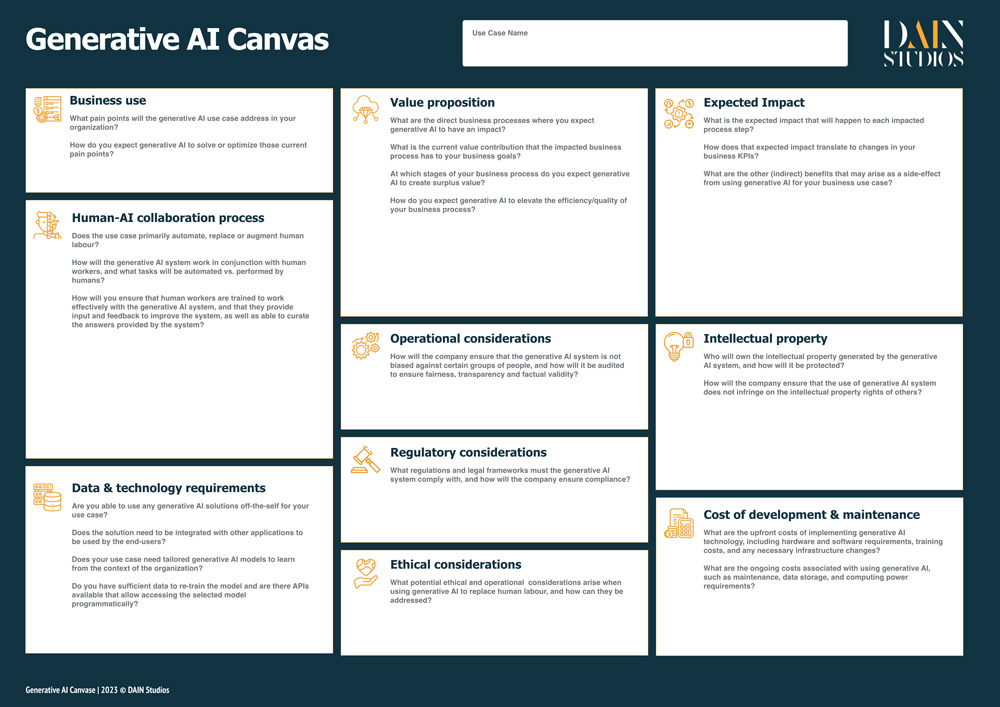
A compact frame for the candidate now reads:
| Element | Address-exception use case |
|---|---|
| User | An order exception coordinator handling a flagged discrepancy. |
| Task | Resolve conflicting address information so the order can proceed on a confirmed basis. |
| Intervention | When the conflict is flagged, a generative AI assistant uses the authorized order record and customer message to prepare a discrepancy note and clarification draft. It does not choose the correct address or take action in the order system. |
| Output | An internal note identifying each conflicting detail and its source, plus a draft message asking the customer to confirm the address. |
| Human oversight | The coordinator checks the draft against the records, edits or rejects it, and approves any outgoing message. Address changes and order release remain with the authorized human workflow. |
Compare this with “AI will resolve address exceptions automatically.” The shorter statement hides the hardest decisions: what resolve means, which source can establish the address, and who is accountable before an order moves. The framed version makes those questions visible.
It also exposes a useful scope test. If someone proposes adding automatic record updates later, that is not merely a technical enhancement to the same use case. It changes the intervention, the output's effect, and the required oversight. Reframe it explicitly before evaluating it.
A use-case frame need not promise a particular saving yet. It should, however, make the proposed change specific enough that you could observe whether the coordinator uses the drafts, whether review is workable, and whether the original task improves. The next lesson will connect that workflow change to a causal value hypothesis and an operational or financial KPI.
Key takeaways
A generative AI use case is a description of work changing hands, not a label for a tool. Specify the direct user and their task; state when and how AI intervenes; define an output that the user can inspect and use; and place human review before consequential actions. Keep the system's stopping point as clear as its capabilities.
With that frame in place, the next lesson asks a different question: If this intervention works as intended, what measurable business outcome should change, and why?