Recommended resources
The freely available resources this lesson will direct you to.
Hello! Welcome back.
In the last lesson, you built an impressive /test-and-fix command, a complete, automated workflow for debugging and validation. That skill is perfect for handling focused, short-lived tasks. Now, we're shifting our focus from the tactical to the strategic. How do you maintain control and productivity during a task that spans hours or even days, like a large-scale refactor?
This lesson introduces the first critical skill for such endeavors: mastering context management. Your learning outcome is to use the /compact command and context management strategies to handle long-running, complex refactoring tasks. Without this skill, even the most advanced AI assistant will get lost, repeat itself, and ultimately fail. By the end of this lesson, you'll have a toolkit to keep Claude Code focused, efficient, and on track throughout a major codebase transformation.
1. The Challenge of a Finite "Attention Budget"
An LLM's context window is like its working memory. Every piece of information—your prompts, the files you've loaded, the tool outputs, and the conversation history—competes for a finite amount of "attention." As you work, this window fills up, and performance inevitably degrades.
This isn't just about hitting a hard limit. Long before that, you'll notice:
- Slower response times.
- More generic or repetitive answers.
- "Forgetting" key decisions or file contents from earlier in the conversation.
- Increased token consumption and cost.
The video below gives an excellent 1-minute overview of why managing this "attention budget" is so critical.
Master Context in Claude Code in 5 Minutes
Watch this segment from GritAI Studio's 'Master Context in Claude Code in 5 Minutes' to understand the core problem of context saturation.
Watch from 00:58 to 01:52. Pay attention to the analogy of a meeting with too many people and the consequences of providing too much or too little context.
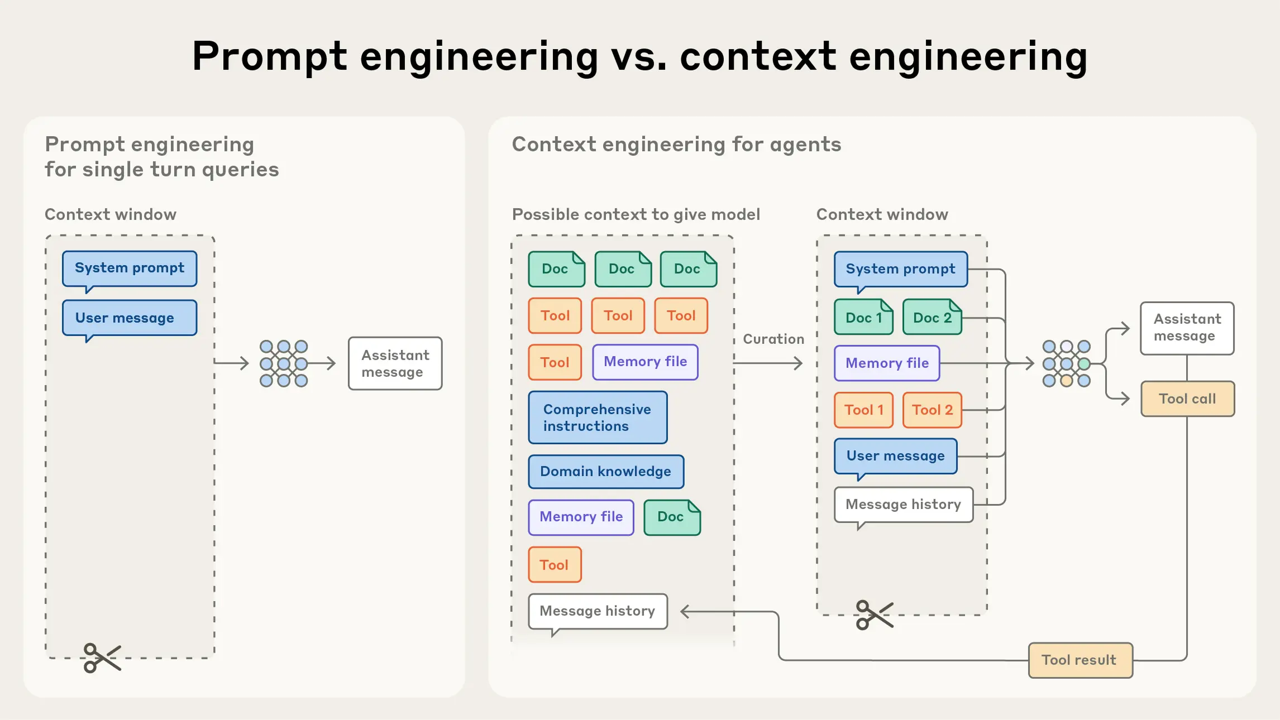
Effectively guiding Claude Code through a large task isn't just about writing good prompts; it's about curating what the model sees at every step. This discipline is often called context engineering.
2. Observability: Know Your Context
You can't manage what you can't measure. Claude Code provides two essential commands for monitoring your session's memory:
/cost: Shows a summary of token usage and the associated cost for your current session./context: Provides a detailed breakdown of where your tokens are being spent—system prompts, memory files likeCLAUDE.md, tool outputs, and the conversation history itself.
Using /context regularly is a fundamental habit for any power user. It allows you to spot and address context bloat before it becomes a problem.
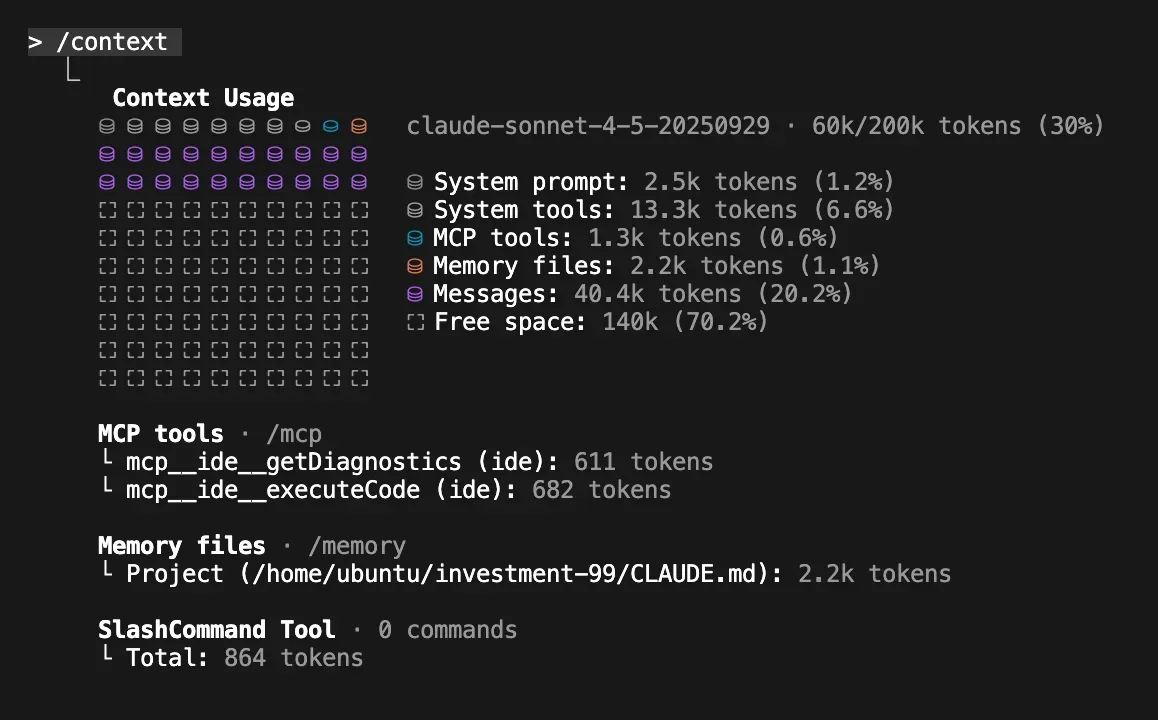
Let's dive into the details of what makes up the context window and how to interpret these numbers.
The SFEIR Institute's tutorial on Context Management provides a clear, structured explanation of the context window's anatomy and how to monitor it.
Read 'Step 1: How does the 200k-token window work?'. This will solidify your understanding of the layers that contribute to token usage and how the /cost command reflects this.
3. Proactive Context Management Strategies
Waiting for Claude to auto-compact is a reactive approach. A proactive approach gives you full control over the "narrative" of your session. Here are four key strategies.
Strategy 1: Precision Loading
Instead of asking Claude to "find the user authentication logic," load the specific files you know are relevant using @. This is the single most effective way to reduce context usage.
- Vague:
Find and fix the bug in the login flow.(Could load dozens of files) - Precise:
@src/api/auth_routes.py @src/services/auth_service.py Fix the bug where JWTs are not expiring.(Loads exactly two files)
Strategy 2: Checkpointing and Clearing
For very long tasks, the conversation history itself becomes the biggest consumer of tokens. The best way to manage this is to create manual checkpoints.
- Summarize: At a logical stopping point (e.g., after refactoring one module), write a summary of your progress, key decisions, and next steps.
- Persist: Save this summary to a file, like
refactor-notes.md. - Clear: Use the
/clearcommand to wipe the conversation history and start with a fresh context window. - Reload: Add your notes file to the fresh context (
@refactor-notes.md) and continue.
This technique is like saving your game. It gives you a clean slate without losing your progress.
Master Context in Claude Code in 5 Minutes
The same GritAI Studio video demonstrates this checkpointing technique effectively.
Watch the segment from 01:52 to 03:12. Note how the presenter manually summarizes the state into a progress.md file, clears the context, and then references the file to continue.
Strategy 3: Task Decomposition
Don't try to refactor an entire application in one session. Break the work down into logical, independent units. Given your background, think of this as applying the Single Responsibility Principle to your AI sessions.
For a sync-to-async FastAPI conversion, you might use:
- Session 1: Refactor database models and queries.
- Session 2: Refactor service layer functions for the
usersmodule. - Session 3: Refactor API routes for the
usersmodule and update tests.
The SFEIR tutorial (LINK) covers this in "Strategy 2: break down complex tasks" and expands on it in "Step 5: How to scale with multi-sessions and parallelism?".
Strategy 4: Leveraging CLAUDE.md
We've covered CLAUDE.md before, but its importance grows in long sessions. It serves as your persistent, low-cost memory, ensuring Claude never forgets core architectural rules, style guides, or build commands, even after multiple compactions or clears.
4. Surgical Pruning with /compact
While clearing is a blunt instrument, /compact is a surgical tool. It doesn't just delete old messages; it triggers a sophisticated process of summarization and restoration.
Inside Claude Code's Compaction System
To really understand /compact, it helps to know what's happening under the hood. This article, based on reverse-engineering Claude Code, explains the process beautifully.
First, read the 'What is Compaction?' section to see how it differs from simple truncation or summarization. Then, read 'The Compaction Prompt' and 'Post-Compaction Restoration' sections. This will give you a clear mental model: compaction creates a structured 'working state' and then rehydrates critical context like recent files.
The real power of /compact comes from guiding it. Instead of just running /compact, you can provide a "focus hint" to tell Claude what information is most important to preserve.
Syntax: /compact <focus hint>
Example Scenarios:
-
You've just finished refactoring a database schema and are about to start on the API layer.
/compact Preserve the database schema decisions and file paths. The previous debugging steps for the old schema are no longer relevant. -
You are midway through a sync-to-async conversion.
/compact Focus on the async/await conversion patterns we've established. Summarize the completed modules briefly.
This guided approach is far superior to letting the model decide what's important. It ensures the most critical parts of your long-running plan survive the compaction process.
Master Context in Claude Code in 5 Minutes
Let's see guided compaction in action.
Watch from 05:12 to 05:29. The example /compact focus on preserving our authentication refactoring discussion is a perfect illustration of providing a focus hint.
5. Applying These Strategies to a Refactoring Workflow
Let's imagine you're tasked with converting a synchronous FastAPI project to be fully asynchronous. This is a classic long-running, complex refactoring task. Here is how you would apply today's lesson:
- Initial Setup: You start your Claude Code session. Your
CLAUDE.mdfile already defines the project as using FastAPI and specifies async best practices. - Start the Task: You load the first set of files for refactoring.
I will now begin converting the project to use async/await, starting with the data access layer. @src/db/user_repo.py @src/models/user.py - First Sub-task: You work with Claude over several prompts to refactor the user repository, making the functions
async defand using an async database driver. You run tests to verify. This sub-task is now complete. Your conversation history is now 30 messages long. - First Compaction: This is a perfect "task boundary." You use a guided compact to prune the history while preserving the strategy.
/compact Preserve the pattern for converting SQLAlchemy repository methods to async. The initial failed attempts can be discarded. - Second Sub-task: Now, with a cleaner context, you move to the service layer.
Next, I will refactor the user service to call the new async repository methods. @src/services/user_service.py - Progress Check: After refactoring the service layer, you use
/contextand notice the token count is high again. - Checkpointing: Instead of another compact, you decide to checkpoint. You ask Claude:
Summarize our progress. List the modules converted to async and the key patterns used. Note that the next step is to refactor the API routes.
Claude provides a clean summary. You copy this into a new file,async-refactor-log.md. - Reset: You run
/clear. Your context window is now empty. - Resume: You start the final sub-task with a perfectly curated context.
Let's continue the refactor. We will now update the API routes. Here is our progress log: @async-refactor-log.md. Let's start with the user routes: @src/api/user_routes.py
By alternating between guided compaction at small boundaries and checkpointing at major boundaries, you can maintain perfect control over the context for a task of any length.
Conclusion
You now have a robust framework for managing Claude Code's context during complex, long-running tasks. This is an essential skill that separates basic users from true power users who can reliably steer AI through large-scale engineering work.
Key Takeaways:
- Context is a Finite Resource: Treat the context window as a valuable, manageable "attention budget."
- Monitor Continuously: Use
/contextand/costas your dashboard to stay informed about token consumption. - Be Proactive, Not Reactive: Use precision loading, task decomposition, and checkpointing to control the narrative. Don't wait for auto-compaction.
/compactis a Surgical Tool: Use it at logical task boundaries with a "focus hint" to prune conversation history while preserving critical information.- Checkpointing is for Major Milestones: For very long tasks, persisting a summary to a file and using
/clearis the ultimate way to reset and refocus.
Next Up:
Managing context is the foundation. In our next lesson, we will build upon this by learning how to apply a structured multi-step prompting framework to plan and execute large-scale codebase changes. You'll learn how to create a detailed plan before writing any code, and the context management skills you've acquired today will be crucial for ensuring Claude can follow that plan from start to finish.