Recommended resources
The freely available resources this lesson will direct you to.
Hello! Last time, your script classified mock research results with a loop and conditionals. The rule worked, but it lived inside one script. This lesson turns that rule into functions: named pieces of code that accept specified inputs and give the caller a usable result. That is how the same decision rule can later serve a local workflow or an API endpoint.
Allow about 40 minutes: roughly 10 minutes for the video, a short reading, and the rest to build and run the refactored script. You do not need AWS access.
Give the rule a name
A function is defined with def, but its body does not run until you call it. Values supplied in a call are arguments; the names receiving them in the definition are parameters.
Watch Bro Code’s Functions in Python are easy for the mechanics. Its examples print greetings at first; pay particular attention when it switches to returning a result that the caller can use.
Functions in Python are easy 📞
Bro Code demonstrates how to define and call functions, pass arguments to parameters, and return a result.
Watch define and call for def, parentheses, and indentation. Continue through passing inputs; notice how the number and order of arguments affect the call. Finish with returning results, focusing on how the caller stores a returned value.
Here is a small function using a result title:
def make_label(title):
    return f"Result: {title}"

label = make_label("Official release notes")
print(label)  # Result: Official release notes
Python encounters the definition first and remembers it. The call supplies "Official release notes" as the argument for title. The return statement sends the completed string back, where label stores it.
return and print do different jobs. print displays something; return gives a value to the caller. If make_label only printed its label, assigning label = make_label(...) would leave label holding None, not the displayed text. A function also returns None if execution finishes without reaching a return statement.
State the input and output types
For your classifier, the intended inputs are a numeric relevance score and a Boolean indicating whether the result is active. The output is one status string. A function signature can make that agreement visible:
def classify_result(score: float, active: bool) -> str:
    if active and score >= 0.8:
        return "accepted"
    elif active and score >= 0.5:
        return "review"
    else:
        return "skipped"
Read score: float as “this parameter is intended to receive a float.” Likewise, active: bool describes the flag, and -> str describes the returned value. Each branch returns a string, so every path through this function has an explicit result. On reaching return, Python leaves the function immediately.
Read the beginning of “Annotations” in Real Python’s Defining Your Own Python Function. It explains the signature syntax and an important limitation of type hints.
Defining Your Own Python Function – Real Python
Real Python explains how annotations describe function parameters and return values, and why they are not runtime checks.
In the “Annotations” subsection, start at the paragraph beginning “To add annotations to a function.” Read the syntax explanation through the paragraph explaining that Python does not enforce type hints at runtime. Focus on the colon after each parameter name and the return-type annotation before the final colon. You can stop before the toy function beginning “Consider the following toy function.”
A type hint is not input validation. Python does not automatically reject a call just because an argument disagrees with its annotation. An editor or static type checker may warn you, while the running code may fail later—or behave in an unintended way. This image shows PyCharm warning about a string passed to a parameter annotated as bool; it is an editor warning, not a Python runtime check.
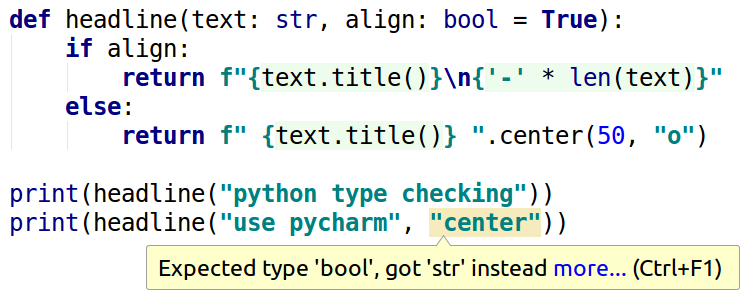
For now, call your functions with data that matches their stated types. Later, when your API receives data from outside the program, you will validate it rather than trusting annotations alone.
Refactor the research-results script
In VS Code, create functions_demo.py in research-decision-api. The following script keeps the mock records and classification rules from last lesson. What changes is where the work lives: classify_result decides the status, format_result prepares a display string, and the loop calls both.
def classify_result(score: float, active: bool) -> str:
    if active and score >= 0.8:
        return "accepted"
    elif active and score >= 0.5:
        return "review"
    else:
        return "skipped"


def format_result(title: str, status: str) -> str:
    return f"{title}: {status}"


results = [
    {"title": "Official release notes", "score": 0.92, "active": True},
    {"title": "Community overview", "score": 0.63, "active": True},
    {"title": "Archived announcement", "score": 0.96, "active": False},
    {"title": "Old roundup", "score": 0.20, "active": True},
]

counts = {"accepted": 0, "review": 0, "skipped": 0}

for result in results:
    status = classify_result(
        score=result["score"],
        active=result["active"],
    )
    counts[status] += 1

    line = format_result(title=result["title"], status=status)
    print(line)

print("Counts:", counts)
The calls use keyword arguments: score=... names the parameter receiving each value. You could instead call classify_result(0.92, True) using positional arguments, but naming the arguments makes the meaning of True clearer.
Notice the boundary between the functions and the rest of the script. classify_result does not read results, change counts, or print. Given the same valid score and active values, it returns the same status. The surrounding loop handles the batch and its counts. Similarly, format_result returns text; the loop decides whether to print it. Keeping these responsibilities separate makes each function easier to reuse.
Save and run the file in your VS Code PowerShell terminal:
python functions_demo.py
If you are not using an activated virtual environment, run .\.venv\Scripts\python.exe functions_demo.py instead. You should see:
Official release notes: accepted
Community overview: review
Archived announcement: skipped
Old roundup: skipped
Counts: {'accepted': 1, 'review': 1, 'skipped': 2}
Trace the archived announcement: its score is 0.96, but active is False. Neither condition matches, so the function returns "skipped". The caller uses that string both to select counts["skipped"] and to build the display line.
Check the function’s contract at the boundaries
“Predictable output” means more than getting the expected answer for one example. The rules should also give a clear answer at their thresholds and when a result is inactive. Add these lines after the function definitions and before results, then run the script again:
assert classify_result(0.80, True) == "accepted"
assert classify_result(0.50, True) == "review"
assert classify_result(0.49, True) == "skipped"
assert classify_result(0.96, False) == "skipped"
assert checks that an expression is true. These checks produce no output when they pass; if one is false, Python stops with an AssertionError. They document four expected results without changing the function or its inputs. The practice scores here are invented; the function assumes a valid numeric score, but neither its type hint nor these checks enforce a score range or verify the fields of an external record.
If a result surprises you, inspect the branch order and indentation first. For example, a score of exactly 0.80 must reach the first branch, not the 0.5 branch. If you receive None instead of a status, check that every path in the function reaches a return.
Where this leaves the project
You can now define a function with typed parameters, call it with arguments, and return a value the caller can use. The classifier’s three branches all return the same kind of output, while the batch loop remains responsible for counting and printing.
In the next lesson, you will move data beyond hard-coded Python records: reading and writing JSON and loading configuration from environment variables without putting secrets in the source file.