Recommended resources
The freely available resources this lesson will direct you to.
Hello. In the previous lesson, you used git diff to inspect configuration changes, git restore to correct content at the working-tree or staging level, and git revert to undo a committed mistake without rewriting history.
Now you will use a branch as a controlled line of work for a configuration change. The operational goal is not merely to know the commands: it is to keep the stable configuration history separate, validate the proposed change before it reaches that history, inspect the exact integrated result, and retain a recoverable path if a merge becomes uncertain.
For this LFCS-oriented lab, the Git repository represents tracked configuration files, not the live system. A Git branch does not isolate a running service, kernel parameter, or VM. Test branch content in a disposable environment or with non-invasive validation commands before applying it to /etc on a real host.
Branches: separate lines of committed history
A Git branch is a movable name for a commit. It is not a full copy of the repository. When you create a branch, Git creates another name that initially points at the same commit as your current branch. The two histories only diverge when one branch receives a new commit.
HEAD identifies your currently checked-out branch. New commits move the branch named by HEAD.
The two commands to prefer are:
git switch BRANCH_NAME
git switch -c NEW_BRANCH_NAME
git switch BRANCH_NAMEchanges to an existing branch.git switch -c NEW_BRANCH_NAMEcreates a branch at the current commit and changes to it immediately.
Older documentation often uses git checkout for both tasks. It works, but git switch is less ambiguous because its purpose is specifically branch selection.
Before switching branches, inspect the repository:
git status
git branch --show-current
git log --oneline --decorate -n 5
A clean working tree is the standard precondition for administrative branching and merging. It prevents a local uncommitted edit from being confused with the branch’s intended change, and it makes git merge --abort much more reliable if a conflict occurs.
Git - Basic Branching and Merging
Read the relevant parts of Pro Git’s “Basic Branching and Merging” chapter. It provides the core model for branch switching, fast-forward integration, true merge commits, and conflict handling.
In “Basic Branching,” read the explanation of why switching branches changes the files in your working tree. Begin at the switching explanation. Focus on the fact that a checkout changes the files on disk to match the selected branch. Then, in “Basic Merging,” read the merge-commit explanation. Notice why diverging histories require Git to create a new commit with two parents. Finally, in “Basic Merge Conflicts,” read from the conflict-marker explanation. Focus on the fact that staging a resolved file tells Git that the conflict has been handled.
A branch is useful for a system configuration change because it makes the proposed change explicit and reviewable:
- The baseline branch remains the known-good configuration history.
- The configuration branch contains only the proposed change and its tests.
- The merge is a deliberate integration decision, rather than an accidental commit to the baseline.
Merge direction and merge shapes
The most important rule is:
git merge SOURCEincorporatesSOURCEinto the branch currently checked out.
If you want to integrate config/sshd-clientalive into main or master, first switch to the baseline branch, then merge the configuration branch.
git switch main
git merge config/sshd-clientalive
Substitute master if that is the name of your baseline branch.
There are two ordinary merge outcomes.
Fast-forward merge
A fast-forward is possible when the current branch has no commits that the branch being merged lacks. Git simply advances the current branch name to the newer commit. No new merge commit is needed.
This is still a valid integration: the configuration commits are part of the baseline history. However, the history does not contain a distinct “merge reviewed and accepted here” commit.
True merge commit
When both branches have made commits after their shared starting point, their histories have diverged. Git combines their changes and, if successful, creates a new merge commit with two parents.
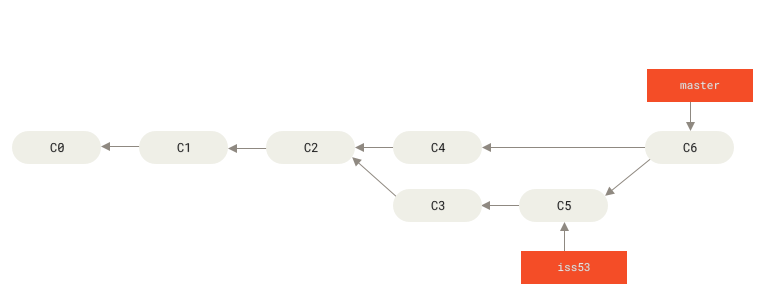
For configuration administration, an explicit merge commit can be useful even if Git could fast-forward. It marks the integration point and preserves the idea that a branch was tested separately. Use:
git merge --no-ff --no-commit config/sshd-clientalive
These options have distinct purposes:
--no-ffrequests a merge commit even when fast-forward would be possible.--no-commitperforms the merge calculation but stops before writing the merge commit, giving you a final opportunity to inspect and test the integrated result.
Do not treat either option as a substitute for testing. They create an inspection point; they do not establish that the resulting service configuration is correct.
Git Branching and Merging - Detailed Tutorial
Watch the merge and conflict portions of “Git Branching and Merging - Detailed Tutorial” from SuperSimpleDev. The demonstrations reinforce the key operational rule: the checked-out branch receives the merge.
Watch merge direction to see why you switch to the destination branch before merging. Then watch conflict resolution for a visual explanation of why Git stops when two branches make incompatible edits to the same content. The examples use application files, but apply exactly the same way to tracked service and system-configuration files.
Lab setup: preserve unrelated work before branching
Continue with ~/lfcs-git-lab from the previous lessons.
cd ~/lfcs-git-lab
git status
git branch --show-current
At the end of the previous lab, ssh/banner.lab may still contain an unrelated, uncommitted banner change. Do not discard it with git restore . merely to get a clean state.
If that edit is still present and you want to preserve it without putting it on the baseline branch, place it on a separate work-in-progress branch. Record the current branch name first:
base_branch=$(git branch --show-current)

git switch -c wip/banner-review
git add -- ssh/banner.lab
git commit -m "Draft SSH banner update"

git switch "$base_branch"
git status
The baseline branch is clean again, while the banner work is preserved on wip/banner-review. It has not been merged into the baseline configuration history.
If your repository is already clean, simply define the baseline branch variable:
base_branch=$(git branch --show-current)
Confirm both the baseline and preserved work are visible:
git branch --verbose
git log --oneline --decorate --graph --all -n 10
The wip/banner-review branch is intentionally unrelated to the SSH daemon change that follows. Leave it alone for this lesson.
Create and test a configuration branch
Create a descriptive branch from the clean baseline:
git switch -c config/sshd-clientalive
git status
The asterisk in git branch output, or On branch config/sshd-clientalive in git status, confirms that new commits will belong to this branch.
Add two valid OpenSSH server directives to the lab configuration file:
printf '%s\n' \
  '' \
  '# Lab: detect unresponsive SSH clients' \
  'ClientAliveInterval 300' \
  'ClientAliveCountMax 2' \
  >> ssh/sshd_config.lab
These options tell sshd to send an application-level request after 300 seconds of client inactivity and to disconnect a client that fails to answer the configured number of checks. They are not a generic “idle shell timeout”; they concern whether an SSH client remains responsive.
First, inspect exactly what changed:
git diff -- ssh/sshd_config.lab
Perform simple content checks:
grep -qx 'ClientAliveInterval 300' ssh/sshd_config.lab
grep -qx 'ClientAliveCountMax 2' ssh/sshd_config.lab
Each successful grep command exits with status 0 and prints nothing. These checks verify your intended text, but they do not prove that OpenSSH accepts the file.
If openssh-server is installed in the lab and /run/sshd exists, perform a daemon syntax test without starting or reloading the service:
if command -v sshd >/dev/null 2>&1 && [ -d /run/sshd ]; then
  sudo sshd -t -f "$PWD/ssh/sshd_config.lab"
else
  echo "Skipping sshd syntax test: openssh-server or /run/sshd is unavailable."
fi
sshd -t checks configuration syntax only. It does not enable the setting and does not restart the service. In an exam or production workflow, use the validator appropriate to the configuration you are changing, such as nginx -t, systemd-analyze verify, visudo -c, or a service-specific test command.
Once the branch content and tests are satisfactory, stage only the intended file:
git add -- ssh/sshd_config.lab
git diff --cached -- ssh/sshd_config.lab
git commit -m "Configure SSH client alive checks"
Verify the branch’s history and its difference from the baseline:
git status
git log --oneline --decorate --graph --all -n 12

git log --oneline "$base_branch"..HEAD
git diff "$base_branch"...HEAD -- ssh/sshd_config.lab
The two-dot log expression lists commits reachable from HEAD that are not reachable from the baseline branch. The three-dot diff compares the branch’s changes with its merge base, which is usually the clearest review for “what did this configuration branch introduce?”
At this point, the baseline branch remains unchanged. You can test the branch’s tracked configuration without claiming that it has been integrated.
Integrate with a final inspection point
Before merging, test the branch’s content once more if the relevant validator is available. Then return to the baseline branch:
git switch "$base_branch"
git status
git log --oneline --decorate -n 5
The working tree should be clean. Do not proceed if git status reports unrelated staged or unstaged changes. Resolve or preserve them first; an unclean tree makes merge recovery less predictable.
Begin the merge, but deliberately stop before committing:
git merge --no-ff --no-commit config/sshd-clientalive
If Git reports a clean merge, the changes are now present in the working tree and staged for the pending merge commit. They are not yet recorded in the baseline branch’s history.
Inspect the result as it will exist after integration:
git status
git diff --cached -- ssh/sshd_config.lab

grep -qx 'ClientAliveInterval 300' ssh/sshd_config.lab
grep -qx 'ClientAliveCountMax 2' ssh/sshd_config.lab
If available, repeat the syntax validation:
if command -v sshd >/dev/null 2>&1 && [ -d /run/sshd ]; then
  sudo sshd -t -f "$PWD/ssh/sshd_config.lab"
fi
Only after the merged result passes review and validation, complete the merge:
git commit -m "Merge SSH client alive configuration"
Verify the final state:
git status
git log --oneline --decorate --graph --all -n 15
git show --stat HEAD
git show HEAD -- ssh/sshd_config.lab
The configuration branch is now integrated. Delete it locally only after confirming that the merge commit contains the intended change:
git branch -d config/sshd-clientalive
This is a safe delete: -d refuses to delete a branch that Git believes has unmerged commits. Do not use -D merely to silence that warning; it can discard commits that have not been integrated elsewhere.
Your wip/banner-review branch should remain. It represents a distinct administrative task and should not be removed as part of SSH daemon configuration cleanup.
Merge conflicts: stop, inspect, resolve, test
A merge conflict does not mean Git has damaged your repository. It means Git cannot safely choose a final result without human judgment.
For example, a conflict might occur if the baseline branch and config/sshd-clientalive both changed the same directive:
<<<<<<< HEAD
ClientAliveInterval 120
=======
ClientAliveInterval 300
>>>>>>> config/sshd-clientalive
During a merge into the baseline branch:
- the section above
=======is the version fromHEAD, the currently checked-out baseline branch; - the section below
=======is from the branch being merged; - the marker lines are not valid configuration syntax and must not remain in the file.
Start with evidence:
git status
git diff
Then edit the conflicted file to contain the exact intended final configuration. You may choose the baseline value, the branch value, or a deliberately chosen third value. Remove every conflict marker.
After resolving one file, validate it before staging:
grep -nE '^(ClientAliveInterval|ClientAliveCountMax)' ssh/sshd_config.lab

if command -v sshd >/dev/null 2>&1 && [ -d /run/sshd ]; then
  sudo sshd -t -f "$PWD/ssh/sshd_config.lab"
fi
Then mark only the resolved path as ready:
git add -- ssh/sshd_config.lab
git status
git merge --continue
git merge --continue creates the merge commit once all conflicts are resolved and staged.
If you decide the merge should not proceed, abort it rather than using a broad reset:
git merge --abort
git status
This returns the merge operation toward its pre-merge state. It is most dependable when you started with a clean working tree, which is why that precondition matters.
A repeatable safe-merge routine
For a tracked system-configuration change, use this sequence:
- Confirm the baseline branch and ensure
git statusis clean. - Create a named configuration branch with
git switch -c. - Make one focused configuration change.
- Inspect it with
git diff -- PATH. - Run an appropriate non-invasive validator or test.
- Commit only the intended path.
- Compare the branch with the baseline using
git log BASE..HEADandgit diff BASE...HEAD. - Switch back to the baseline branch.
- Merge with
--no-ff --no-commitwhen you want an explicit reviewable integration point. - Test the merged result, then commit the merge.
- Inspect the resulting history and delete the merged branch with
git branch -d.
The important distinction is that Git protects the configuration history and makes the decision trail visible. It does not automatically test syntax, reload a service safely, or isolate runtime changes. Those remain administrative responsibilities.
You can now use a Git branch to isolate a configuration proposal, test and inspect it independently, and merge it into the baseline only after a deliberate final review. You also know why merge direction depends on the currently checked-out branch, when a merge commit is created, and how to resolve or abort a conflicting integration safely.
This completes the Git portion of the module. Next, the course moves into process and service diagnosis, beginning with process hierarchies, process states, threads, and the /proc filesystem.