Recommended resources
The freely available resources this lesson will direct you to.
Welcome back! In our previous lesson, we designed the complete architecture for an LLM CI/CD pipeline, establishing the importance of an automated "evaluation gate" to ensure model changes are safe and effective.
Today, we move from design to implementation. Your learning goal is to script a benchmark evaluation suite that captures performance and quality metrics for a given model. This script will become the engine of the evaluation gate we designed, providing the data needed to automatically approve or reject a new model version before it ever reaches production. Drawing on your background in SRE and automation, you will create a tool that is central to maintaining the reliability and effectiveness of an LLM-powered application.
1. The Two Pillars of LLM Evaluation
A comprehensive evaluation suite must answer two fundamental questions about a model change:
- Is it better? (Quality): Does the new model or prompt produce more accurate, relevant, and safe outputs? Does it avoid regressions on critical tasks?
- Is it fast and efficient? (Performance): How quickly does the model respond? How many tokens can it generate per second? How do these metrics change under load?
We will build a single script that measures both of these dimensions.

This diagram shows a high-level benchmarking workflow. Our script will be the core component of the "Experiments" stage, taking data and a model, and producing "Tracked results" for both accuracy and latency.
2. Measuring Quality with LLM-as-a-Judge
Quantifying the quality of an LLM's open-ended output is challenging. Traditional metrics like exact match are often too rigid. A modern and powerful approach is LLM-as-a-judge, where we use a powerful LLM (like GPT-4) with a specific set of criteria to score the output of the model we are testing.
The open-source framework DeepEval provides an excellent implementation of this concept and many others. It allows us to define complex, nuanced quality metrics in just a few lines of Python.
Evaluate LLMs in Python with DeepEval
The video "Evaluate LLMs in Python with DeepEval" by NeuralNine provides a great practical introduction to the framework. It will show you how to define both custom and pre-built metrics.
Please watch the following sections. As you watch, focus on how DeepEval allows you to translate a subjective concept like "correctness" into a measurable score. Introduction: Understands the challenge of evaluating LLMs and introduces the LLM-as-a-judge concept. Creating a Custom Metric: Pay close attention to how a custom G_Eval metric is defined with a natural language criteria. This is a very flexible and powerful feature. Asserting Tests: Shows how to run the evaluation and interpret the pass/fail result and the reasoning. Predefined Metrics: Explains built-in metrics like AnswerRelevancy and Faithfulness, which are essential for RAG systems. Using Datasets: Demonstrates how to structure an evaluation against a ground truth dataset, which is exactly what we need for our CI gate.
Key Quality Metrics
DeepEval provides a rich set of metrics. Given your experience with RAG, two particularly relevant ones are:
FaithfulnessMetric: Measures if the model's output is factually consistent with the providedretrieval_context. It helps detect hallucinations.AnswerRelevancyMetric: Measures how well the model's output addresses the originalinput, ignoring irrelevant information.
You can also create your own metrics with G_Eval for things like checking tone, brevity, or adherence to a specific format.
LLM Evaluation Metrics: The Ultimate LLM Evaluation Guide
This article from Confident-AI provides a comprehensive overview of the different types of LLM evaluation metrics.
Please read the introduction ("What are LLM Evaluation Metrics?") and the section "Choosing Your Evaluation Metrics". This will help you strategically select the most impactful metrics for your evaluation suite, following the "5 Metric Rule".
3. Scripting Performance Benchmarks
While quality is paramount, performance directly impacts user experience and operational cost. A model that is 1% better but 50% slower might not be a worthwhile trade-off. We need to capture key performance indicators.
The blog post "LLM Inference Performance Benchmarking from Scratch" provides an excellent foundation for scripting these metrics.
LLM Inference Performance Benchmarking from Scratch
This article details how to build a benchmarking script from scratch. We will implement the metrics it defines.
Please read the "Performance analysis" section. Focus on understanding the definitions and calculations for TTFT, ITL, and TPS.
Key Performance Metrics
Based on the article, we will script the following metrics for each request:
- Time To First Token (TTFT): The latency from sending the request to receiving the first output token. This is a critical measure of perceived responsiveness.
- Inter-Token Latency (ITL): The average time between subsequent tokens after the first one. This measures the raw generation speed of the model during the decoding phase.
- Total Output Tokens per Second (TPS): The overall throughput of a single request, from start to finish.
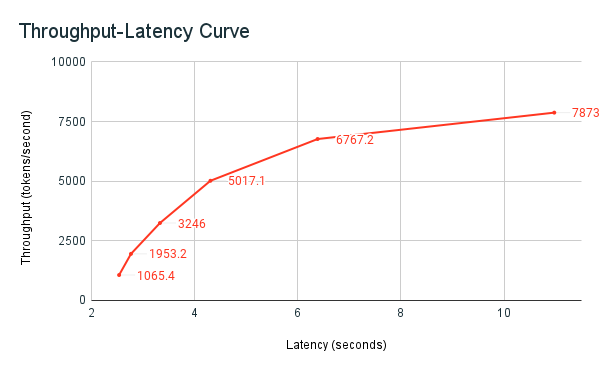
This throughput-latency curve illustrates a fundamental trade-off. Our performance metrics will allow us to plot points on this curve for different models or configurations, helping us understand their performance characteristics.
4. Assembling the Evaluation Suite Script
Now, let's combine these concepts into a functional Python script. This script will serve as the core of our evaluation gate. It will iterate through a "golden dataset" of test cases, run the model, and calculate both quality and performance metrics for each case.
Below is a skeleton for our evaluation_suite.py. It assumes you have an OpenAI-compatible API endpoint for your model running locally or remotely.
import time
import asyncio
import httpx
import json
from deepeval import assert_test
from deepeval.metrics import FaithfulnessMetric, AnswerRelevancyMetric, GEval
from deepeval.test_case import LLMTestCase

# --- Configuration ---
API_URL = "http://localhost:8000/v1/chat/completions"
MODEL_NAME = "your-model-name"
GOLDEN_DATASET_PATH = "golden_dataset.jsonl"

# --- 1. Define Quality Metrics ---
# For RAG systems, faithfulness is key.
faithfulness_metric = FaithfulnessMetric(threshold=0.7, model="gpt-4o")
# Ensure the answer is to the point.
answer_relevancy_metric = AnswerRelevancyMetric(threshold=0.8, model="gpt-4o")
# Custom metric: check if the answer is concise (under 100 words).
conciseness_metric = GEval(
    name="Conciseness",
    criteria="Evaluate if the actual output is concise and under 100 words.",
    model="gpt-4o",
    threshold=0.9
)

# --- 2. Performance & Request Logic ---
async def get_streaming_response(client, prompt, context):
    """Sends a request and yields token data while tracking performance."""
    payload = {
        "model": MODEL_NAME,
        "messages": [
            {"role": "system", "content": f"Use this context to answer: {context}"},
            {"role": "user", "content": prompt}
        ],
        "stream": True,
        "max_tokens": 256,
        "temperature": 0.1
    }

    perf_metrics = {
        "ttft": None,
        "itl": None,
        "total_time": None,
        "output_tokens": 0
    }

    full_response = ""
    request_timestamp = time.perf_counter()
    first_token_timestamp = None

    async with client.stream("POST", API_URL, json=payload, timeout=60) as response:
        async for chunk in response.aiter_bytes():
            # Skip empty keep-alive chunks
            if not chunk or chunk.strip() == b'':
                continue

            # Record TTFT on first chunk
            if first_token_timestamp is None:
                first_token_timestamp = time.perf_counter()
                perf_metrics["ttft"] = first_token_timestamp - request_timestamp

            # Simple parsing for OpenAI-like SSE
            try:
                line = chunk.decode('utf-8').strip()
                if line.startswith("data: "):
                    line = line[len("data: "):]
                if line == "[DONE]":
                    break

                data = json.loads(line)
                content = data.get("choices", [{}])[0].get("delta", {}).get("content", "")
                if content:
                    full_response += content
                    perf_metrics["output_tokens"] += 1 # A simplification; real token counting needs a tokenizer
            except (json.JSONDecodeError, IndexError):
                # Handle potential malformed chunks
                continue

    last_token_timestamp = time.perf_counter()
    perf_metrics["total_time"] = last_token_timestamp - request_timestamp

    # Calculate final performance metrics
    if perf_metrics["output_tokens"] > 1 and first_token_timestamp is not None:
        perf_metrics["itl"] = (last_token_timestamp - first_token_timestamp) / (perf_metrics["output_tokens"] - 1)

    return full_response, perf_metrics


# --- 3. Main Evaluation Loop ---
async def main():
    """Loads dataset and runs evaluation for each test case."""
    all_results = []

    with open(GOLDEN_DATASET_PATH, 'r') as f:
        golden_dataset = [json.loads(line) for line in f]

    async with httpx.AsyncClient() as client:
        for i, item in enumerate(golden_dataset):
            print(f"--- Running Test Case {i+1}/{len(golden_dataset)} ---")

            # Get model output and performance
            actual_output, perf_metrics = await get_streaming_response(
                client, item["input"], item.get("retrieval_context")
            )

            # Create a test case for quality evaluation
            test_case = LLMTestCase(
                input=item["input"],
                actual_output=actual_output,
                expected_output=item.get("expected_output"),
                retrieval_context=item.get("retrieval_context")
            )

            # Run quality assertions
            # This will raise an exception if a metric fails its threshold
            try:
                assert_test(test_case, [faithfulness_metric, answer_relevancy_metric, conciseness_metric])
                quality_passed = True
            except AssertionError as e:
                print(f"Quality check failed: {e}")
                quality_passed = False

            # Store results
            results = {
                "test_case": i+1,
                "input": item["input"],
                "quality_passed": quality_passed,
                "performance": perf_metrics
            }
            all_results.append(results)
            print(f"Results: {results}")

    # --- 4. Final Report ---
    print("\n--- Benchmark Summary ---")
    # Here you could calculate average TTFT, P99 latency, etc.
    # and print a final summary table.
    with open("evaluation_results.json", "w") as f:
        json.dump(all_results, f, indent=2)

    print("Evaluation complete. Results saved to evaluation_results.json")

if __name__ == "__main__":
    asyncio.run(main())
To use this script, you would create a golden_dataset.jsonl file where each line is a JSON object like this:
{"input": "What is the capital of France?", "retrieval_context": ["Paris is the capital and most populous city of France."], "expected_output": "Paris."}
{"input": "What causes the seasons?", "retrieval_context": ["The tilt of the Earth's axis is the most important reason why seasons occur."], "expected_output": "The seasons are caused by the tilt of the Earth's axis."}
Conclusion
In this lesson, you've taken a major step in our capstone project by scripting a comprehensive benchmark evaluation suite. This single script provides a repeatable, automated way to measure both the quality and performance of an LLM, forming the heart of the CI/CD pipeline we designed.
Key Takeaways:
- A robust evaluation suite must measure both quality (correctness, relevance) and performance (latency, throughput).
- Frameworks like DeepEval make it practical to implement "LLM-as-a-judge" for sophisticated quality checks using natural language criteria.
- Key performance metrics like TTFT and ITL provide granular insights into the user experience and model efficiency.
- By combining these measurements in a single script that runs against a golden dataset, we create a powerful, automated gate for our CI/CD pipeline.
In the next lesson, we will take the script we've built today and integrate it into a GitHub Actions workflow. You will configure it to run automatically on every pull request, effectively creating the "evaluation gate" that blocks or approves changes based on these critical metrics.