Recommended resources
The freely available resources this lesson will direct you to.
Introduction
Welcome to our next lesson in the "Multi-GPU Communication" module. In the previous lesson, we explored how inter-node technologies like InfiniBand and RDMA enable high-speed, low-latency communication between servers. We concluded by introducing GPU-Direct RDMA as the crucial final link, allowing a network adapter to communicate directly with GPU memory.
Today, we will generalize from that specific example to address a broader and more fundamental concept. Our learning outcome is to describe the role of GPU-Direct technologies in enabling data transfers that bypass the CPU.
These technologies are central to modern AI system design because they attack one of the primary bottlenecks in data-intensive applications: the CPU's role as a data-path intermediary. We will cover:
- The problem of the "CPU bounce buffer" and its performance implications.
- The GPU-Direct technology family as the solution, focusing on two key members:
- GPU-Direct RDMA for networking.
- GPU-Direct Storage for high-speed I/O.
- The underlying mechanism that makes this possible: Peer-to-Peer (P2P) communication over the PCIe bus and the necessary driver-level coordination.
By the end of this lesson, you will understand the architectural principles behind eliminating the CPU from the critical data path, a cornerstone of designing efficient, scalable AI systems.
The CPU as a Data-Path Bottleneck
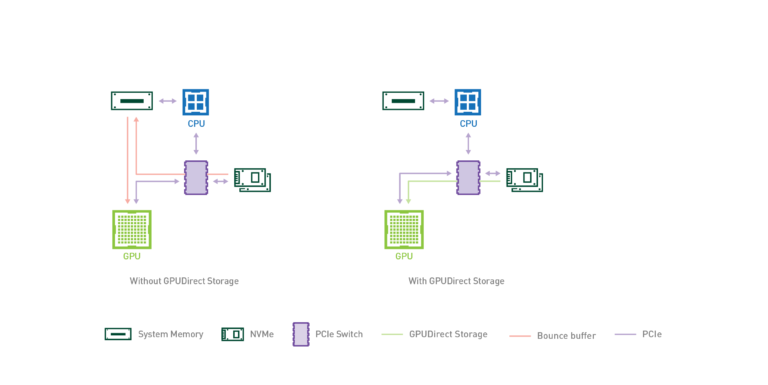
In a traditional system architecture, the CPU and its main memory (DRAM) act as a central hub for all data movement. If a GPU needs to process data from a storage device (like an NVMe SSD) or a network card (NIC), the data follows an indirect path:
- The source device (e.g., NVMe drive) uses Direct Memory Access (DMA) to write the data into a buffer in the host system's RAM.
- The CPU is then tasked with orchestrating a second transfer, copying the data from that system RAM buffer, across the PCIe bus, and into the GPU's dedicated memory (VRAM).
This two-step process, often called using a "bounce buffer," introduces two significant performance penalties:
- Increased Latency and Bandwidth Saturation: The data makes an extra "hop" through system memory, consuming both memory bandwidth and PCIe bandwidth, and adding latency to the end-to-end transfer.
- CPU Cycle Consumption: The CPU is busy managing these memory copies, stealing cycles that could be used for other tasks like data preprocessing, application logic, or scheduling the next wave of GPU work.
As datasets grow and GPUs become more powerful, this CPU-mediated data path becomes a major system bottleneck. The following image and video explain this problem clearly in the context of storage.
To hear this explained by an expert, let's watch a short segment from a talk on GPU-Direct Storage.
Introduction to GPU Direct Storage with NVIDIA and VAST Data
This video, from a presentation by an NVIDIA architect, opens by framing the I/O bottleneck and then details the inefficiencies of the traditional CPU-centric data path.
Watch from the beginning (00:23) to 01:41. Pay close attention to the description of the bottlenecks in terms of bandwidth, latency, and CPU cycles burned by the extra trip through host memory.
This fundamental problem motivated the development of a suite of technologies designed to create more direct data paths to the GPU.
GPU-Direct: A Family of CPU-Bypass Technologies
GPU-Direct is the umbrella term for a set of NVIDIA technologies that enable direct communication between a GPU and other PCIe devices on the same bus, effectively creating "data freeways" that bypass the congested city center of the CPU and its main memory.
The core mechanism enabling this is Peer-to-Peer (P2P) DMA. This allows the DMA engine on one PCIe device (the "peer," e.g., a NIC or storage controller) to be programmed to read from or write to the memory address space of another PCIe device (the GPU).
Let's examine the two most important members of this family for AI systems.
1. GPU-Direct RDMA
We were introduced to this in our last lesson. GPU-Direct RDMA enables a network adapter, particularly an RDMA-capable NIC (RNIC), to transfer data directly into or out of the GPU memory of a remote machine.
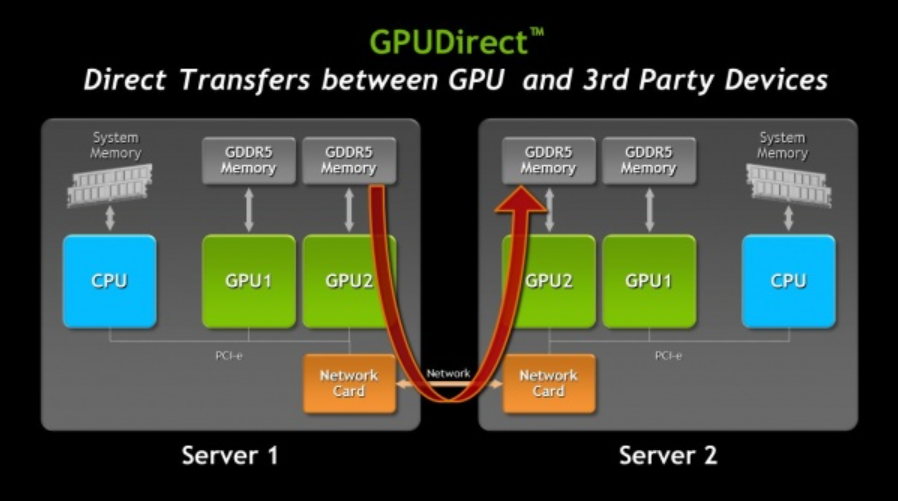
But how does this work under the hood? A NIC's DMA engine knows how to access system physical addresses, but it doesn't understand GPU virtual addresses. This is where a sophisticated, driver-level coordination comes into play. The following article provides an excellent deep-dive into this mechanism.
The Evolution and Implementation of GPUDirect RDMA
The article 'The Evolution and Implementation of GPUDirect RDMA' explains how the technology solves the address translation problem. We will focus on the initial, proprietary implementation which lays out the fundamental principles.
Please read the section titled 'The Birth of GPUDirect RDMA'. Focus on the step-by-step description of the driver-level collaboration, from the application passing a GPU pointer to the RDMA driver interacting with the NVIDIA driver to translate that address.
To summarize the key workflow you just read about:
- An application allocates a buffer in GPU memory using
cudaMalloc(). - It passes the GPU pointer to a standard RDMA memory registration function.
- The RDMA driver receives this special pointer and, instead of trying to process it, queries the NVIDIA GPU driver through a dedicated API (
nvidia_p2p_get_pages). - The NVIDIA driver performs the necessary internal translation (GPU Virtual Address -> Physical Bus Address) and returns a list of physical addresses that the NIC's hardware can understand.
- The RDMA driver programs the NIC's DMA engine with these physical addresses, enabling it to directly access the specified region of GPU memory.
This mechanism effectively teaches the NIC how to speak directly to the GPU's memory space.
2. GPU-Direct Storage
GPU-Direct Storage (GDS) applies the exact same principle to storage devices. It allows data to be read from a local or remote NVMe drive directly into GPU memory, bypassing the CPU bounce buffer. This is critical for workloads that process datasets larger than can fit in GPU memory, such as large-scale data analytics, visualization, and training on massive datasets.
Let's return to the video from earlier to see the measured benefits and a view of the architecture.
Introduction to GPU Direct Storage with NVIDIA and VAST Data
This segment quantifies the performance gains of GDS and shows how it works in a system like the NVIDIA DGX A100, where data can flow directly from the NICs (accessing remote storage) to the GPUs via an internal PCIe switch.
Watch from 01:41 to 02:23 and then the short clarification from 04:40 to 05:15. Note the claimed improvements (e.g., 3x bandwidth) and the key insight that GDS is about enabling the DMA engines in the storage device or NIC to target GPU memory.
As you saw, the performance gains are significant, and the underlying concept is identical to GPU-Direct RDMA: enabling a peer device's DMA engine to directly target GPU memory.
The Foundation: PCIe Topologies and Memory Consistency
All GPU-Direct technologies are built on the peer-to-peer capabilities of the PCI Express bus. However, simply having devices on the same bus is not enough to guarantee optimal performance. The specific PCIe topology—the map of how devices are connected to CPUs and switches—is a critical factor in system design.
The path between two peer devices can significantly impact the latency and bandwidth of their communication.
This video segment explores different PCIe topologies (dual root, single root, cascaded) and explains their tradeoffs in terms of CPU-to-GPU bandwidth versus GPU-to-GPU bandwidth.
Watch from 47:44 to 50:18. Focus on how communication between two GPUs (which is a form of P2P) is affected by whether the path stays within a single CPU's PCIe root complex or has to cross a CPU-to-CPU interconnect like UPI/QPI.
This highlights a crucial point for system architects: designing a machine for efficient P2P communication involves minimizing the number of hops between devices. A single-root topology, where all GPUs and peer devices hang off the same CPU's root complex, is generally optimal for P2P performance, even if it presents a tradeoff for CPU-to-GPU bandwidth.
Finally, while GPU-Direct solves the data movement problem, it introduces a challenge: memory consistency. GPUs employ a relaxed memory model to maximize performance. This means that from a GPU kernel's perspective, memory operations from a peer device may not be immediately visible or may appear out of order.
To solve this, the CUDA programming model and the underlying NVIDIA driver provide mechanisms to enforce stricter ordering. For a buffer to be used with GPU-Direct, an application must set an attribute (CU_POINTER_ATTRIBUTE_SYNC_MEMOPS) on it. This tells the CUDA runtime to disable certain optimizations and ensure that CPU-initiated CUDA operations (like kernel launches or memory copies) are correctly ordered with respect to the P2P traffic from the peer device. This is a classic performance vs. correctness tradeoff that system designers and low-level programmers must manage. You can find more detail on this in the "Synchronization and Memory Ordering" section of NVIDIA's GPUDirect RDMA documentation (resource_id=[LINK](https://docs.nvidia.com/cuda/gpudirect-rdma/)), which is a great reference for further reading.
Conclusion
In this lesson, we have moved beyond a single use case to understand the overarching principle of CPU-bypass for high-performance data transfers. We've established that the CPU can be a significant bottleneck and that the GPU-Direct family of technologies provides an architectural solution.
Key Takeaways:
- The Problem: Traditional data paths that use system RAM as a "bounce buffer" introduce latency and consume valuable CPU cycles, creating a bottleneck for data-hungry GPUs.
- The Solution: The GPU-Direct technology family enables direct Peer-to-Peer (P2P) DMA transfers between a GPU and other PCIe devices, bypassing the CPU and system memory.
- Key Examples: GPU-Direct RDMA provides a direct path to the network, while GPU-Direct Storage provides a direct path to storage devices like NVMe SSDs.
- The Mechanism: The core of GPU-Direct is a sophisticated coordination between device drivers to translate GPU memory addresses into physical bus addresses that a peer device's DMA engine can use.
- System Implications: The effectiveness of GPU-Direct depends on the underlying PCIe topology, and using it correctly requires careful management of memory synchronization to ensure data consistency.
Preview of the Next Lesson:
We now understand the low-level hardware paths for both intra-node (NVLink) and inter-node (GPU-Direct RDMA) communication. The next logical step is to explore the software that makes this powerful hardware usable. In our next lesson, we will describe the role of collective communication libraries (e.g., NCCL) in abstracting hardware communication details, showing how they provide optimized, high-level primitives like AllReduce that intelligently leverage these direct communication paths.