Recommended resources
The freely available resources this lesson will direct you to.
- Azure Container Apps - Health Probes Explained | Step by Stepwww.youtube.com
- Azure Container Apps - Revisions Explained | Step by Stepwww.youtube.com
- Health probes in Azure Container Apps | Microsoft Learnlearn.microsoft.com
- Blue-Green Deployment in Azure Container Apps | Microsoft Learnlearn.microsoft.com
Good release behavior begins with a distinction that is easy to blur: a container can be running while still being unable to serve useful application traffic. In this lesson, you will make that distinction explicit for the FastAPI backend, then use Azure Container Apps revisions to release a new image without immediately trusting it with all requests.
The backend is currently internal and reached through the public React frontend’s Nginx proxy. That boundary remains unchanged. The release work happens on the backend Container App: probes decide whether replicas are usable; revisions let the old and new versions coexist; traffic weights determine which version serves the frontend’s proxied requests.
By the end, you will have a repeatable manual release procedure suitable for later automation with GitHub Actions: deploy a candidate revision, validate it without production traffic, expose it gradually, and restore traffic to the known-good revision if needed.
Health is three different questions
Azure Container Apps supports three probe roles:
| Probe | Question it answers | Appropriate backend behavior |
|---|---|---|
| Startup | Has this process finished starting successfully? | The FastAPI server can answer a basic HTTP request. |
| Liveness | Is this running replica still responsive? | The process event loop is alive and not stuck. |
| Readiness | Should this replica receive application traffic now? | The API can serve requests, including reaching required dependencies such as PostgreSQL. |
Read Microsoft’s concise overview first. It establishes the intended meaning of the three probes and the two available probe mechanisms.
Health probes in Azure Container Apps | Microsoft Learn
Read the opening sections of Microsoft Learn’s “Health probes in Azure Container Apps.” Focus on the separate operational purpose of startup, liveness, and readiness checks, rather than treating “health” as one condition.
In the opening “Health probes in Azure Container Apps” section, read the probe overview. Then continue into the “HTTP probes” section. Note that an HTTP response from 200 through 399 is success; a response outside that range is failure. Compare HTTP probes, which can express application logic, with TCP probes, which only establish that a port accepts connections.
For this FastAPI service, HTTP probes are more useful than TCP probes. TCP success would only show that Uvicorn is listening on port 8000. It would not show that your service is ready to use PostgreSQL, has loaded its runtime configuration correctly, or can execute a simple query.
Design endpoints deliberately
Use the health endpoints developed earlier, or adapt the names below consistently to match your application:
/health/live
/health/ready
Their responsibilities should remain narrow:
/health/livereturns success if the FastAPI process itself is responsive. It should not make a database call, invoke an external API, or perform an expensive computation./health/readyreturns success only when the application can serve a normal request. For this lab, a quickSELECT 1against PostgreSQL is appropriate. If the database is unavailable, return503 Service Unavailable.- The startup probe can call
/health/live. Its purpose is to allow a slow process enough time to begin accepting requests before liveness or readiness checks are applied.
A common failure mode is making liveness depend on PostgreSQL. If the database has a short outage, every API replica can be restarted even though restarting them cannot fix the database. That turns a dependency incident into extra container churn. Put dependency checks in readiness instead.
Keep these endpoints unauthenticated, but expose them only through the internal container port. In your design, /health/ready reaches the public internet only through the frontend’s deliberate /api/ proxy route. Avoid placing secrets, connection strings, diagnostic dumps, or exception details in their responses.
Configure explicit probes in Terraform
When ingress is enabled, Container Apps can add default TCP probes. Defaults are better than having no checks, but they cannot distinguish “port is open” from “the API is ready to use its database.” Replace that ambiguity with explicit HTTP probes.
Read the configuration and revision behavior in the latter half of the health-probe documentation.
Health probes in Azure Container Apps | Microsoft Learn
Continue with Microsoft Learn’s configuration examples and default behavior. This is particularly important because readiness status participates in whether a revision is trusted with traffic.
In the “Examples” section, inspect the JSON and YAML probe definitions, paying attention to path, port, periodSeconds, and failureThreshold. Then read the “Default configuration” section from the default and readiness guidance. Notice the recommendation to wait for readiness success before shifting traffic in multiple-revision mode.
Add the following blocks inside the existing container block of azurerm_container_app.backend. The probe port is the container port, 8000, not the frontend’s Nginx port and not an external HTTPS port.
container {
  name   = "backend"
  image  = local.backend_image
  cpu    = 0.25
  memory = "0.5Gi"

  # Keep your existing DATABASE_URL secret reference and other variables here.

  startup_probe {
    transport               = "HTTP"
    port                    = 8000
    path                    = "/health/live"
    interval_seconds        = 5
    timeout                 = 3
    failure_count_threshold = 24
  }

  liveness_probe {
    transport               = "HTTP"
    port                    = 8000
    path                    = "/health/live"
    interval_seconds        = 10
    timeout                 = 3
    failure_count_threshold = 3
  }

  readiness_probe {
    transport               = "HTTP"
    port                    = 8000
    path                    = "/health/ready"
    interval_seconds        = 5
    timeout                 = 3
    failure_count_threshold = 3
  }
}
These values express a reasonable learning-lab policy:
- The startup probe permits roughly two minutes of unsuccessful checks before the revision is treated as unable to start: seconds.
- Once startup succeeds, liveness checks every 10 seconds. Three consecutive failures trigger recovery behavior rather than reacting to one delayed response.
- Readiness checks more frequently because it controls whether a replica may receive traffic.
The exact timings should follow measured application behavior in a production system. If the backend ordinarily starts in three seconds but sometimes needs 20 seconds for image initialization and configuration loading, a startup allowance of only five seconds is too aggressive. Conversely, a ten-minute allowance can delay detecting a genuinely broken image.
Apply the probe configuration
Before applying, ensure the endpoints work in the running application. The current frontend proxy gives you a safe public test path:
export FRONTEND_URL="$(terraform output -raw frontend_url)"

curl --fail --silent --show-error \
  "$FRONTEND_URL/api/health/ready"
Then review the Terraform change:
terraform fmt -recursive
terraform validate
terraform plan -out probes.tfplan
The plan should show a change to the backend Container App template. A template change is revision-scoped, so applying it creates a new backend revision. At this stage, the Container App is still in Single revision mode, so traffic moves automatically once the new revision becomes ready.
terraform apply probes.tfplan
List revisions and inspect their status:
export RESOURCE_GROUP="$(terraform output -raw resource_group_name)"
export BACKEND_APP="$(terraform output -raw backend_container_app_name)"

az containerapp revision list \
  --name "$BACKEND_APP" \
  --resource-group "$RESOURCE_GROUP" \
  --output table
The new revision should become active and healthy. If it is unhealthy, do not proceed to multi-revision releases. Start with logs:
az containerapp logs show \
  --name "$BACKEND_APP" \
  --resource-group "$RESOURCE_GROUP" \
  --tail 100
Typical causes include a route-name mismatch, probing the wrong port, a readiness endpoint returning 503 because it cannot connect to PostgreSQL, or an application startup time longer than the startup allowance.
Cost of this practical action: No new Azure resource is created. Applying the change creates a revision and briefly runs a replacement backend replica. While the revision is active, Container Apps compute and log ingestion are usage-based. With the existing min_replicas = 0, max_replicas = 1, and bounded Log Analytics ingestion, this should be a small incremental cost for a short test. Your existing PostgreSQL instance remains the more predictable ongoing lab cost.
Revisions turn deployment into a traffic decision
A revision is an immutable snapshot of the revision-scoped Container App configuration: image, environment variables, resource settings, probes, and scale configuration. Changing the image reference from one uniquely tagged ACR image to another creates a new revision. Changing only the contents behind a reused image tag does not create a revision and makes rollback ambiguous, which is one reason to keep using unique Git-based tags.
There are two relevant modes:
| Mode | Active revisions | Typical use |
|---|---|---|
Single |
One revision serves traffic. A healthy new revision replaces the old one. | Simple development iteration |
Multiple |
Several revisions can remain active, each with an explicit traffic weight. | Blue-green release, canary release, A/B testing, controlled rollback |
For a validated release, switch the backend to Multiple revision mode. This means traffic assignment is no longer automatic. That is precisely the point: a new image can become healthy without receiving production traffic.
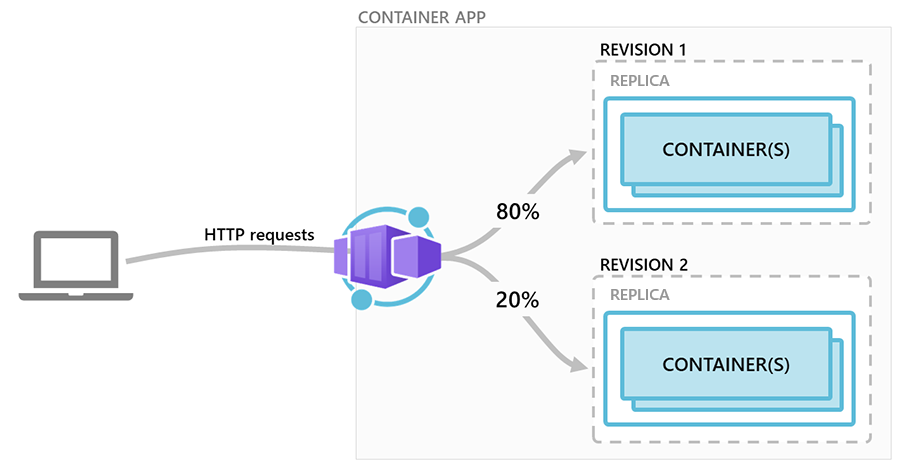
Read the official blue-green guide through its setup and validation sections.
Blue-Green Deployment in Azure Container Apps | Microsoft Learn
Read Microsoft Learn’s “Blue-Green Deployment in Azure Container Apps” as the model for the release workflow used below. Focus on its use of immutable revisions, deterministic revision suffixes, labels, and explicit traffic weights.
In the introduction, read the blue-green model. Then read “Create a container app with multiple active revisions enabled,” noting why a release-specific revisionSuffix makes revision names predictable. Continue through “Deploy a new revision and assign labels.” Focus on the example where the stable revision has 100 percent traffic and the candidate has 0 percent, but can still be tested through its labeled FQDN.
The documentation calls the old revision blue and the candidate green. For a small lab, stable and candidate are clearer labels because their purpose remains obvious even after several release cycles.
Give traffic ownership one controller
Terraform currently owns the Container App declaration, while this lesson uses Azure CLI to change image revisions and traffic interactively. These tools must not fight each other.
Change the backend to multiple-revision mode in Terraform:
resource "azurerm_container_app" "backend" {
  # Existing configuration omitted.

  revision_mode = "Multiple"

  # Existing identity, registry, ingress, and template configuration omitted.
}
For the manual release period, prevent Terraform from reverting CLI-managed image and traffic changes on its next apply:
lifecycle {
  ignore_changes = [
    template[0].container[0].image,
    template[0].revision_suffix,
    ingress[0].traffic_weight,
  ]
}
This is an intentional ownership boundary:
- Terraform owns the Container Apps environment, identities, registry integration, ingress policy, secrets wiring, probes, and baseline resource configuration.
- Azure CLI owns the short-lived release transition: candidate image, revision suffix, labels, and traffic weights.
- A later GitHub Actions workflow will replace these manual CLI steps.
Apply the revision-mode adjustment before releasing another image:
terraform fmt -recursive
terraform validate
terraform plan -out multiple-revisions.tfplan
terraform apply multiple-revisions.tfplan
Cost of this practical action: Changing revision mode creates no new Azure service. Multiple mode can cost more temporarily because two revisions may run replicas at the same time during validation or traffic splitting. Keep both revisions at the existing maximum of one replica and perform tests promptly. Do not leave an unused revision receiving traffic or configured with a positive minimum replica count.
Release a candidate with zero production traffic
The following workflow releases a new backend image. It assumes you already built and pushed a uniquely tagged image such as backend:git-a1b2c3d to your private ACR.
First, ensure the Azure Container Apps CLI extension is available, then set release variables. The candidate suffix must be lowercase and should uniquely identify the source version.
az extension add --name containerapp --upgrade

export RESOURCE_GROUP="$(terraform output -raw resource_group_name)"
export BACKEND_APP="$(terraform output -raw backend_container_app_name)"
export FRONTEND_APP="$(terraform output -raw frontend_container_app_name)"
export ACR_NAME="$(terraform output -raw acr_name)"

export RELEASE_SUFFIX="git-a1b2c3d"
export CANDIDATE_IMAGE="$ACR_NAME.azurecr.io/backend:$RELEASE_SUFFIX"
Identify the current stable revision. Immediately after switching to multiple mode, there should be one active revision:
export STABLE_REVISION="$(
  az containerapp revision list \
    --name "$BACKEND_APP" \
    --resource-group "$RESOURCE_GROUP" \
    --query "[?properties.active].name | [0]" \
    --output tsv
)"

printf 'Stable revision: %s\n' "$STABLE_REVISION"
Label it:
az containerapp revision label add \
  --name "$BACKEND_APP" \
  --resource-group "$RESOURCE_GROUP" \
  --label stable \
  --revision "$STABLE_REVISION"
Deploy the new image with a deterministic revision suffix:
az containerapp update \
  --name "$BACKEND_APP" \
  --resource-group "$RESOURCE_GROUP" \
  --image "$CANDIDATE_IMAGE" \
  --revision-suffix "$RELEASE_SUFFIX"
With Multiple mode enabled, this command creates a candidate revision but does not automatically give it all frontend traffic. Its predictable revision name is:
export CANDIDATE_REVISION="${BACKEND_APP}--${RELEASE_SUFFIX}"

printf 'Candidate revision: %s\n' "$CANDIDATE_REVISION"
Label the candidate and explicitly set traffic:
az containerapp revision label add \
  --name "$BACKEND_APP" \
  --resource-group "$RESOURCE_GROUP" \
  --label candidate \
  --revision "$CANDIDATE_REVISION"

az containerapp ingress traffic set \
  --name "$BACKEND_APP" \
  --resource-group "$RESOURCE_GROUP" \
  --revision-weight \
    "$STABLE_REVISION=100" \
    "$CANDIDATE_REVISION=0"
The candidate is now an active revision with zero production traffic. This is the central safety property of the workflow.
Check the deployed candidate image and revision condition:
az containerapp revision show \
  --name "$BACKEND_APP" \
  --resource-group "$RESOURCE_GROUP" \
  --revision "$CANDIDATE_REVISION" \
  --query "{
    image: properties.template.containers[0].image,
    active: properties.active,
    healthState: properties.healthState,
    runningState: properties.runningState
  }" \
  --output yaml
Do not shift traffic until the candidate reports a healthy state. A readiness-probe failure should be treated as a release failure, not as something to override with a traffic command.
Cost of this practical action: No additional persistent resource is provisioned. During image pull, startup, readiness testing, and any traffic split, both stable and candidate revisions can consume Container Apps compute and create logs. For this small lab, keep validation brief and do not raise max_replicas above 1. ACR storage grows only by the new image layers not already present.
Validate the candidate before it serves users
Because the backend uses internal ingress, do not make it public merely to test a candidate revision. Instead, validate it from the same Container Apps environment, using the frontend container as an internal test location.
Retrieve the Container Apps environment domain and construct the candidate label hostname:
export ENVIRONMENT_NAME="$(terraform output -raw container_apps_environment_name)"

export APP_DOMAIN="$(
  az containerapp env show \
    --name "$ENVIRONMENT_NAME" \
    --resource-group "$RESOURCE_GROUP" \
    --query properties.defaultDomain \
    --output tsv
)"

export CANDIDATE_HOST="${BACKEND_APP}---candidate.${APP_DOMAIN}"

printf 'Candidate internal hostname: %s\n' "$CANDIDATE_HOST"
Wake the frontend if it has scaled to zero:
export FRONTEND_URL="$(terraform output -raw frontend_url)"

curl --fail --silent --show-error \
  "$FRONTEND_URL/"
Get its active replica name:
export FRONTEND_REPLICA="$(
  az containerapp replica list \
    --name "$FRONTEND_APP" \
    --resource-group "$RESOURCE_GROUP" \
    --query "[0].name" \
    --output tsv
)"

printf 'Frontend replica: %s\n' "$FRONTEND_REPLICA"
Then execute a readiness request from the frontend container. The Nginx Alpine image normally includes BusyBox wget:
az containerapp exec \
  --name "$FRONTEND_APP" \
  --resource-group "$RESOURCE_GROUP" \
  --replica "$FRONTEND_REPLICA" \
  --command "wget -qO- https://${CANDIDATE_HOST}/health/ready"
A successful response validates several things together:
- The candidate image was pulled successfully from ACR.
- Startup and readiness probes permitted the candidate to become healthy.
- The candidate received its Key Vault-backed database configuration.
- The candidate could reach PostgreSQL.
- Internal Container Apps DNS and ingress reached the specific labeled candidate revision.
Also inspect candidate logs for startup exceptions or unexpected readiness failures:
az containerapp logs show \
  --name "$BACKEND_APP" \
  --resource-group "$RESOURCE_GROUP" \
  --revision "$CANDIDATE_REVISION" \
  --tail 100
If readiness fails, leave traffic at 100/0. Correct the application or configuration, build a new uniquely tagged image, and create a new candidate revision. Do not mutate the candidate image tag in ACR; the revision should remain a clear historical record.
Cost of this practical action: The internal test does not create a resource or expose a new public endpoint. It may briefly start the scale-to-zero frontend and candidate backend replicas, causing a small amount of Container Apps compute and log ingestion. Close browser tabs and stop repeated polling when finished, especially if your application maintains WebSocket connections.
Canary traffic and rollback
After the candidate passes direct validation, route a small share of normal frontend traffic to it. The following split mirrors the traffic model in the diagram: stable receives 80 percent and candidate receives 20 percent.
az containerapp ingress traffic set \
  --name "$BACKEND_APP" \
  --resource-group "$RESOURCE_GROUP" \
  --revision-weight \
    "$STABLE_REVISION=80" \
    "$CANDIDATE_REVISION=20"
Verify the resulting assignment:
az containerapp ingress traffic show \
  --name "$BACKEND_APP" \
  --resource-group "$RESOURCE_GROUP" \
  --output table
Use the frontend normally and run several readiness requests through its public same-origin proxy:
for attempt in {1..10}; do
  curl --fail --silent --show-error \
    "$FRONTEND_URL/api/health/ready"
  printf '\n'
done
For this small lab, a canary does not provide statistically meaningful production evidence. It does, however, lets you rehearse the operational mechanics: both revisions are live, some traffic reaches the candidate, and the old version remains immediately available.
Watch candidate logs while traffic is split:
az containerapp logs show \
  --name "$BACKEND_APP" \
  --resource-group "$RESOURCE_GROUP" \
  --revision "$CANDIDATE_REVISION" \
  --follow
In a real release, rollback criteria should be agreed before deployment. Examples include readiness failures, elevated request failures, unexpected application exceptions, PostgreSQL connection errors, a broken WebSocket handshake, or a visible regression in the frontend workflow.
Roll back traffic immediately
If the candidate misbehaves, restore all traffic to the stable revision:
az containerapp ingress traffic set \
  --name "$BACKEND_APP" \
  --resource-group "$RESOURCE_GROUP" \
  --revision-weight \
    "$STABLE_REVISION=100" \
    "$CANDIDATE_REVISION=0"
This is a traffic rollback, not an image overwrite. The candidate revision is retained for inspection, while the stable revision immediately resumes serving all frontend-proxied API and WebSocket traffic.
For this lab, perform the command as a rollback drill even if the candidate is healthy. Confirm the traffic state:
az containerapp ingress traffic show \
  --name "$BACKEND_APP" \
  --resource-group "$RESOURCE_GROUP" \
  --output table
After collecting enough logs, deactivate the rejected or no-longer-needed candidate:
az containerapp revision deactivate \
  --name "$BACKEND_APP" \
  --resource-group "$RESOURCE_GROUP" \
  --revision "$CANDIDATE_REVISION"
Deactivation stops that revision’s containers. Keep the stable revision active.
Cost of this practical action: The 80/20 split can keep two backend revisions warm or active, depending on traffic and scaling behavior. Limit the canary to a few minutes in this personal lab. The rollback and deactivation commands incur no separate service charge; deactivation reduces future Container Apps compute and log costs. ACR image storage remains until you later remove unused image tags.
Key takeaways
Health probes and revisions solve different parts of safe delivery:
- Startup probes give a new container enough time to begin functioning.
- Liveness probes detect a responsive-process failure and should avoid dependency checks.
- Readiness probes decide whether a replica is fit to receive requests; for this backend, readiness includes PostgreSQL availability.
- Explicit HTTP probes on port
8000provide substantially better signals than merely checking that a TCP port is open. - A Container Apps revision is an immutable deployment snapshot created by revision-scoped changes such as image, probes, and runtime settings.
Multiplerevision mode enables a candidate revision to exist with zero traffic, then receive a controlled canary share.- Labels provide stable human-readable references to the known-good and candidate revisions.
- Rollback is a fast traffic-weight change back to the stable revision; it does not require rebuilding or redeploying the old image.
The next module moves to Azure Kubernetes Service. You will provision a short-lived, cost-controlled AKS cluster with Terraform and authorize it to pull the same private ACR images, giving you a second deployment model for the frontend and FastAPI backend.