Recommended resources
The freely available resources this lesson will direct you to.
Welcome back. Your FastAPI backend is running in Azure Container Apps, pulls its image from ACR using a managed identity, and receives its PostgreSQL connection string from Key Vault without Terraform ever handling the secret value.
This lesson adds the React frontend while tightening the overall network boundary: the browser will reach only the frontend publicly. The frontend’s Nginx server will proxy REST and WebSocket requests to the backend over internal Container Apps ingress. This gives the browser one HTTPS origin, avoiding routine CORS problems and preventing direct public access to the API.
The practical path is:
- Build the React application so it calls relative
/apiand/wspaths. - Package it with Nginx, which forwards those paths to the backend.
- Deploy the frontend image privately from ACR with a dedicated managed identity.
- Change the backend ingress from external to internal.
- Validate REST, WebSocket, and public-exposure boundaries.
One browser origin, two application services
A React SPA runs in the user’s browser. If it is served at:
https://ca-frontend-grasp-lab.<azure-container-apps-domain>
then a request such as:
GET /api/health/ready
is sent by the browser to the frontend origin. Nginx in the frontend container receives it and forwards it to the backend over the Container Apps environment. The browser never needs the backend’s hostname.

This is materially different from giving the browser the backend FQDN directly.
| Design | Browser calls | CORS needed? | Backend publicly reachable? |
|---|---|---|---|
| Direct API design | https://backend... |
Usually yes | Yes |
| Same-origin reverse-proxy design | /api/... and /ws/... on frontend |
No, for normal REST calls | No |
| This lab | Same-origin reverse-proxy design | No | No |
For a browser, origin includes protocol, hostname, and port. A request from the frontend’s hostname to the backend’s hostname is cross-origin even when both apps are in the same Azure environment. A relative request such as /api/todos, however, is same-origin because it returns to the hostname from which the React application was loaded.
Configure Ingress for your app in Azure Container Apps
Read Microsoft Learn’s “Configure Ingress for your app in Azure Container Apps” to establish the meaning of external versus internal ingress, target ports, and HTTP transport choices.
Start with the opening explanation and the Ingress settings table. Then read Automatic port detection and Enable ingress in full. In particular, read automatic port detection, then locate the Enable ingress section and read the ingress configuration guidance. For this lab, explicitly set the target port rather than relying on detection.
For the frontend, we use:
- external ingress, so a browser can load the React app;
- port
80inside the Nginx container; - HTTPS at the ACA public endpoint;
- HTTP transport, which is appropriate for a normal website and WebSocket upgrade requests.
For the backend, we change to:
- internal ingress, so only other Container Apps in the same environment can call it;
- port
8000, matching the FastAPI process; - its existing managed identity, Key Vault reference, and PostgreSQL connection unchanged.
Why CORS is not the solution here
Azure Container Apps can configure CORS headers at the ingress layer. That capability is useful when a browser must call a separately hosted API directly. It is not the preferred shape for this lab, because CORS does not prevent a non-browser client from calling a public API; it only instructs browsers which cross-origin responses JavaScript may read.
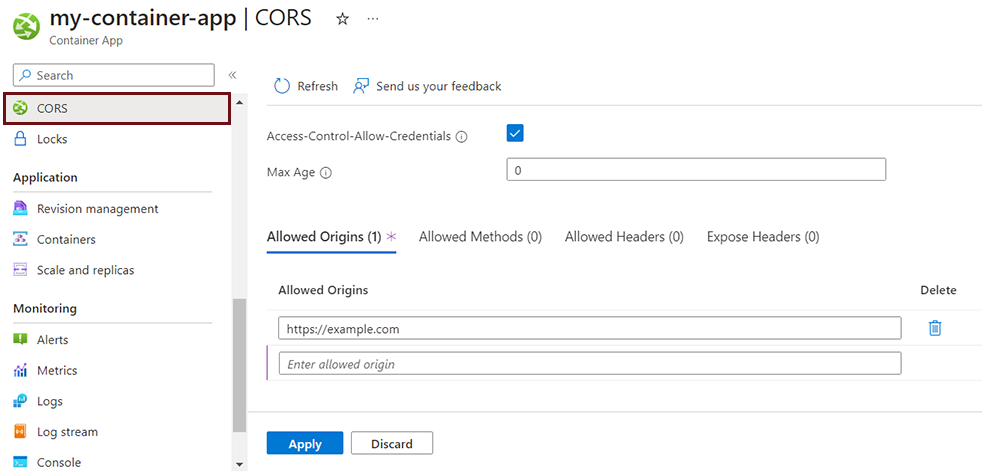
Avoid these tempting but weak fixes:
- Do not set
Access-Control-Allow-Origin: *merely to make the frontend work. - Do not allow credentials with a wildcard origin.
- Do not leave the backend public solely because the frontend needs it.
- Do not hard-code the backend ACA FQDN into the React bundle.
The reverse proxy makes the browser’s REST request same-origin:
Browser URL:     https://frontend-host/api/todos
Nginx upstream:  https://internal-backend-host/api/todos
The browser sees only the first URL. Nginx makes the second request server-side.
WebSockets use the same approach. The browser connects to:
wss://frontend-host/ws/updates
Nginx forwards the WebSocket upgrade request to the internal backend. wss is important: a page delivered over HTTPS should not attempt an insecure ws connection, which browsers commonly block as mixed content.
One caveat is application-level WebSocket origin validation. If your FastAPI code explicitly inspects the Origin header, it must allow the frontend’s public origin or future custom domain. FastAPI’s normal HTTP CORS middleware does not, by itself, provide WebSocket origin enforcement.
Prepare the React application and Nginx proxy
The React code should use paths relative to its own origin. For example, a small API helper can use:
export async function apiFetch(path: string, init?: RequestInit) {
  return fetch(`/api${path}`, init);
}

export function webSocketUrl(path: string): string {
  const protocol = window.location.protocol === "https:" ? "wss" : "ws";
  return `${protocol}://${window.location.host}/ws${path}`;
}
With this convention:
apiFetch("/todos")calls/api/todos;webSocketUrl("/updates")createswss://<frontend-host>/ws/updates;- neither bundle contains a backend hostname;
- the same frontend image can be deployed into a different environment without rebuilding solely to change an API URL.
This differs from a server-rendered frontend or Node.js backend-for-frontend application, where a runtime API_BASE_URL environment variable can be read directly by server code.
Communication between microservices in Azure Container Apps
Read the relevant Microsoft Learn example to see the standard pattern of obtaining a Container App FQDN and passing it to a frontend service as configuration.
Find the Communicate between container apps portion. Read the API endpoint configuration sequence. The example’s server-side API_BASE_URL pattern is useful context. In this lab, Nginx—not browser JavaScript—will receive the backend FQDN as a runtime environment variable.
Nginx configuration
Create frontend/nginx/default.conf.template. This assumes the FastAPI backend already exposes REST routes below /api/ and WebSocket routes below /ws/. Both path prefixes are preserved by the proxy.
server {
    listen 80;
    server_name _;

    root /usr/share/nginx/html;
    index index.html;

    location /api/ {
        proxy_pass https://${BACKEND_FQDN};
        proxy_http_version 1.1;

        proxy_ssl_server_name on;
        proxy_ssl_name ${BACKEND_FQDN};

        proxy_set_header Host ${BACKEND_FQDN};
        proxy_set_header X-Forwarded-For $proxy_add_x_forwarded_for;
        proxy_set_header X-Forwarded-Proto https;
    }

    location /ws/ {
        proxy_pass https://${BACKEND_FQDN};
        proxy_http_version 1.1;

        proxy_ssl_server_name on;
        proxy_ssl_name ${BACKEND_FQDN};

        proxy_set_header Host ${BACKEND_FQDN};
        proxy_set_header X-Forwarded-For $proxy_add_x_forwarded_for;
        proxy_set_header X-Forwarded-Proto https;

        proxy_set_header Upgrade $http_upgrade;
        proxy_set_header Connection "upgrade";

        proxy_read_timeout 3600s;
        proxy_send_timeout 3600s;
    }

    location / {
        try_files $uri $uri/ /index.html;
    }
}
The /api/ location needs no Upgrade headers because it handles ordinary HTTP. The /ws/ location explicitly keeps HTTP/1.1 and forwards the Upgrade and Connection headers required to establish a WebSocket.
The official Nginx image processes files ending in .template under /etc/nginx/templates. Its startup script replaces ${BACKEND_FQDN} with the container environment variable value. It leaves ordinary Nginx variables such as $uri and $http_upgrade intact.
If your backend routes are not prefixed with /api or /ws, change the frontend routes and proxy locations consistently. Do not add a path-rewrite rule until you have confirmed that your existing FastAPI paths actually require it.
Dockerfile for a Vite-based React application
Create or adapt frontend/Dockerfile:
FROM node:22-alpine AS build

WORKDIR /app

COPY package*.json ./
RUN npm ci

COPY . .
RUN npm run build


FROM nginx:1.27-alpine

COPY --from=build /app/dist /usr/share/nginx/html
COPY nginx/default.conf.template /etc/nginx/templates/default.conf.template

EXPOSE 80
This example assumes Vite, whose production output directory is dist. If your React project uses Create React App, its build output is conventionally build; change only that COPY source directory.
Cost of this practical action: USD 0 in Azure. Editing frontend code, Nginx configuration, and the Dockerfile does not provision cloud resources.
Build and push a uniquely tagged frontend image
Use a traceable image tag. If the working tree is clean, a short Git commit ID is practical:
export ACR_NAME="$(terraform output -raw acr_name)"
export FRONTEND_TAG="git-$(git rev-parse --short HEAD)"

docker build \
  --tag "$ACR_NAME.azurecr.io/frontend:$FRONTEND_TAG" \
  ./frontend

az acr login --name "$ACR_NAME"

docker push "$ACR_NAME.azurecr.io/frontend:$FRONTEND_TAG"
Confirm that the image exists:
az acr repository show-tags \
  --name "$ACR_NAME" \
  --repository frontend \
  --orderby time_desc \
  --output table
Do not use latest for a deployment you may need to inspect or roll back. A tag such as git-a1b2c3d establishes a clear relationship among source revision, built image, and Container Apps revision.
Cost of this practical action: The local Docker build and ACR login have no separate Azure compute charge. Pushing increases ACR image storage slightly. Because the registry already exists from the previous module, this is normally a small incremental cost, but remove obsolete lab images when they are no longer useful.
Deploy the frontend with a narrow managed identity
The frontend needs only one Azure permission: AcrPull on your private registry. It does not need Key Vault access, PostgreSQL access, or backend credentials.
First, modify the existing backend ingress block. Change only the visibility and add explicit HTTP transport:
ingress {
  external_enabled = false
  target_port      = 8000
  transport        = "http"

  traffic_weight {
    latest_revision = true
    percentage       = 100
  }
}
After this change, the prior public backend_url is no longer a browser API endpoint. Keep the FQDN as internal deployment configuration instead.
Add the following resources to your Terraform root. The code assumes the resource names established in previous lessons:
azurerm_resource_group.labazurerm_container_registry.appazurerm_container_app_environment.labazurerm_container_app.backend
variable "frontend_container_app_name" {
  description = "Name of the React frontend Container App."
  type        = string
}

variable "frontend_image_repository" {
  description = "ACR repository containing the frontend image."
  type        = string
}

variable "frontend_image_tag" {
  description = "Unique tag of the frontend image."
  type        = string
}

locals {
  frontend_image = join("", [
    azurerm_container_registry.app.login_server,
    "/",
    var.frontend_image_repository,
    ":",
    var.frontend_image_tag,
  ])
}

resource "azurerm_user_assigned_identity" "frontend" {
  name                = "id-frontend-runtime"
  resource_group_name = azurerm_resource_group.lab.name
  location            = azurerm_resource_group.lab.location

  tags = {
    project     = "grasp-azure-lab"
    environment = "lab"
    managed_by  = "terraform"
    purpose     = "frontend-runtime"
    cleanup     = "after-container-apps-module"
  }
}

resource "azurerm_role_assignment" "frontend_acr_pull" {
  scope                = azurerm_container_registry.app.id
  role_definition_name = "AcrPull"
  principal_id         = azurerm_user_assigned_identity.frontend.principal_id
}

resource "azurerm_container_app" "frontend" {
  name                         = var.frontend_container_app_name
  resource_group_name          = azurerm_resource_group.lab.name
  container_app_environment_id = azurerm_container_app_environment.lab.id
  revision_mode                = "Single"

  identity {
    type         = "UserAssigned"
    identity_ids = [azurerm_user_assigned_identity.frontend.id]
  }

  registry {
    server   = azurerm_container_registry.app.login_server
    identity = azurerm_user_assigned_identity.frontend.id
  }

  ingress {
    external_enabled = true
    target_port      = 80
    transport        = "http"

    traffic_weight {
      latest_revision = true
      percentage       = 100
    }
  }

  template {
    min_replicas = 0
    max_replicas = 1

    container {
      name   = "frontend"
      image  = local.frontend_image
      cpu    = 0.25
      memory = "0.5Gi"

      # Nginx substitutes this value into default.conf.template at startup.
      # It is service-discovery metadata, not a secret.
      env {
        name  = "BACKEND_FQDN"
        value = azurerm_container_app.backend.ingress[0].fqdn
      }
    }
  }

  tags = {
    project     = "grasp-azure-lab"
    environment = "lab"
    managed_by  = "terraform"
    cleanup     = "after-container-apps-module"
  }

  depends_on = [
    azurerm_role_assignment.frontend_acr_pull,
  ]
}

output "backend_fqdn" {
  description = "Backend ingress hostname for internal Container Apps communication."
  value       = azurerm_container_app.backend.ingress[0].fqdn
}

output "frontend_url" {
  description = "Public React frontend URL."
  value       = "https://${azurerm_container_app.frontend.ingress[0].fqdn}"
}
Add the frontend settings to your ignored local variables file:
frontend_container_app_name = "ca-frontend-grasp-lab"
frontend_image_repository   = "frontend"
frontend_image_tag          = "git-a1b2c3d"
The frontend’s BACKEND_FQDN is not a secret, so it is safe as a normal container environment variable. It is intentionally not passed into React’s browser bundle. Only Nginx uses it.
The backend’s internal ingress remains reachable from this frontend because both applications belong to the same Container Apps environment. The browser cannot use that internal endpoint directly.
Cost of this practical action: The new managed identity and RBAC assignment have no meaningful direct cost. The frontend shares the existing Container Apps environment and Log Analytics workspace, so no second environment or workspace is created. With min_replicas = 0, the frontend can scale to zero while idle. When a browser page is open or a WebSocket remains connected, at least one frontend replica remains active. The existing Log Analytics workspace’s 0.1 GiB daily quota now covers logs from both backend and frontend, so avoid verbose access logging.
Apply and validate the routing boundary
Run the normal Terraform review sequence:
terraform fmt -recursive
terraform validate
terraform plan -out frontend.tfplan
Before applying, verify the plan contains:
- one new frontend managed identity;
- one
AcrPullassignment scoped to ACR; - one frontend Container App using the unique frontend image tag;
- an external frontend ingress on port
80; - an internal backend ingress on port
8000; BACKEND_FQDNas a normal environment variable;- no ACR password, database URL, Key Vault secret value, or PostgreSQL password.
Apply the reviewed plan:
terraform apply frontend.tfplan
Retrieve the public frontend URL:
export FRONTEND_URL="$(terraform output -raw frontend_url)"

printf '%s\n' "$FRONTEND_URL"
Open that URL in a browser. The first request may be slower because the frontend can scale from zero.
Validate the REST proxy
If your FastAPI readiness path remains /health/ready, call it through the frontend proxy:
curl --fail --silent --show-error \
  --retry 5 \
  --retry-all-errors \
  --retry-delay 5 \
  "$FRONTEND_URL/api/health/ready"
A successful response confirms:
- The frontend image was pulled from ACR.
- Nginx is listening on port
80. - ACA external ingress reaches the frontend.
- Nginx resolves and contacts the backend FQDN.
- Internal backend ingress accepts the request.
- The backend still reaches PostgreSQL successfully.
Then confirm that the backend is not publicly available:
export BACKEND_FQDN="$(terraform output -raw backend_fqdn)"

curl --include \
  "https://$BACKEND_FQDN/health/ready"
From your local machine, this must not return a successful backend readiness response. An HTTP 404 is an expected outcome for a request arriving from outside the Container Apps environment.
Validate browser behavior
In the browser developer tools:
- Open the Network tab.
- Reload the frontend page.
- Trigger one normal API action in the UI.
- Confirm its request URL starts with the frontend hostname and
/api/, not the backend hostname. - Trigger the application’s WebSocket function.
- Find the
/ws/request and confirm it completes the WebSocket handshake, typically with status101 Switching Protocols.
The browser should show neither a CORS error nor a mixed-content error. If it does, the problem is normally one of these:
| Symptom | Likely cause | First check |
|---|---|---|
Frontend page returns 502 |
Nginx cannot contact backend | Confirm BACKEND_FQDN uses the backend ingress FQDN and backend ingress is internal, not disabled |
/api/... returns 404 |
Frontend proxy path does not match FastAPI routes | Compare the Nginx location /api/ path with the route that worked in the previous lesson |
| WebSocket does not connect | Missing upgrade forwarding or incorrect client URL | Confirm the browser uses wss://<frontend-host>/ws/... and Nginx has Upgrade and Connection headers |
| Browser reports CORS | Browser is still calling a full backend URL | Search the React source and built configuration for http:// or the backend FQDN |
| Browser reports mixed content | Frontend builds a ws:// URL |
Derive ws versus wss from window.location.protocol as shown earlier |
| Frontend cannot pull image | Missing role propagation or wrong tag | Verify AcrPull, repository name, and tag; wait briefly for RBAC propagation before retrying |
Cost of this practical action: Terraform planning and curl validation do not create a separate charge. Applying starts the frontend deployment, and browser testing may keep one small frontend replica active briefly. The main controllable costs remain Container Apps active replica time, ACR storage, existing PostgreSQL, and log ingestion.
Keep the lab affordable
For the remainder of the Container Apps module, keep both apps configured with:
min_replicas = 0
max_replicas = 1
This is appropriate for a personal learning environment, not a production availability target. In particular, a single replica is a poor production choice for a WebSocket service: if it restarts, all connections to it disconnect. The next lesson will add health probes and work with revisions, which are necessary before discussing safer release behavior.
When pausing work, close browser tabs that hold WebSocket connections. That permits the frontend to scale down when no traffic remains.
Do not destroy the frontend, backend, Container Apps environment, ACR, Key Vault, or PostgreSQL server yet; the next lesson builds directly on this deployment. If you stop the course after this module, review a Terraform destroy plan carefully and delete the PostgreSQL server as well, because it is likely the most predictable continuing charge.
Cost of this practical action: Closing browser tabs and allowing scale-to-zero avoids further active-replica usage. Deleting the Container Apps resources stops their future compute and logging activity, but it does not automatically remove ACR image storage or PostgreSQL costs.
Key takeaways
You now have a two-service Azure Container Apps deployment with a deliberate browser boundary:
- The React frontend is publicly reachable through ACA external ingress.
- The FastAPI backend uses ACA internal ingress and is no longer directly exposed to the internet.
- Nginx proxies
/api/and/ws/paths to the internal backend. - Relative frontend paths keep REST calls same-origin and avoid routine browser CORS configuration.
- WebSocket connections use
wssat the frontend origin and are forwarded with the required upgrade headers. - The frontend pulls a private ACR image through its own minimal
AcrPullmanaged identity. - Scale-to-zero, a single maximum replica, and a shared bounded logging workspace keep the lab within a modest budget.
Next, you will add Container Apps health probes, deploy a new revision, validate it before trusting it with traffic, and roll back a failed release.