Recommended resources
The freely available resources this lesson will direct you to.
Hello! Last lesson, you made model calls safer by closing HTTP clients reliably and distinguishing timeouts, failed HTTP statuses, and unusable response bodies. You also used MockTransport to produce those conditions without a running model. Now you’ll turn that idea into repeatable pytest tests: fixtures will give each test a clean starting point, parameterization will cover several cases without duplicating test logic, and mocks will replace the network boundary.
Allow about 40–45 minutes to watch the selected clips, read the short documentation sections, and run the code.
Give each test a behavior to verify
A useful test states what should happen for a particular input and checks it with assert. Pytest discovers functions named test_* in files named test_*.py; it runs them and reports which assertion failed. Watch the basic demonstration in Tech With Tim’s Please Learn How To Write Tests in Python… • Pytest Tutorial. The video uses pip to install packages; for this course’s uv project, use the commands below instead.
Please Learn How To Write Tests in Python… • Pytest Tutorial
Tech With Tim demonstrates pytest’s test-file naming, assertions, and failure output.
Watch the first test, beginning when the test file is created and ending after the failed assertion is displayed. Focus on how the reported failure identifies the expected and actual values.
From your project root, install pytest as a development dependency:
uv add --dev pytest
Keep the small model-call function from the previous lesson as the code under test. Save this version in model_client.py at the project root:
import httpx
from pydantic import BaseModel, Field


class ModelReply(BaseModel):
    response: str = Field(min_length=1)


def call_model(client: httpx.Client, prompt: str) -> str:
    response = client.post("/generate", json={"prompt": prompt})
    response.raise_for_status()
    reply = ModelReply.model_validate(response.json())
    return reply.response
If this project does not yet have its runtime dependencies, add them with uv add httpx pydantic. Notice the function’s boundary: it uses a supplied client rather than creating one. A test can therefore replace that client without changing call_model. The behaviors worth checking are not just “returns an answer,” but also “sends the intended request” and “does not turn a failed or invalid response into an answer.”
Use fixtures for clean starting conditions
An HTTP client substitute will be needed by several tests. Creating it separately inside every test works, but repeats setup; sharing one global mock risks carrying its configured responses and call history from one test to another. A fixture solves both problems. A test requests a fixture by naming it as a function argument, and pytest supplies its value.
Watch the fixture demonstration, then read the corresponding pytest documentation. The video’s examples make the isolation problem visible; the documentation clarifies that fixtures run when requested, not simply before every test in the suite.
Please Learn How To Write Tests in Python… • Pytest Tutorial
Continue Tech With Tim’s tutorial for a demonstration of fresh test objects and fixture teardown.
Watch the fixture examples. Pay particular attention to why a shared mutable object makes one test affect another, and to the code that runs after a fixture’s yield.
Read pytest’s official fixture guide to connect the video’s examples to fixture requests, per-test isolation, and cleanup.
In “Requesting” fixtures, read fixture requests, then the “Quick example” immediately below it. In “Fixtures are reusable”, read fresh test data and its two-test list example. Finally, in “Teardown/Cleanup (AKA Fixture finalization)”, find “1. yield fixtures (recommended)”; read its explanation from “Yield fixtures yield instead of return” through reverse teardown and the rest of that sentence. You can skip the longer email and finalizer examples.
Create tests/conftest.py:
from unittest.mock import Mock

import httpx
import pytest


@pytest.fixture
def client() -> Mock:
    return Mock(spec=httpx.Client)
conftest.py is where pytest looks for fixtures shared by tests in that directory and its descendants; tests do not need to import client. By default, this fixture runs once per requesting test case. spec=httpx.Client limits the mock to attributes present on httpx.Client, helping catch a misspelled client method. It does not automatically validate the shape of every value returned by a mocked method.
The project-tree image shows another valid placement: conftest.py inside tests/unit/ makes its fixtures available to tests beneath that directory. Our smaller example puts it directly in tests/.
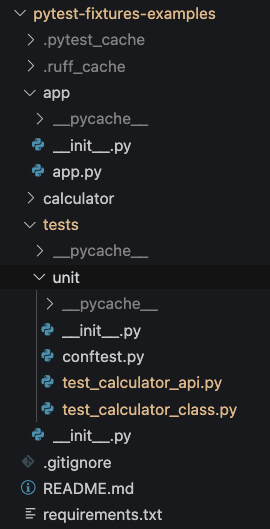
For a fixture that owns a real resource, use yield so teardown happens after the test. For example, this alternative fixture owns a real HTTPX client but uses a controlled transport, so it still needs no running server:
@pytest.fixture
def transport_client():
    transport = httpx.MockTransport(
        lambda request: httpx.Response(200, json={"response": "ready"})
    )
    with httpx.Client(
        base_url="http://localhost:11434",
        transport=transport,
    ) as client:
        yield client
The client is closed when pytest finishes the test and resumes the fixture after yield. Use the simpler return fixture when there is no resource to clean up, as with our Mock.
Parameterize cases that follow the same rule
Suppose two prompts should both produce their respective answer strings. Writing two near-identical test functions obscures their shared rule. @pytest.mark.parametrize supplies several input sets to one test function; pytest runs it separately for each set.
Watch the short demonstration and read the official example before adding the test. The video calls the feature “parameterization”; in code, pytest spells its decorator parametrize.
Please Learn How To Write Tests in Python… • Pytest Tutorial
Tech With Tim shows how one test body runs against multiple input-and-expected-output pairs.
Watch parameterized tests. Notice how the failing run identifies the particular case, rather than merely saying that the test function failed.
How to parametrize fixtures and test functions
Use pytest’s official guide for the exact decorator syntax and to see how it reports a failing parameter set.
In “@pytest.mark.parametrize: parametrizing test functions”, read the input pairs, including the test_expectation.py example and the failure report immediately below it. You can stop before the examples that parametrize whole classes and modules.
Create tests/test_model_client.py with this first test:
from unittest.mock import Mock

import httpx
import pytest

from model_client import call_model


def model_request() -> httpx.Request:
    return httpx.Request("POST", "http://localhost:11434/generate")


@pytest.mark.parametrize(
    "prompt,answer",
    [
        ("annual leave", "Annual leave is 20 days."),
        ("travel expenses", "Submit receipts within 30 days."),
    ],
    ids=["leave", "expenses"],
)
def test_returns_valid_model_reply(
    client: Mock, prompt: str, answer: str
) -> None:
    client.post.return_value = httpx.Response(
        200,
        json={"response": answer},
        request=model_request(),
    )

    assert call_model(client, prompt) == answer
    client.post.assert_called_once_with(
        "/generate", json={"prompt": prompt}
    )
There are two checks here. The ordinary assertion checks the result. assert_called_once_with checks the interaction at the boundary: the function posted to the expected path with the expected JSON. Each parameter set also requests a fresh client fixture, so the second case does not inherit the first case’s call count.
Keep parameter sets independent. Pytest passes parameter values as they are; if a test mutates a list or dictionary supplied as a parameter, a later case may see the changed object. The strings above avoid that issue, and the response object is constructed inside each run.
Mock the boundary, not the behavior you intend to test
A mock stands in for a dependency whose behavior you control. In this test, client.post is mocked, but call_model, HTTPX’s response-status check, JSON decoding, and Pydantic validation all run. That distinction matters: if you mocked call_model itself, the test would learn nothing about its implementation.
ArjanCodes’ How to Write Great Unit Tests in Python demonstrates mock assertions and shows why supplying a dependency can be simpler than patching it later.
How to Write Great Unit Tests in Python
ArjanCodes demonstrates mock objects and then refactors toward passing dependencies into code that needs them.
Watch mock behavior for configured results and call assertions. Then watch dependency injection; relate it to call_model(client, prompt), where the test supplies the client.
Append the following tests to tests/test_model_client.py. They cover the distinct failure points from the previous lesson without opening a network connection:
from json import JSONDecodeError

from pydantic import ValidationError


@pytest.mark.parametrize(
    "status,body,error_type",
    [
        (503, {"error": "unavailable"}, httpx.HTTPStatusError),
        (200, {"response": ""}, ValidationError),
    ],
    ids=["failed-status", "invalid-shape"],
)
def test_rejects_unusable_responses(
    client: Mock,
    status: int,
    body: dict[str, str],
    error_type: type[Exception],
) -> None:
    client.post.return_value = httpx.Response(
        status,
        json=body,
        request=model_request(),
    )

    with pytest.raises(error_type):
        call_model(client, "annual leave")


def test_rejects_non_json_body(client: Mock) -> None:
    client.post.return_value = httpx.Response(
        200,
        content=b"not json",
        request=model_request(),
    )

    with pytest.raises(JSONDecodeError):
        call_model(client, "annual leave")


def test_propagates_timeout(client: Mock) -> None:
    client.post.side_effect = httpx.ReadTimeout(
        "model did not respond",
        request=model_request(),
    )

    with pytest.raises(httpx.ReadTimeout):
        call_model(client, "annual leave")

    client.post.assert_called_once_with(
        "/generate", json={"prompt": "annual leave"}
    )
return_value supplies what a successful call to the mocked post method returns. side_effect instead makes that call raise a timeout. pytest.raises(...) says that an exception is the expected behavior for this case: the test fails if no matching exception occurs. For the 503 case, a real httpx.Response raises at raise_for_status(); for the empty answer, the response passes the HTTP check but fails Pydantic validation. Using real response objects avoids inventing a loose imitation of HTTPX’s response behavior.
Run all the tests from the project root:
uv run python -m pytest -q
You should see six passed: two successful parameter sets, two parameterized error cases, one non-JSON case, and one timeout case. If a test fails, read its case name and assertion output before changing code; for example, invalid-shape points to a different boundary from failed-status.
Mocks make these tests fast and deterministic, but they prove only how your code behaves given the responses you supplied. They do not prove that a running model service uses the same response format or is reachable. That distinction will matter when you later test a real HTTP integration.
Takeaway
Use fixtures to give tests reusable, isolated setup; use a yield fixture when that setup owns something that must be cleaned up. Use parameterization when several cases obey the same test rule, and use mocks to control external dependencies while leaving the behavior under test real. Check both important outputs and, where it is part of the contract, important calls to dependencies.
Next, you’ll use async and await to issue concurrent HTTP requests with timeouts. The same testing principle will carry forward: control the external response, then verify how your own request-handling code behaves.