Recommended resources
The freely available resources this lesson will direct you to.
Hello! Welcome back to the second module of our course.
In the previous lesson, you successfully set up a complete local LLM development environment using Ollama. You now have a Llama 3 8B model running on your machine and have confirmed you can interact with it programmatically using Python.
While calling the model directly works, it's not a scalable way to build applications. The logic for formatting prompts, processing inputs, and handling outputs quickly becomes messy and hard to maintain. This is where a framework like LangChain becomes invaluable.
This lesson addresses the learning outcome: Explain the core components of LangChain: chains, prompt templates, and output parsers. We will explore these three foundational pillars that allow you to build structured, modular, and powerful LLM applications. Understanding these is the next critical step toward building the vulnerable chatbot for your demo.
1. Why LangChain? From Raw Calls to Composable Chains
LangChain is a framework designed to simplify the development of applications powered by language models. It provides a set of modular building blocks and a way to compose them into "chains" that handle complex workflows.
The modern way to build these chains is with the LangChain Expression Language (LCEL). LCEL provides a declarative syntax, using the pipe (|) operator, to connect components. This makes the code more readable and closely mirrors the conceptual flow of data through your application.
Take a look at this comparison:

As you can see, LCEL abstracts away the boilerplate, allowing you to focus on the logic. Your experience with infrastructure automation pipelines (like in Ansible or Terraform) should make this declarative, component-based approach feel familiar.
The core idea is to assemble a pipeline from individual, reusable components. Let's look at the main ones.
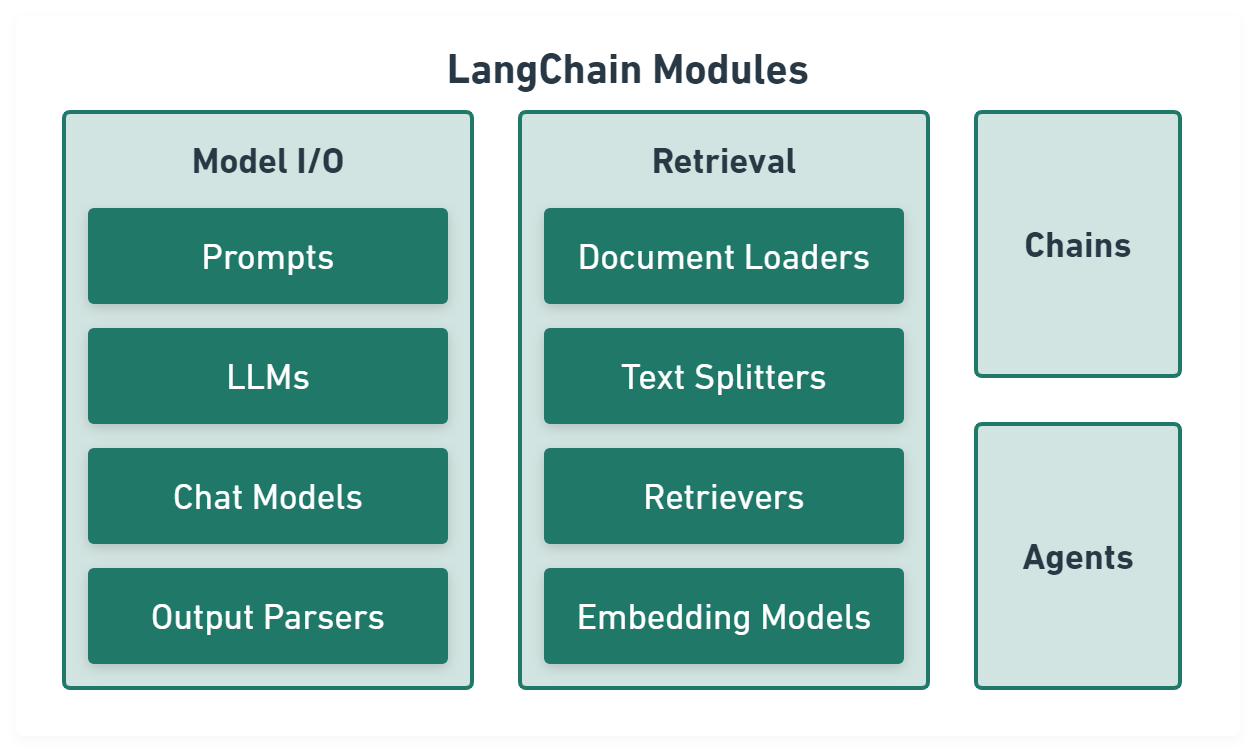
2. The Core Components of a LangChain Chain
A basic LangChain chain consists of three key parts:
- Prompt Template: A template that formats the input for the model. It takes user input and other variables and structures them into a complete prompt.
- Model: The language model that will process the prompt. In our case, this will be our local Llama 3 model accessed via Ollama.
- Output Parser: A component that takes the model's raw output and transforms it into a more useful format (e.g., a string, JSON, or a custom Python object).
Let's explore each one.
A. Prompt Templates: Structuring the Input
Hardcoding prompts is inflexible. Prompt templates allow you to create dynamic prompts with placeholders for variables. LangChain provides several types, but for modern chat models, ChatPromptTemplate is the standard. It allows you to structure prompts as a sequence of messages, each with a specific role (e.g., system, user, ai).
Mastering LangChain Output Parsers and Prompt Templates
This article from Medium provides a clear distinction between the two main types of prompt templates in LangChain.
Read the section titled 'Prompt Templates: Two Variants'. Focus on understanding the difference between String Prompt Templates for simple tasks and Chat Prompt Templates for more complex, role-based interactions, which is what we'll be using.
Here is how you would create a ChatPromptTemplate in Python. Note the use of tuples to define the role and content of each message.
# First, ensure you have langchain installed
# pip install langchain langchain_community langchain_core

from langchain_core.prompts import ChatPromptTemplate


# Create a template with system and user roles
# The `{topic}` is a placeholder for a variable we will provide later
prompt_template = ChatPromptTemplate.from_messages([
    ("system", "You are an expert on cloud-native technologies. Explain concepts concisely."),
    ("user", "What is the core purpose of {topic}?")
])


# You can format the prompt by providing the variables
formatted_prompt = prompt_template.invoke({"topic": "Kubernetes"})


# This would produce a list of messages ready to be sent to the model
print(formatted_prompt)
B. Output Parsers: Structuring the Output
LLMs produce text, but applications often need structured data. Output Parsers are responsible for this transformation.
StrOutputParser: The simplest parser. It just takes the model's output and returns it as a string.JsonOutputParser/PydanticOutputParser: These are more powerful. They instruct the model to return a JSON object and then parse that JSON into a Python dictionary or a Pydantic object. This is a best practice for reliable applications.
Using structured output enforces a schema, which is critical for making your application's logic robust and predictable. Given your Python background, using Pydantic will be a natural fit.
LangChain is AMAZING | Quick Python Tutorial
This segment from ArjanCodes provides an excellent demonstration of how to enforce structured output using Pydantic, a powerful data validation library in Python.
Watch from 06:58 to 10:11. Pay close attention to how a Pydantic BaseModel is defined to create a schema, and how the PydanticOutputParser uses this schema to both generate formatting instructions for the LLM and parse the resulting output.
The key insight here is that the parser does two things:
- It provides
get_format_instructions()that you add to your prompt, telling the LLM how to format its response. - It parses the LLM's string output, validating it against the Pydantic schema you defined.
This combination significantly reduces the chance of errors from malformed model outputs.
3. Assembling the Chain with LCEL
Now, let's bring these components together into a chain using the LangChain Expression Language (LCEL). The syntax is simple and intuitive: prompt | model | parser.
The article 'LangChain Best Practices' explains why LCEL is the modern standard and shows a concise example of a complete chain.
Read section '1) Prefer LCEL (Runnables) over legacy chains'. The 'Why' section summarizes the benefits, and the code block shows a complete, simple chain. Notice the | operators connecting the components.
So, how does this | operator actually work? For someone with your development background, understanding the mechanism behind the magic is important. Every component in an LCEL chain is a Runnable. The pipe operator is essentially syntactic sugar that composes these Runnable objects.
LangChain Expression Language - The ONLY video you need to TRULY understand LCEL
This video from Coding Crash Courses offers a fantastic deep dive into the mechanics of LCEL. It will give you that 'under the hood' understanding you're looking for.
Watch the following parts: 00:36 - 02:00: This shows the basic composition of a chain (prompt, model, parser) using the pipe operator. 02:00 - 03:09: This explains that every component has an invoke method and shows how data flows sequentially through the chain. 03:09 - 08:06: This is the key section. It explains how the pipe operator (|) is an overload of Python's __or__ method. The custom class examples clearly demonstrate how chaining is implemented. This will give you a fundamental grasp of LCEL's design.
4. Putting It All Together: A Complete Example
Let's integrate these concepts with the Ollama setup from our last lesson. First, you'll need to install the necessary LangChain packages.
# In your activated virtual environment
pip install langchain langchain_core langchain-community pydantic
Now, create a Python script (lcel_test.py) with the following code. This example defines a Pydantic model for a structured response, creates a prompt template that includes formatting instructions, initializes the Ollama chat model, and chains everything together.
from langchain_community.chat_models import ChatOllama
from langchain_core.output_parsers import PydanticOutputParser
from langchain_core.prompts import ChatPromptTemplate
from pydantic import BaseModel, Field


# 1. Define your desired data structure with Pydantic
class ToolInfo(BaseModel):
    tool_name: str = Field(description="The name of the software tool or technology.")
    purpose: str = Field(description="A one-sentence summary of the tool's primary purpose.")


# 2. Set up a Pydantic parser
parser = PydanticOutputParser(pydantic_object=ToolInfo)


# 3. Create a prompt template that includes the format instructions
prompt = ChatPromptTemplate.from_messages(
    [
        (
            "system",
            "You are an expert SRE. Extract information about software tools. "
            "Follow the user's formatting instructions precisely.\n{format_instructions}",
        ),
        ("user", "Describe the tool: {tool_description}"),
    ]
).partial(format_instructions=parser.get_format_instructions())


# 4. Initialize your local LLM
# Make sure your Ollama service is running!
model = ChatOllama(model="llama3:8b")


# 5. Create the chain by piping the components together
chain = prompt | model | parser


# 6. Invoke the chain with a tool description
try:
    result = chain.invoke({
        "tool_description": "Terraform is an open-source infrastructure as code software tool "
                            "that enables users to define and provision a data center "
                            "infrastructure using a high-level configuration language."
    })
    print("Successfully parsed output:")
    print(f"Tool Name: {result.tool_name}")
    print(f"Purpose: {result.purpose}")

except Exception as e:
    print(f"An error occurred: {e}")
Run this script. The output should be a cleanly parsed ToolInfo object, demonstrating that the entire chain—from templated prompt to structured output—is working with your local model.
Conclusion
You have now mastered the fundamental components of LangChain. This is the core skill set required to build sophisticated LLM applications.
Key Takeaways:
- LangChain builds on components: Applications are constructed by composing modular, reusable parts.
- Prompt Templates provide a flexible and clean way to structure inputs for the LLM, separating logic from static text.
- Output Parsers are essential for reliability, transforming the LLM's raw text into structured, validated data that your application can use. Pydantic-based parsers are a best practice.
- LCEL Chains (
|) provide an elegant, readable, and powerful syntax to define the flow of data through your application's components.
In our next lesson, "Build a minimal LangChain RAG chatbot wrapped in a FastAPI endpoint," we will put this knowledge into practice. We'll add a new component—a Retriever—to our chain to create a simple RAG application. This will form the core of our vulnerable chatbot and set the stage for exploring indirect prompt injection attacks.