Recommended resources
The freely available resources this lesson will direct you to.
- How to Build Your First Decision Tree in Python (scikit-learn)www.youtube.com
- Random Forest Classification in Python With Scikit-Learnwww.datacamp.com
- Decision Tree Classification in Python Tutorialwww.datacamp.com
- Random Forest Algorithm Explained with Python and scikit-learnwww.youtube.com
- How to Implement Decision Trees in Python (Train, Test, Evaluate, Explain)www.youtube.com
- Decision Tree and Random Forestlife-sciences-ml-at-tacc.readthedocs.io
Hello! Welcome back to our course on AI Engineering.
In the last lesson, you successfully trained and evaluated a logistic regression model. You learned that while it's a powerful tool for classification, it is fundamentally a linear model, meaning it separates data with a straight line or a hyperplane.
Today, we'll explore more complex models that can capture non-linear relationships in data: Decision Trees and Random Forests. These models are highly intuitive and form the basis for many advanced machine learning algorithms. You'll find that the evaluation skills you learned—using the confusion matrix, precision, and recall—are directly applicable here.
By the end of this 60-minute lesson, you will be able to:
- Train and evaluate a Decision Tree classifier using Scikit-learn.
- Understand the concept of feature importance to interpret the model's decisions.
- Train and evaluate a Random Forest classifier and understand why it often outperforms a single decision tree.
Let's get started!
1. Decision Trees: Asking a Series of Questions
A decision tree operates much like we do when making a decision: by asking a series of questions. Imagine trying to decide if you should play tennis. You might ask: "Is the outlook sunny?" If yes, you might then ask, "Is the wind strong?" The model learns the best sequence of these yes/no questions to ask based on the features in your data to arrive at a final classification.
The structure of the model looks like an upside-down tree:
- Root Node: The first question that splits all the data.
- Internal Nodes: Subsequent questions that split the data further.
- Leaf Nodes: The final "answers" or class predictions.
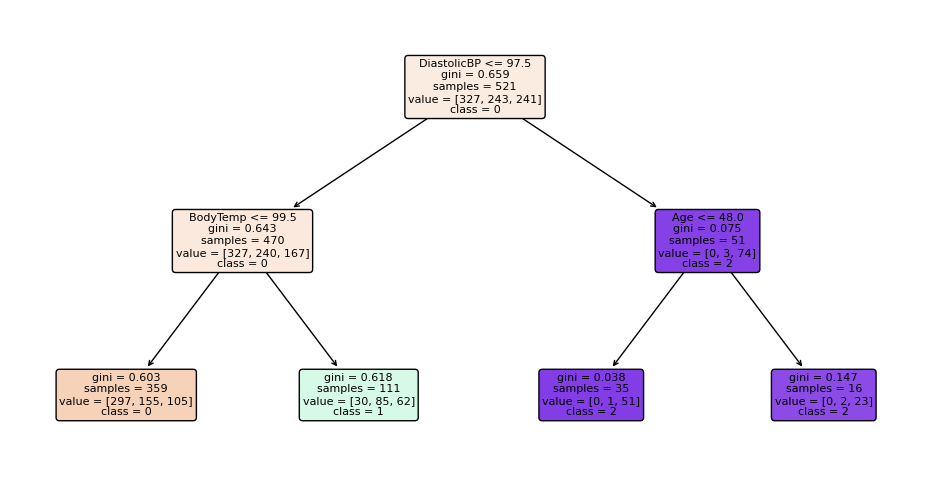
The tree learns which questions to ask (i.e., which features to split on) by choosing the splits that do the best job of separating the classes. A common metric used to measure the quality of a split is the Gini Impurity, which indicates how "mixed" a group of samples is. A perfect split results in nodes with a Gini impurity of 0 (all samples belong to one class).
To dive deeper into the theory, you can optionally review the "The Decision Tree Algorithm" and "Attribute Selection Measures" sections in the DataCamp article, Decision Tree Classification in Python Tutorial.
Building and Evaluating a Decision Tree
Now, let's put this into practice. The following video provides a complete walkthrough of building a decision tree classifier in Scikit-learn to predict whether a baseball player will be inducted into the Hall of Fame.
How to Build Your First Decision Tree in Python (scikit-learn)
This video from Ryan & Matt Data Science will guide you through the entire process of building and evaluating your first decision tree model in Python.
Please watch from the beginning until 09:21. (00:00 - 05:29): The first part covers loading the data and performing the train-test split. This should be a good review of the workflow you've already practiced. (05:29 - 09:21): This is the core section. Pay close attention to how the DecisionTreeClassifier is imported, instantiated (DTC = ...), trained (.fit()), and used for predictions (.predict()). Notice that the evaluation uses the same confusion_matrix and classification_report you used in the last lesson.
Feature Importance
One of the great benefits of tree-based models is their interpretability. After training, we can ask the model which features were most useful for making its predictions. This is known as feature importance. Features that lead to the most significant reductions in impurity (the best splits) are considered more important.
Let's continue with the video to see how this is done.
How to Build Your First Decision Tree in Python (scikit-learn)
The next segment of the same video demonstrates how to extract and interpret feature importances from your trained decision tree.
Please watch from 09:21 to 11:41. Focus on how .feature_importances_ is accessed from the trained model object. Observe how the presenter combines these importance scores with the original feature names to create a clear, ranked list.
The Overfitting Problem
Decision trees have a significant weakness: if left unconstrained, they will continue splitting the data until every single training example is perfectly classified. This results in a model that is overly complex and has memorized the training data, including its noise. This is called overfitting, and it means the model will perform poorly on new, unseen data.
To combat this, we can prune the tree, which means limiting its growth. This is typically done by setting hyperparameters, such as max_depth (the maximum number of levels in the tree) or ccp_alpha (a complexity parameter that prunes weaker branches).
The final part of the video demonstrates this.
How to Build Your First Decision Tree in Python (scikit-learn)
Let's see how changing the model's hyperparameters can help control overfitting and simplify the tree.
Watch from 11:41 to the end (15:03). Notice how the presenter trains a second model with the ccp_alpha parameter set. See how this drastically changes the feature importances, effectively forcing the model to focus only on the most predictive features.
2. Random Forests: The Wisdom of the Crowd
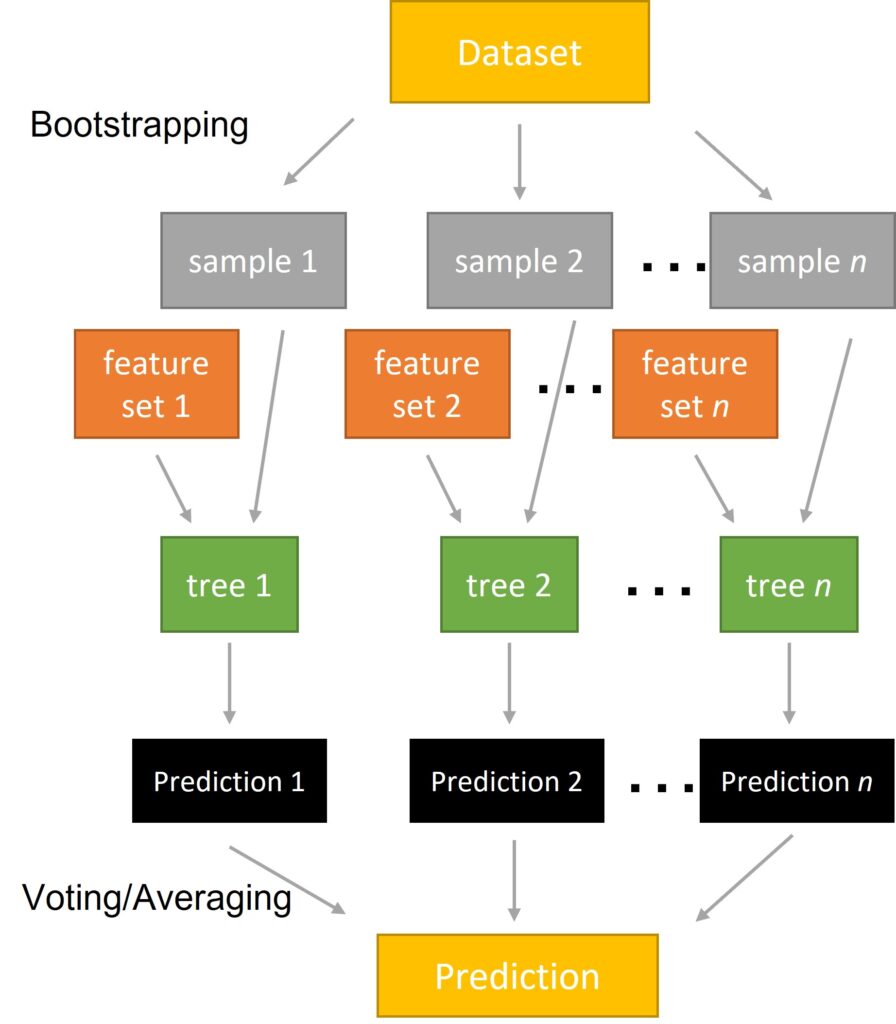
While pruning helps, a more powerful solution to the overfitting problem is to use an ensemble of trees. This is the core idea behind the Random Forest algorithm.
Instead of building one perfect (and likely overfit) decision tree, a random forest builds many "weaker" decision trees on random subsets of the data and features. To make a prediction, each tree in the forest "votes" for a class, and the class with the most votes wins. This "wisdom of the crowd" approach results in a model that is much more robust and accurate than any single tree.
Building and Evaluating a Random Forest
The good news is that training a RandomForestClassifier in Scikit-learn follows the exact same workflow you've already mastered. Let's see it in action using the same baseball dataset.
Random Forest Algorithm Explained with Python and scikit-learn
This video, also from Ryan & Matt Data Science, demonstrates how to build a Random Forest model, highlighting its power over a single decision tree.
Please watch from 00:54 to 08:39. (00:54 - 05:36): Observe the familiar data preparation and fit/predict workflow, this time with RandomForestClassifier. (05:36 - 08:39): Pay attention to the model's accuracy score and compare it to the single decision tree from the previous exercise. You should see an improvement! Note how feature_importances_ is also available for random forests.
You likely noticed that the random forest achieved a higher accuracy score out-of-the-box. This is very common and demonstrates the power of ensemble methods.
Hyperparameter Tuning for Random Forests
Like decision trees, random forests have hyperparameters that can be tuned to optimize performance. Some of the most important ones include:
n_estimators: The number of trees in the forest. More trees are generally better but increase computational cost.max_depth: The maximum depth of each individual tree. This helps control the complexity of the trees.
The next video segment shows how adjusting these can lead to even better performance.
Random Forest Algorithm Explained with Python and scikit-learn
Let's look at how to tune a Random Forest by providing specific hyperparameter values during instantiation.
Watch from 08:39 to the end (11:33). Notice the parameters being set (n_estimators, criterion, max_depth, etc.) when creating the new RandomForestClassifier object. Compare the final accuracy score of this tuned model to the default one. This process of manually setting parameters is a precursor to more systematic methods like Grid Search, which we'll cover later.
Key Takeaways
- Decision Trees are interpretable, flowchart-like models that can capture non-linear patterns but are highly prone to overfitting.
- Random Forests are an ensemble method that builds many decision trees on random subsets of data and features. They are more robust, more accurate, and less prone to overfitting than single trees.
- Both models provide feature importances, allowing you to understand which variables are most influential in making predictions.
- The Scikit-learn API remains consistent: the
fit/predict/evaluate workflow you've learned applies toDecisionTreeClassifier,RandomForestClassifier, and many other models.
What's Next?
Excellent work! You have now mastered two powerful and widely used classification algorithms. You've also seen how the principles of training and evaluation remain consistent even as models become more complex.
So far, we have focused on supervised learning, where our data has labels (e.g., 'Hall of Fame' or 'Not'). In the next lesson, we will make our first foray into unsupervised learning by exploring k-means clustering, an algorithm for finding hidden groups in unlabeled data.