Recommended resources
The freely available resources this lesson will direct you to.
- How We Film Interviews With Two People In Framewww.youtube.com
- Easy Way To Shoot A 3 PERSON INTERVIEWwww.youtube.com
- Best Practices and Tips for Shooting Smartphone Videos | Teaching Resourcesteaching-resources.delta.ncsu.edu
- Mobile Videography: A Complete Guide to Creating High-Quality Videos - Equinet Academywww.equinetacademy.com
Welcome back. You have already arranged the three seats around one shared microphone and tested the recorded audio for voice balance and distortion. Keep that working arrangement: a better picture is not worth losing a clear voice.
In this lesson, you will turn the phone into a steady, well-lit group camera. The goal is a continuous shot in which an editor can see all three in-room speakers throughout a real conversation—not merely a frame that looks good while everyone sits still. Allow about 35–40 minutes, including a short camera test.
Compose for a conversation, not a posed photograph
Start with the three people in their agreed audio positions. Put the phone on the other side of the shared microphone, facing the group, then check its actual camera preview. Aim for a medium-wide group shot: all three faces and upper bodies should be visible, with enough room for ordinary gestures. If the microphone is visible, that is usually less troublesome than placing it where it hides someone’s mouth or face.
A useful starting point is to set the lens around seated eye height and point it toward the middle of the group. Look at the outer speakers first. Can you see both faces when they turn toward the person in the middle? Are their heads uncomfortably close to the frame edges? Leave a little space above everyone’s head and at either side for natural leaning. At the same time, do not pull back so far that all three faces become tiny.
If the seats form an arc around the mic, one person may be noticeably closer to the camera than the others. Check that everyone remains sharp and visible; adjust the camera position or angle before changing seats that already work for audio. Move the phone physically when possible rather than using digital zoom, which may sacrifice image detail. For a standard widescreen podcast video, start with the phone horizontal (landscape). If the editor needs a vertical deliverable instead, agree on that format before recording—three people need considerably more careful framing in a narrow image.
How We Film Interviews With Two People In Frame
Watch How We Film Interviews With Two People In Frame from Spoken Frame Media for principles you can transfer to a three-person, single-phone shot. Its equipment and multi-camera setup are not requirements for your session.
Watch shared focus to see why participants at very different camera distances can be difficult to keep sharp. Then watch the wider view for the idea of fitting the whole conversation into a primary shot. Later, even lighting shows why a light much closer to one person can leave others comparatively dark.
A shot that contains everyone is not automatically a usable group shot. It must continue to contain everyone as they look at each other, speak, listen, and shift in their seats.
Make the camera stay put
For a seated conversation, a locked-off shot is preferable to a hand-held phone. Secure the phone in a tripod or a stable clamp on a firm surface. Check that the mount grips it safely, the support will not wobble if someone touches the table, and nobody needs to cross in front of it. Avoid balancing the phone against loose objects. Keep charging cables tidy and outside walking paths; make sure a cable cannot pull the phone out of position.
Once mounted, check the preview again. The phone’s screen orientation, mount, or cable can slightly change the angle you thought you had set. If your phone-to-Riverside camera connection offers different lenses or view modes, choose the one that shows all three people clearly without stretching faces at the edges. Do not change the working shared-mic setup or enable the phone as a second room-audio source just to solve a camera problem.
The following guide gives practical phone-shooting advice. Some of its instructions are written for general smartphone video rather than a Riverside group recording; apply its camera and lighting principles while retaining your established external microphone.
Best Practices and Tips for Shooting Smartphone Videos | Teaching Resources
Read Best Practices and Tips for Shooting Smartphone Videos from Teaching Resources for the fundamentals of steady support, light, and phone orientation.
In “Step 1: Lighting — Shoot Your Video in Bright Areas,” read the lighting guidance, focusing on light that stays consistent during a long take. In “Step 2: Keep your Phone Steady while Recording,” read from steady supports; for this session, choose a support that needs no one to hold it. In “Step 4: Get Close to Your Subject,” read the zoom advice, but remember that getting closer must not cut a speaker out. In “Step 5: Avoid Vertical Video Syndrome,” read orientation advice as guidance for a widescreen deliverable, not a rule for every publishing format. Finally, under “Best Practices,” find “Avoiding Backlit-Settings” and read the backlighting explanation.
Light three faces, not just the room
A room can look bright to your eyes while its phone video shows dark or grainy faces. Check the image on the phone or Riverside preview, especially the two people at the edges. The most useful light falls onto faces. A bright window directly behind the group may make the window look good while the speakers appear dark.
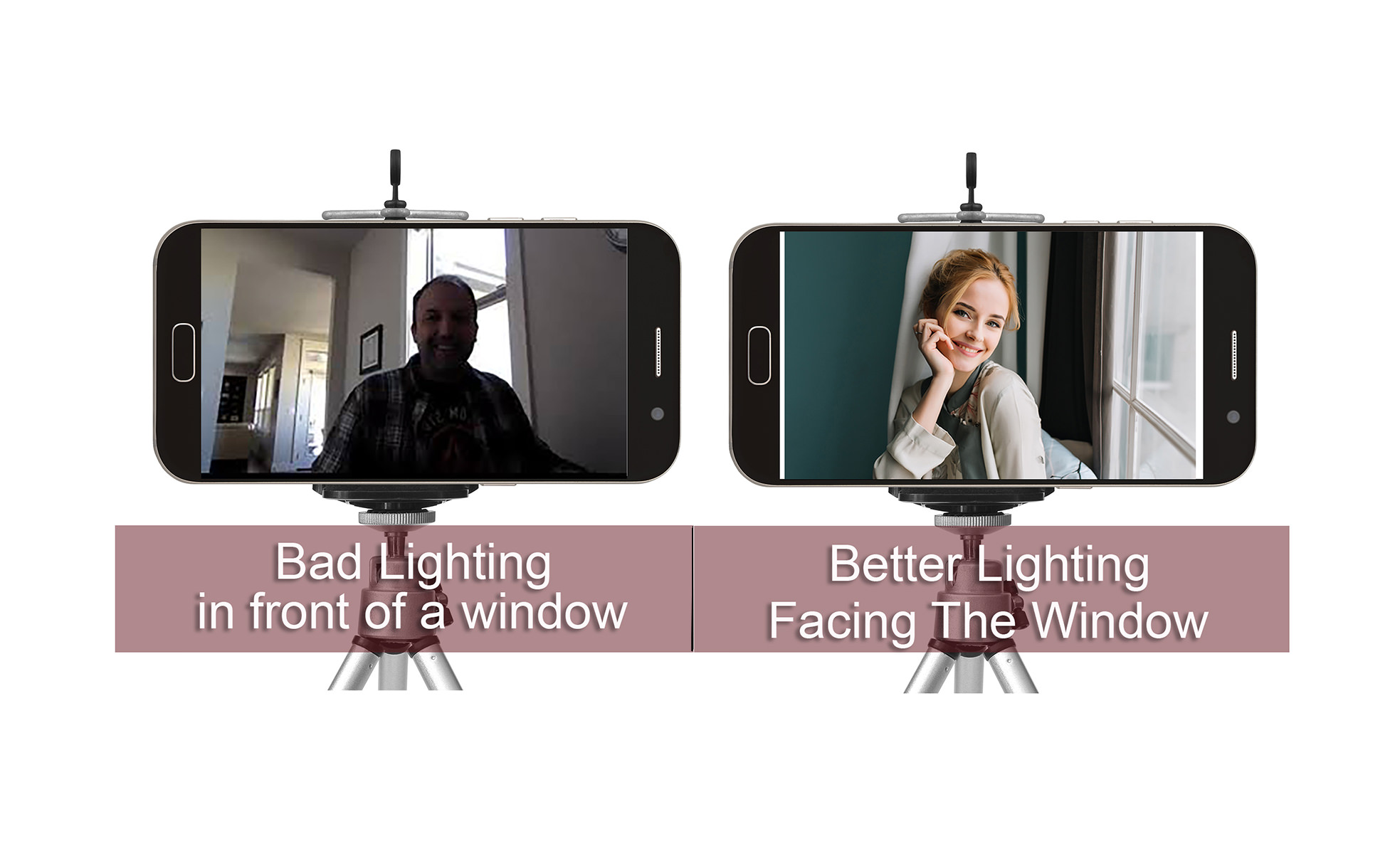
For three people, try to place the group so a window lights their faces from the front or slightly to one side, rather than sitting behind them in the shot. If daylight is harsh, a blind or curtain may soften it. If one edge speaker remains much darker, check whether you can reposition an existing lamp or adjust the seating angle slightly without changing each person’s effective distance to the shared mic. Judge the result across all three faces, not just the middle one.
Consistency matters during a long conversation. Moving sunlight, a bright window beside a dim corner, or changing overhead lights can make the phone repeatedly adjust its exposure and colour. Choose a lighting arrangement likely to remain steady for the whole recording. If your particular phone-camera connection offers focus, exposure, or white-balance controls, you may use them after lighting and framing look right; those controls are not available in every Riverside phone-camera arrangement. Do not depend on a setting you have not verified in the actual preview and a saved test.
Check the shot people will actually make
Use the intended phone camera and Riverside setup for a short 60–90-second video test. Have all three people sit where they will record, speak to one another, turn their heads, gesture normally, and lean forward and back a little. This is a camera check, not the later full rehearsal.
Watch the live preview, then inspect the saved test recording, since a preview may be mirrored or displayed differently from the recorded frame. Check five things:
- Visibility: All three faces remain in frame during natural movement; no person, mic, or object routinely blocks another speaker.
- Scale and focus: Faces are large enough to read expressions and all three look reasonably sharp.
- Stability: The frame stays still when participants move or touch nearby furniture.
- Light: Each face is clear, without a bright background turning the group into silhouettes or one person being markedly darker.
- Continuity: The phone keeps its chosen orientation and camera view throughout the test.
Correct the cause you observe, then record a brief second test. If someone is cropped, widen the composition or reposition the camera before moving an audio-tested seat. If the picture is dark, improve the light reaching faces before accepting a grainy result. If it shakes, secure the support rather than asking everyone to sit unnaturally still.
Keep a quick note—or a reference image—of the final phone position, framing, and lighting arrangement. That will make the setup easier to reproduce on recording day.
Key takeaways
For an editor-ready group camera, all three speakers must remain visible, sharp, and reasonably evenly lit while they converse. Preserve the shared-mic positions, secure the phone, compose with space for movement, keep bright windows from overpowering faces, and verify the saved test rather than trusting a still preview.
The room’s camera and microphone are now ready for a fuller session setup. Next, you will prepare the remote guest’s invitation and arrival instructions.