Recommended resources
The freely available resources this lesson will direct you to.
Hello! Welcome to the final lesson in our module on logistic regression.
In our last session, we built the engine for our model by implementing the gradient descent algorithm. We saw how to iteratively update the parameter vector by moving in the direction opposite to the gradient of the cost function, ensuring we find the optimal parameters that minimize prediction error.
Now that we know how to find the best , a crucial question remains: what do these learned parameters actually represent? This lesson will connect the abstract numbers in the vector to a concrete, geometric concept. We will explore how these parameters define the decision boundary, the line (or plane) that the model uses to separate the different classes.
By the end of this lesson, you will be able to define the decision boundary for binary logistic regression and explain precisely how the learned parameters determine its characteristics.
1. Defining the Decision Boundary
In binary logistic regression, our model, , outputs the estimated probability that an input belongs to the positive class (). The classification rule is straightforward:
- If , we predict .
- If , we predict .
The decision boundary is the threshold where the model is perfectly uncertain. It's the set of all points for which the predicted probability is exactly 0.5.
Let's derive the equation for this boundary. We start with our model's hypothesis:
We set this probability to 0.5:
Solving for the exponent:
\begin{align*}
1 &= 0.5 (1 + e^{-\boldsymbol{\theta}^T \mathbf{x}}) \
2 &= 1 + e^{-\boldsymbol{\theta}^T \mathbf{x}} \
1 &= e^{-\boldsymbol{\theta}^T \mathbf{x}}
\end{align*}
Taking the natural logarithm of both sides:
\begin{align*}
\ln(1) &= \ln(e^{-\boldsymbol{\theta}^T \mathbf{x}}) \
0 &= -\boldsymbol{\theta}^T \mathbf{x} \
\boldsymbol{\theta}^T \mathbf{x} &= 0
\end{align*}
This simple equation, , is the mathematical definition of the decision boundary in logistic regression. All points in the feature space that satisfy this equation lie on the boundary.
This is also highlighted in the following resource.
The document 'Logistic Regression' from Carnegie Mellon University provides a concise, formal definition of the decision boundary.
Please read the paragraph within section 12.2 that begins 'Formally, the model logistic regression model is...'. Focus on the sentence that explicitly defines the decision boundary: 'The decision boundary separating the two predicted classes is the solution of β₀ + x · β = 0...'. Note that their β₀ is our θ₀ and their β is our vector of θ₁...θd.
2. The Geometry of the Decision Boundary
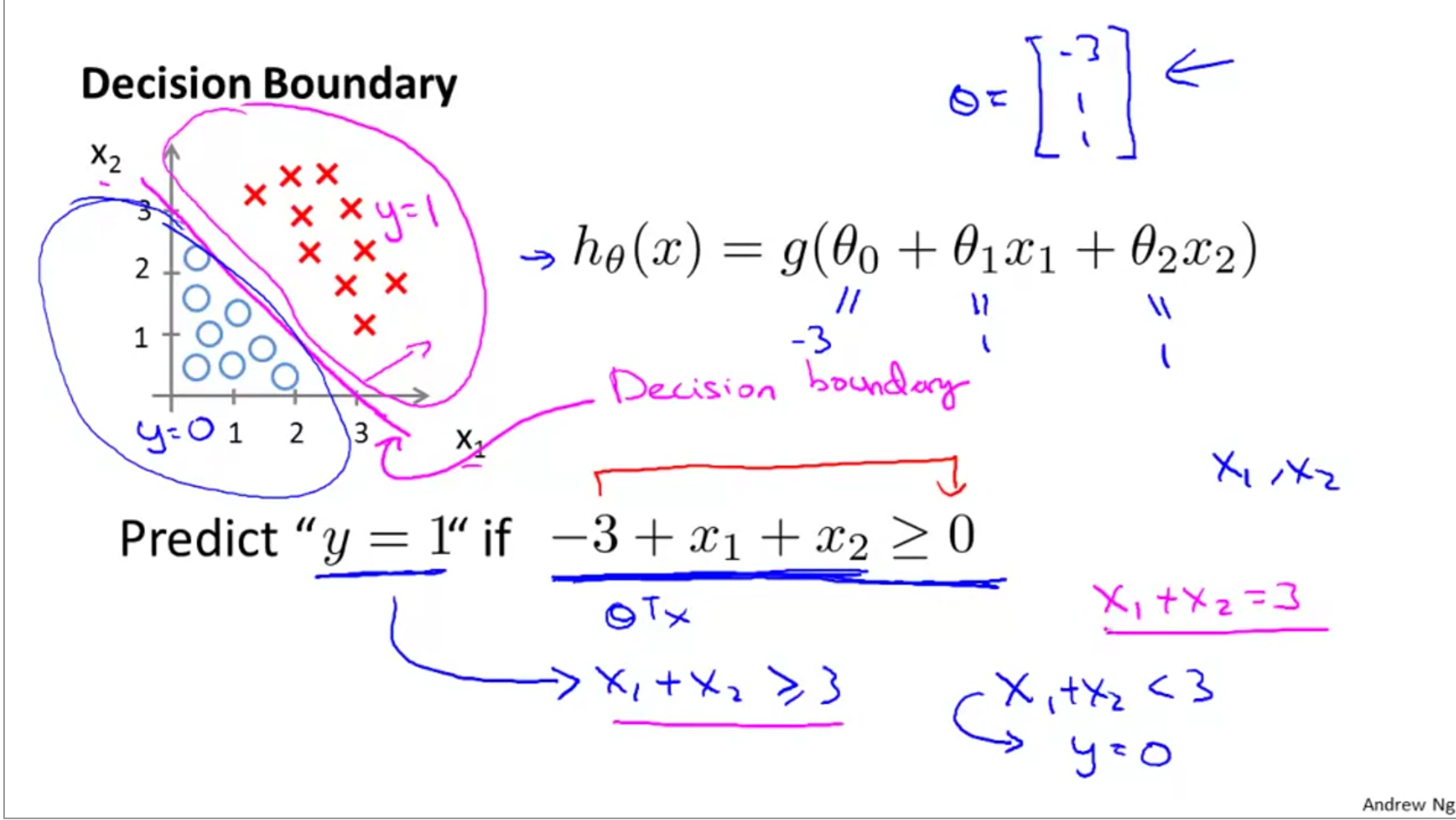
The equation defines a hyperplane. A hyperplane is a generalization of a line (in 2D) or a plane (in 3D) to any number of dimensions. Let's make this concrete for a 2D case where we have two features, and .
Our feature vector is (including the intercept term) and our parameter vector is . The decision boundary equation becomes:
This is the equation of a straight line in the plane. For any point on this line, the model outputs . For points on one side of the line, the probability will be (predict 1), and for points on the other side, it will be (predict 0).
The image below provides an excellent visualization.
3. How Parameters Determine the Boundary
Now we'll dissect how each part of the parameter vector shapes this boundary. The following video provides a clear and intuitive explanation of these roles.
Logistic regression 3: The decision boundary and weight vector
The video 'Logistic regression 3: The decision boundary and weight vector' by Herman Kamper offers a fantastic geometric interpretation of the logistic regression parameters.
Please watch the video from the beginning to 09:03, and then from 17:25 to 20:07. Pay close attention to these key concepts: The formal definition of the decision boundary (00:24-02:22). The visual proof that the weight vector is orthogonal to the decision boundary (02:22-06:50). The role of the bias term as an offset (07:40-09:03). How the length (magnitude) of the weight vector affects the steepness of the probability transition (17:25-20:07).
Let's summarize and formalize the insights from the video. We'll separate the bias/intercept term from the rest of the weights . The boundary equation is .
The Weight Vector : Orientation
The weight vector determines the orientation or slope of the decision boundary.
A key mathematical property, as proven in the video, is that the vector is always orthogonal (perpendicular) to the decision boundary.
Let's think about why this is true. Consider two points and that both lie on the decision boundary. Then:
Subtracting the two equations gives:
The vector is a vector that lies in the hyperplane of the decision boundary (it connects two points on the boundary). The equation means that the dot product of and any vector in the decision boundary hyperplane is zero. By definition, this means is orthogonal to the hyperplane.
The vector points in the direction of the steepest increase in probability.
The Bias Term : Position
The bias term determines the position or offset of the boundary. It shifts the boundary away from the origin.
If , the equation becomes , which defines a hyperplane that passes through the origin. A non-zero shifts this hyperplane parallel to itself. The magnitude and sign of determine how far and in which direction (relative to ) it is shifted.
The Magnitude of : Confidence
The magnitude or norm of the weight vector, , determines the steepness of the probability transition across the decision boundary.
- A large means that changes rapidly as moves away from the boundary. This causes the sigmoid function to transition very sharply from 0 to 1. The model becomes very "confident" in its predictions, even for points very close to the boundary.
- A small results in a more gradual change in and a slower transition in the sigmoid function. The probabilities change more smoothly, and the model is less confident in its predictions near the boundary.
This is a crucial concept when we later discuss regularization, where we often penalize large weights to prevent overfitting and overly confident models.
Test your understanding!
You have trained two logistic regression models on the same 2D dataset.
- Model A has parameters: .
- Model B has parameters: .
- Write down the decision boundary equation for both models.
- How do their decision boundaries compare geometrically?
- Which model will produce more confident predictions (i.e., probabilities closer to 0 or 1) for a point that is a small distance away from the boundary? Why?
Show answer
-
Equations:
- Model A:
- Model B:
-
Geometric Comparison: The decision boundaries are identical. Both models define the exact same line in the feature space.
-
Confidence: Model B will produce more confident predictions. The weight vector for Model B is , and for Model A is . The magnitude of the weight vector for Model B is , which is larger than the magnitude for Model A, . A larger weight magnitude leads to a steeper sigmoid curve and therefore more confident predictions.
Conclusion
In this lesson, we demystified the parameters learned by a logistic regression model by giving them a clear geometric interpretation. We have established that for binary classification, these parameters define a linear decision boundary.
Key Takeaways:
- The decision boundary is the set of points where the model's predicted probability is exactly 0.5. Its equation is .
- In a 2D feature space, this boundary is a straight line. For features, it is a -dimensional hyperplane.
- The weight vector (parameters ) is orthogonal to the decision boundary and determines its orientation.
- The bias term determines the position or offset of the boundary from the origin.
- The magnitude of the weight vector, , controls the steepness of the probability curve, which translates to the model's prediction confidence.
This concludes our deep dive into logistic regression. You now understand its probabilistic formulation, how to derive its cost function and gradient, how to optimize it with gradient descent, and what the resulting model represents geometrically.
Preview of the Next Module:
In the next module, we will explore another powerful linear classifier: the Support Vector Machine (SVM). While an SVM also uses a decision boundary to separate classes, we will see that it chooses the 'best' boundary based on a very different and elegant principle: maximizing the margin, or the 'street,' between the closest points of the opposing classes. This will provide a fascinating contrast to the probabilistic approach of logistic regression.