Recommended resources
The freely available resources this lesson will direct you to.
Hello! Welcome to the final lesson in our module on financing and pre-tax returns.
In our last session, you learned how to perform a sensitivity analysis to see how changes in down payment and interest rates affect a property's pre-tax cash flow and cash-on-cash return. We used a high-level function to calculate the total annual debt service. Today, we're going to peel back that layer and look at the anatomy of the loan itself.
This lesson focuses on building a mortgage amortization schedule—a detailed, period-by-period breakdown of your loan payments. You will learn to write Python code to generate this schedule and then integrate it into a pre-tax cash flow model. This will not only give you a more granular view of your debt service but also lay the essential groundwork for tracking equity buildup and, later, for calculating tax deductions.
By the end of this lesson, you'll have a powerful, reusable Python function to model any standard mortgage in Spain, completing your pre-tax analysis toolkit.
1. The Anatomy of a Mortgage Payment
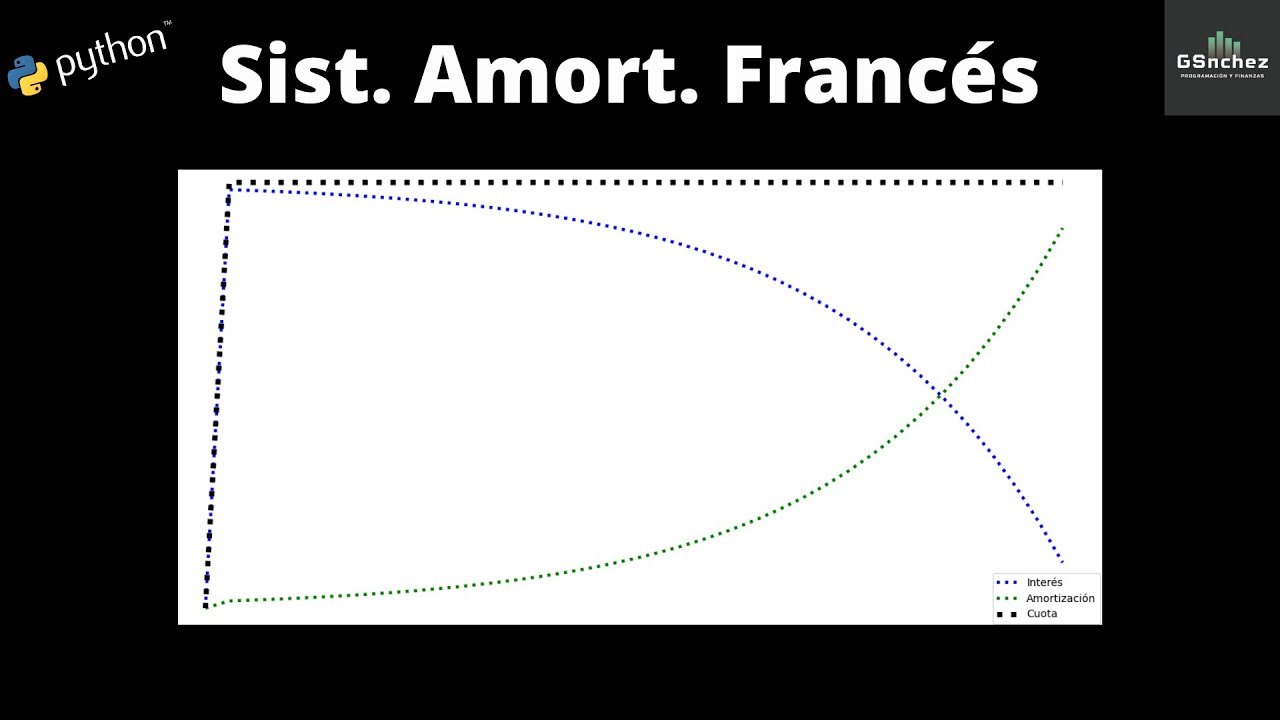
In Spain, the most common type of mortgage repayment structure is the French amortization system (sistema de amortización francés). Its defining characteristic is a constant periodic payment (e.g., the same monthly amount) throughout the loan's life.
However, the composition of that payment changes over time.
- Early Payments: Are mostly made up of interest. A smaller portion goes toward paying down the principal loan amount.
- Later Payments: The interest portion shrinks, and the principal portion grows.
This dynamic is crucial to understand. The interest you pay is a direct cost that impacts your cash flow and is a tax-deductible expense (which we'll cover in Module 9). The principal you pay down is not an expense; it is you converting debt into equity in the property.
The graph below visualizes this relationship perfectly. The total payment (Cuota) is flat, while the interest (Interés) declines and the principal repayment (Amortización) increases over the term of the loan.
2. Building an Amortization Schedule in Python
Given your background as a software engineer, you'll find that libraries like numpy-financial and pandas make building a dynamic financial model for this both elegant and efficient. We are going to build a full amortization schedule from scratch.
To do this, we'll rely on a fantastic, in-depth guide.
Building a Financial Model with Pandas
The article 'Building a Financial Model with Pandas' by Chris Moffitt provides a step-by-step tutorial for creating the exact amortization model we need. It's a great example of using Python for financial analysis.
First, please read the 'Introduction', 'What is an amortization schedule?', and 'Payment, Principal and Interest' sections. This will introduce the core concepts and the specific numpy-financial functions we'll be using.
The Core Functions: PMT, IPMT, and PPMT
As the article you just read explained, the numpy-financial library gives us three key functions for this task:
npf.pmt(rate, nper, pv): Calculates the total periodic payment. You've seen this one before.npf.ipmt(rate, per, nper, pv): Calculates the interest part of the payment for a specific period (per).npf.ppmt(rate, per, nper, pv): Calculates the principal part of the payment for a specific period (per).
Notice that ipmt and ppmt require the per argument—the specific period (e.g., month 1, month 24) you're calculating for. This is because the interest/principal split changes with every payment. For any given period, the following is true: pmt = ipmt + ppmt.
Constructing the Schedule with Pandas
Now, let's turn theory into code. We will follow the logic from the article to build a pandas DataFrame that represents our amortization schedule.
# Ensure you have the necessary libraries installed:
# pip install numpy-financial pandas

import pandas as pd
import numpy_financial as npf
from datetime import date

# --- Loan Parameters ---
INTEREST_RATE = 0.035  # 3.5% annual interest
YEARS = 30
PAYMENTS_YEAR = 12
PRINCIPAL = 200000  # Loan amount
START_DATE = date(2024, 1, 1)

# 1. Create a DataFrame with a DatetimeIndex for each payment period
# 'MS' frequency stands for Month Start
rng = pd.date_range(START_DATE, periods=YEARS * PAYMENTS_YEAR, freq='MS')
rng.name = "Payment_Date"

# Create the DataFrame, starting the index from 1 instead of 0
df = pd.DataFrame(index=rng, columns=['Payment', 'Principal', 'Interest', 'Balance'], dtype='float')
df.reset_index(inplace=True)
df.index += 1
df.index.name = "Period"

# 2. Calculate Payment, Principal, and Interest for each period
# Note: We pass df.index to the 'per' argument of ipmt and ppmt.
# This is a vectorized operation that calculates the value for each period in one go.
df['Payment'] = npf.pmt(INTEREST_RATE / PAYMENTS_YEAR, YEARS * PAYMENTS_YEAR, -PRINCIPAL)
df['Interest'] = npf.ipmt(INTEREST_RATE / PAYMENTS_YEAR, df.index, YEARS * PAYMENTS_YEAR, -PRINCIPAL)
df['Principal'] = npf.ppmt(INTEREST RATE / PAYMENTS_YEAR, df.index, YEARS * PAYMENTS_YEAR, -PRINCIPAL)

# 3. Calculate the running balance
# The balance at any point is the initial principal minus the cumulative sum of principal paid.
df['Balance'] = PRINCIPAL - df['Principal'].cumsum()

# Display the first and last 5 rows of the schedule
print("--- Amortization Schedule (Head) ---")
print(df.head().round(2))
print("\n--- Amortization Schedule (Tail) ---")
print(df.tail().round(2))
When you run this code, you'll see the DataFrame populated. Notice in the head how Interest is high and Principal is low. In the tail, this relationship has flipped. The final balance correctly goes to (near) zero. This vectorized approach, using cumsum(), is much more efficient and "Pandas-idiomatic" than looping through each row, a detail you'll appreciate from a software design perspective.
For a deeper dive into this cumsum technique and how to handle complexities like extra principal payments, please continue with the article.
Building a Financial Model with Pandas
The next sections of the 'Building a Financial Model with Pandas' article show a more robust way to calculate the balance and handle early loan payoffs.
Please read the sections 'Maintaining the Balance - Try 2' and 'The Big Payoff'. Focus on the use of cumsum() to calculate the running balance and clip() to ensure principal payments don't exceed the loan amount. Understanding how to find the last_payment is key to modeling accelerated payment scenarios.
3. Creating a Reusable Function and Modeling Pre-Tax Cash Flow
As we've done in previous lessons, the best practice is to encapsulate this logic into a reusable function. This allows us to easily generate schedules for different loan scenarios. The final section of the article you're reading does exactly this.
Let's create our own version, which will return both the detailed monthly schedule and a summarized annual DataFrame. This annual summary is perfect for integrating into our cash flow models.
def create_amortization_schedule(principal, interest_rate, years, start_date=date.today()):
    """
    Creates a monthly amortization schedule and an annual summary.

    Args:
        principal (float): The loan amount.
        interest_rate (float): The annual interest rate.
        years (int): The term of the loan in years.
        start_date (date): The start date of the loan.

    Returns:
        tuple: A monthly schedule (DataFrame) and an annual summary (DataFrame).
    """
    payments_year = 12
    rate_monthly = interest_rate / payments_year
    n_periods = years * payments_year

    # Create the monthly schedule DataFrame
    rng = pd.date_range(start_date, periods=n_periods, freq='MS')
    df_monthly = pd.DataFrame(index=rng, columns=['Payment', 'Principal', 'Interest', 'Balance'], dtype='float')
    df_monthly.index.name = "Payment_Date"
    df_monthly.reset_index(inplace=True)
    df_monthly.index += 1
    df_monthly.index.name = "Period"

    # Calculate values
    df_monthly['Payment'] = npf.pmt(rate_monthly, n_periods, -principal)
    df_monthly['Interest'] = npf.ipmt(rate_monthly, df_monthly.index, n_periods, -principal)
    df_monthly['Principal'] = npf.ppmt(rate_monthly, n_periods, -principal)
    df_monthly['Balance'] = principal - df_monthly['Principal'].cumsum()

    # Create the annual summary
    df_annual = df_monthly.set_index('Payment_Date')[['Payment', 'Principal', 'Interest']].resample('Y').sum()
    df_annual['Year'] = df_annual.index.year
    df_annual.set_index('Year', inplace=True)

    # Get the ending balance for each year
    annual_ending_balance = df_monthly.groupby(df_monthly['Payment_Date'].dt.year)['Balance'].last()
    df_annual['Ending_Balance'] = annual_ending_balance

    return df_monthly.round(2), df_annual.round(2)

# --- Now, let's integrate this with our property's pre-tax cash flow ---

# Property Assumptions
NET_OPERATING_INCOME = 9300 # From previous lessons

# Generate the schedules
monthly_schedule, annual_summary = create_amortization_schedule(PRINCIPAL, INTEREST_RATE, YEARS, START_DATE)

# Integrate with NOI to get Pre-Tax Cash Flow
annual_summary['Net_Operating_Income'] = NET_OPERATING_INCOME
annual_summary['Pre_Tax_Cash_Flow'] = annual_summary['Net_Operating_Income'] - annual_summary['Payment']

print("\n--- Annual Financial Summary ---")
print(annual_summary[['Net_Operating_Income', 'Payment', 'Pre_Tax_Cash_Flow', 'Principal', 'Interest', 'Ending_Balance']].head())
Running this final script gives you a powerful annual summary. For each year, you can see your total payments (which we call Debt Service), how much of it was interest vs. principal, the resulting pre-tax cash flow, and your remaining loan balance. This is the bedrock of a multi-year cash flow projection, a topic we will explore in depth in Module 5.
Test your understanding!
Using the output from the final Python script (annual_summary DataFrame):
- In what year does the total annual principal paid (
Principalcolumn) first exceed the total annual interest paid (Interestcolumn)? - What is the pre-tax cash flow in the first year of the loan?
- How much equity has been built up through principal paydown by the end of year 5? (Equity Buildup = Initial Loan - Ending Balance)
Show answer
-
Looking at the
annual_summaryoutput, you would scan down thePrincipalandInterestcolumns. For the given parameters (3.5% rate), the principal paid exceeds the interest paid in Year 16 of the loan (2039). -
The pre-tax cash flow is shown in the
Pre_Tax_Cash_Flowcolumn. For the first year (2024), it is €236.43. (NOIof €9,300 minusPaymentof €9,063.57). -
The initial loan was €200,000. From the
annual_summarytable, theEnding_Balanceat the end of year 5 (2028) is €186,839.29. The equity buildup is €200,000 - €186,839.29 = €13,160.71.
4. Exploring a Complete Application
The code we've written today forms the core engine of more complex real estate analysis tools. To see how these concepts can be assembled into a complete, interactive application, you can explore the following open-source project on GitHub.
YannickBroich/Real-Estate-Cash-Flow-Simulator
The 'Real-Estate-Cash-Flow-Simulator' is a Streamlit web application that uses these same principles to create a multi-scenario investment simulator. It's an excellent case study of a practical application.
Read the 'Overview', 'Features', and 'Input Variables' sections to understand what the tool does. Then, follow the 'How to Run Locally' instructions to clone the repository and run the app on your machine. I encourage you to experiment with the inputs and observe how they affect the 'Cashflow Before Taxes' plot. This is a great way to connect our Python code to a user-facing product.
Conclusion
Congratulations on completing Module 2! You've built a comprehensive understanding of financing, leverage, and pre-tax returns, culminating in the creation of a dynamic financial model in Python.
Key Takeaways:
- An amortization schedule provides a detailed breakdown of each loan payment into its principal and interest components.
- The French amortization system, with its constant payments, is the standard for Spanish mortgages.
- Python's
numpy-financialandpandaslibraries provide a powerful and efficient combination for building amortization schedules, especially using vectorized operations likecumsum(). - An annual summary of your amortization schedule is the key to modeling pre-tax cash flow, tracking loan balance, and calculating equity buildup over time.
Preview of the Next Lesson:
So far, our analysis has been about the performance of a property given a certain price and financing structure. In our next module, we pivot to valuation. We'll begin by learning to calculate and interpret the Capitalization Rate (Cap Rate). The cap rate is one of the most fundamental metrics in real estate, allowing you to value properties and compare opportunities based purely on their income-generating ability, completely independent of financing. This will equip you to answer a new, critical question: "Is this property a good deal at this price?"