Recommended resources
The freely available resources this lesson will direct you to.
Hello! Welcome back to our course on real estate investment analysis.
In our last lesson, we dove into sensitivity analysis using two-variable data tables. This was a great way to see how your returns (like NPV and IRR) might change when two key assumptions, such as rent growth and exit cap rate, vary. However, a real investment model has many more than two assumptions. What if you want to understand the combined risk profile of rent, vacancy, operating expenses, and exit cap rate all at once?
This is where today's topic comes in. Our learning outcome is to build tornado diagrams to visualize the impact of multiple variables on returns. A tornado diagram is a powerful visualization tool that takes the one-variable-at-a-time sensitivity analysis we touched on and presents it in an intuitive, ranked format. It will instantly show you which assumption is the most critical driver of your investment's success.
1. What is a Tornado Diagram?
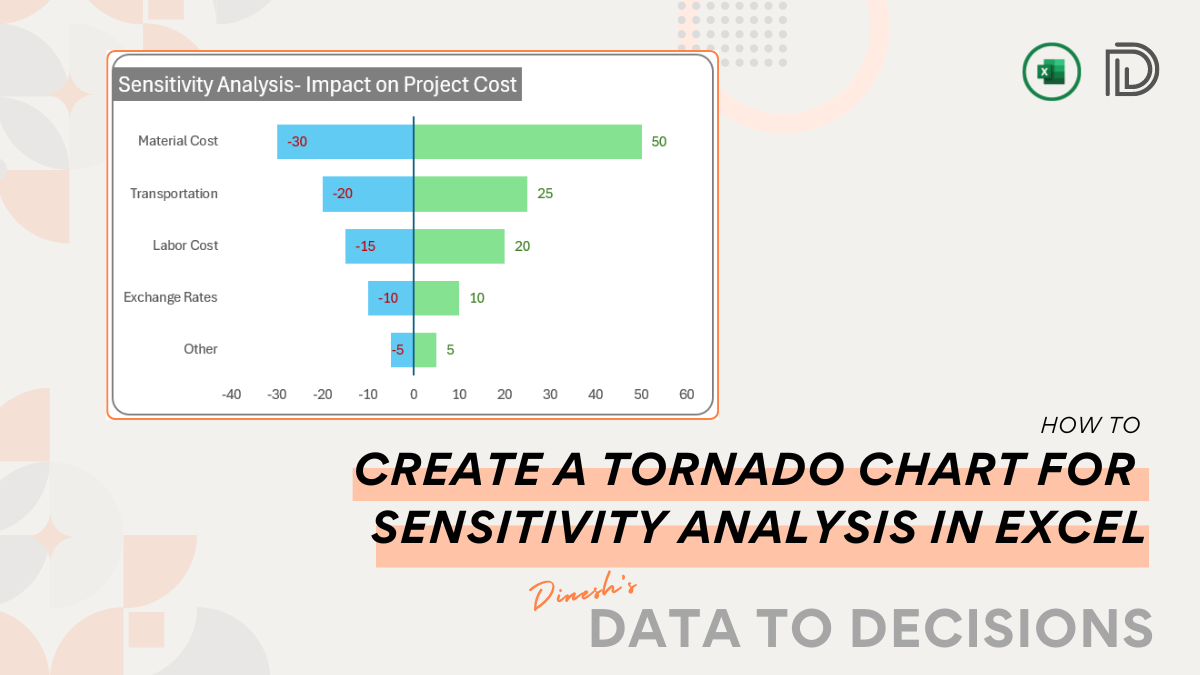
A tornado diagram is a type of bar chart used in sensitivity analysis to compare the relative importance of different variables. It gets its name because the chart is typically sorted with the largest bars at the top and the smallest at the bottom, resembling a tornado funnel.
Let's break down its components:
- Central Axis: This vertical line represents your "base case" outcome—for example, the NPV you calculated using your most likely assumptions for all variables.
- Horizontal Bars: Each bar represents one of your input variables (e.g., rent, vacancy, exit cap rate).
- Bar Length: The length of each bar shows how much the outcome (NPV) changes when that single variable is moved from its "low" estimate to its "high" estimate, while all other variables are held constant at their base case values.
To get a more dynamic explanation, let's watch a short video that introduces the concept. While the example is from an engineering context, the core economic principle of using Net Present Value (NPV) and testing its sensitivity to various inputs is identical to what we do in real estate.
Sensitivity Analysis and Tornado Plots
This video from the LearnChemE channel provides a clear introduction to sensitivity analysis and sets the stage for why a tornado plot is so useful. It uses an NPV calculation as its core example.
Watch from the beginning to 03:22. Focus on understanding: The general purpose of sensitivity analysis. The idea of having a 'base case' output (in this case, NPV) that depends on multiple inputs. How changing one input at a time affects the final output.
2. How to Interpret a Tornado Diagram
The real power of a tornado diagram lies in its interpretation. It answers a crucial question: "Where should I focus my due diligence efforts?"
Here’s what to look for:
-
The Ranking: Variables are sorted by the total width of their bars. The variable at the top is the one your project is most sensitive to. In our project cost example above, a mistake in forecasting material costs is far more damaging than a mistake in forecasting labor costs. For a real estate investment, you will often find that the exit cap rate and rental income are at the top.
-
The Range of Impact: The width of the bar shows the "swing" in potential outcomes. A very wide bar means that even small changes in that assumption can lead to drastically different returns. A narrow bar indicates that the assumption is less critical to the overall result.
-
Upside vs. Downside (Asymmetry): Sometimes, the bar for a variable isn't symmetrical around the base case. This tells you that the variable has a non-linear impact. For example, a 20% increase in vacancy might hurt your NPV more than a 20% decrease in vacancy helps it.
The final section of the video you started watching provides an excellent walkthrough of interpreting the completed chart.
Sensitivity Analysis and Tornado Plots
Let's finish the video to see how to analyze the final tornado plot and draw actionable conclusions.
Watch from 09:17 to 10:31. Notice how the narrator immediately identifies 'Sales' as the most critical variable and explains what that means from a business perspective.
As the video concludes, if your analysis shows that your returns are extremely sensitive to rental income, it tells you that you need to be very confident in your market rent survey and your projected rent growth.
3. Creating a Tornado Diagram in Python
While these charts are often made in Excel, your background in software engineering makes Python a more powerful and scalable tool for this task. The process directly mirrors the logic of sensitivity analysis.
Here's the step-by-step logic we will implement:
- Establish a Base Case: Define a set of "most likely" input parameters for your investment (e.g., rent, vacancy, OpEx, exit cap rate) and calculate the base case NPV.
- Define Low/High Ranges: For each variable you want to test, determine a pessimistic (low) and optimistic (high) value. A common starting point is +/- 10% from the base case.
- Isolate and Calculate: Loop through each variable. For each one, calculate the NPV for its
lowvalue and itshighvalue, ensuring all other variables remain at theirbase casevalues. - Store and Sort: Store the results and calculate the total range of impact (high NPV - low NPV) for each variable. Then, sort the variables in descending order based on this range.
- Plot the Chart: Use a plotting library like
matplotlibto create the horizontal bar chart.
The following article provides a great template for building this kind of plot in Python. We will adapt its methodology for our real estate scenario.
Visualize sensitivity with a Tornado plot in Python | by Chi VT
This article by Chi VT on Medium demonstrates a clean method for creating a tornado plot using Python's matplotlib library. We will use the broken_barh technique shown here.
Skim through the sections '1. Create a new data frame for drawing' and '2. Draw the Tornado plot'. You don't need to understand the specifics of the author's 'vulnerability' data, but focus on the Python code structure: how the data is prepared, and how plt.broken_barh() is used to draw the bars relative to a base value.
Python Implementation
Now, let's apply this logic to a real estate investment model. Below is a Python script that generates a tornado diagram for the NPV of an investment, testing its sensitivity to four key variables.
The calculate_npv function is a simplified stand-in for a full multi-year pro forma model. In a real application, this function would contain the detailed cash flow projections we've discussed in previous modules.
import numpy as np
import matplotlib.pyplot as plt
from matplotlib.patches import Patch

# --- 1. Simplified Financial Model ---
# In a real scenario, this would be a detailed function from our previous lessons.
def calculate_npv(params):
    """
    A simplified NPV calculation for demonstration.
    This function simulates a 5-year holding period.
    """
    annual_rent = params['monthly_rent'] * 12
    op_ex = params['opex_ratio'] * annual_rent

    # Calculate NOI for 5 years with a simple growth assumption
    noi_y1 = annual_rent * (1 - params['vacancy_rate']) - op_ex
    # For simplicity, let's assume NOI is constant. A real model would have growth.

    # Calculate cash flows
    cash_flows = [noi_y1] * 5

    # Calculate reversion value (sale price)
    sale_price = noi_y1 / params['exit_cap_rate']
    cash_flows[-1] += sale_price # Add sale price to the last year's cash flow

    # Initial investment (negative cash flow at time 0)
    initial_investment = -1_000_000 # Assume a 1M€ purchase price

    # Combine all cash flows
    all_cash_flows = [initial_investment] + cash_flows

    # Calculate NPV
    npv = np.npv(0.08, all_cash_flows) # Assume an 8% discount rate
    return npv

# --- 2. Define Base Case and Sensitivity Ranges ---
base_case_params = {
    'monthly_rent': 5000,
    'vacancy_rate': 0.05,
    'opex_ratio': 0.35,
    'exit_cap_rate': 0.06
}

# Define the variables to test and their low/high variations (+/- 10%)
variables_to_test = {
    'Monthly Rent (€)': {'key': 'monthly_rent', 'low': 4500, 'high': 5500},
    'Vacancy Rate (%)': {'key': 'vacancy_rate', 'low': 0.07, 'high': 0.03}, # Note: high vacancy is bad
    'OpEx Ratio (%)': {'key': 'opex_ratio', 'low': 0.30, 'high': 0.40},
    'Exit Cap Rate (%)': {'key': 'exit_cap_rate', 'low': 0.05, 'high': 0.07} # Note: high cap rate is bad
}

# --- 3. Run Sensitivity Analysis ---
base_case_npv = calculate_npv(base_case_params)

results = []
for name, var_info in variables_to_test.items():
    key = var_info['key']

    # Calculate NPV for the low case
    low_params = base_case_params.copy()
    low_params[key] = var_info['low']
    low_npv = calculate_npv(low_params)

    # Calculate NPV for the high case
    high_params = base_case_params.copy()
    high_params[key] = var_info['high']
    high_npv = calculate_npv(high_params)

    # Store results, ensuring 'low' always refers to the lower NPV value
    if low_npv < high_npv:
        results.append({'name': name, 'low': low_npv, 'high': high_npv, 'range': high_npv - low_npv})
    else: # Handle inverse relationships (like vacancy, opex, cap rate)
        results.append({'name': name, 'low': high_npv, 'high': low_npv, 'range': low_npv - high_npv})


# --- 4. Sort and Prepare for Plotting ---
results.sort(key=lambda x: x['range'])
names = [r['name'] for r in results]
low_values = [r['low'] for r in results]
high_values = [r['high'] for r in results]

# --- 5. Plot the Tornado Diagram ---
fig, ax = plt.subplots(figsize=(10, 6))

# Y-axis positions
y_pos = np.arange(len(names))

# Plot the bars using broken_barh
# The bars are defined by (start, width)
low_bar_widths = [base_case_npv - v for v in low_values]
ax.barh(y_pos, low_bar_widths, left=low_values, color='cornflowerblue', label='Worse Outcome')

high_bar_widths = [v - base_case_npv for v in high_values]
ax.barh(y_pos, high_bar_widths, left=base_case_npv, color='salmon', label='Better Outcome')

# Add the base case line
ax.axvline(base_case_npv, color='black', linestyle='--', label=f'Base Case NPV: {base_case_npv:,.0f}€')

# Formatting
ax.set_yticks(y_pos)
ax.set_yticklabels(names)
ax.set_xlabel('Net Present Value (NPV) in €')
ax.set_title('Tornado Diagram for Real Estate Investment NPV')
ax.grid(axis='x', linestyle=':', alpha=0.7)
ax.legend()

# Format x-axis to show currency
from matplotlib.ticker import StrMethodFormatter
ax.xaxis.set_major_formatter(StrMethodFormatter('{x:,.0f}€'))

plt.tight_layout()
plt.show()
Test your understanding!
After running the Python code, examine the generated tornado diagram and answer the following:
- Which variable has the largest impact on the Net Present Value?
- Which variable has the smallest impact?
- Why do you think the
Exit Cap Ratebar is so much wider than theVacancy Ratebar, even though both were varied?
Show answer
- The Exit Cap Rate has the largest impact on NPV. Its bar is the widest, indicating that a +/- 1% change in this assumption causes the largest swing in the final valuation.
- The Vacancy Rate has the smallest impact among the tested variables.
- The
Exit Cap Ratedirectly impacts the reversion value (the final sale price), which is the single largest cash flow in the entire investment holding period. A small change in the denominator of theSale Price = NOI / Exit Cap Rateformula creates a huge change in the sale price. In contrast, theVacancy Rateaffects the annual NOI, which is a much smaller cash flow in any given year compared to the final sale price. Therefore, its impact on the total NPV is less pronounced.
Conclusion
You've now added another powerful risk analysis tool to your arsenal. By moving beyond two-variable tables, you can now systematically test and visualize the impact of numerous assumptions simultaneously.
Key Takeaways:
- A tornado diagram is a visual tool for sensitivity analysis that ranks the impact of different input variables on a key output metric like NPV.
- The chart immediately highlights your most critical assumptions—the ones at the top with the widest bars—telling you where to focus your due diligence.
- The logic involves running a one-at-a-time sensitivity analysis for each variable (varying it from a low to high value) and plotting the range of outcomes.
- Using Python and
matplotlib, you can programmatically generate these diagrams, allowing you to easily integrate them into more complex financial models.
Preview of the Next Lesson:
Tornado diagrams are based on changing one variable at a time. But in the real world, variables often move together. A recession, for instance, might cause rents to fall, vacancy to rise, and exit cap rates to increase all at the same time.
In our next lesson, we will learn how to create scenario models (best case, base case, worst case). This will allow us to model these correlated changes and build coherent "stories" about the future to better understand the true range of potential investment outcomes.