Recommended resources
The freely available resources this lesson will direct you to.
Welcome. This first module builds the JavaScript, TypeScript, and Node.js foundations you will use when building a MERN application. Before writing asynchronous workflows, it helps to understand a more basic question: when several pieces of JavaScript are ready to run, which one runs next?
In this lesson, you will trace execution through the call stack, microtask queue, and task queue. Allow about 40 minutes, including the short video, readings, and a careful walkthrough of the code example.
The call stack: what is running now?
JavaScript runs a function call to completion before continuing with the code that called it. The call stack records those active calls. When one function calls another, the new call sits on top; when it returns, execution resumes in the function beneath it.
function formatMessage() {
  return "Saved";
}

function showMessage() {
  console.log(formatMessage());
}

showMessage();
console.log("Done");
The main script calls showMessage(), which calls formatMessage(). Only after formatMessage() returns can showMessage() log "Saved" and return. The main script then logs "Done". This is synchronous execution: the output is Saved, then Done.
Read MDN’s account of execution contexts for a closer look at what the stack preserves during nested calls.
In depth: Microtasks and the JavaScript runtime environment
MDN explains how the runtime keeps track of active function calls. Read this to make the call stack more concrete before adding asynchronous callbacks.
Find the discussion of execution contexts immediately above the “Run, JavaScript, run” heading. Start with the paragraph beginning “When a fragment of JavaScript code runs” and read the stack explanation through the paragraph about recursive calls. Focus on the nested greetUser() and localGreeting() calls: which call must finish before its caller can continue?
A queued callback does not interrupt a function already running on the stack. If synchronous code takes a long time, other JavaScript callbacks must wait. That distinction matters both for responsive React interfaces and for Node.js services handling multiple requests.
Asynchronous work: ready is not the same as running
Suppose you register a timer:
console.log("Start");

setTimeout(() => {
  console.log("Timer");
}, 0);

console.log("End");
The output is Start, End, Timer. Calling setTimeout registers a timer and returns; it does not run the callback on the spot. Once the timer is eligible, its callback can wait as a task until the current script has finished. A delay of 0 means do not wait for an additional requested delay, not interrupt the current code.
In a browser, the environment also manages things such as network activity and user events outside the currently executing JavaScript call stack. Completing that work makes associated JavaScript eligible to run later; it does not let the callback cut into an active call. The following sketch shows the main pieces. Treat it as a scheduling model rather than a literal map of every browser or Node.js API—its “FS” label, for example, is host-dependent.
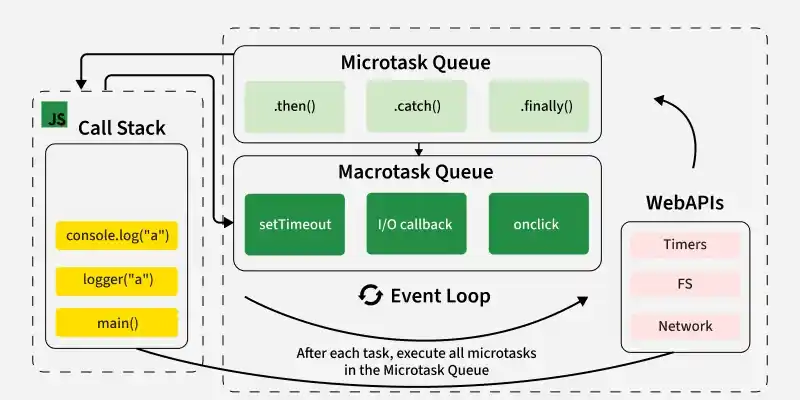
Watch Lydia Hallie’s visual explanation to see calls enter and leave the stack and callbacks wait for execution. You need only one Promise fact for now: a handler passed to .then() on an already fulfilled Promise is scheduled to run later, rather than during the .then() call.
JavaScript Visualized - Event Loop, Web APIs, (Micro)task Queue
Watch “JavaScript Visualized - Event Loop, Web APIs, (Micro)task Queue” by Lydia Hallie for an animated trace of the stack and both queues.
Watch the call stack for synchronous execution and blocking work. Continue through browser callbacks; notice that an elapsed timer makes a callback eligible but cannot force it onto a busy stack. Finish with microtask priority, especially the explanation that newly scheduled microtasks also run before the next task.
Two queues, with a checkpoint between tasks
The task queue—often called the macrotask queue in introductory explanations—holds work such as eligible timer callbacks. The initial script is itself run as a task in the browser scheduling model.
The microtask queue holds work such as Promise .then() handlers and callbacks scheduled with queueMicrotask(). The essential rule is:
- Finish the currently running script or task, including its synchronous function calls.
- Run microtasks until the microtask queue is empty. A microtask may add more microtasks, which must also run.
- Run a subsequent eligible task. After that task finishes, check and drain microtasks again.
In a browser, rendering may occur between tasks after microtasks have been processed; microtasks are not an opportunity for a screen update between every callback. Read the concise algorithm in Event loop: microtasks and macrotasks to reinforce where each queue fits.
Event loop: microtasks and macrotasks
The javascript.info chapter states the scheduling rule and then condenses it into an event-loop algorithm. Read these parts to turn the video's animation into a procedure you can apply to code.
In “Macrotasks and Microtasks,” start at the paragraph beginning “Microtasks come solely from our code” and read the queue comparison. Stop after the sentence about completing all microtasks; focus on why the synchronous log precedes the Promise handler, which precedes the timer. Then, under “Summary,” read the numbered algorithm from its first step through the step about waiting for another task. Notice that it says to drain the microtask queue, not merely run one microtask.
This is a useful browser-oriented model, not a claim that every JavaScript host has one identical task queue. Node.js has its own event-loop phases and additional scheduling details. For the traces in this lesson, keep the core distinction: synchronous calls run now, Promise handlers and queueMicrotask callbacks run at microtask checkpoints, and timer callbacks run as later tasks.
Trace a script in rounds
Consider this program. The helper log makes it easier to see when a callback actually executes rather than when it is registered.
function log(label) {
  console.log(label);
}

log("A");

setTimeout(() => {
  log("T1");

  Promise.resolve().then(() => log("P-in-T1"));
  setTimeout(() => log("T2"), 0);
}, 0);

Promise.resolve().then(() => {
  log("P1");
  queueMicrotask(() => log("M2"));
});

queueMicrotask(() => log("M1"));

log("Z");
First, finish the main script. log("A") runs immediately. Registering the first timer does not run its callback. Because the Promise is already fulfilled, its .then() handler is queued as a microtask; queueMicrotask queues M1 behind it. Finally, log("Z") runs. So far the output is A, Z.
Next, drain microtasks. The P1 handler runs first. It logs P1 and queues M2. But M1 was already waiting, so M1 runs before M2. At this point the output is A, Z, P1, M1, M2.
Then, run an eligible task. When the first timer’s callback gets its turn, it logs T1, queues the P-in-T1 Promise handler as a microtask, and registers another timer for T2. Once the T1 callback finishes, the runtime drains microtasks again. Thus P-in-T1 logs before the later timer task can log T2.
The complete output is:
A
Z
P1
M1
M2
T1
P-in-T1
T2
The decisive moment is inside T1: scheduling a second timer does not make it the next callback to run, because the newly queued Promise microtask gets a checkpoint first. Also, neither Promise callback executes inside the call to .then(); those calls schedule handlers. By contrast, an ordinary function call such as log("A") runs immediately on the current stack.
When tracing unfamiliar code, keep three separate notes: what is on the stack now, which microtasks are waiting, and which later tasks have become eligible. Record output only when a console.log call actually runs. This prevents the common mistake of treating “scheduled” as “executed.”
Key takeaways
The call stack explains what runs now; the queues explain what can run later. A current task finishes before queued callbacks execute, all available microtasks are drained before the next task, and a microtask created during that drain joins the same drain. Timer delays determine eligibility, not a guaranteed execution time.
Next, you will use this execution model to build asynchronous workflows with async/await and Promise combinators.