Recommended resources
The freely available resources this lesson will direct you to.
Hello. In the previous lesson, you traced what runs immediately on the call stack and what waits in the microtask or task queue. That explains when a Promise handler can run. Today, the question is how to organize the work: when should one operation wait for another, and when should several operations proceed concurrently?
You will build an asynchronous dashboard-loading workflow with async/await, then choose among the four main Promise combinators according to what the workflow needs when requests succeed or fail. Allow about 40 minutes for the lesson, including the short video and two readings.
Promises represent eventual outcomes
A Promise represents an operation whose outcome may not be available yet. It begins pending and eventually becomes fulfilled with a value or rejected with a reason. Settled means either fulfilled or rejected.
A handler registered with .then() or .catch() does not run during the registration call. As you saw previously, a ready Promise handler runs later as a microtask. There is another important rule: .then() returns a new Promise. If its handler returns a value, that value becomes the new Promise’s fulfillment value. If it returns another Promise, the new Promise follows that operation’s outcome.
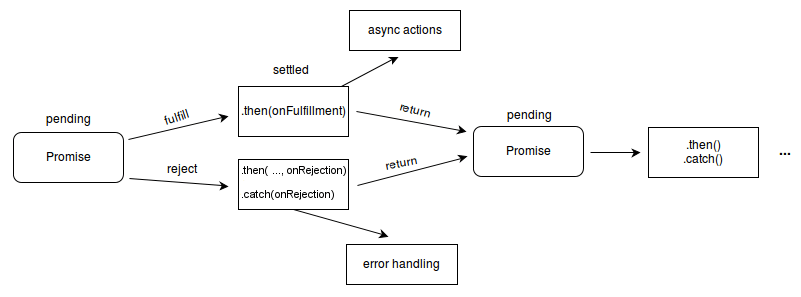
That rule makes dependent operations possible without deeply nested callbacks:
getAccount()
  .then((account) => getProjects(account.id))
  .then((projects) => console.log(projects))
  .catch((error) => console.error(error));
The return implicit in (account) => getProjects(account.id) matters. If you started getProjects(account.id) inside a block but forgot to return it, the next handler would not wait for the projects.
Read the opening portion of MDN’s “Chaining” section to see why each handler’s return value determines what the next handler receives.
Using promises - JavaScript - MDN Web Docs
Read MDN’s Using promises guide for the connection between a Promise chain and a sequence of dependent operations.
In “Chaining,” begin with the paragraph opening “A common need is to execute two or more asynchronous operations in sequence.” Read through the returned-fetch explanation. Stop after the paragraph explaining why returning fetch lets the chain track its completion. Focus on the contrast between returning a Promise from a handler and starting one without returning it—the “floating Promise” problem.
async/await expresses dependencies directly
An async function always returns a Promise, even if its code returns an ordinary value. Inside it, await obtains the fulfillment value of a Promise before continuing with the dependent part of that function. If the awaited Promise rejects, await throws its rejection reason at that point.
Here is the earlier chain written with async/await:
async function loadProjects() {
  const account = await getAccount();
  const projects = await getProjects(account.id);
  return projects;
}
The account must be available before you can supply its ID to getProjects, so these operations genuinely belong in sequence. Although the code reads top to bottom, await does not block all JavaScript while the request is pending. The function suspends, returns a pending Promise to its caller, and can resume later; other work can run meanwhile. Code before the first await still runs synchronously when the function is called.
Watch Fireship’s The Async Await Episode I Promised for the transition from Promise chains to async/await, particularly the difference between a necessary dependency and an accidental sequential wait.
The Async Await Episode I Promised
Fireship uses small examples to show how Promise returns, async/await, concurrency, and error handling fit together.
Watch Promise chains for the returned Promise and shared .catch() handler. Then watch async and await, independent work, and error handling. Focus on which request can start before another finishes. The video sometimes calls concurrent requests “parallel”; here, the important claim is that their waiting periods can overlap, not that JavaScript executes their callbacks simultaneously.
Combine dependent and independent requests
Imagine loading a MERN dashboard. You need an account first; after obtaining its ID, you can request projects and alerts independently. The following complete example simulates asynchronous APIs with timers, so its behavior is easy to inspect:
function delayed(value, milliseconds, shouldFail = false) {
  return new Promise((resolve, reject) => {
    setTimeout(() => {
      if (shouldFail) {
        reject(new Error("Request failed"));
      } else {
        resolve(value);
      }
    }, milliseconds);
  });
}

const getAccount = () =>
  delayed({ id: "account-1" }, 100);

const getProjects = (accountId) =>
  delayed([{ id: 1, ownerId: accountId }], 200);

const getAlerts = (accountId) =>
  delayed([{ id: 2, ownerId: accountId }], 150);

async function loadDashboard() {
  const account = await getAccount();

  const [projects, alerts] = await Promise.all([
    getProjects(account.id),
    getAlerts(account.id),
  ]);

  return { account, projects, alerts };
}

loadDashboard().then(console.log).catch(console.error);
getAccount() must finish before either ID-dependent call starts. Once the ID is known, both calls start before the await Promise.all(...) suspends loadDashboard. If both succeed, Promise.all fulfills with their values in input order, even if alerts finish first. With these simulated delays, the workflow takes roughly the account delay plus the longer of the two subsequent delays; timers and scheduling do not guarantee an exact wall-clock time.
Compare the tempting alternative:
const projects = await getProjects(account.id);
const alerts = await getAlerts(account.id);
Here, getAlerts is not even called until projects arrive. Sequential awaits are correct when the second operation needs the first result, but they introduce needless waiting when the operations are independent. Conversely, Promise.all cannot invent a missing dependency: you still have to await the account before making requests that require its ID.
There is a related rule for collections. If getProject(id) returns a Promise, projectIds.map((id) => getProject(id)) produces an array of Promises, not an array of projects. Await the group with Promise.all(...). Do not use forEach(async (...) => ...) when the surrounding workflow must wait for all items: forEach does not return a Promise representing their completion.
Choose a combinator by the result you need
Promise.all is one of four common ways to coordinate multiple operations. Read the method descriptions and examples in Node.js Learn’s Discover Promises in Node.js, then use the distinctions below to decide which contract fits an application feature.
Discover Promises in Node.js | Node.js Learn
Read Node.js Learn’s explanations of the four Promise combinators to compare their success and failure behavior.
Under “Advanced Promise Methods,” read the subsections “Promise.all,” “Promise.allSettled,” “Promise.race,” and “Promise.any,” beginning at the four descriptions and continuing through the Promise.any description ending with “AggregateError.” Scan each accompanying example for the shape of its result. Stop before “Promise.reject() and Promise.resolve().”
| Method | When its returned Promise settles | What you receive |
|---|---|---|
Promise.all |
After every input fulfills, or as soon as one rejects | An ordered array of values, or the first rejection reason |
Promise.allSettled |
After every input settles | An ordered array of outcome objects, including successes and failures |
Promise.race |
As soon as the first input settles | That input’s value or rejection reason |
Promise.any |
As soon as the first input fulfills, or after all reject | The first fulfillment value, or an AggregateError |
For the dashboard example, Promise.all says that projects and alerts are required for a successful combined result. If alerts are optional and you want to display projects even when alerts fail, Promise.allSettled makes the individual outcomes available:
const [projectOutcome, alertOutcome] = await Promise.allSettled([
  getProjects(account.id),
  getAlerts(account.id),
]);

if (projectOutcome.status === "fulfilled") {
  console.log("Projects:", projectOutcome.value);
} else {
  console.error("Projects unavailable:", projectOutcome.reason);
}

if (alertOutcome.status === "fulfilled") {
  console.log("Alerts:", alertOutcome.value);
} else {
  console.error("Alerts unavailable:", alertOutcome.reason);
}
An allSettled outcome has status: "fulfilled" and value, or status: "rejected" and reason. The returned Promise fulfills with those descriptions; it does not reject merely because an input rejected. That is useful only if your code actually checks the statuses.
race and any answer different questions. Consider a fast rejection and a slower success:
const fastFailure = delayed("unavailable", 100, true);
const slowerSuccess = delayed("backup ready", 200);
Given freshly created Promises with those behaviors, Promise.race([fastFailure, slowerSuccess]) rejects when the fast failure settles. Promise.any([fastFailure, slowerSuccess]) ignores that rejection while waiting and fulfills with "backup ready". If every input to Promise.any rejects, it rejects with an AggregateError, whose .errors array contains the reasons. You might use any when any one of several interchangeable sources can supply the data. Use race when the first outcome of either kind should decide the result.
The combinators observe and coordinate operations; they do not themselves start, speed up, or cancel work. Calling getProjects(...) starts that simulated operation before its Promise is placed in the array. If Promise.all rejects early, the other requests may still finish. Likewise, a losing operation in race or any may continue. Cancellation, when an underlying API supports it, requires a separate mechanism.
Make failure handling part of the workflow
A rejection at an await acts like a thrown error within the async function. A caller can handle it with .catch(), as in the dashboard example, or the function can handle it locally with try/catch:
async function loadDashboardSafely() {
  try {
    return await loadDashboard();
  } catch (error) {
    console.error("Dashboard load failed:", error);
    throw error; // Let the caller know the dashboard is unavailable.
  }
}
The throw is a deliberate decision. If the catch block instead returned a fallback object, loadDashboardSafely() would fulfill with that object; its caller would not see a rejection. Either behavior can be appropriate, but silently logging and continuing can leave a caller believing incomplete data is valid.
Notice the return await inside try: it ensures that a rejection from loadDashboard() reaches this catch block. More generally, every Promise that matters to a workflow must be returned, awaited, or deliberately handled. A Promise started and then forgotten can finish after the workflow has reported success—or reject without the intended handler.
Key takeaways
Use await to express a real dependency; start independent operations together and await their combined result. Choose Promise.all when every result is required, allSettled when you need each outcome, race when the first settlement decides, and any when the first success is sufficient. None of them cancels the operations it observes.
These workflows will soon carry richer application data. Next, you will use TypeScript unions, interfaces, and narrowing to model what that data can be—including distinct success and failure shapes.